💡 학습목표
   1. 플로우 차트로 알아 보는 간단한 동작 원리
1. 플로우 차트로 알아 보는 간단한 동작 원리
스프링 부트 기반의 웹 애플리케이션이 클라이언트(웹 브라우저)로부터 요청을 받아 처리하는 주요 단계의 플로우 차트( 기본적인 웹 요청 및 응답 프로세스)
💡 아파치와 톰캣
1. 정적 파일 요청 시 간단한 실행 흐름(예: CSS, JS, HTML 이미지 파일) - URL 호출
[웹 브라우저]     [스프링부트내장웹서버(아파치)]  [정적 파일]
      |                  |                       |
      | 1. HTTP 요청     |                       |
      | -------------->  |                       |
      |                  | ----------------->    |
      |                  |                       |
      |                  |                       |
      |                  |                       |
      |                  |                       |
      |                  |                       |
      |                  | <-------------------  |
      |  2. HTTP 응답    |                       |
      | <--------------  |                       |
| | |- 웹 브라우저가 html, css, js, 이미지 파일과 같은 정적 파일을 요청하면 HTTP 요청이 스프링 부트 내장 웹 서버로 전송됩니다.
- 스프링 부트 내장 웹 서버는 해당 정적 파일을 찾고, 요청에 따른 정적 파일을 클라이언트인 웹 브라우저로 직접 응답합니다.
2. 동적 파일(JSP, JSON …) 요청시 간단한 실행 흐름 (예: JSP, json) - 거의 대부분 URI 호출
[ 웹 브라우저 ]        [ 웹 서버 ]          [ WAS ]            [ 스프링 컨테이너 ]
     |                   |                   |                     |
     |      1. HTTP      |                   |                     |
     |      Request      |                   |                     |
     | ----------------> |                   |                     |
     |                   |                   |                     |
     |                   |    2. 요청 전달    |                     |
     |                   | ----------------> |                     |
     |                   |                   |                     |
     |                   |                   |   3. 스프링 컨트롤러  |
     |                   |                   |   호출 및 처리        |
     |                   |                   |  ---------------->  |
     |                   |                   |                     |
     |                   |                   |                     |
     |                   |                   |                     |
     |                   |                   |                     |
     |                   |                   |                     |
     |                   |                   |                     |
     |                   |                   |   4. 비즈니스 로직    |
     |                   |                   |   수행 (서비스, DB    |
     |                   |                   |   연동 등)           |
     |                   |                   | ---------------->   |
     |                   |                   |                     |
     |                   |                   |                     |
     |                   | 5. JSP->HTML,json |                     |
     |                   |  <--------------  |                     |
     |                   |                   |                     |
     |                   |                   |                     |
     |                   |                   |                     |
     |      6. HTTP      |                   |                     |
     |      Response     |                   |                     |
     |  <--------------  |                   |                     |
| | | |- 웹 브라우저에서 HTTP 요청(예: 웹 페이지 로드)을 생성하고, 이 요청은 웹 서버로 전송됩니다.
- 웹 서버는 요청을 WAS(웹 애플리케이션 서버)로 전달합니다. WAS는 동적 요청을 처리할 수 있는 컨테이너(예: Tomcat)로 생각할 수 있습니다.
- 컨테이너는 스프링 컨트롤러로 요청을 전달합니다.
- 스프링 컨트롤러는 비즈니스 로직을 수행하기 위해 필요한 서비스를 호출하거나 데이터베이스와 상호 작용합니다.
- 비즈니스 로직이 완료되면, 컨트롤러는 HTML 또는 JSON과 같은 응답 데이터를 생성합니다.
- 컨테이너는 생성된 응답을 웹 서버로 반환합니다.
- 웹 서버는 웹 브라우저로 응답을 전송하고, 브라우저는 결과를 표시합니다.
미리보기
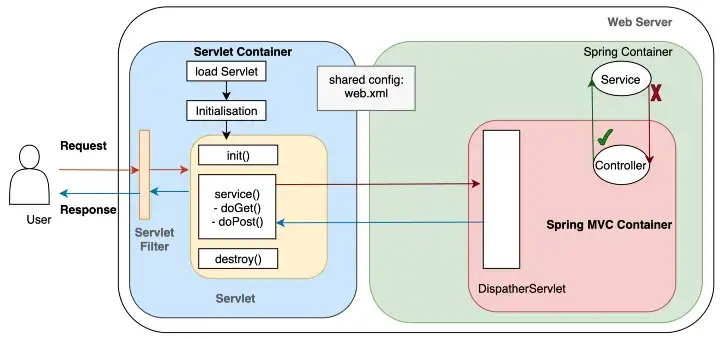
💡 서블릿 컨테이너란?
서블릿 컨테이너는 개발자가 웹 서버와 통신하기 위하여 소켓을 생성하고,
특정 포트에 리스닝하고, 스트림을 생성하는 등의 복잡한 일들을 할 필요가 없게 해준다.
서블릿 컨테이너는 servlet의 생성부터 소멸까지의 일련에 과정(life-cycle)을 관리하고,
매번 요청이 들어올 때마다 새로운 쓰레드를 요청 별로 부여한다.

요약하면, 서블릿 컨테이너는 클라이언트의 HTTP 요청을 받아들이고
서블릿 및 JSP를 실행하는 환경을 제공하는 소프트웨어입니다.
다음으로 기본적인 로직 레이어 간의 호출 및 반환 흐름을 알아 보자 ( Controller 까지 왔을 때)
[ 컨트롤러 ] ------> [ 서비스 ] ------> [ 데이터베이스 ]
<------ <-------
컨트롤러(Controller): 클라이언트(웹 브라우저 또는 다른 클라이언트)에서의 HTTP 요청을 받고 처리합니다. 이 요청은 서비스로 전달되며, 컨트롤러는 서비스로부터 반환된 결과를 기다립니다.
-
서비스(Service): 컨트롤러에서 받은 요청을 처리하기 위해 비즈니스 로직을 구현합니다. 서비스는 필요한 경우 데이터베이스에 접근하여 데이터를 가져옵니다. 그런 다음, 서비스는 결과를 컨트롤러로 반환합니다.
-
데이터베이스(Database): 데이터베이스 레포지토리에서 데이터베이스와 상호 작용하고 데이터를 읽거나 씁니다. 작업이 완료되면 서비스에 결과를 반환하고, 서비스는 이를 컨트롤러로 전달합니다.
WAS에서 생성되는 형식 (MIME TYPE)
크게 text, application, image, audio, video로 나뉜다.
-
HTML (Hypertext Markup Language): 웹 페이지의 구조와 내용을 나타내는 가장 일반적인 형식입니다. HTML은 브라우저에서 렌더링되어 사용자에게 웹 페이지를 표시합니다.
-
JSON (JavaScript Object Notation): 데이터 교환을 위한 경량 데이터 형식으로, 자바스크립트 객체와 유사한 형태로 데이터를 표현합니다. 주로 웹 애플리케이션 간 데이터 교환에 사용됩니다.
-
XML (eXtensible Markup Language): 데이터의 구조와 의미를 표현하기 위한 마크업 언어입니다. 주로 데이터 교환 형식 또는 설정 파일로 사용됩니다.
-
텍스트: 텍스트 파일은 다양한 형태의 텍스트 데이터를 저장하고 전송하는 데 사용됩니다. 예를 들어 로그 파일, 구성 파일 등이 있습니다.
-
이미지: 웹 애플리케이션에서 이미지를 생성하거나 저장하여 브라우저에 표시할 수 있습니다. 주요 이미지 형식으로는 JPEG, PNG, GIF 등이 있습니다.
-
PDF (Portable Document Format): 문서를 표현하고 공유하기 위한 형식으로, 주로 문서 공유 및 인쇄 용도로 사용됩니다.
-
바이너리 형식: 웹 애플리케이션에서 생성되는 데이터가 바이너리 형식인 경우도 있습니다. 이러한 데이터는 파일 다운로드, 이미지 처리, 동영상 스트리밍 등에 사용될 수 있습니다.
이외에도 다양한 형식이 웹 애플리케이션에서 생성될 수 있으며, 이 형식들은 클라이언트와 서버 간 데이터 교환 및 웹 페이지 렌더링에 활용됩니다.
2. UserController 생성
package com.tencoding.bank.controller;

import org.springframework.stereotype.Controller;
import org.springframework.web.bind.annotation.GetMapping;
import org.springframework.web.bind.annotation.RequestMapping;

@Controller
@RequestMapping("/user")
public class UserController {

	// 주소 설계

	// 회원 가입 페이지 요청
	// http://localhost:80/user/sign-up

	// 로그인 페이지 요청
	// http://localhost:80/user/sign-in
	// /WEB-INF/view/ -> prefix
	// /WEB-INF/view/user/signUp
	// .jsp -> suffix

    @GetMapping("/sign-up")
	public String signUp() {
		return "user/signUp";
	}
}
user/signUp.jsp
<%@ page language="java" contentType="text/html; charset=UTF-8" pageEncoding="UTF-8"%>

<!-- header.jsp -->
<%@ include file="/WEB-INF/view/layout/header.jsp"%>

<!-- start main.jsp -->
<div class="col-sm-8">
	<h2>회원가입</h2>
	<h5>어서오세요 환영합니다.</h5>
	<div class="bg-light p-md-5 h-75">
		<form action="/user/signup-proc">
			<div class="form-group">
				<label for="username">username:</label>
				<input type="text" class="form-control" placeholder="Enter username" id="username" name="username">
			</div>
			<div class="form-group">
				<label for="password">Password:</label>
				<input type="password" class="form-control" placeholder="Enter password" id="pwd" name="password">
			</div>
			<div class="form-group">
				<label for="fullname">Fullname:</label>
				<input type="text" class="form-control" placeholder="Enter fullname" id="fullname" name="fullname">
			</div>
			<button type="submit" class="btn btn-primary">Submit</button>
		</form>
		</div>

		</div>
	</div>
</div>
<!-- end main.jsp -->


<!-- footer.jsp -->
<%@ include file="/WEB-INF/view/layout/footer.jsp"%>
로그인 페이지
package com.tencoding.bank.controller;

import org.springframework.stereotype.Controller;
import org.springframework.web.bind.annotation.GetMapping;
import org.springframework.web.bind.annotation.RequestMapping;

@Controller
@RequestMapping("/user")
public class UserController {

	// 주소 설계

	// 회원 가입 페이지 요청
	// http://localhost:80/user/sign-up

	// 로그인 페이지 요청
	// http://localhost:80/user/sign-in
	// /WEB-INF/view/ -> prefix
	// /WEB-INF/view/user/signUp
	// .jsp -> suffix

    @GetMapping("/sign-up")
	public String signUp() {
		return "user/signUp";
	}

	@GetMapping("/sign-in")
	public String signIn() {
		return "user/signIn";
	}
}
user/signIn.jsp
<%@ page language="java" contentType="text/html; charset=UTF-8" pageEncoding="UTF-8"%>

<!-- header.jsp -->
<%@ include file="/WEB-INF/view/layout/header.jsp"%>

<!-- start main.jsp -->
<div class="col-sm-8">
	<h2>로그인 페이지</h2>
	<h5>어서오세요 환영합니다.</h5>
	<div class="bg-light p-md-5 h-75">
		<form action="" method="post">
			<div class="form-group">
				<label for="username">username</label>
				<input class="form-control" type="text" id="username" name="username" placeholder="Enter username">
			</div>
			<div class="form-group">
				<label for="pwd">password</label>
				<input class="form-control" type="password" id="pwd" name="password" placeholder="Enter password">
			</div>
			<button type="submit" class="btn btn-primary">Submit</button>
		</form>
	</div>


	</div>
	</div>
</div>
<!-- end main.jsp -->


<!-- footer.jsp -->
<%@ include file="/WEB-INF/view/layout/footer.jsp"%>
3. AccountController 생성
package com.tencoding.bank.controller;

import org.springframework.stereotype.Controller;
import org.springframework.web.bind.annotation.GetMapping;
import org.springframework.web.bind.annotation.RequestMapping;

@Controller
@RequestMapping("/account")
public class AccountController {
	// 계좌 목록 페이지
	// http://localhost:80/account/list

	@GetMapping({"/list", "/"})
	public String list() {
		return "account/list";
	}


	// 계좌 생성 페이지
	// http://localhost:80/account/save

	@GetMapping("/save")
	public String save() {
		return "account/save";
	}

	// 출금 페이지
	// http://localhost:80/account/withdraw

	@GetMapping("/withdraw")
	public String withdraw() {
		return "account/withdraw";
	}

	// 입금 페이지
	// http://localhost:80/account/deposit

	@GetMapping("/deposit")
	public String deposit() {
		return "account/deposit";
	}

	// 이체 페이지
	// http://localhost:80/account/transfer

	@GetMapping("/transfer")
	public String transfer() {
		return "account/transfer";
	}


	// TODO - 수정하기
	// 상세 보기 페이지
	// http://localhost:80/account/detail/1

	@GetMapping("/detail")
	public String detail() {
		return "account/detail";
	}
}
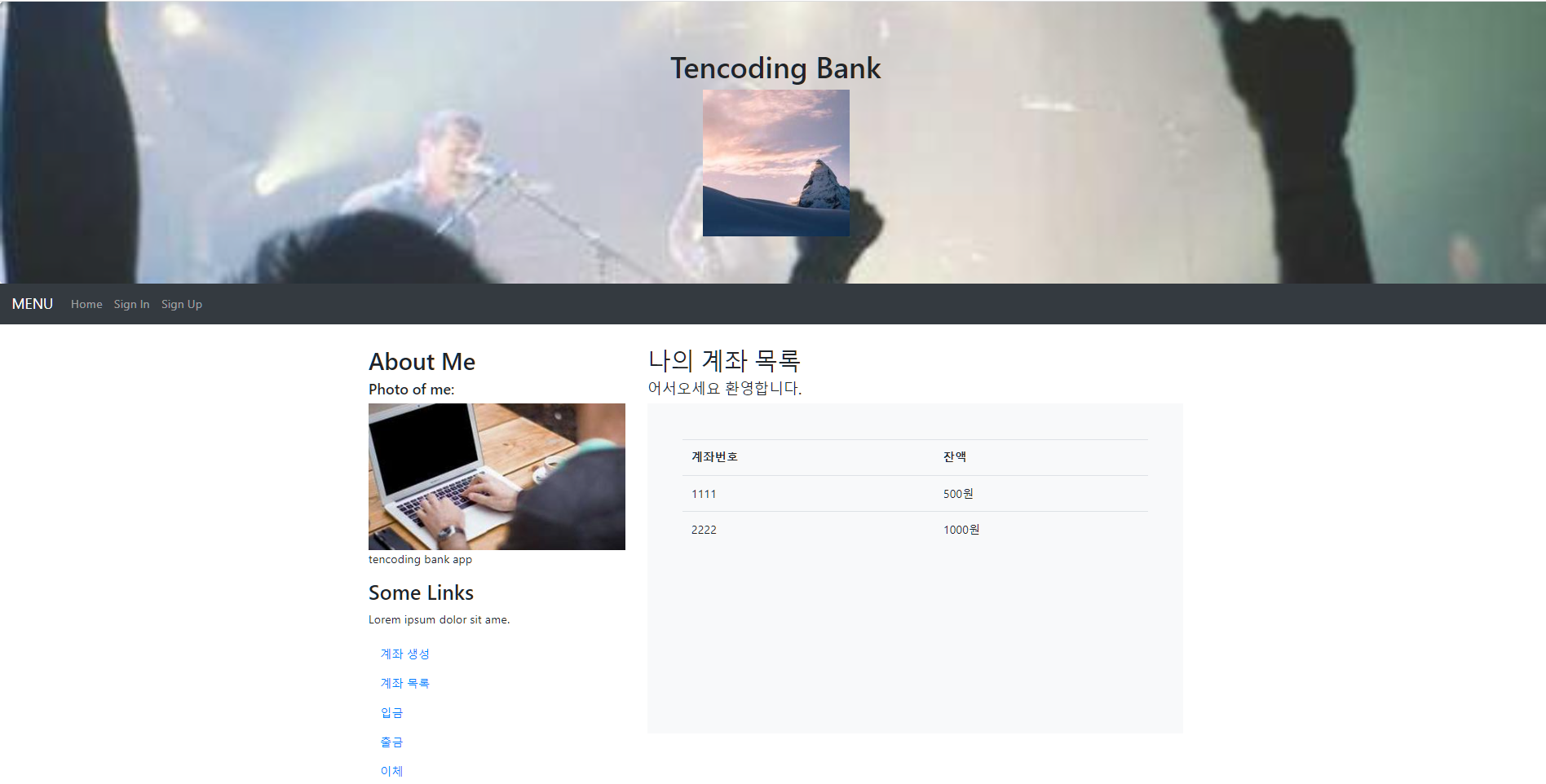
account/list.jsp
<%@ page language="java" contentType="text/html; charset=UTF-8" pageEncoding="UTF-8"%>


<%@ include file="/WEB-INF/view/layout/header.jsp"%>


<div class="col-sm-8">
	<h2>나의 계좌 목록</h2>
	<h5>어서오세요 환영합니다.</h5>
	<div class="bg-light p-md-5 h-75">
		<table class="table">
			<thead>
				<tr>
					<th>계좌번호</th>
					<th>잔액</th>
				</tr>
			</thead>

			<tbody>
				<tr>
					<td>1111</td>
					<td>500원</td>
				</tr>
				<tr>
					<td>2222</td>
					<td>1000원</td>
				</tr>
			</tbody>
		</table>
	</div>


	</div>
	</div>
</div>

<%@ include file="/WEB-INF/view/layout/footer.jsp"%>
계좌 목록 페이지
계좌 생성 페이지
    // 계좌 생성 페이지
	// http://localhost:80/account/save

	@GetMapping("/save")
	public String save() {
		return "account/save";
	}
account/save.jsp
<%@ page language="java" contentType="text/html; charset=UTF-8" pageEncoding="UTF-8"%>


<%@ include file="/WEB-INF/view/layout/header.jsp"%>


<div class="col-sm-8">
	<h2>계좌 생성 페이지(인증)</h2>
	<h5>어서오세요 환영합니다.</h5>
	<div class="bg-light p-md-5 h-75">
		<div class="form-group">
			<form action="" method="post">
				<div class="form-group">
					<label for="number">계좌번호</label>
					<input type="text" class="form-control" id="number" placeholder="생성 계좌번호를 입력하세요" name="number">
				</div>
				<div class="form-group">
					<label for="password">계좌 비밀번호</label>
					<input type="password" class="form-control" id="password" placeholder="계좌 비밀번호를 입력하세요" name="password">
				</div>
				<div class="form-group">
					<label for="balance">입금 금액</label>
					<input type="text" class="form-control" id="balance" placeholder="입금 금액을 입력하세요" name="balance">
				</div>
				<button type="submit" class="btn btn-primary">계좌 생성</button>
			</form>
		</div>
	</div>

	</div>
	</div>
</div>

<%@ include file="/WEB-INF/view/layout/footer.jsp"%>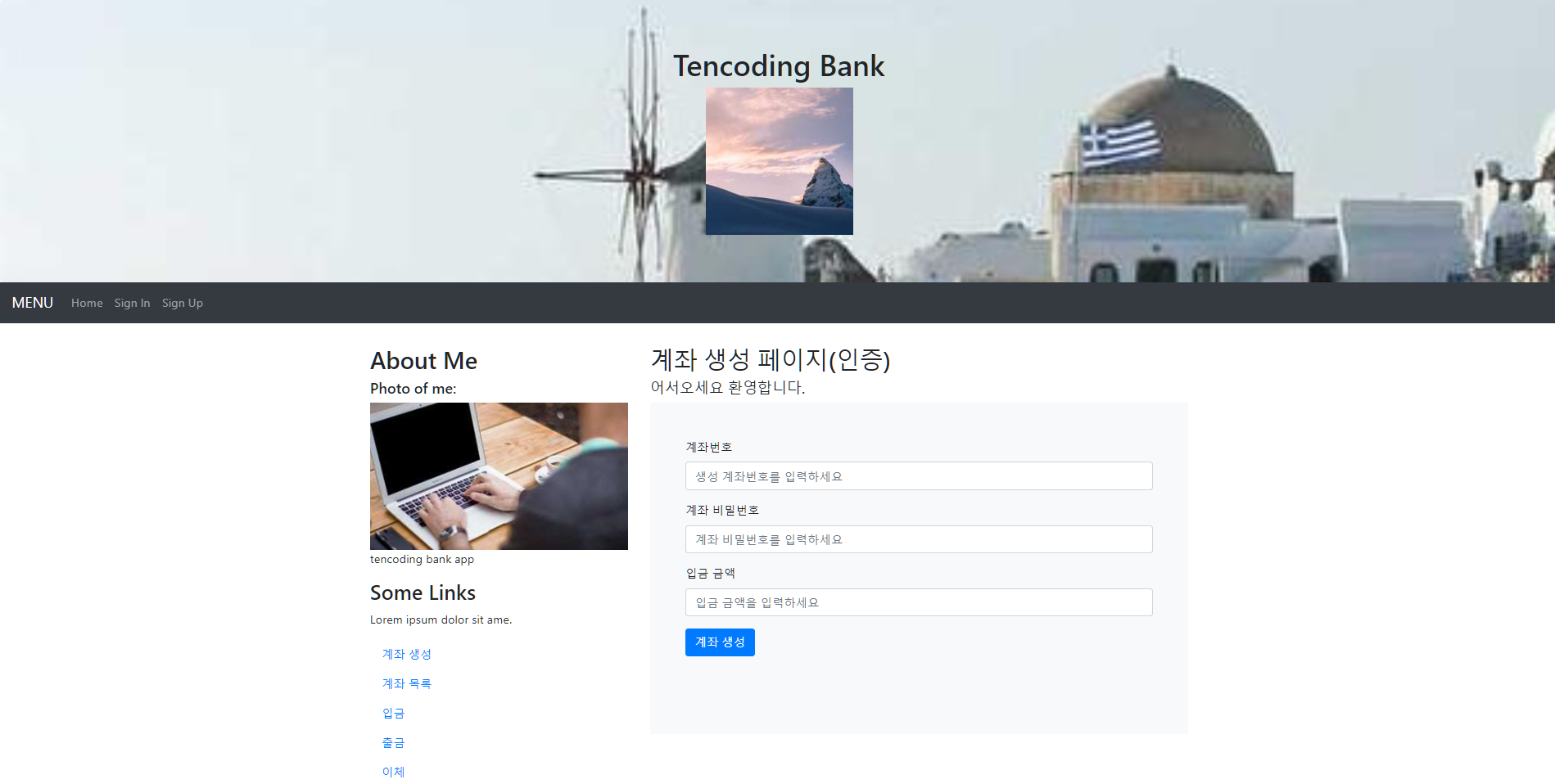
출금 페이지
	// 출금 페이지
	// http://localhost:80/account/withdraw

	@GetMapping("/withdraw")
	public String withdraw() {
		return "account/withdraw";
	}
account/withdraw.jsp
<%@ page language="java" contentType="text/html; charset=UTF-8" pageEncoding="UTF-8"%>


<%@ include file="/WEB-INF/view/layout/header.jsp"%>


<div class="col-sm-8">
	<h2>출금 페이지(인증)</h2>
	<h5>어서오세요 환영합니다.</h5>
	<div class="bg-light p-md-5 h-75">
		<div class="form-group">
			<form action="" method="post">
				<div class="form-group">
					<label for="amount">출금 금액</label>
					<input type="text" id="amount" class="form-control" placeholder="출금 금액을 입력하세요" name="amount">
				</div>
				<div class="form-group">
					<label for="wAccountNumber">출금 계좌번호</label>
					<input type="text" id="wAccountNumber" class="form-control" placeholder="출금 금액을 입력하세요" name="wAccountNumber">
				</div>
				<div class="form-group">
					<label for="wAccountPassword">출금 계좌 비밀번호</label>
					<input type="password" id="wAccountPassword" class="form-control" placeholder="출금 금액을 입력하세요" name="wAccountPassword">
				</div>
				<button type="submit" class="btn btn-primary">출금</button>
			</form>
		</div>
	</div>

	</div>
	</div>
</div>

<%@ include file="/WEB-INF/view/layout/footer.jsp"%>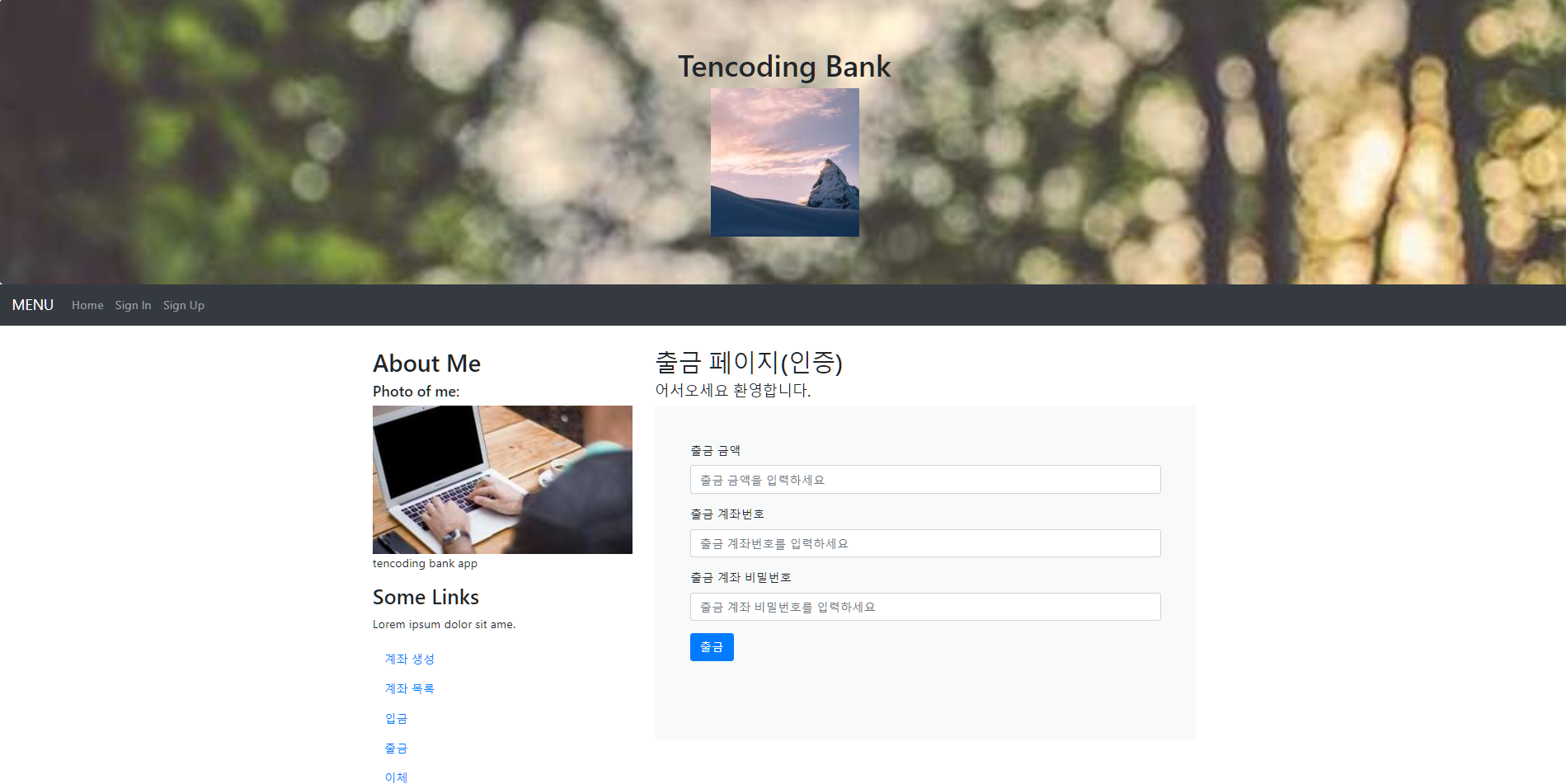
입금 페이지
	// 입금 페이지
	// http://localhost:80/account/deposit

	@GetMapping("/deposit")
	public String deposit() {
		return "account/deposit";
	}
account/deposit.jsp
<%@ page language="java" contentType="text/html; charset=UTF-8" pageEncoding="UTF-8"%>


<%@ include file="/WEB-INF/view/layout/header.jsp"%>


<div class="col-sm-8">
	<h2>입금 페이지(인증)</h2>
	<h5>어서오세요 환영합니다.</h5>
	<div class="bg-light p-md-5 h-75">
		<div class="form-group">
			<form action="" method="post">
				<div class="form-group">
					<label for="amount">입금 금액</label>
					<input type="text" id="amount" class="form-control" placeholder="입금 금액을 입력하세요" name="amount">
				</div>
				<div class="form-group">
					<label for="dAccountNumber">입금 계좌번호</label>
					<input type="text" id="dAccountNumber" class="form-control" placeholder="입금 계좌번호를 입력하세요" name="dAccountNumber">
				</div>
				<button type="submit" class="btn btn-primary">입금</button>
			</form>
		</div>
	</div>

	</div>
	</div>
</div>

<%@ include file="/WEB-INF/view/layout/footer.jsp"%>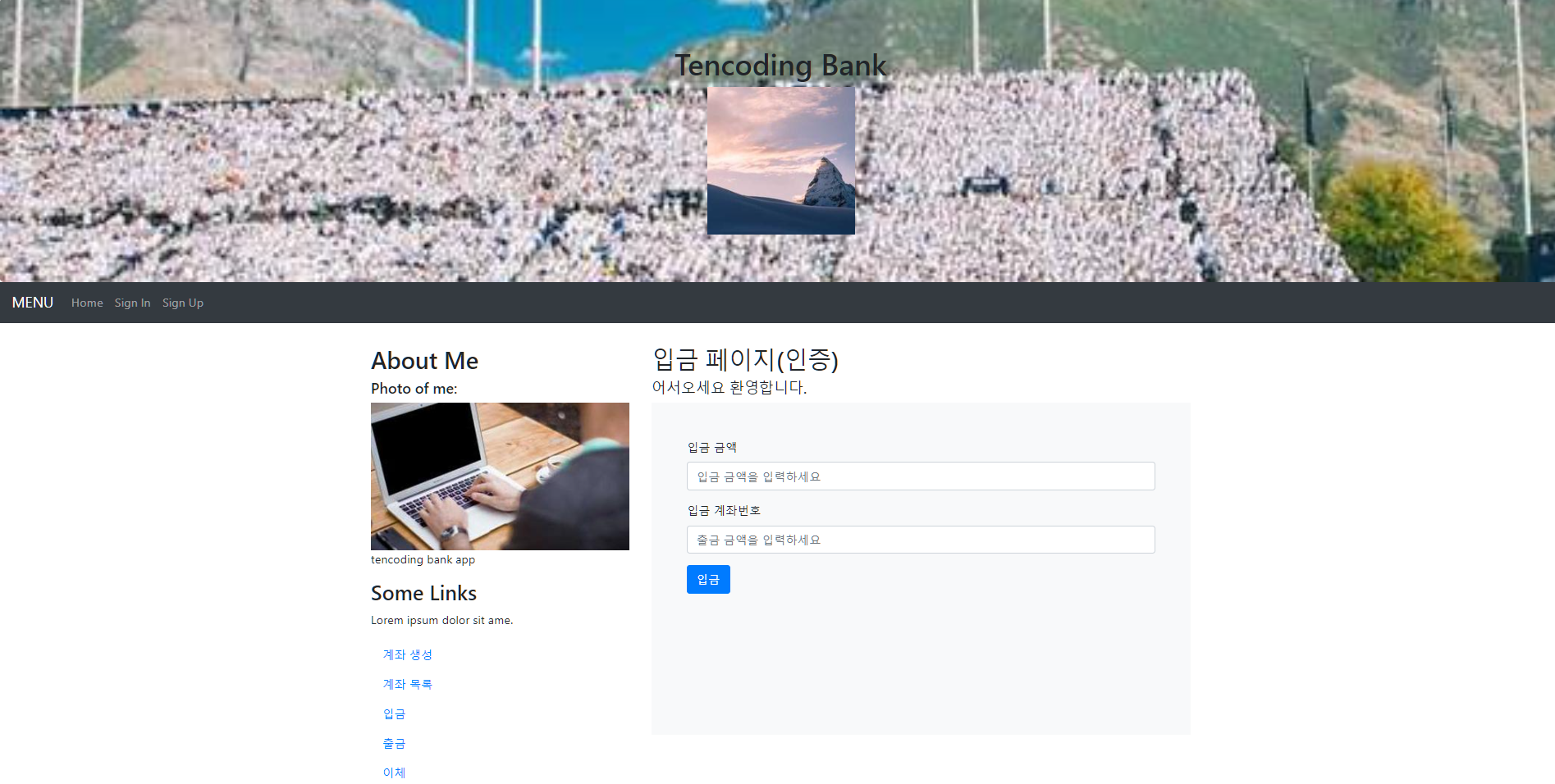
이체 페이지
	// 이체 페이지
	// http://localhost:80/account/transfer

	@GetMapping("/transfer")
	public String transfer() {
		return "account/transfer";
	}
account/transfer.jsp
<%@ page language="java" contentType="text/html; charset=UTF-8" pageEncoding="UTF-8"%>


<%@ include file="/WEB-INF/view/layout/header.jsp"%>


<div class="col-sm-8">
	<h2>이체 페이지(인증)</h2>
	<h5>어서오세요 환영합니다.</h5>
	<div class="bg-light p-md-5 h-75">
		<div class="form-group">
			<form action="" method="post">
				<div class="form-group">
					<label for="amount">입금 금액</label>
					<input type="text" id="amount" class="form-control" placeholder="입금 금액을 입력하시오" name="amount">
				</div>
				<div class="form-group">
					<label for="wAccountNumber">출금 계좌번호</label>
					<input type="text" id="wAccountNumber" class="form-control" placeholder="출금 계좌 번호를 입력하세요" name="wAccountNumber">
				</div>
				<div class="form-group">
					<label for="dAccountNumber">입금 계좌번호</label>
					<input type="text" id="dAccountNumber" class="form-control" placeholder="입금 계좌 번호를 입력하세요" name="dAccountNumber">
				</div>
				<div class="form-group">
					<label for="wAccountPassword">출금 계좌 비밀번호</label>
					<input type="text" id="wAccountPassword" class="form-control" placeholder="출금 계좌 비밀번호를 입력하세요" name="wAccountPassword">
				</div>
				<button type="submit" class="btn btn-primary">이체</button>
			</form>
		</div>
	</div>

	</div>
	</div>
</div>

<%@ include file="/WEB-INF/view/layout/footer.jsp"%>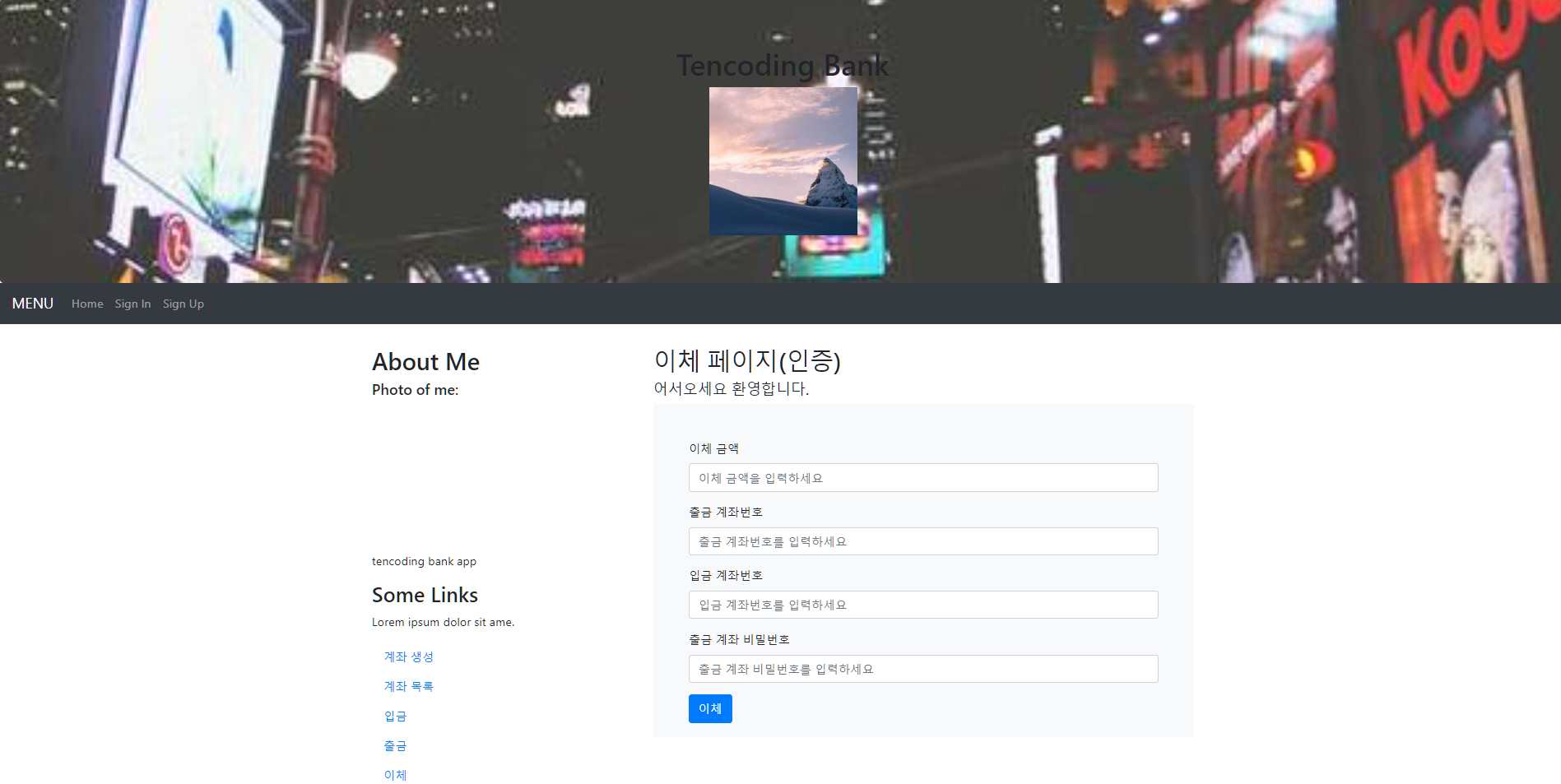
dto 설계
💡 반드시 기억할 것은 HTML form 태그는 기본적으로 method 방식을 get,post 만 지원한다.

   1. 스프링 부트 컨트롤러는 key=value 데이터를 자동으로 파싱 해서 변수에 담아 준다.

   FORM 태그 METHOD -> get 처리
   특징 : body 로 데이터를 담아 보내지 않음

   FORM에 한계 GET, POST 가능
   REST FULL API 활용 못하고 있음

   PUT, DELETE - form 말고 같다 -->
   ajax로 restfull 방식으로 변경해서 처리하기
signUpFormDto.java
package com.example.bankExam.dto;

import lombok.Data;

@Data
public class signUpFormDto {
	// form name태그 기준
	private String username;
	private String password;
	private String fullname;
}
signInFormDto.java
package com.example.bankExam.dto;

import lombok.Data;

@Data
public class signInFormDto {
	// form name태그 기준
	private String username;
	private String password;

}
.
.
.
.