
react-native-appsflyer 설치
yarn add react-native-appsflyer

npx pod-install ios
Android - Deep Link 설정
// android/app/src/main/java/com/appsflyer_deep_link_app/MainActivity.kt

import android.os.Bundle
import android.content.Intent // add this
...

override fun onCreate(savedInstanceState: Bundle?) {
  super.onCreate(null)
}

// add this
override fun onNewIntent(intent: Intent) {
  super.onNewIntent(intent)
  setIntent(intent)
}
<!-- android/app/src/main/AndroidManifest.xml -->
<manifest xmlns:android="http://schemas.android.com/apk/res/android" xmlns:tools="http://schemas.android.com/tools" package="com.appsflyer_deep_link">
<uses-permission android:name="android.permission.INTERNET" />
<uses-permission android:name="android.permission.ACCESS_NETWORK_STATE" />
<uses-permission android:name="com.google.android.gms.permission.AD_ID" />
<application
tools:replace="android:allowBackup"
android:name=".MainApplication"
android:label="@string/app_name"
android:icon="@mipmap/ic_launcher"
android:roundIcon="@mipmap/ic_launcher_round"
android:allowBackup="false"
android:theme="@style/AppTheme"
android:supportsRtl="true">
<activity
android:name=".MainActivity"
android:label="@string/app_name"
android:configChanges="keyboard|keyboardHidden|orientation|screenLayout|screenSize|smallestScreenSize|uiMode"
android:launchMode="singleTask"
android:windowSoftInputMode="adjustResize"
android:exported="true">
<intent-filter>
<action android:name="android.intent.action.MAIN" />
<category android:name="android.intent.category.LAUNCHER" />
</intent-filter>
<intent-filter android:autoVerify="true">
<action android:name="android.intent.action.VIEW" />
<category android:name="android.intent.category.DEFAULT" />
<category android:name="android.intent.category.BROWSABLE" />
<data android:scheme="https" android:host="appsflyer-deep-link.onelink.me" />
</intent-filter>
<intent-filter>
<action android:name="android.intent.action.VIEW" />
<category android:name="android.intent.category.DEFAULT" />
<category android:name="android.intent.category.BROWSABLE" />
<data android:scheme="appsflyer-deep-link" />
</intent-filter>
</activity>
</application>
</manifest>
Android - Package Name 변경


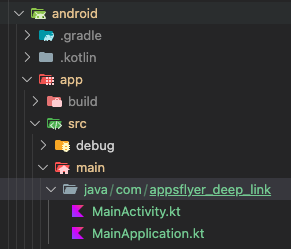
iOS - Deep Link 설정
// ios/appsflyer_deep_link_app/AppDelegate.swift

import UIKit
import React
import React_RCTAppDelegate
import ReactAppDependencyProvider
import AppsFlyerLib

@main
class AppDelegate: RCTAppDelegate {
  override func application(_ application: UIApplication, didFinishLaunchingWithOptions launchOptions: [UIApplication.LaunchOptionsKey : Any]? = nil) -> Bool {
    self.moduleName = "appsflyer_deep_link_app"
    self.dependencyProvider = RCTAppDependencyProvider()
    self.initialProps = [:]

    return super.application(application, didFinishLaunchingWithOptions: launchOptions)
  }

  override func sourceURL(for bridge: RCTBridge) -> URL? {
    self.bundleURL()
  }

  override func bundleURL() -> URL? {
#if DEBUG
    RCTBundleURLProvider.sharedSettings().jsBundleURL(forBundleRoot: "index")
#else
    Bundle.main.url(forResource: "main", withExtension: "jsbundle")
#endif
  }

  // ✅ Open URI-scheme (iOS 9+)
  override func application(_ app: UIApplication, open url: URL, options: [UIApplication.OpenURLOptionsKey : Any] = [:]) -> Bool {
      AppsFlyerLib.shared().handleOpen(url, options: options)
      return true
  }

  // ✅ Open Universal Links
  override func application(_ application: UIApplication, continue userActivity: NSUserActivity, restorationHandler: @escaping ([UIUserActivityRestoring]?) -> Void) -> Bool {
      AppsFlyerLib.shared().continue(userActivity, restorationHandler: nil)
      return true
  }
}
// ios/appsflyer_deep_link_app/Info.plist

...

<key>CFBundleSignature</key>
<string>????</string>

// add this
<key>CFBundleURLTypes</key>
<array>
	<dict>
		<key>CFBundleTypeRole</key>
		<string>Editor</string>
		<key>CFBundleURLName</key>
		<string>com.appsflyer-deep-link-app</string>
		<key>CFBundleURLSchemes</key>
		<array>
			<string>appsflyer-deep-link</string>
		</array>
	</dict>
</array>

<key>CFBundleVersion</key>
<string>$(CURRENT_PROJECT_VERSION)</string>

...
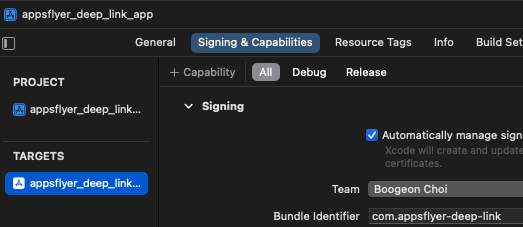
iOS - Bundle Identifier 변경
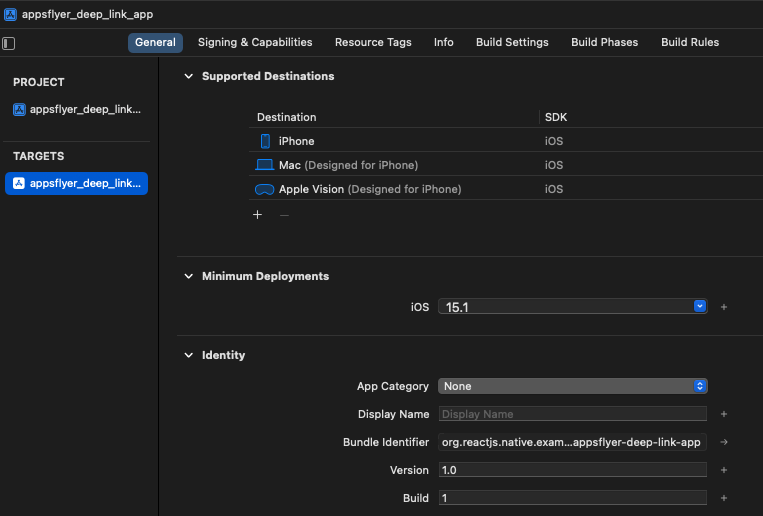
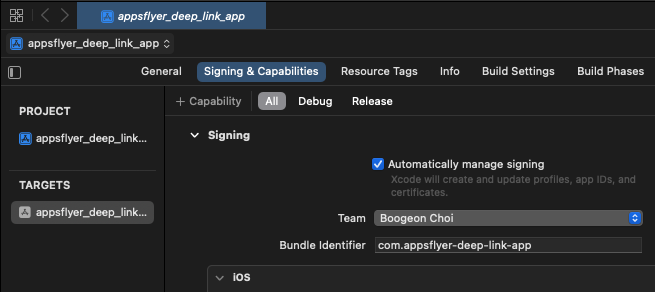
com.appsflyer-deep-link으로 변경iOS - URL Types 추가
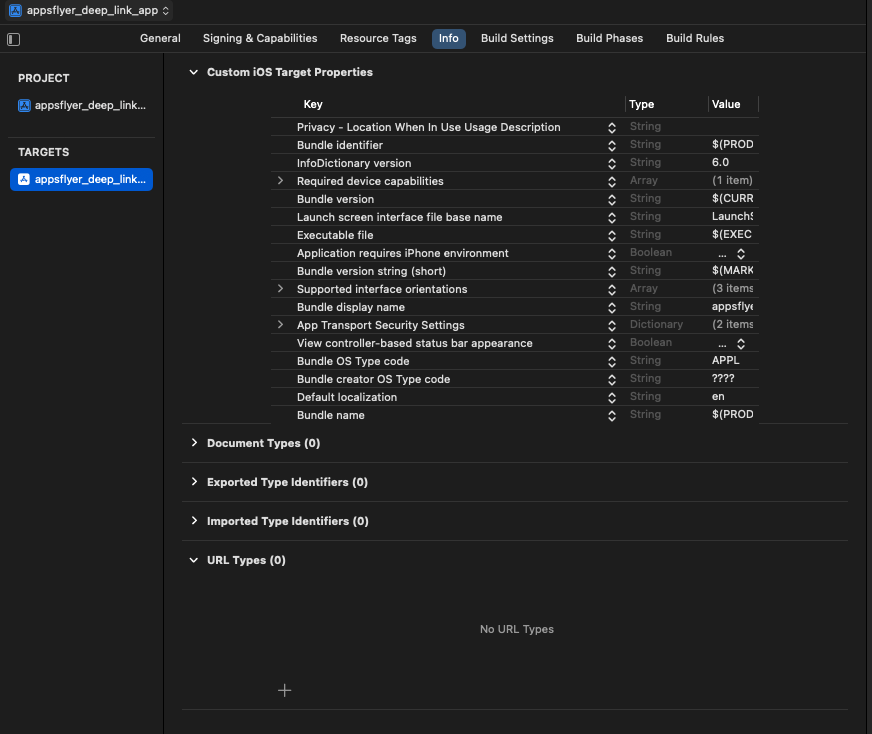
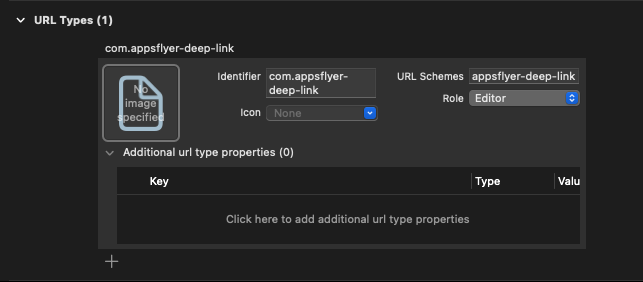
Identifier: com.appsflyer-deep-link
URL Schemes: appsflyer-deep-link
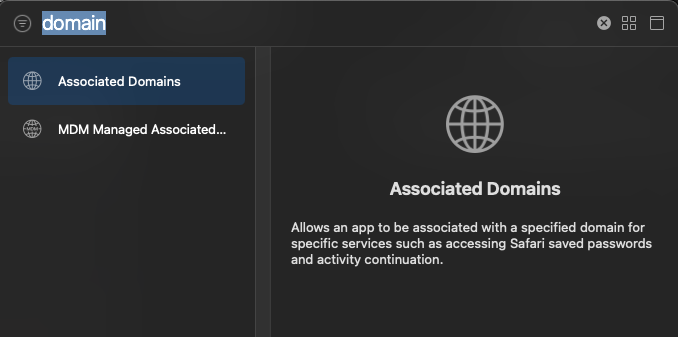
iOS - Associated Domains 변경
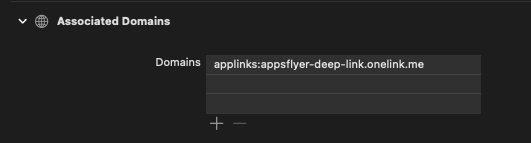
Associated Domains는 웹 사이트 도메인과 앱 간의 안전하게 연결시킵니다.
즉, 유니버셜 링크를 허용할 도메인입니다.
Appsflyer는 *.onelink.me 라는 도메인을 사용합니다.
Supporting associated domains | Apple Developer Documentation
참고자료
https://github.com/AppsFlyerSDK/appsflyer-react-native-plugin
노션링크
react native appsflyer deep link 완벽 가이드 - 초기 설정 (1)
react native appsflyer deep link 완벽 가이드 - SDK 설치 (2) - 현재
react native appsflyer deep link 완벽 가이드 - OneLink (3)
react native appsflyer deep link 완벽 가이드 - 코드 (4)

https://qnrjs42.notion.site