일반화 프로그래밍
일반화란? : 특수한 개념으로부터 공통된 개념을 찾아 묶는 것
예) 사람, 돼지, 오리너구리, 고래는 새끼에게 젖을먹이는 "포유류"이다.
11.1 일반화 프로그래밍
일반화 프로그래밍이란?
- 데이터 형식(Data type) 일반화를 이용하는 프로그래밍 패러다임 기법입니다.
- 한 가지 코드를 다양한 데이터 형식에 활용하는 방식을 말합니다.
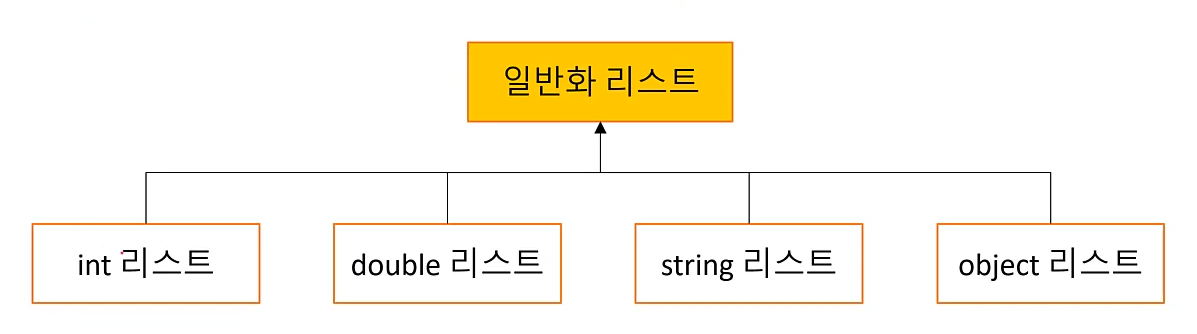
예) 위 그림에서 데이터 타입이 다를 뿐 동일한 기능을 가지고있는 리스트라는 개념을 일반화 프로그래밍 기법으로 묶어서 일반화 리스트라는 각 데이터 타입에 대응하는 한 가지 코드를 만들 수 있습니다.
11.2 일반화 메소드
- 데이터 형식을 일반화한 메소드
- 메소드 이름 뒤에 형식 매개 변수를 입력하여 작성
- 형식 매개 변수 : <>사이에 일반화 데이터 형식을 입력
- 컴파일 단계에서 형식 매개 변수는 실제 형식으로 치환됨
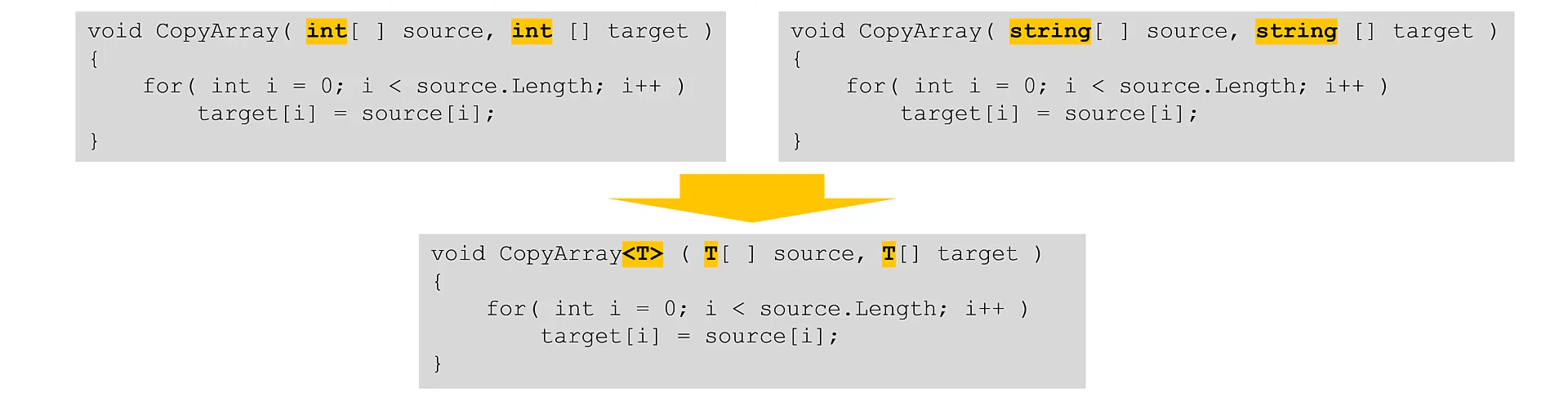
위 그림은 같은 코드이나 데이터 형식만 다른 코드를 형식 매개 변수< T >를 이용하여 일반화 메소드로 만든 모양입니다.
//일반화 메소드 선언 방법
한정자  반환형식  메소드이름<형식_매개변수>  (매개변수_목록)
{
	...
}
//int 버전
public void CoppyArray( int[] source, int[] target )
{
for( int i = 0; i < source.Length; i++)
target[i] = source[i];
}
//string 버전
public void CoppyArray( string[] source, string[] target )
{
for( int i = 0; i < source.Length; i++)
target[i] = source[i];
}
//기타 여러 버전...
//일반화 메소드로 선언한 버전
public void CopyArray<T> (T[] source, T[] target)
{
for( int i = 0; i < source.Length; i++)
target[i] = source[i];
}여기서 T는 Type을 말합니다 그리고 그저 형식 매개변수의 이름일 뿐입니다. 예를들면 T를 U나 Hi로 바꿔도 잘 작동합니다.
이제 T에 사용하고 싶은 데이터 형식을 대입하여 사용할 수 있습니다.
int[] source = {1,2,3,4,5};
int[] target = new int[source.Length];

//일반화 메소드 실행 (T에 int를 대입합니다.)
Copyarray<int>(source, target);

foreach (int element in target)
{
	COnsole.WriteLine(element);
}
11.3 일반화 클래스
- 데이터 형식을 일반화한 클래스
- 클래스 이름 뒤에 형식 매개 변수를 입력해서 작성
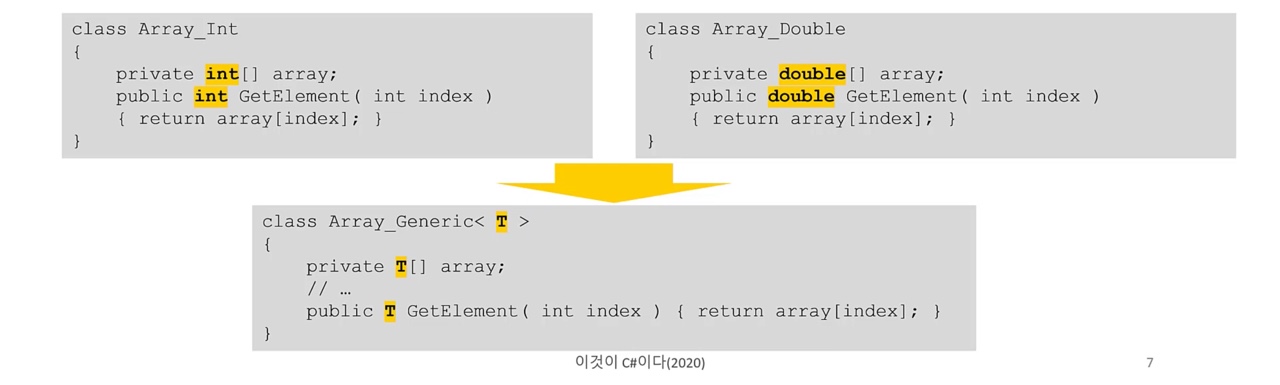
위 그림을 보면 Array_Int와 Array_Double은 기능이 같은 클래스입니다.
하지만 내부적으로 사용하는 데이터 형식이 다르므로 클래스를 분리해서 구현했습니다.
이 두 클래스는 데이터 형식만 빼고 다른 부분이 모두 같으므로 일반화 할 수 있습니다.
class Array_Generic<T>
{
	private T[] array;
    // ...
    public T GetElement(int index)
    	return array[index];
}

//사용
static void Main(string[] args)
{
	Array_Generic<int> intArr = new Array_Generic<int>();
    Array_Generic<double> dblArr = new Array_Generic<double>();

    //var로 간략하게 사용할수있습니다.
    var intArr2 = new ArrayGeneric<int>();
    var dblArr2 = new ArrayGeneric<double>();
}
아래 예제는 10장에서 만들었던 indexer 예제를 일반화 클래스를 이용해서 개선한것입니다.
namespace Generic_Class
{
    class MyList<T>
    {
        private T[] array;

        public MyList()
        {
            array = new T[3]; //용량: 3
        }

        public T this[int index]
        {
            get { return array[index]; }
            set
            {
                if (index >= array.Length)
                {
                    Array.Resize<T>(ref array, index + 1);
                    Console.WriteLine($"Array Resize : {array.Length}");
                }
                array[index] = value;
            }
        }

        public int Length
        {
            get { return array.Length; }
        }
    }

    class MainApp
    {
        static void Main(string[] args)
        {
            var str_list = new MyList<string>();
            str_list[0] = "abc";
            str_list[1] = "def";
            str_list[2] = "ghi";
            str_list[3] = "jkl";
            str_list[4] = "mno";

            for (int i = 0; i < str_list.Length; i++)
            {
                Console.WriteLine(str_list[i]);
            }

            Console.WriteLine();

            var int_list = new MyList<int>();
            int_list[0] = 0;
            int_list[1] = 1;
            int_list[2] = 2;
            int_list[3] = 3;

            for (int i = 0; i < int_list.Length; i++)
            {
                Console.WriteLine(int_list[i]);
            }
        }
    }
}
출력
Array Resize : 4
Array Resize : 5
abc
def
ghi
jkl
mno
Array Resize : 4
0
1
2
3
11.4 형식 매개변수 제약
- 형식 매개 변수가 특정 조건을 갖추도록 강제 하는 기능
- 문법 : "where 형식 매개변수 : 제약조건"
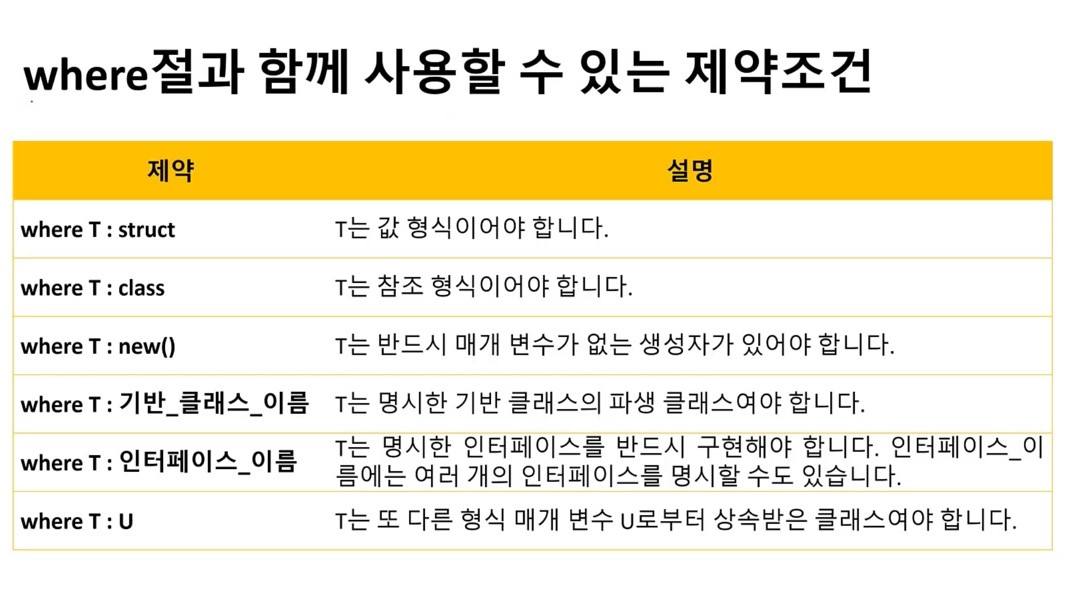
예1) 형식 매개변수 T를 Myclass의 파생 클래스로 제약
//파생 클래스의 인스턴스는 기반 클래스의 인스턴스로 간주함.
//따라서 T는 Myclass의 파생 클래스만 넣을 수 있다.(당연히 Myclass도 넣을 수 있음)
class MyList<T> where <T> : Myclass
{
	//...
}
예2) 형식 매개변수 T를 값 형식으로 제약
void CoppyArray<T>(T[] source, T[] target) where <T> : struct
{
	for(int i = 0; i < source.Length; i++)
    {
    	target[i] = source[i];
    }
}
예3) 형식 매개변수 T가 반드시 매개변수가 없는 생성자가 있도록 제약
//Generic클래스 안에 있는 CreateInstance함수는 어떤 클래스의 객체라도 생성해줍니다.
//단, 매개변수가 없는 생성자를 가졌을때만 한정입니다.
	class Generic
    {
        public static T CreateInstance<T>() where T : new()
        {
            return new T();
        }
    }

    class instanceA
    {
        private int i;
        private string b;

        //매개변수가 있는 생성자를 가진 instanceA
        public instanceA(int i, string b)
        {
            this.i = 0;
            this.b = "string";
        }
    }

    class instanceB
    {
        private double d;

        //기본 생성자만 가지고있는 instanceB
        public instanceB()
        {
            this.d = 0.123;
        }
    }

    internal class Program
    {
        static void Main(string[] args)
        {
            var a = Generic.CreateInstance<instanceA>();	//컴파일 오류
            var b = Generic.CreateInstance<instanceB>();	//정상작동
        }
    }
예4) 상위 코드에서 사용되던 형식 매개변수 U로부터 상속받는 형식으로 제약
using System;

//다음 코드의 CopyArray<T>()는 소속 클래스인 BaseArray<U>의
//형식 매개변수 U로부터 T가 상속받아야 할 것을 강제합니다.
class Base { }
class Derived : Base { }
class BaseArray<U> where U : Base
{
    public U[] Array { get; set; }
    public BaseArray(int size)
    {
        Array = new U[size];
    }

    //매개변수 T[] Source에 대입 가능한 인스턴스는
    //1.형식 매개변수에 Base를 담은 경우 : Base(기반클래스)와 Derived(파생클래스)를 담을 수 있음
    //2.형식 매개변수에 Derived를 담은 경우 : Derived와 Derived의 파생클래스만 담을 수 있음
    public void CopyArray<T>(T[] Source) where T : U
    {
        Source.CopyTo(Array, 0);
    }
}

public class MainApp
{
	//기본 생성자를 가진 클래스만 인스턴스 생성가능
	public static T CreateInstance<T>() where T : new()
    {
        return new T();
    }

	public static void Main()
    {
    	BaseArray<Base> a = new BaseArray<Base>(3);
		a.Array[0] = new Base();		//기반클래스인 Base와
		a.Array[1] = new Derived();		//파생클래스인 Derived를 담을 수 있음
		a.Array[2] = CreateInstance<Base>();

		for(int i = 0; i < 3; i++)
			Console.WriteLine(a.Array.GetValue(i));

		Console.WriteLine(" ");

		BaseArray<Derived> b = new BaseArray<Derived>(3);
		b.Array[0] = new Derived();		//Base형식은 여기서 담을 수 없다
		b.Array[1] = CreateInstance<Derived>();
		b.Array[2] = CreateInstance<Derived>();

		for(int i = 0; i < 3; i++)
			Console.WriteLine(b.Array.GetValue(i));

		Console.WriteLine(" ");

		BaseArray<Derived> c = new BaseArray<Derived>(3);
		c.CopyArray<Derived>(b.Array);

		for(int i = 0; i < 3; i++)
			Console.WriteLine(c.Array.GetValue(i));
    }
}
출력
Base
Derived
Base
Derived
Derived
Derived
Derived
Derived
Derived
11.5 일반화 컬렉션
10장에서 소개 했던 컬렉션 클래스는 전부 Object형식을 기반으로 했습니다.
이들은 object형식을 통해 어떤 형식이든 담을 수 있는 장점이있지만,
컬렉션 요소에 접근할 때마다 박싱과 언박싱이 반복적으로 일어나기 때문에 쓸대없는 형식변환덕에 성능이 저하된다는 단점이있습니다.
이러한 단점을 일반화 컬렉션으로 해결할 수 있습니다.
- 컴파일 할때 사용할 형식이 결정되고, 쓸데없는 형식변환을 일으키지 않습니다.
- 잘못된 형식의 객체를 담게 될 위험이 없어집니다.
11.5.1 List< T >
using System;
using System.Collections.Generic;

public class Program
{
	public static void Main()
	{
		List<int> list = new List<int>();
		for(int i = 0;i < 5; i++)
			list.Add(i);

		foreach (int element in list)
			Console.WriteLine($"{element} ");
		Console.WriteLine();

		list.RemoveAt(2);

		foreach (int element in list)
			Console.WriteLine($"{element} ");
		Console.WriteLine();

		list.Insert(2,2);

		foreach (int element in list)
			Console.WriteLine($"{element} ");
		Console.WriteLine();
	}
}
출력
0 1 2 3 4
0 1 3 4
0 1 2 3 4
11.5.2 Queue< T >
using System;
using System.Collections.Generic;

public class Program
{
	public static void Main()
	{
		Queue<int> queue = new Queue<int>();

		queue.Enqueue(1);
		queue.Enqueue(2);
		queue.Enqueue(3);
		queue.Enqueue(4);
		queue.Enqueue(5);

		while (queue.Count > 0)
			Console.Write($"{queue.Dequeue()} ");
	}
}
출력
1 2 3 4 5
11.5.1 Stack< T >
using System;
using System.Collections.Generic;

public class Program
{
	public static void Main()
	{
		Stack<int> stack = new Stack<int>();

		stack.Push(1);
		stack.Push(2);
		stack.Push(3);
		stack.Push(4);
		stack.Push(5);

		while(stack.Count > 0)
			Console.Write($"{stack.Pop()} ");
	}
}
출력
5 4 3 2 1
11.5.1 Dictionary< TKey, TValue >
예제1
using System;
using System.Collections.Generic;

public class Program
{
	public static void Main()
	{
		Dictionary<string,string> dic = new Dictionary<string,string>();

		dic["하나"] = "one";
		dic["둘"] = "two";
		dic["셋"] = "three";
		dic["넷"] = "four";

		Console.Write($"{dic["하나"]} {dic["둘"]} {dic["셋"]} {dic["넷"]}");
	}
}
출력
one two three four
예제2
using System;
using System.Collections.Generic;

namespace EmptySpace
{
    class Monster
    {
        public int id;

        public Monster(int id) { this.id = id; }
    }

    class MainApp
    {
        static void Main(string[] args)
        {
            Dictionary<int, Monster> dic = new Dictionary<int, Monster>();

            for (int i = 0; i < 100; i++)
            {
                dic[i] = new Monster(i);
            }

            Monster mon = dic[50];                                  //이런 방법은 잘못된 키값을 넣을 경우 바로 오류가 난다.
                                                                    //ex) dic[123]처럼 범위를 벗어나는 값을 넣을경우.

            bool found = dic.TryGetValue(50, out Monster monster);  //정상 키값이라면 monster에 값을 리턴한다.
                                                                    //잘못된 키값이라면 BOOL값으로 FALSE가 들어온다.

            dic.Remove(40);         //40의 키값을 가진 인스턴스를 삭제한다.
            dic.Clear();            //딕셔너리 안에 든 정보를 전부 삭제한다.

        }
    }
}
11.6 foreach를 사용할 수 있는 일반화 클래스
10장에서 foreach문을 사용할 수 있는 클래스를 만들기 위해 IEnumerable 인터페이스를 상속해서 클래스를 만들었습니다.
일반화 클래스에서는 IEnumerable의 일반화 버전인
IEnumerable< T >인터페이스를 상속하면 형식 변환으로 인한 성능저하 없이 foreach 순회가 가능합니다.
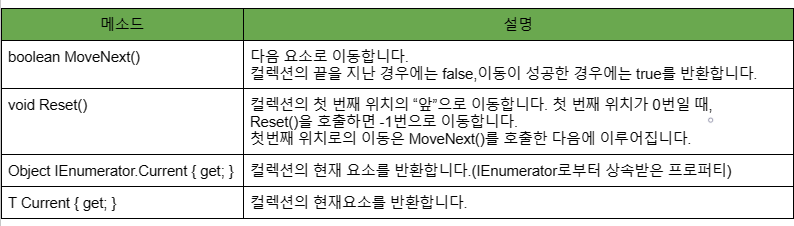
IEnumerable< T > 인터페이스를 상속받으면 구현해야하는 메소드

IEnumerator< T > 인터페이스를 상속받으면 구현해야하는 메소드
using System.Collections;

namespace Generic_Enumerable
{
    class MyList<T> : IEnumerable<T>, IEnumerator<T>
    {
        private T[] array;
        int position = -1;

        public MyList()
        {
            array = new T[3];
        }

        public T this[int index]
        {
            get
            {
                return array[index];
            }
            set
            {
                if (index >= array.Length)
                {
                    Array.Resize<T>(ref array, index + 1);
                    Console.WriteLine($"Array Resized : {array.Length}");
                }
                array[index] = value;
            }
        }

        public int Length
        {
            get { return array.Length; }
        }

        public IEnumerator<T> GetEnumerator()
        {
            return this;
        }

        IEnumerator IEnumerable.GetEnumerator()
        {
            return this;
        }


        public T Current
        {
            get { return array[position]; }
        }

        object IEnumerator.Current
        {
            get { return array[position]; }
        }


        public bool MoveNext()
        {
            if (position == array.Length - 1)
            {
                Reset();
                return false;
            }

            position++;
            return (position < array.Length);
        }

        public void Reset()
        {
            position = -1;
        }

        public void Dispose() { }
    }

    internal class Program
    {
        static void Main(string[] args)
        {
            MyList<string> str_list = new MyList<string>();

            str_list[0] = "abc";
            str_list[1] = "def";
            str_list[2] = "ghi";
            str_list[3] = "jkl";

            foreach (string str in str_list)
                Console.WriteLine(str);

            MyList<int> int_list = new MyList<int>();
            for (int i = 0; i < 5; i++)
            {
                int_list[i] = i;
            }

            foreach (int e in int_list)
                Console.WriteLine(e);

        }
    }
}