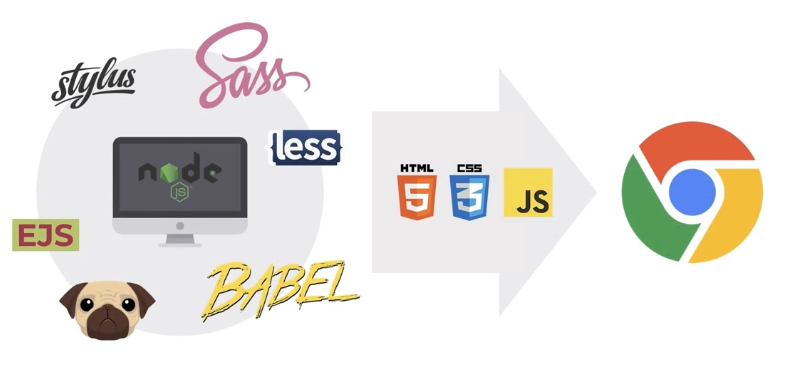
노드js환경에서 자바스크립트라는 프로그래밍 언어로 변환을 만들어주고 변환된 결과(html, css, javascript)를 브라우저에서 동작을 한다.
노드js 설치
https://nodejs.org/ko/download
LTS(Long Term Support) - 정기적으로 안정되고 신뢰도가 높은 지원이 보장되는 버전으로 유지/보수와 보안(서버 운영 등)에 초점을 맞췄다.
터미널에서
node --version or node -v 명령어를 통해 버전 확인
-- => 플래그(Flag) : 터미널에서 입력하는 명령(CLI)의 옵션을 말한다.
npm init -y : 패키지 생성
npm install : 특정한 기능을 설치할 수 있다.
- 패키지들을 개발용으로만 사용할 것인지 or 배포용으로 사용할지를 구분해야한다.
- 개발용으로만 사용할거면 --save-dev or -D로 추가해서 설치해준다. ex) npm install --D parcel
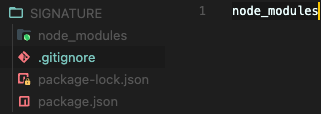
.gitignore : 파일을 숨겨 깃허브 등 관리할 수 있다.
기존 html에서 Open with Live Server을 통해 개발 서버를 오픈하였고 브라우저에서 동작하는 내용만 포함한 상태로 개발 서버를 간단하게 오픈해주지만 고도화된 개발을 통해서 하면 쓰기가 어렵다. 그래서 번들러를 통해 개발을 진행하면 좋다.
Parcel은 JavaScript 프로젝트를 위한 현대적이고 구성이 필요 없는 웹 애플리케이션 번들러입니다. 웹 애플리케이션에서 자산을 번들링, 트랜스파일링 및 최적화하는 프로세스를 자동화하여 프로젝트를 보다 쉽고 빠르게 설정하고 구축할 수 있습니다.
- Parcel은 트랜스파일링, 축소 등을 포함하여 웹 애플리케이션의 최적화되고 프로덕션 준비가 된 번들 생성을 담당하는 번들러입니다. 더 크고 복잡한 프로젝트를 구축하도록 설계되었습니다.
- Open with Live Server는 로컬 개발 서버를 생성하는 개발 도구로, 개발 중에 빠른 피드백이 가능합니다. 소규모 프로젝트나 빠른 프로토타이핑 및 테스트에 적합니다.
html => head 영역에 추가해준다. type또한 까먹지 말자
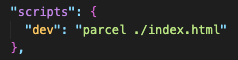
<script type="module" src="./main.js"></script>package.json에 입력해주고 터미널에 npm run dev로 실행해준다.
npm install lodash : Lodash는 일반적인 프로그래밍 작업을 단순화하고 향상시키기 위한 광범위한 도우미 기능을 제공하는 널리 사용되는 JavaScript 유틸리티 라이브러리입니다.
import _ from 'lodash'이 라이브러리는 성능 최적화, 간결한 구문 및 다양한 환경에서의 일관성으로 유명하여 개발자들 사이에서 선호됩니다. 또한 React, Angular 및 Vue와 같은 최신 JavaScript 프레임워크와 함께 널리 사용되어 개발 작업을 간소화하고 능률화합니다. lodash에서 가져오기 문은 전체 lodash 라이브러리를 밑줄() 기호로 가져오는 일반적인 방법으로, 현재 파일 또는 모듈 내의 모든 기능에 쉽게 액세스할 수 있습니다.
parcel 번들러를 통해 타입스크립트 내용을 묶어서 자바스크립트로 변환시켜주어 브라우저에 보여주게 된다. -> dist 폴더를 통해 결과를 볼 수 있다.
npm run build : "build" 스크립트에 의해 생성된 프로덕션 빌드는 일반적으로 웹 서버에 업로드하거나 공용 사용을 위해 호스팅 서비스에 배포하는 것입니다. 이 빌드는 성능에 최적화되어 있으며 오버헤드가 최소화되어 로드 시간이 빨라지고 사용자 경험이 향상됩니다.
  "scripts": {
    "dev": "parcel ./index.html",
    "build": "parcel build ./index.html"
  },
유의적 버전(Semantic Versioning, Semver) : Semantic Versioning은 프로젝트의 코드베이스에 대한 변경 사항 및 업데이트를 전달하기 위해 소프트웨어 개발에서 주로 사용되는 버전 관리 체계입니다.
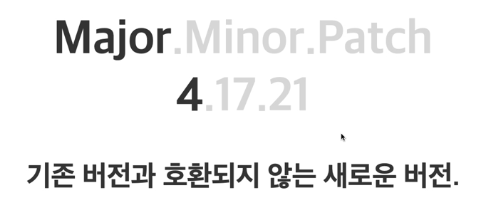
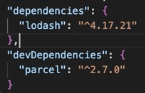
Major ( 4 ) : 기존 버전과 호환되지 않는 새로운 버전.
Minor ( 17 ) : 기존 버전과 호환되는 기능이 추가된 버전.
Patch ( 21 ) : 기존 버전과 호환되는 버그 및 오타 등이 수정된 버전.
npm info 패키지이름 : 패키지 정보 확인 가능
npm info 패키지이름@버전 : 직접적으로 버전을 설치할 수 있다.
npm update 패키지 : 최신 버전으로 업데이트 할 수 있다.
^Major.Minor.Patch : 캐럿(^) 기호는 package.json 파일에서 종속성을 지정하기 위해 npm(Node.js) 및 yarn과 같은 패키지 관리자에서 일반적으로 사용됩니다. 이를 통해 개발자는 이전 버전과의 호환성을 유지하면서 동일한 MAJOR 버전 내에서 새로운 기능 및 개선 사항에 대한 업데이트를 받을 수 있습니다.
<script type="module" defer src="./main.js"></script>defer 속성은 HTML 문서가 구문 분석을 완료할 때까지 스크립트 실행을 연기하도록 브라우저에 지시하는 데 사용됩니다. 이렇게 하면 스크립트 로드 및 실행에 의해 차단되지 않고 HTML 구문 분석 및 렌더링을 계속할 수 있습니다. defer 속성은 특히 페이지의 초기 렌더링에 필수적이지 않은 스크립트를 처리할 때 페이지 로드 성능을 개선하는 데 유용합니다.
type="module"과 defer를 결합하면 JavaScript 모듈이 비차단 방식으로 로드되고 HTML 문서가 완전히 구문 분석될 때까지 실행이 지연됩니다.
원시형 String, Number
const string1 = "Hello"
const string2 = 'Hello'
const string3 = `Hello ${string1} ?!`  // 백틱은 데이터를 채워넣을 떄 사사용 (템플릿 리터럴(기호)라고 한다.)

console.log(string3);
const number = 123
const pi = 3.14 // 부동소수점
console.log(typeof (number + 1));
console.log(typeof (number + undefined)); // Nan이 출력
const a = 0.1
const b = 0.2
console.log(typeof((a + b).toFixed(1)));
console.log(typeof(Number((a + b).toFixed(1))));
// toFixed를 통해 소수점을 잘라낼 수 있다. 하지만 문자 데이터가 나오기 때문에 Number를 통해 숫자 데이터로 변환시켜줘야한다.
원시형 Boolean, null, undefined
// Boolean(불린)
const a = true
const b = false

if(a) { // b로 하면 false이기 때문에 출력되지 않는다.
    console.log('Hello');
}
let age = null; //nul (명시적) 이라는 데이터는 존재하지 않는다. 값이 비어있다고 생각하면 된다.
// undefined는 값이 할당되지 않을 때 기본적으로 설정되어 있다.(암시적)
console.log(age);
setTimeout(function() {
age = 85
console.log(age);
}, 1000)객체
const user = {
    name : 'HEROPY',
    age : 85,
    year : null
}

console.log(user); //{ name: 'HEROPY', age: 85 }
console.log(user.name); // HEROPY
console.log(user.age); // 85
console.log(user.email); // undefined 값을 할당하고 싶지 않으면 null로 표시
배열
// 배열

// const fruits = new Array('Apple', 'Banana', 'Cherry') 배열 만드는 법 1
const fruits = ['Apple', 'Banana', 'Cherry'] // 배열 만드는 법 2 배열안에 있는 데이터들을 item or 요소(Elements)라고 한다.

console.log(fruits);
console.log(fruits[1]);
console.log(fruits[0]); // 배열에 특정 데이터를 조회하는 것이 배열이라고 생각하면 된다.
console.log(fruits.length); // 배열의 요소가 길이(몇개) 있는지 확인할 수 있다.
console.log(fruits[fruits.length -1]); // 배열의 끝 요소를 확인 할 수 있다.
객체
// Object(객체)

// const user = new Object();  // 객체를 생성자 함수로 만드는 방법 1
//객체는 key:value 형식으로 만들어진다. key:value, 속성(property) 다 같은 뜻이다.
// user.name = 'Chan'
// user.age = 85

//function User(){  // 함수 내부에 this를 이용해서 만드는 방법 2
//    this.name = 'chan'
//    this.age = 85
//}

//const user = new User()

//const user = {  // 대부분 객체 리터럴을 통해서 만든다. 방법 3
//    name: 'chan',
//    age: 85
//}  // 객체데이터에서 속성 키는 고유하다. 그리고 순서는 중요하지 않다.


//console.log(user);
//console.log(user.name);//점표기법
//console.log(user['name']);//대괄호 표기법

const userA = {
    name: 'chan',
    age: 27
}

const userB = {
    name: 'baek',
    age: 25,
    parent: userA
}

console.log(userB);
console.log(userB.parent);
console.log(userB.parent.name);
console.log(userB['parent']['name']);

const users = [userA, userB]
console.log(users);
console.log(users[0].name);
console.log(users[0]['name']);
함수
//함수

function hello(){
    console.log('Hello');
}


hello(); // 함수는 하나의 데이터이며, ()을 입력해야 실행한다.
console.log(hello);


// function getNumber(){
//     return 123
// }

const getNumber = function(){
    return 123 // return을 통해 반환 시켜준다.
}

console.log(getNumber());

const a = function(){
    console.log('A');
}

const b = function(c){
    console.log(c);
    c()
}

// b(123)
b(a)

// 함수는 하나의 자바스크립트 데이터로써 그 함수 자체와 함수에 호출 즉 소괄호을 열고 닫아서 쓰는 것은 다른 개념이다.
const func = function(){
    console.log(123);
}

console.log(func);
func()
형 변환
// 형 변환(Type Conversasion)

const a = 1 // Number
const b = '1' //String

console.log(a == b); // 동등 연산자
console.log(a === b); // 일치 연산자 이거를 사용하는 것을 추천
참과 거짓(Truthy & Falsy)
// 참과 거짓(Truthy & Falsy)

// 1) false
// 2) 0
// 3) null
// 4) undefined
// 5) NaN
// 6) ''
// 7) 0n
// 위에거 이외에는 거의 참이다.


if(true) {
    console.log('참!');
}

// const fruits = ['Apple', 'Banana'];
const fruits = [];

if(fruits.length){  // lenth를 통해 참과 거짓을 나눌 수 있다.
    console.log('아이템이 들어있음!');
}
데이터 타입 확인
// 데이터 타입 확인

console.log(typeof 'Hello' === 'string');
console.log(typeof 123 === 'number');
console.log(typeof false === 'boolean');
console.log(typeof undefined === 'undefined');
console.log(typeof null === 'object');
console.log(typeof [] === 'object');
console.log(typeof {} === 'object');
console.log(typeof function(){} === 'function');

// console.log(null.constructor);
console.log([].constructor === Array);
console.log({}.constructor === Object);

console.log(Object.prototype.toString.call(null).slice(8, -1) === 'Null');

function checkType(data) {
    return Object.prototype.toString.call(data).slice(8, -1)
}

console.log(checkType('Hello') === 'String');
console.log(checkType(123) === 'Number');
console.log(checkType(false) === 'Boolean');
console.log(checkType(null) === 'Null');