예외 처리
- 예외는 프로그램 실행 중 예상하지 못한 상황이 발생하는 것을 의미한다.
- 예외를 처리하지 않으면 프로그램이 중단될 수 있다.
그래서 예외 처리를 통해 프로그램이 안정적으로 실행되게 할 수 있다.
의도하지 않은 예외
- 10 / 0과 같은 연산을 수행하면 ArithmeticException(산술예외)가 발생한다.
예외를 처리하지 않으면 이후 코드는 실행되지 않는다.
의도적인 예외 (throw)
- 특정 조건에서 의도적으로 예외를 발생시킬 수 있다.
ex) 비즈니스 규칙을 위반한 경우(미성년자 접근) - throw를 활용하면 특정 상황에서 예외를 명확하게 정의하고 제어할 수 있다.
throw new IllegalArgumentException("미성년자는 접근할 수 없습니다!");예외의 구조와 종류
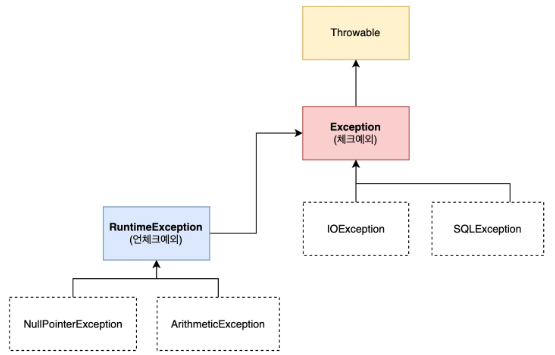
- RuntimeException - UncheckedException (런타임 시 발생하는 예외)
RuntimeException을 상속받는 모든 예외를 UncheckedException이라고 한다.
예외처리를 컴파일러가 확인하지 않는다. - Exception - CheckedException
Exception클래스를 직접 상속받는 모든 예외를 CheckedException이라고 한다.
예외처리를 컴파일러가 확인해 준다. - 런타임 중 잡히는 예외를 UncheckedException
컴파일 중 잡히는 예외를 CheckedException
예외 전파
- 예외 전파는 메서드에서 발생한 예외가 해당 메서드 내에서 처리되지 않았을 때 메서드를 호출한 상위 메서드로 전달되는 과정을 말한다.
- 예외가 프로그램 시작 지점(main())까지 전파되고 끝내 처리되지 않으면 프로그램이 비정상 종료된다.
RuntimeException - UncheckedException
- RuntimeException을 상속받는 모든 예외를 UncheckedException이라 한다.
- 컴파일러가 예외 처리를 강제하지 않는 예외다.
그러므로 예외 처리를 하지 않아도 컴파일 오류(빨간 줄)가 발생하지 않는다.
처리되지 않은 예외는 계속 프로그램 시작 지점까지 전파된다.
전파돼서 끝내 예외가 처리되지 않으면 프로그램이 비정상적으로 종료된다.
Exception - CheckedException
- Exception클래스를 직접 상속받는 모든 예외를 CheckedException이라 한다.
(RuntimeException을 상속받는 예외는 제외) - 컴파일러가 예외 처리를 강제하는 예외다.
예외 처리를 하지 않으면 컴파일 오류가 발생한다. - 반드시 try-catch로 예외를 처리하거나 throws키워드를 사용해야 한다.
(throws로 예외 처리의 책임을 호출자에게 전가할 수 있다.) - try-catch 예외를 직접 처리하는 방식
try {
	exceptionPractice.callUncheckedException();
} catch (RuntimeException e) { // 예외처리
	System.out.println("언체크 예외 처리");
} catch (Exception e) {
	System.out.println("체크 예외 처리");
}- throw 예외를 호출한 곳에서 처리하도록 강제하는 방식(책임 전가)
public class ExceptionPractice {
	public void callCheckedException() throws Exception { // ✅ throws 예외를 상위로 전파
		if (true) {
          System.out.println("체크예외 발생");
          throw new Exception();
      	}
	}
}
public class Main {
public static void main(String[] args) {
// 예외 실습 객체 인스턴스화
ExceptionPractice exceptionPractice = new ExceptionPractice();
// 체크 예외 사용
// ✅ 반드시 상위 메서드에서 try-catch 를 활용해 주어야합니다.
try {
exceptionPractice.callCheckedException();
} catch (Exception e) {
System.out.println("예외처리");
}
}
}Optional
- Optional은 null을 안전하게 다루게 해주는 객체다.
- null을 직접 다루는 대신 Optional을 사용하면 NullPointerException을 방지할 수 있다.
직접적인 null처리
- if문을 활용해서 null처리를 할 수 있지만 모든 코드에서 null 이 발생할 가능성을 미리 예측하고 처리하는 것은 현실적으로 어렵다.
if(class!=null)Optional 활용
-
Optional객체를 메서드 반환 자료형에 선언해서 해당 메서드가 null이 반환될 가능성을 명확하게 전달할 수 있다.
-
Optional.ofNullalbe()을 사용하여 null이 반환 될 수 있는 객체를 감싼다.
-
활용할 때는 isPresent()와 같은 Optional API를 통해 안전하게 null처리를 할 수 있다.
-
isPresent() 활용 방법
Optional 내부의 값이 존재할 경우 true를 반환하고
내부 값이 null일 경우 false를 반환한다.
import java.util.Optional;

public class Camp {
    private Student student;

    // ✅ null 이 반환될 수 있음을 명확하게 표시
    public Optional<Student> getStudent() {
        return Optional.ofNullable(student);
    }
}
import java.util.Optional;
public class Main {
public static void main(String[] args) {
Camp camp = new Camp();
// Optional 객체 반환받음
// Optional값을 반환 받음으로 널이 반환 될 수도 있는 값이라는 것을 알려줌
Optional<Student> studentOptional = camp.getStudent();
// Optional 객체의 기능 활용
boolean flag = studentOptional.isPresent(); // false 반환
if (flag) {
// 존재할 경우
Student student = studentOptional.get(); // ✅ 안전하게 Student 객체 가져오기
String studentName = student.getName();
System.out.println("studentName = " + studentName);
} else {
// null 일 경우
System.out.println("학생이 없습니다.");
}
}
}- orElseGet()활용 방법
orElseGet()은 값이 없을 때만 기본값을 제공하는 로직을 실행하는 메서드다.
(C#에서 ?? 연산자와 기능이 비슷함)
import java.util.Optional;

public class Camp {
    private Student student;

    // ✅ null 이 반환될 수 있음을 명확하게 표시
    public Optional<Student> getStudent() {
        return Optional.ofNullable(student);
    }
}
import java.util.Optional;

public class Main {
    public static void main(String[] args) {
        Camp camp = new Camp();

        // ✅ Optional 객체의 기능 활용 (orElseGet 사용)
        Student student = camp.getStudent()
                              .orElseGet(() -> new Student("미등록 학생"));

        System.out.println("studentName = " + student.getName());
    }
}
컬렉션
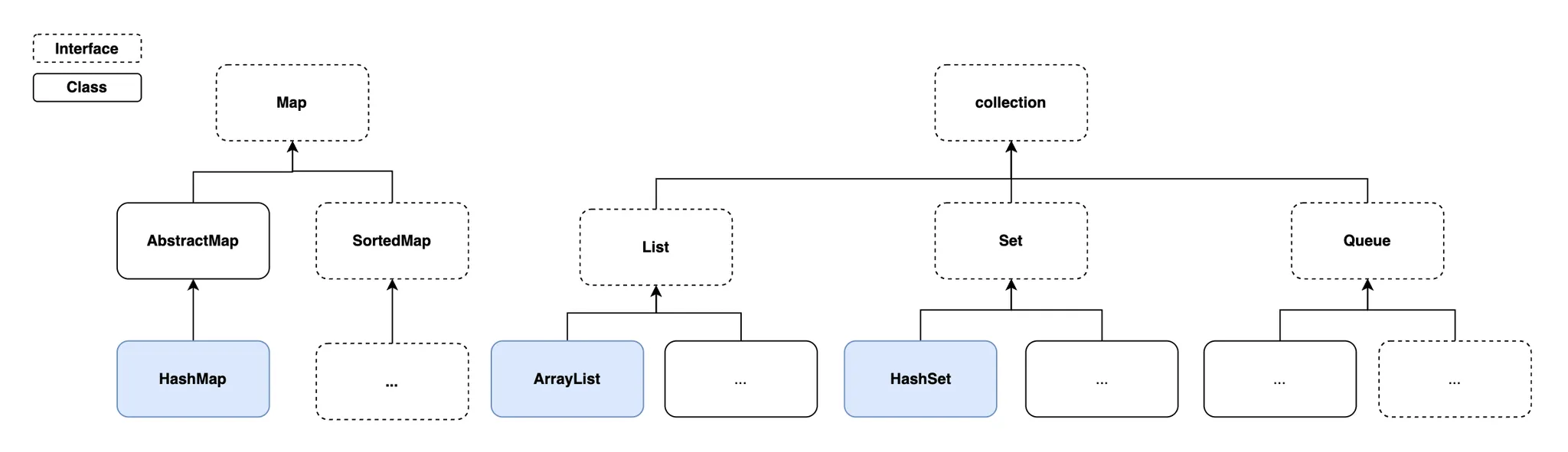
- 자바 컬렉션 프레임 워크는 다양한 자료구조들을 쉽게 사용할 수 있도록 인터페이스와 구현체(ArrayList, HashSet, HashMap 등)를 제공하는 집합이다.
- 컬렉션을 통해 데이터의 저장, 조회, 삭제, 정렬 등 다양한 기능을 간편하게 구현할 수 있다.
- 배열과 다르게 컬렉션은 길이를 동적으로 변경할 수 있다.
배열의 한계
- 배열은 크기가 고정되어 있어서 한 번 설정하면 길이를 변경할 수 없다.
(배열 길이 초과 시 에러가 발생)
int[] numbers = new int[2];
numbers[0] = 10;
numbers[1] = 20;
numbers[2] = 30; // ❌ 요소 추가시 에러발생- 배열과 다르게 컬렉션은 길이를 동적으로 변경할 수 있다.
ArrayList<Integer> arrayList = new ArrayList<>();
arrayList.add(10);
arrayList.add(20);
arrayList.add(30); // ✅ 정상 동작 (길이 제한 없음)
컬렉션의 종류와 특징
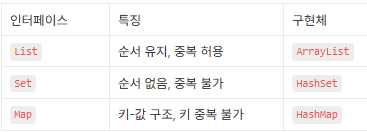
- 컬렉션의 종류
ArrayList
- 요소의 순서를 유지하고 중복된 값을 저장할 수 있는 자료구조다.
- add("값") : 요소 추가
- get(인덱스) : 요소 조회
- remove("값") : 요소 제거
HashSet
- 순서를 유지하지 않고 중복을 허용하지 않습니다.
(순서를 보장하지 않기 때문에 get(인덱스)지원을 하지 않습니다.) - add("값") : 요소 추가
- remove("값") : 요소 제거
HashMap
- 키-값 구조로 데이터를 저장합니다.(Dictionary)
- 순서를 보장하지 않고 키는 중복될 수 없지만 값은 중복 가능합니다.
- put("키",값) : 요소 추가
- get("키) : 요소 조회
- remove("키") : 요소 제거
- keySet() : 키 확인
- values() : 값 확인
제네릭
- 제네릭은 클래스, 메서드 등에 사용되는 < T >타입 매개변수를 의미한다.
- 타입을 미리 지정하지 않고 사용 시점에 유연하게 결정할 수 있는 문법이다.
- 제네릭을 활용하면 코드 재사용성과 타입 안정성을 보장받을 수 있지만,
과도하게 사용하면 오히려 복잡해질 수 있으므로 주의해야 한다.
코드 재사용성
- 다양한 타입에서 동일한 코드로 재사용 가능하다
- 재사용 불가능한 클래스
이 클래스는 특정 타입(Integer)으로 고정 되어 있어 재사용이 어렵다.
다시 사용하려면 다른 클래스를 만들어야 한다.
public class Box {
    private Integer item; // ⚠️ Integer 타입으로 고정

    public Box(Integer item) { // ⚠️ Integer 타입으로 고정
        this.item = item;
    }

    public Integer getItem() {
        return this.item;
    }
}
public class Main {
public static void main(String[] args) {
// ✅ Integer 타입 박스
Box box1 = new Box(100);
// ❌ String 타입을 저장하려면 새로운 클래스를 만들어야 함
Box box2 = new Box("ABC");
}
}타입 안정성
- 잘못된 타입 사용을 컴파일 시점에서 방지한다.
- 타입 안정성이 낮은 클래스
다형성을 활용하면 다양한 타입을 저장 가능하지만 실행 중 오류가 발생할 가능성이 높다.
사용 시 형 변환이 필요하고 실수로 잘못된 타입을 사용하면 런타임 오류가 발생한다.
(잘못된 다운캐스팅 활용 시 : ClassCastException)
public class ObjectBox {
    private Object item; // ⚠️ 다형성: 모든 타입 저장 가능 (하지만 안전하지 않음)

    public ObjectBox(Object item) {
        this.item = item;
    }

    public Object getItem() {
        return this.item;
    }
}
public class Main {
public static void main(String[] args) {
// ✅ ObjectBox 사용
ObjectBox objBox = new ObjectBox("Hello");
String str = (String) objBox.getItem(); // 형변환 필요
System.out.println("objBox 내용: " + str); // Hello
// ⚠️ 실행 중 오류 발생 (잘못된 다운 캐스팅: ClassCastException)
objBox = new ObjectBox(100); // 정수 저장
String error = (String) objBox.getItem(); // ❌ 오류: Integer -> String
System.out.println("잘못된 변환: " + error);
}
}제네릭 활용(재사용성+타입 안정성)
- < T >(타입 매개변수)는 제네릭에서 타입을 의미하는 자리이다.
실제 데이터 타입으로 대체되어 사용한다.
public class GenericBox<T> { // ✅ 제네릭 클래스
    private T item;

    public GenericBox(T item) {
        this.item = item;
    }

    public T getItem() {
        return this.item;
    }
}- 타입 소거는 컴파일 시점에 제네릭 타입 정보를 제거하는 과정이다.
< T >타입 매개변수 부분은 Object로 대체된다.
필요한 경우 컴파일러가 자동으로 강제 다운 캐스팅 코드를 삽입하여 타입 안정성을 보장한다.
public class Main {
    public static void main(String[] args) {

        // 1. ✅ 재사용 가능(컴파일시 타입소거: T -> Object)
        GenericBox<String> strGBox = new GenericBox<>("ABC");
        GenericBox<Integer> intGBox = new GenericBox<>(100);
        GenericBox<Double> doubleGBox = new GenericBox<>(0.1);

        // 2. ✅ 타입 안정성 보장(컴파일시 타입소거: 자동으로 다운캐스팅)
        String strGBoxItem = strGBox.getItem();
        Integer intGBoxItem = intGBox.getItem();
        Double doubleGBoxItem = doubleGBox.getItem();
        System.out.println("strGBoxItem = " + strGBoxItem);
        System.out.println("intGBoxItem = " + intGBoxItem);
        System.out.println("doubleGBoxItem = " + doubleGBoxItem);
    }
}
제네릭 메서드
- 제네릭 메서드는 메서드 내부에서 사용할 타입을 유연하게 지정하는 기능이다.
public class GenericBox<T> {
    private T item;

	public GenericBox(T item) {
        this.item = item;
    }

    public T getItem() {
        return this.item;
    }

	// ⚠️ 일반 메서드 T item 는 클래스의 <T> 를 따라간다.
    public void printItem(T item) {
        System.out.println(item);
    }

    // ✅ 제네릭 메서드 <S> 는 <T> 와 별개로 독립적이다.
    public <S> void printBoxItem(S item) {
        System.out.println(item);
    }
}
public class Main {
public static void main(String[] args) {
GenericBox<String> strGBox = new GenericBox<>("ABC");
GenericBox<Integer> intGBox = new GenericBox<>(100);
// ⚠️ 일반메서드: 클래스 타입 매개변수를 따라갑니다.
// String 데이터 타입 기반으로 타입소거가 발생.
// String 타입의 다운캐스팅 코드 삽입!
strGBox.printItem("ABC"); // ✅ String 만 사용가능
strGBox.printItem(100); // ❌ 에러 발생
// ✅ 제네릭 메서드: 독립적인 타입 매개변수를 가집니다.
// String 타입 정보가 제네릭 메서드에 아무런 영향을 주지 못함.
// 다운캐스팅 코드 삽입되지 않음.
strGBox.printBoxItem("ABC"); //✅ 모든 데이터 타입 활용 가능
strGBox.printBoxItem(100); //✅ 모든 데이터 타입 활용 가능
strGBox.printBoxItem(0.1); //✅ 모든 데이터 타입 활용 가능
}
}제네릭이 활용된 곳
- Optional< T >와 ArrayList< T >컬렉션 클래스 등은 제네릭 클래스이다.
람다
익명 클래스
- 익명 클래스는 별도의 클래스 파일을 만들지 않고 코드 내에서 일회성으로 정의해 사용한다.
- 인터페이스, 클래스의 구현과 상속을 활용해 익명 클래스를 구현할 수 있다.
(람다에서는 인터페이스를 사용한 익명 클래스를 사용한다.) - 인터페이스를 활용한 익명 클래스 예제
public interface Calculator {
    int sum(int a, int b);
}
public class Main {
public static void main(String[] args) {
// ✅ 익명 클래스 활용
Calculator calculator1 = new Calculator() {
@Override
public int sum(int a, int b) {
return a + b;
}
};
int ret1 = calculator1.sum(1, 1);
System.out.println("ret1 = " + ret1);
}
}람다
- 익명 클래스를 더 간결하게 표현하는 문법이다.
- 람다는 함수형 인터페이스를 통해서 구현하는 것을 권장한다.
왜냐하면 하나의 추상 메서드만 가져야하기 때문이다.
하지만, 하나의 추상 메서드를 가진 일반 인터페이스를 통해서도 사용 가능하다. - 람다식을 활용한 익명 클래스 변환 방법
컴파일 시점에 컴파일러가 람다 표현식을 보고 익명 클래스를 구현한다.
Calcultor인터페이스에 추상 메서드가 하나뿐이기 때문에 컴파일러는 람다 표현식이 sum메서드 라고 추론이 가능하다.
// 람다 표현식
Calculator calculator1 = (a, b) -> a + b;

// 익명클래스
Calculator calculator1 = new Calculator() {
		@Override
		public int sum(int a, int b) {
				return a + b;
		}
};- 익명 클래스 대신 람다 표현식을 활용한 예제
@FunctionalInterface // ✅ 함수형 인터페이스 선언
public interface Calculator {
    int sum(int a, int b); // ✅ 오직 하나의 추상 메서드만 선언해야합니다.
}
public class Main {
public static void main(String[] args) {
...
// ✅ 람다식 활용
Calculator calculator2 = (a, b) -> a + b;
int ret2 = calculator2.sum(2, 2);
System.out.println("ret2 = " + ret2);
}
}람다 사용시 주의사항
- 람다식을 활용할때는 꼭 함수형 인터페이스를 활용해야한다.
- 함수형 인터페이스는 단 하나의 추상 메서드만 가지도록 강제하는 이노테이션이다.
- 인터페이스에 두 개 이상의 추상 메서드가 존재하면 컴파일러가 어떤 메서드를 구현하는지 모호해지기 때문이다.
- 예를 들어 오버로딩 기능을 통해 같은 이름의 sum() 메서드를 여러 형태로 정의한다면 람다 표현식이 어떤 메서드를 구현하는 것인지 명확하지 않아 모호성이 발생할 수 있다.
람다식을 매개변수로 전달하는 방법
public class Main {
    public static int calculate(int a, int b, Calculator calculator) {
        return calculator.sum(a, b);
    }

    public static void main(String[] args) {
        // ✅ 람다식을 직접 매개변수로 전달
        int ret5 = calculate(5, 5, (a, b) -> a + b);
        System.out.println("ret5 = " + ret5); // 출력: ret5 = 10
    }
}
스트림
- 스트림이란 데이터를 효율적으로 처리할 수 있는 흐름이다.
- 선언형 스타일로 가독성이 굉장히 뛰어나다.
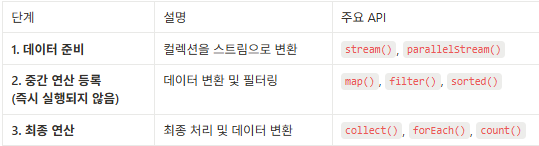
- 데이터 준비 -> 중간 연산 -> 최종 연산 순으로 처리된다.
- 스트림은 컬렉션(List, Set 등)과 함께 자주 활용된다.
비교해보기(for vs 스트림)
- 각 요소를 10배로 변환 후 출력하는 예시
public class Main {
    public static void main(String[] args) {
        // ArrayList 선언
        List<Integer> arrayList = new ArrayList<>(List.of(1, 2, 3, 4, 5));

        // ✅ for 명령형 스타일
        List<Integer> ret1 = new ArrayList<>();
        for (Integer num : arrayList) {
            int multipliedNum = num * 10; // 각 요소 * 10
            ret1.add(multipliedNum);
        }

        // ✅ 스트림 선언적 스타일
        List<Integer> ret2 = arrayList
        .stream()
        .map(num -> num * 10)
        .collect(Collectors.toList());

        // 출력
        System.out.println("ret1 = " + ret1);
        System.out.println("ret2 = " + ret2);

    }
}- ArrayList를 List로 받는 이유
다형성을 활용해 List인터페이스로 ArrayList구현체를 받으면 나중에 다른 구현체(LinkedList, Vector)로 변경할 때 코드 수정을 최소화 할 수 있기 때문이다.
스트림 살펴보기
- 스트림은 데이터 처리를 위해 여러 API를 제공한다.
스트림을 사용하여 각 요소를 10배로 변환 후 리스트로 변환하는 예제
- stream() : 데이터 준비 - 데이터를 스트림으로 변환하여 연산 흐름을 만들 준비를 한다.
- map() : 중간 연산 등록 - 각 요소를 주어진 함수에 적용해서 변환한다.
- collect() : 최종 연산 - 결과를 원하는 형태(List, Set)로 수집한다.
arrayList
	.stream() // 데이터 준비
    .map() // 중간 연산 등록
    .collect() // 최종 연산
// 1. 데이터 준비: 스트림 생성
Stream<Integer> stream = arrayList.stream();
// 2. 중간 연산 등록: 각 요소를 10배로 변환 로직 등록
Stream<Integer> mappedStream = stream.map(num->num*10);
// 3. 최종 연산: 최종 결과 리스트로 변환
List<Integer> ret2 = mappedStream.collect(Collectors.toList());
// ✅ 한 줄로 표현 가능
List<Integer> ret2 = arrayList.stream() // 1. 데이터 준비
.map(num -> num * 10) // 2. 중간 연산 등록
.collect(Collectors.toList()); // 3. 최종 연산스트림을 사용하여 짝수만 10배로 변환 후 리스트로 변환하는 예제
List<Integer> arrayList = new ArrayList<>(List.of(1, 2, 3, 4, 5));

// ✅ filter() + map() 사용 예제
List<Integer> ret6 = arrayList.stream() // 1. 데이터 준비: 스트림 생성
        .filter(num -> num % 2 == 0)    // 2. 중간 연산: 짝수만 필터링
        .map(num -> num * 10)           // 3. 중간 연산: 10배로 변환
        .collect(Collectors.toList()); // 4. 최종 연산: 리스트로 변환

System.out.println(ret6); // 출력: [20, 40]- for문으로 구현시
// For 문 예시
List<Integer> arrayList = new ArrayList<>(List.of(1, 2, 3, 4, 5));

List<Integer> ret6 = new ArrayList<>();
for (int num : arrayList) {
    int remain = num % 2;
    if (remain == 0) {
        int data = num * 10;
        ret6.add(data);
    }
}
// 5. 결과 출력
System.out.println(ret6); // 출력: [20, 40]
쓰레드
- 쓰레드는 프로그램 내에서 독립적으로 실행되는 하나의 작업 단위이다.
- 싱글 쓰레드는 한 번에 하나의 작업만 처리하지만, 멀티 쓰레드는 여러 작업을 동시에 처리할 수 있다.
- 멀티 쓰레드를 활용하면 여러 작업을 병렬로 수행할 수 있어 성능을 향상시킬 수 있다.
싱글 쓰레드
- 싱글 쓰레드는 한 명의 일꾼이 작업을 처리하는 것과 같다.
- 일꾼이 한 명이기 때문에 여러 개의 작업이 있다면 순차적으로 처리해야 한다.
- main() 메서드는 프로그램 시작과 동시에 생성되는 하나의 쓰레드이다.
멀티 쓰레드
- 멀티 쓰레드는 작업을 처리할 수 있는 일꾼이 여러 명 있는 것과 같다.
- 멀티 쓰레드를 활용해서 여러 작업을 병렬로 처리할 수 있다.
- Thread 클래스를 상속받아 쓰레드를 구현할 수 있다.
- Thread.run() 메서드를 오버라이드 해서 쓰레드가 수행할 작업을 정의할 수 있다.
- start() 메서드를 호출하면 새로운 쓰레드가 생성되고 run()의 작업 내용이 실행된다.
- 쓰레드를 실행시킬 때 꼭 start()를 사용해야 한다.
왜냐하면 start()는 새로운 쓰레드에서 run()을 실행하지만, run()을 직접 호출하면 현재 쓰레드에서 실행되기 때문이다.
총 세 개의 쓰레드(main, thread0, thread1)을 병렬로 실행하는 예제
- main 쓰레드는 thread0, thread1을 생성하고 실행시킨다.
- 생성된 thread0, thread1은 0.5초마다 0~9숫자를 출력한다.
// ✅ Thread 클래스 상속으로 쓰레드 구현
public class MyThread extends Thread {
    @Override
    public void run() {
        String threadName = Thread.currentThread().getName();
        System.out.println("::: " + threadName + "쓰레드 시작 :::");
        for (int i = 0; i < 10; i++) {
            System.out.println("현재 쓰레드: " + threadName + " - " + i);
            try {
                Thread.sleep(500); // 딜레이 0.5 초
            } catch (InterruptedException e) {
                e.printStackTrace();
            }
        }
        System.out.println("::: " + threadName + "쓰레드 종료 :::");
    }
}
public class Main {
public static void main(String[] args) {
System.out.println("::: main 쓰레드 시작");
MyThread thread0 = new MyThread();
MyThread thread1 = new MyThread();
// 1. thread0 실행
System.out.println("::: main 이 thread0 을 실행");
thread0.start();
// 2. thread1 실행
System.out.println("::: main 이 thread1 을 실행");
thread1.start();
System.out.println("::: main 쓰레드 종료");
}
}join() 특정 쓰레드가 끝날 때까지 대기
- join()은 main() 쓰레드가 다른 쓰레드가 종료될 때까지 기다리게 하는 메서드다.
- join()을 호출한 쓰레드가 끝날 때까지 main() 쓰레드가 대기한다.
- main() 쓰레드가 너무 빨리 끝나지 않고 모든 작업이 완료된 후 종료되도록 할 때 유용하다.
- 두 쓰레드(thread0, thread1)가 실행되고 끝날 때까지 main()이 기다리는 예제
public class Main {
    public static void main(String[] args) {
        System.out.println("::: main 쓰레드 시작");
        MyThread thread0 = new MyThread();
        MyThread thread1 = new MyThread();

        // 시작시간 기록
        long startTime = System.currentTimeMillis();

        // 1. thread0 시작
        System.out.println("thread0 시작");
        thread0.start();

        // 2. thread1 시작
        System.out.println("thread1 시작");
        thread1.start();

        // ⌛️ main 쓰레드 대기 시키기
        try {
            thread0.join();
            thread1.join();
        } catch (InterruptedException e) {
            e.printStackTrace();
        }

        long endTime = System.currentTimeMillis();
        long totalTime = endTime - startTime;
        System.out.println("총 작업 시간: " + totalTime + "ms");
        System.out.println("::: main 쓰레드 종료");
    }
}
Runnable 인터페이스 활용(권장)
- Runnable 인터페이스를 활용해 쓰레드를 구현하는 것을 권장하는 이유
- 유지 보수성과 재사용성 향상
- Thread클래스를 상속받아 MyThread를 구현하면 실행 로직과 쓰레드 제어 로직이 결합되어 한 가지 클래스에서 두 가지 역할을 담당하게 된다.
(쓰레드 제어 로직 : start(), join(), isAlive() 등)
(실행 로직 : 숫자 0~9 출력)
(하나의 클래스는 하나의 책임만 가지는 것이 유지 보수에 좋다.) - Runnalbe을 활용하면 실행 로직을 별도의 구현체로 분리할 수 있다.
(Thread는 쓰레드를 제어하는 역할)
(Runnable 구현체는 실행 로직을 관리)
// 구현체를 Thread로 상속받지 않고
public class MyRunnable extends Thread {
// Runnalbe로 구현한다.
public class MyRunnable implements Runnable {
public class Main {
public static void main(String[] args) {
MyRunnable task = new MyRunnable(); // ✅ 하나의 작업 객체 선언
// ✅ 하나의 작업을 여러 쓰레드에서 공유
Thread thread0 = new Thread(task); // 작업 객체 공유
Thread thread1 = new Thread(task); // 작업 객체 공유
// 실행
thread0.start();
thread1.start();
}
}- 기존 클래스를 유지하면서 확장 가능
- Thread를 상속해서 MyThread를 구현하면 다른 클래스를 상속 받지 못한다.
(자바는 클래스의 다중 상속을 지원하지 않기 때문) - Runnable은 인터페이스이므로 기존 클래스의 기능을 유지하면서 상속을 통해 확장할 수 있다.
public class MyThread extends Thread, MyNewClass{ // ❌ 다중 상속 불가
public class MyRunnable extends MyNewClass implements Runnable { // ✅ 다중 상속
백엔드 개발자