1일차
문제
progressDialog = new ProgressDialog(getActivity());
        progressDialog.setTitle("loading...");
        progressDialog.show();
fragment에 dialog 띄울려고 했는데 안띄워짐
스택오버플로우에서는 getActivity()하면 된다는데 안됨 ㅋㅋㅋ
그래서 구글 문서봤음
This class was deprecated in API level 26.
ProgressDialog is a modal dialog, which prevents the user from interacting with the app. Instead of using this class, you should use a progress indicator like ProgressBar, which can be embedded in your app's UI. Alternatively, you can use a notification to inform the user of the task's progress.
해결책
ProgressBar 사용하자!
2일차
fragment에서 dialog가 띄워지긴하는데 내가원하는것은
HomeFragment -> CategorizedFragment로 갈때 시간이 좀 걸려서 그 걸리는 동안 띄우는 것을 원했다.
fragment에서 onCreate -> onCreateView 순서대로 호출되어서 onCreate에 dialog를 설정했는데 작동이 이상하게 됐음.(핸드폰을 가로모드로 돌리고 해야지 작동됨)
그래서 fragment 생명주기를 자세히 이해할 필요가 있다고 느낌
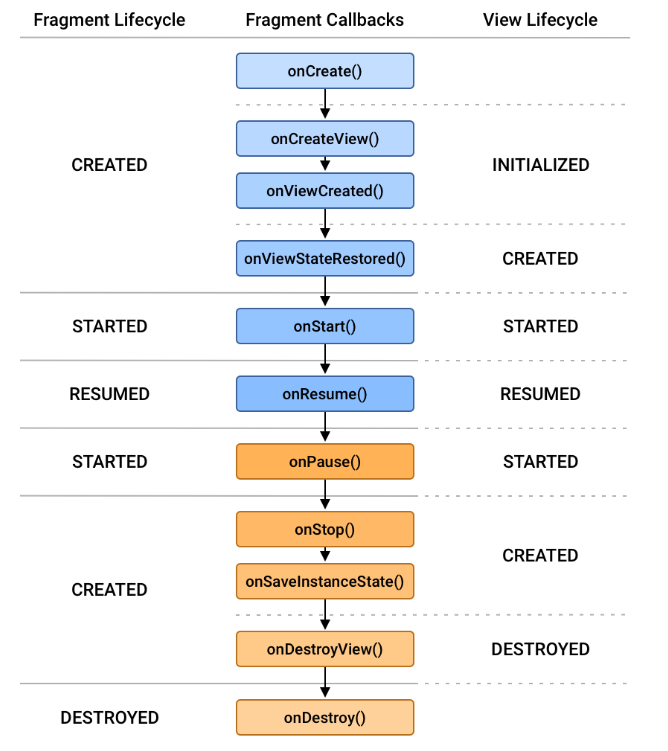
-
onCreate()
FragmentManager에 해당 Fragment추가
SaveInstanceState()로 데이터 복원(데이터가 복원된 다음 view를 그릴수 있음) -
onCreateView()
fragment의 view는 적절한 view instance를 받아야지 그릴 수 있게된다.
즉 dialog가 작동하지 않았던 이유는 view instance도 받지 못한 상태여서 였다.
MainActivity에 static으로 dialog 정의해보고 했지만 결국 해결되지 않았다.
I/Choreographer: Skipped 177 frames! The application may be doing too much work on its main thread.
이런 문구도 뜬것을 보니
recyclerView의 UI 그리는 속도를 향상 시키는 쪽으로 생각해봐야겠다.
이게 속도문제도 있는데 fragment에서 dialog를 먼저 설정하고 recyclerView를 나중에 했는데도 둘다 같이 나왔다.(내가 원했는데 dialog -> recyclerView 순서가 아님)
그래서 생각을 해봤는데 시간 많이 걸리는 findFiles함수를 async로 돌리면 어떨까
3일차
별로의 Thread를 하나 만들어서 그 thread에 findFiles 함수를 처리하게 하고 처리가 완료되면 handler로 받아서 UI를 업데이트하면 된다!
