A long-running synchronous
- 긴 시간이 소요되며 프로그램이 반응하지 않는 문제가 발생.
generatePrimes() 함수가 실행되는 동안, 프로그램이 응답하지 않는다.
아무 것도 입력할 수 없고, 클릭할 수도 없으며, 다른 작업을 수행할 수도 없다.
그 이유는 JavaScript가 단일 스레드로 실행되기 때문이다.
프로그램이 단일 스레드로 구성되어 있기 때문에 한 번에 하나의 작업만 수행할 수 있다.
따라서, 오래 실행되는 동기 호출이 반환될 때까지 기다리고 있다면 다른 작업을 수행할 수 없다.
Asynchronous programming
-
비동기 프로그래밍은 프로그램이 잠재적으로 긴 실행 시간이 필요한 작업을 시작하고, 해당 작업이 완료될 때까지 기다리지 않고도 다른 이벤트에 반응할 수 있는 기법.
-
작업이 완료되면 결과가 프로그램에 제공.
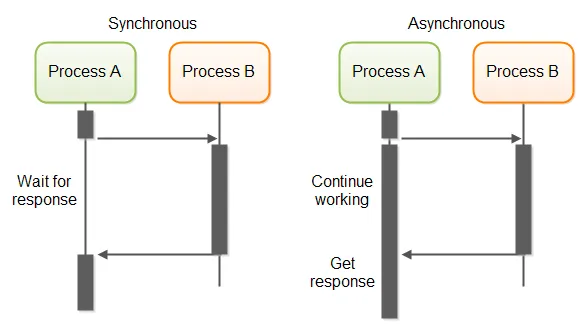
Promise
-
JavaScript에서 비동기 프로그래밍의 기반.
-
비동기 함수에 의해 반한되는 객체로, 작업의 현재 상태를 나타냄.
-
Promise객체는 작업의 최종 성공 또는 실패를 처리하는 메서드를 제공.
How to use promise
1. Using the fetch() API
XMLHttpRequest를 대체하는 Promise 기반의 방법.
const fetchPromise = fetch("https://mdn.github.io/learning-area/javascript/apis/fetching-data/can-store/products.json");

console.log(fetchPromise);

fetchPromise.then((response) => {
  console.log(`Received response: ${response.status}`);
});

console.log("Started request…");

/*
Promise { <state>: "pending" }
Started request…
Received response: 200
*/
2. Chaining promises
const fetchPromise = fetch(
  "https://mdn.github.io/learning-area/javascript/apis/fetching-data/can-store/products.json",
);

fetchPromise.then((response) => {
  const jsonPromise = response.json();
  jsonPromise.then((data) => {
    console.log(data[0].name);
  });
});
콜백 안에서 또 다른 콜백을 호출하여 "콜백 지옥"을 발생시킨다.
const fetchPromise = fetch(
  "https://mdn.github.io/learning-area/javascript/apis/fetching-data/can-store/products.json",
);

fetchPromise
  .then((response) => response.json())
  .then((data) => {
    console.log(data[0].name);
  });
첫 번째 then()의 핸들러 안에서 두 번째 then()을 호출하는 대신, json()이 반환한 promise를 반환하고, 그 반환 값에 두 번째 then()을 호출할 수 있다.
이를 promise 체이닝(promise chaining)이라고 하며, 연속적인 비동기 함수 호출이 필요할 때 점점 증가하는 들여쓰기를 피할 수 있다.
3. Catching errors
-
fetch()는 여러 가지 이유로 오류를 발생시킴. -
오류 처리를 지원하기 위해,
Promise는catch()메서드를 제공.
const fetchPromise = fetch(
  "bad-scheme://mdn.github.io/learning-area/javascript/apis/fetching-data/can-store/products.json",
);

fetchPromise
  .then((response) => {
    if (!response.ok) {
      throw new Error(`HTTP error: ${response.status}`);
    }
    return response.json();
  })
  .then((data) => {
    console.log(data[0].name);
  })
  .catch((error) => {
    console.error(`Could not get products: ${error}`);
  });
비동기 작업이 성공하면 then()에 전달된 핸들러가 호출되고, 비동기 작업이 실패하면 catch()에 전달된 핸들러가 호출된다.
4. Promise terminology
Promise는 다음 세 가지 상태 중 하나에 있을 수 있다:
1. pending:Promise가 생성되었고, 연관된 비동기 함수가 아직 성공하거나 실패하지 않은 상태. 이 상태는fetch()호출로 반환된 프로미스가 여전히 요청을 보내는 중일 때의 상태.
2. fulfilled: 비동기 함수가 성공적으로 완료된 상태.Promise가 이행될 때then()핸들러가 호출.
3. rejected: 비동기 함수가 실패한 상태입니다.Promise가 거부될 때catch()핸들러가 호출.
때때로 "settled"라는 용어를 사용하여 이행(fulfilled)과 거부(rejected) 모두를 포함하는 경우가 있다.
Promisse가 "resolved"되었다는 것은 이행되었거나 다른 프로미스의 상태를 따르도록 locked상태를 말한다.
5. Combining multiple promises
1. Promise.all()
-
It takes an array of promises and returns a single promise.
-
fulfilled when and if all the promises in the array are fulfilled. In this case, the
then()handler is called with an array of all the responses, in the same order that the promises were passed intoall(). -
rejected when and if any of the promises in the array are rejected. In this case, the
catch()handler is called with the error thrown by the promise that rejected.
const fetchPromise1 = fetch(
  "https://mdn.github.io/learning-area/javascript/apis/fetching-data/can-store/products.json",
);
const fetchPromise2 = fetch(
  "https://mdn.github.io/learning-area/javascript/apis/fetching-data/can-store/not-found",
);
const fetchPromise3 = fetch(
  "https://mdn.github.io/learning-area/javascript/oojs/json/superheroes.json",
);

Promise.all([fetchPromise1, fetchPromise2, fetchPromise3])
  .then((responses) => {
    for (const response of responses) {
      console.log(`${response.url}: ${response.status}`);
    }
  })
  .catch((error) => {
    console.error(`Failed to fetch: ${error}`);
  });

/*
https://mdn.github.io/learning-area/javascript/apis/fetching-data/can-store/products.json: 200
https://mdn.github.io/learning-area/javascript/apis/fetching-data/can-store/not-found: 404
https://mdn.github.io/learning-area/javascript/oojs/json/superheroes.json: 200
*/
2. Promise.any()
-
need any one of a set of promises to be fulfilled, and don't care which one.
-
This is like
Promise.all(), except that it is fulfilled as soon as any of the array of promises is fulfilled, or rejected if all of them are rejected
const fetchPromise1 = fetch(
  "https://mdn.github.io/learning-area/javascript/apis/fetching-data/can-store/products.json",
);
const fetchPromise2 = fetch(
  "https://mdn.github.io/learning-area/javascript/apis/fetching-data/can-store/not-found",
);
const fetchPromise3 = fetch(
  "https://mdn.github.io/learning-area/javascript/oojs/json/superheroes.json",
);

Promise.any([fetchPromise1, fetchPromise2, fetchPromise3])
  .then((response) => {
    console.log(`${response.url}: ${response.status}`);
  })
  .catch((error) => {
    console.error(`Failed to fetch: ${error}`);
  });
6. async and await
async
- The
asynckeyword gives you a simpler way to work with asynchronous promise-based code.
async function myFunction() {
  // This is an async function
}
await
- This makes the code wait at that point until the promise is settled, at which point the fulfilled value of the promise is treated as a return value, or the rejected value is thrown.
async function fetchProducts() {
  try {
    // after this line, our function will wait for the `fetch()` call to be settled
    // the `fetch()` call will either return a Response or throw an error
    const response = await fetch(
      "https://mdn.github.io/learning-area/javascript/apis/fetching-data/can-store/products.json",
    );
    if (!response.ok) {
      throw new Error(`HTTP error: ${response.status}`);
    }
    // after this line, our function will wait for the `response.json()` call to be settled
    // the `response.json()` call will either return the parsed JSON object or throw an error
    const data = await response.json();
    console.log(data[0].name);
  } catch (error) {
    console.error(`Could not get products: ${error}`);
  }
}

fetchProducts();
await fetch()를 호출하면, Promise를 얻는 대신에 호출자는 fetch()가 동기 함수인 것처럼 완전히 완료된 Response 객체를 받는다.
코드가 동기적일 때와 똑같이 try...catch 블록을 사용하여 오류 처리를 할 수 있다.
❗Tip
- ❌
async function fetchProducts() {
  try {
    const response = await fetch(
      "https://mdn.github.io/learning-area/javascript/apis/fetching-data/can-store/products.json",
    );
    if (!response.ok) {
      throw new Error(`HTTP error: ${response.status}`);
    }
    const data = await response.json();
    return data;
  } catch (error) {
    console.error(`Could not get products: ${error}`);
  }
}

const promise = fetchProducts();
console.log(promise[0].name); // "promise" is a Promise object, so this will not work- ⭕
async function fetchProducts() {
  const response = await fetch(
    "https://mdn.github.io/learning-area/javascript/apis/fetching-data/can-store/products.json",
  );
  if (!response.ok) {
    throw new Error(`HTTP error: ${response.status}`);
  }
  const data = await response.json();
  return data;
}

const promise = fetchProducts();
promise
  .then((data) => {
    console.log(data[0].name);
  })
  .catch((error) => {
    console.error(`Could not get products: ${error}`);
  });
+) Promise chain의 마지막 단계에서 오류를 처리.
try {
  // using await outside an async function is only allowed in a module
  const response = await fetch(
    "https://mdn.github.io/learning-area/javascript/apis/fetching-data/can-store/products.json",
  );
  if (!response.ok) {
    throw new Error(`HTTP error: ${response.status}`);
  }
  const data = await response.json();
  console.log(data[0].name);
} catch (error) {
  console.error(`Could not get products: ${error}`);
  throw error;
}
Reference
MDN
https://medium.com/insiderengineering/mastering-javascript-promises-from-basics-to-advanced-f24669381c56