포탈? 공간 이동과 같은 느낌을 주는 createPortal에 대해 알아보자.
createPortal
- 하위 항목을 DOM에 다른 부분으로 렌더링 할 수 있게 한다.
<div>
  <SomeComponent />
  {createPortal(children, domNode, key?)}
</div>
Reference
- 포털을 생성하려면 JSX와 렌더링해야 하는 DOM 노드를 전달하여 호출한다.
<div>
  <p>This child is placed in the parent div.</p>
  {createPortal(
    <p>This child is placed in the document body.</p>,
    document.body
  )}
</div>
포털(Portal)은 DOM 노드의 물리적 위치만 변경한다.
그 외 모든 면에서, 포털로 렌더링된 JSX는 포털을 렌더링하는 React 컴포넌트의 자식 노드처럼 동작한다.
예를 들어, 자식은 부모 트리에서 제공된 컨텍스트에 접근할 수 있고, 이벤트는 자식에서 부모로 React 트리를 따라 버블링된다.
Parameters
- children: React에서 렌더링할 수 있는 모든 것(JSX, Fragment, 문자열, 숫자, 배열 등)을 나타낸다.
- domNode: 이미 존재하는 DOM 노드(document.getElementById()로 반환된 것 등)로, 포털이 렌더링될 위치를 지정한다. 업데이트 시 다른 DOM 노드를 전달하면 포털 내용이 다시 생성된다.
- key(optional): 포털의 고유 키로 사용할 수 있는 문자열 또는 숫자이다.
Returns
- JSX에 포함하거나
React컴포넌트에서 반환할 수 있는React노드를 반환한다. React는 렌더링 결과에서 이를 감지하면 제공된 children을 domNode 안에 배치한다.
Caveats
- 포털의 이벤트 전파는 DOM 트리가 아닌 React 트리를 따른다. 예를 들어, 포털 내부에서 클릭하면, 포털을 감싸고 있는
<div onClick>이벤트 핸들러가 실행된다. 문제가 발생하면 이벤트 전파를 중지하거나 포털을 React 트리 상위로 이동시켜야 한다.
Usage
Rendering React components into non-React DOM nodes
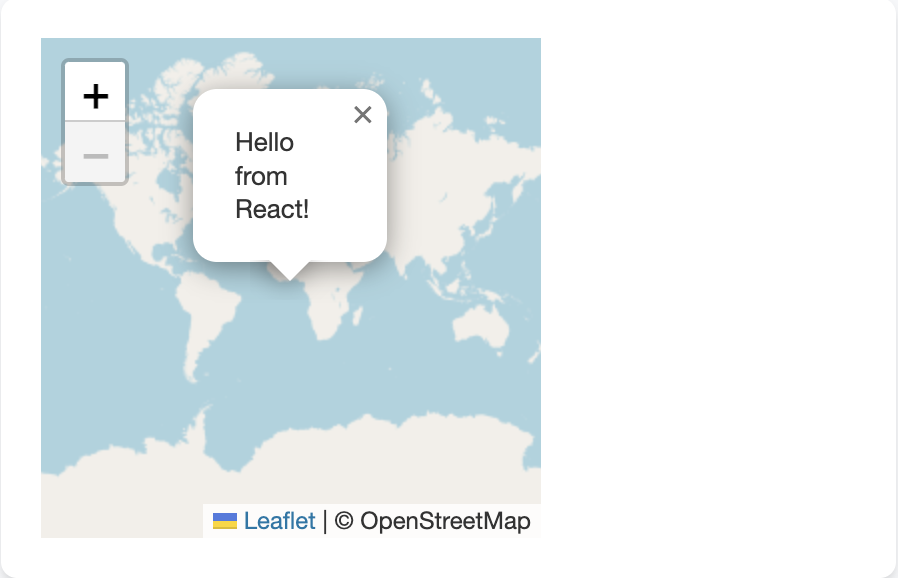
React컴포넌트를React외부에서 관리되는 DOM 노드에 렌더링할 수도 있다.
const [popupContainer, setPopupContainer] = useState(null);useEffect(() => {
if (mapRef.current === null) {
const map = createMapWidget(containerRef.current);
mapRef.current = map;
const popupDiv = addPopupToMapWidget(map);
setPopupContainer(popupDiv);
}
}, []);맵 위젯을 생성할 때, 위젯이 반환하는 DOM 노드를 저장해 그 안에 렌더링할 수 있게 한다.
return (
  <div style={{ width: 250, height: 250 }} ref={containerRef}>
    {popupContainer !== null && createPortal(
      <p>Hello from React!</p>,
      popupContainer
    )}
  </div>
);popupContainer가 준비되었을 때 createPortal을 사용해 React 콘텐츠를 그 안에 렌더링할 수 있다.
Reference
선한 영향력을 줄 수 있는 개발자가 되자, 되고싶다.