AWS VPC Traffic Mirroring의 Replay handler 예제 코드 분석하기

본 글에서는 AWS VPC Traffic Mirroring을 위해 필요한 replay handler를 구현해둔 AWS의 예제 코드를 분석합니다.
AWS VPC Traffic Mirroring
예제 코드를 분석하기 전에 AWS VPC Traffic Mirroring에 대해 간단히 살펴보겠습니다. 자세한 내용은 Mirror production traffic to test environment with VPC Traffic Mirroring을 읽어보시길 권장드립니다.
-
트래픽을 테스트 방법으로 분산과 미러링이 있습니다.
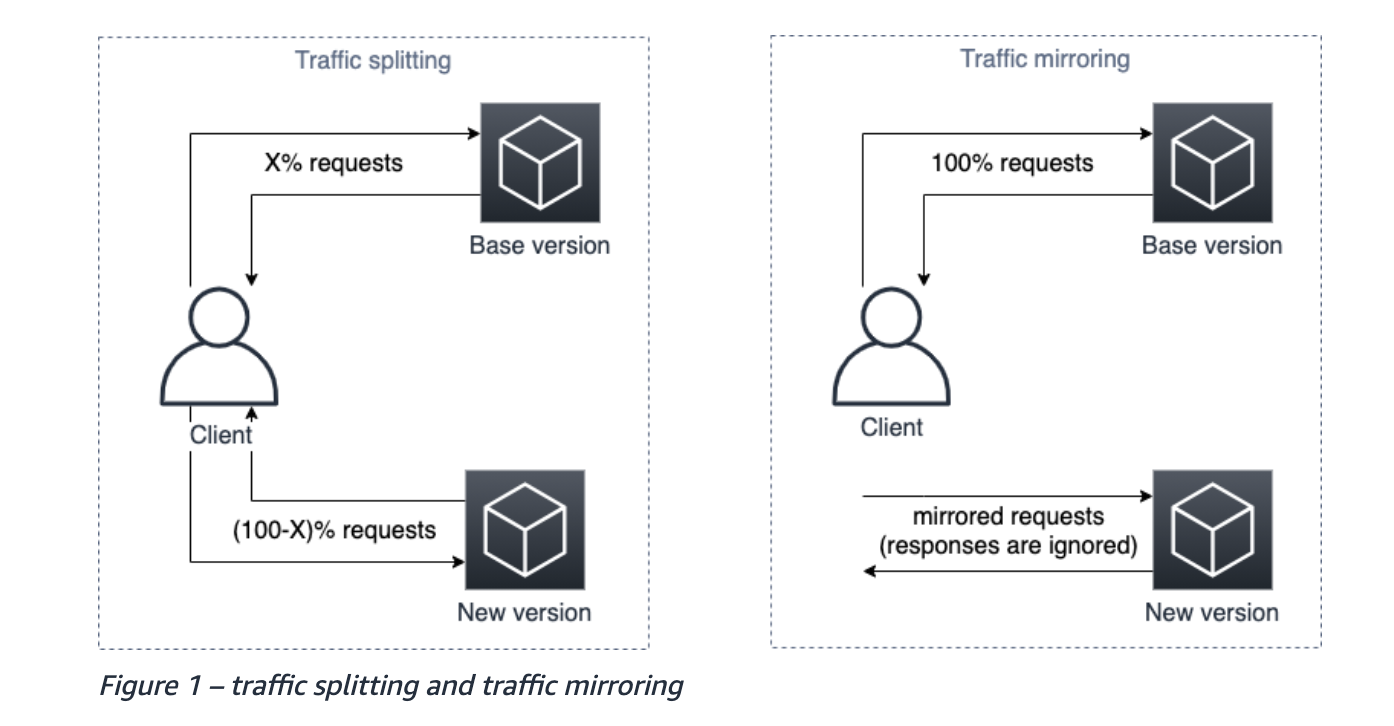
- 분산은 중복 데이터가 생성되지 않아 간편하지만 신규 버전을 사용하는 몇몇 사용자는 신규 버전에서 발생한 문제(에러)를 겪게될 수도 있습니다.
- 미러링은 사용자의 모든 요청이 기존버전으로 가고 새 버전으로 리플레이 됩니다. 모든 클라이언트는 기존 버전에서 응답을 받기 때문에 보다 안정적입니다.
-
미러링을 이용해 트래픽을 테스트 하려면 어플리케이션 API가 멱등해 데이터 중복을 유발하지 않아야 합니다.
-
트래픽 미러링을 위한 오픈소스 솔루션(nginx mirroring capability, k8s gateway api)도 존재합니다. 하지만 이러한 방법들은 앞단에 프록시를 둬야하는 추가 작업이 필요합니다.
-
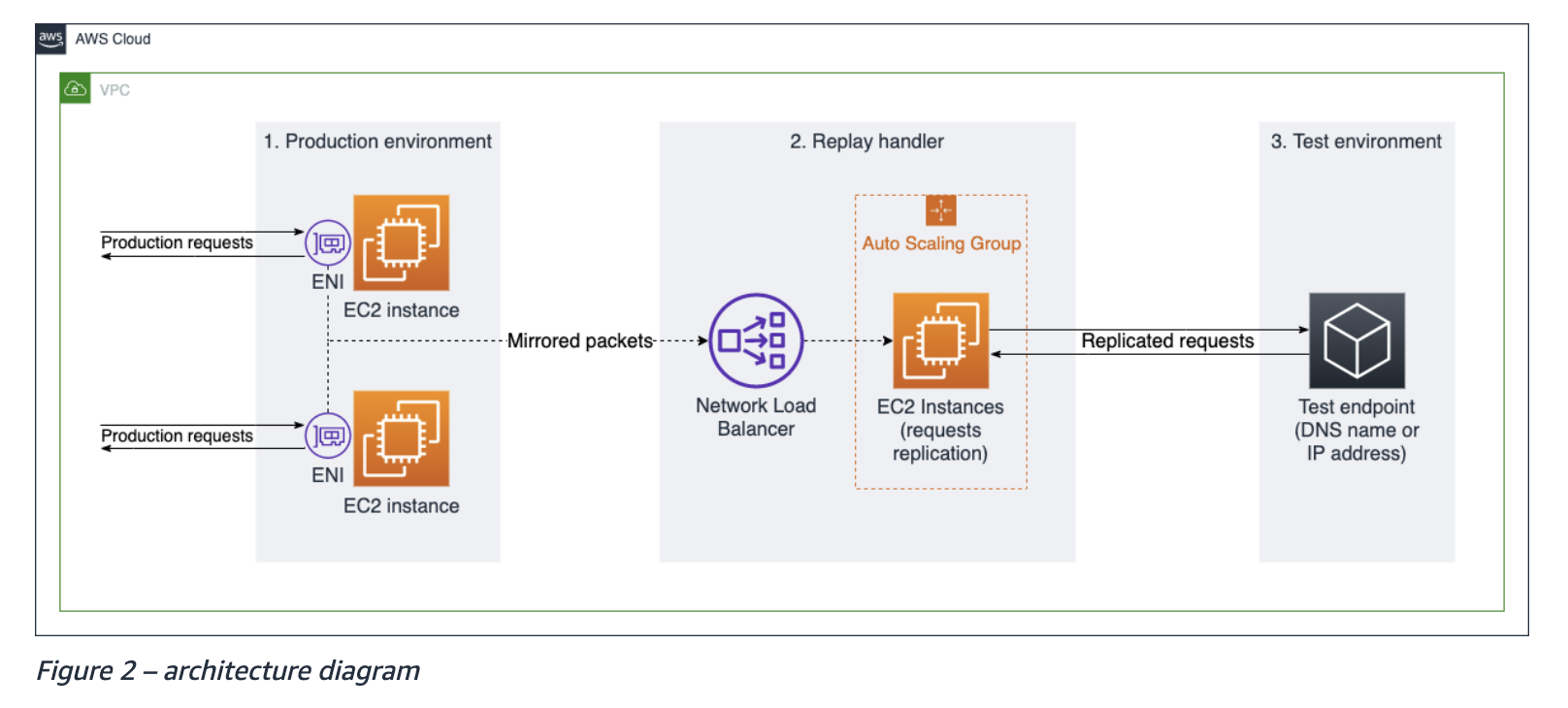
반면 AWS의 VPC Traffic Mirroring은 EC2 환경의 ENI(Elastic Network Interface)를 활용하기 때문에 별도의 컴포넌트 추가 없이 대역외 트래픽을 복제해 줍니다.
코드 분석
이 코드는 Replay handler에 대한 구현으로, Production environment에서 mirroring한 트래픽을 처리해 다시 Test environment에 전달합니다.
전체 흐름
- 패킷 캡처: vxlan0라는 네트워크 인터페이스에서 미러링된 트래픽을 수신합니다.
- TCP 스트림 재조립: 흩어진 TCP 패킷들을 모아서 원래의 순서대로 데이터 Stream을 복원합니다. 네트워크 패킷은 순서가 뒤죽박죽이거나 여러 개로 나뉘어 도착할 수 있어 이에 대한 처리를 같이 진행하고 있습니다.
- HTTP 요청 파싱: 재조립된 데이터 스트림에서 HTTP 요청을 파싱하여 Go의 http.Request 객체로 변환합니다.
- HTTP 요청 재전송: 파싱된 HTTP 요청 정보를 바탕으로 새로운 HTTP 요청을 생성합니다. 새로운 요청을 개발자가 지정한 테스트 환경의 엔드포인트로 전송합니다.
1. 패킷 캡쳐
패킷 캡쳐와 관련된 코드의 일부분 입니다.
func main() {
	var handle *pcap.Handle

	// Set up pcap packet capture
	handle, err = pcap.OpenLive("vxlan0", 8951, true, pcap.BlockForever)
	if err != nil {
		log.Fatal(err)
	}

	// Set up BPF filter
	BPFFilter := fmt.Sprintf("%s%d", "tcp and dst port ", *reqPort)
	if err := handle.SetBPFFilter(BPFFilter); err != nil {
		log.Fatal(err)
	}

	// Read in packets, pass to assembler.
	packetSource := gopacket.NewPacketSource(handle, handle.LinkType())
	packets := packetSource.Packets()

	for {
		select {
		case packet := <-packets:
			tcp := packet.TransportLayer().(*layers.TCP)
			assembler.AssembleWithTimestamp(packet.NetworkLayer().NetworkFlow(), tcp, packet.Metadata().Timestamp)
	}

}
- pcap.OpenLive로 handle을 생성합니다. handle은 vxlan0으로 들어오고 나가는 프레임을 읽는 libpcap을 엽니다.
- BPFFilter를 설정합니다. BPF 필터는 커널 레벨에서 적용됩니다. 원치 않는 패킷을 커널 레벨에서 걸러버리기 때문에 유저 레벨로 불필요한 패킷이 복사되지 않습니다. (성능상 유리)
- handle을 이용해 PacketSource를 생성합니다. PacketSource는 원시 캡쳐 데이터를 디코딩된 패킷으로 바꿔 채널에 흘려보냅니다.
- PacketSource를 이용해 Packets라는 패킷 채널을 생성합니다.
- Packets채널에 값이 들어올 때마다 채널에서 패킷을 꺼내 assembler에게 전달합니다.
VXLAN
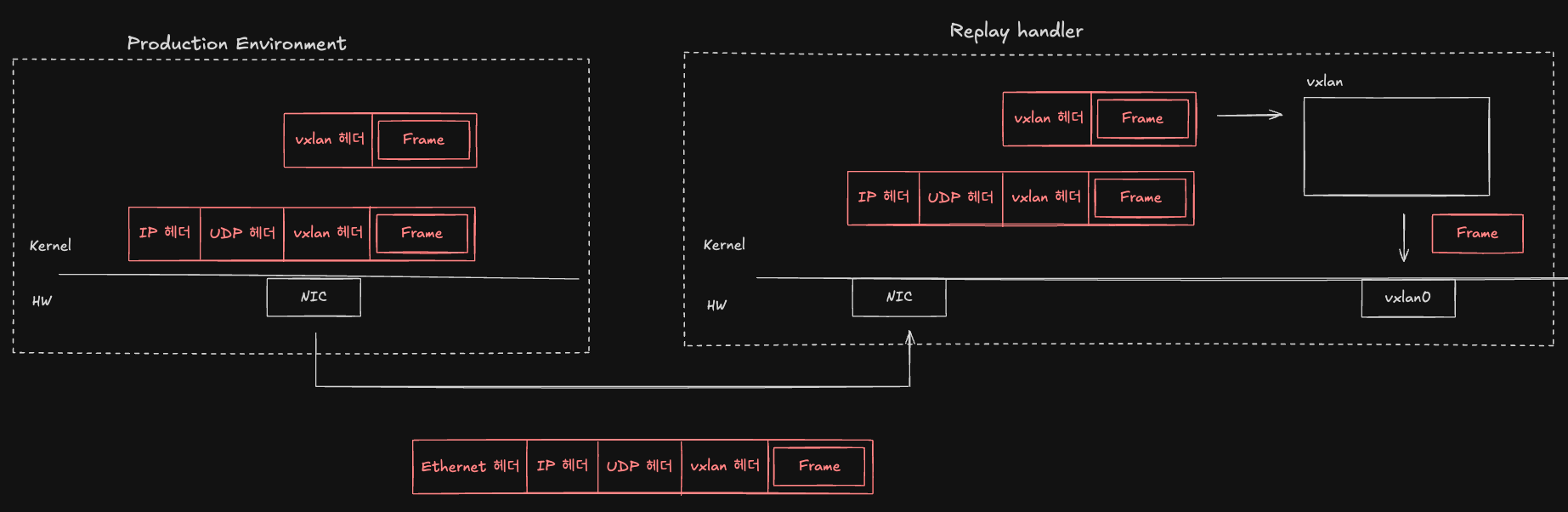
AWS VPC request mirroring은 Production environment에 들어온 요청의 L2 프레임데이터를 미러링하는 기술입니다. handle이 읽을 수 있는 데이터가 vxlan0으로 전달되기 까지의 과정은 다음과 같습니다.
Production Environment
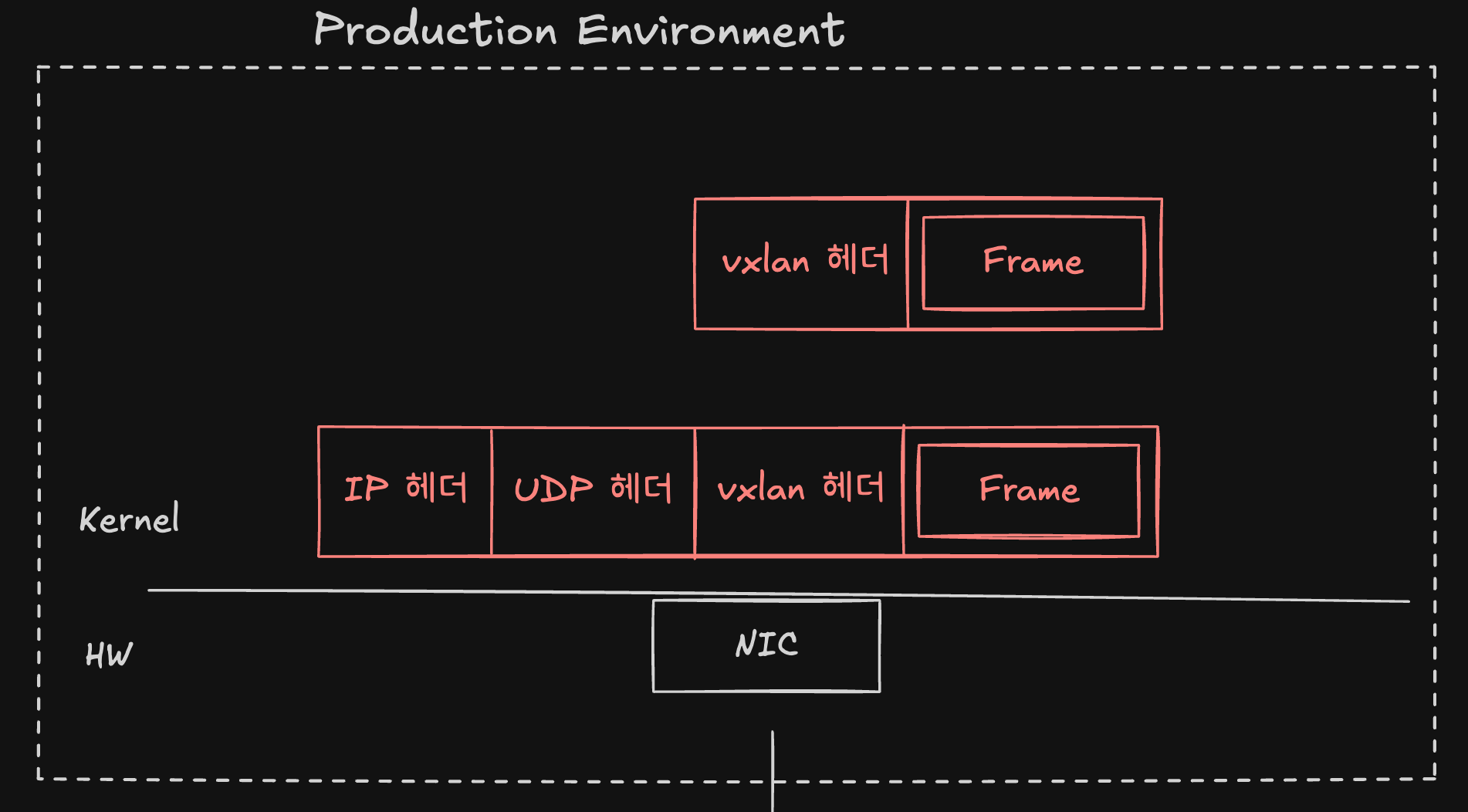
- 미러링할 프레임을 vxlan으로 캡슐화하며 vxlan 헤더를 추가합니다.
- UDP 통신으로 이를 전달하기 때문에 UDP 헤더와 IP 헤더를 추가합니다. (4L, 3L)
- 프레임 단위로 데이터를 전송하기 위해 Ethernet 헤더를 추가합니다. (2L)
- Replay handler로 전달하는 데이터는
|Ethernet 헤더 | IP 헤더 | UDP 헤더 | vxlan 헤더 | Frame |형태의 프레임입니다.
Replay handler
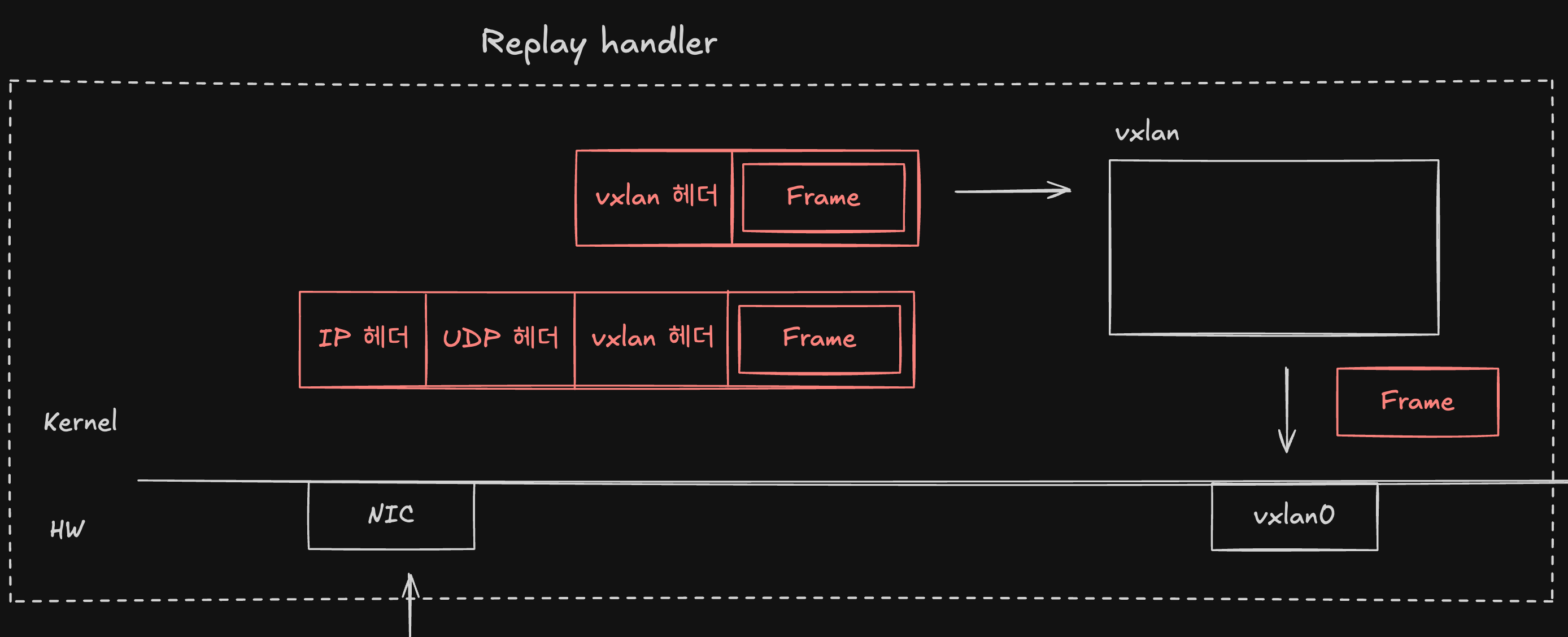
|Ethernet 헤더 | IP 헤더 | UDP 헤더 | vxlan 헤더 | Frame |형태의 프레임을 전달받습니다.- 2L에서 Ethernet 헤더를 제거합니다.
- 3L에서 IP헤더, 4L에서 UDP 헤더를 제거합니다. UDP를 이용한 4789포트로 가는 데이터는 vxlan 캡슐화 트래픽이라는 걸 인지하고 vxlan에게
| vxlan 헤더 | Frame |형태로 데이터를 전달합니다. - vxlan에서
- vxlan헤더를 제거합니다.
- 내부에 담겨 있는 Frame을 복원합니다.
- 복원한 Frame을 vxlan0에 주입합니다.
이러한 과정을 거쳐 vxlan0에 담기게 된 프레임을 pcap.OpenLive로 생성한 handle이 읽어들이게 됩니다.
2. TCP 스트림 재조립
// httpStreamFactory implements tcpassembly.StreamFactory
type httpStreamFactory struct{}

// httpStream will handle the actual decoding of http requests.
type httpStream struct {
	net, transport gopacket.Flow
	r              tcpreader.ReaderStream
}

func (h *httpStreamFactory) New(net, transport gopacket.Flow) tcpassembly.Stream {
	hstream := &httpStream{
		net:       net,
		transport: transport,
		r:         tcpreader.NewReaderStream(),
	}
	go hstream.run() // Important... we must guarantee that data from the reader stream is read.

	// ReaderStream implements tcpassembly.Stream, so we can return a pointer to it.
	return &hstream.r
}

func main() {
	// Set up assembly
	streamFactory := &httpStreamFactory{}
	streamPool := tcpassembly.NewStreamPool(streamFactory)
	assembler := tcpassembly.NewAssembler(streamPool)

	for {
		select {
		case packet := <-packets:
			assembler.AssembleWithTimestamp(packet.NetworkLayer().NetworkFlow(), tcp, packet.Metadata().Timestamp)

		case <-ticker:
			// Every minute, flush connections that haven't seen activity in the past 1 minute.
			assembler.FlushOlderThan(time.Now().Add(time.Minute * -1))
		}
	}

}- httpStreamFactory의 New메서드를 정의합니다. 이는 AssembleWithTimestamp메서드 내부에서 사용됩니다.
- assembler를 생성합니다.
- AssembleWithTimestamp메서드로 packet을 전달받아 재조립을 수행합니다.
- 이 과정에서 아직 해당 방향의 스트림이 없다면, 내부적으로 httpStreamFactory.New를 딱 한 번 호출해서 스트림을 생성합니다.
- 주기적으로 오래된 연결을 정리합니다.
TCP를 재조립하는 구체적인 과정은
github.com/google/gopacket/tcpassembly패키지의 내부 로직에 의해 처리됩니다. 본 글에서 AssembleWithTimestamp가 TCP 스트림을 재조립하는 구체적인 내용은 다루지 않습니다.
3. HTTP 요청 파싱
func (h *httpStreamFactory) New(net, transport gopacket.Flow) tcpassembly.Stream {
	hstream := &httpStream{
		net:       net,
		transport: transport,
		r:         tcpreader.NewReaderStream(),
	}
	go hstream.run() // Important... we must guarantee that data from the reader stream is read.

	// ReaderStream implements tcpassembly.Stream, so we can return a pointer to it.
	return &hstream.r
}


func (h *httpStream) run() {
	buf := bufio.NewReader(&h.r)
	for {
		req, err := http.ReadRequest(buf)
		if err == io.EOF {
			// We must read until we see an EOF... very important!
			return
		} else if err != nil {
			log.Println("Error reading stream", h.net, h.transport, ":", err)
		} else {
			reqSourceIP := h.net.Src().String()
			reqDestionationPort := h.transport.Dst().String()
			body, bErr := ioutil.ReadAll(req.Body)
			if bErr != nil {
				return
			}
			req.Body.Close()
			go forwardRequest(req, reqSourceIP, reqDestionationPort, body)
		}
	}
}
- httpStreamFactory.New를 통해 스트림을 생성할 때 httpStream의 run메서드를 새로운 고루틴으로 실행합니다.
- run메서드는 스트림을 http요청 단위로 파싱하고 각 요청을 비동기로 재전송합니다.
for{}: 무한 루프를 통해 계속해서 들어오는 요청을 처리합니다.req, err := http.ReadRequest(buf): 스트림을 http요청 단위로 파싱합니다.if err == io.EOF {return}: 상대가 연결을 닫았기 때문에 종료합니다.else if err != nil {}: 파싱 오류 발생 시 로그만 찍고 다음 요청을 처리합니다.body, bErr := ioutil.ReadAll(req.Body): body를 모두 읽습니다.go forwardRequest(req, reqSourceIP, reqDestionationPort, body): 새로운 고루틴으로 목적지로 요청을 전송합니다.
4. HTTP 요청 재전송
func forwardRequest(req *http.Request, reqSourceIP string, reqDestionationPort string, body []byte) {

	// if percentage flag is not 100, then a percentage of requests is skipped
	if *fwdPerc != 100 {
		var uintForSeed uint64

		if *fwdBy == "" {
			// if percentage-by is empty, then forward only a certain percentage of requests
			var b [8]byte
			_, err := crypto_rand.Read(b[:])
			if err != nil {
				log.Println("Error generating crypto random unit for seed", ":", err)
				return
			}
			// uintForSeed is random
			uintForSeed = binary.LittleEndian.Uint64(b[:])
		} else {
			// if percentage-by is not empty, then forward only requests from a certain percentage of headers/remoteaddresses
			strForSeed := ""
			if *fwdBy == "header" {
				strForSeed = req.Header.Get(*fwdHeader)
			} else {
				strForSeed = reqSourceIP
			}
			crc64Table := crc64.MakeTable(0xC96C5795D7870F42)
			// uintForSeed is derived from strForSeed
			uintForSeed = crc64.Checksum([]byte(strForSeed), crc64Table)
		}

		// generate a consistent random number from the variable uintForSeed
		math_rand.Seed(int64(uintForSeed))
		randomPercent := math_rand.Float64() * 100
		// skip a percentage of requests
		if randomPercent > *fwdPerc {
			return
		}
	}

	// create a new url from the raw RequestURI sent by the client
	url := fmt.Sprintf("%s%s", string(*fwdDestination), req.RequestURI)

	// create a new HTTP request
	forwardReq, err := http.NewRequest(req.Method, url, bytes.NewReader(body))
	if err != nil {
		return
	}

	// add headers to the new HTTP request
	for header, values := range req.Header {
		for _, value := range values {
			forwardReq.Header.Add(header, value)
		}
	}

	// Append to X-Forwarded-For the IP of the client or the IP of the latest proxy (if any proxies are in between)
	// https://developer.mozilla.org/en-US/docs/Web/HTTP/Headers/X-Forwarded-For
	forwardReq.Header.Add("X-Forwarded-For", reqSourceIP)
	// The three following headers should contain 1 value only, i.e. the outermost port, protocol, and host
	// https://tools.ietf.org/html/rfc7239#section-5.4
	if forwardReq.Header.Get("X-Forwarded-Port") == "" {
		forwardReq.Header.Set("X-Forwarded-Port", reqDestionationPort)
	}
	if forwardReq.Header.Get("X-Forwarded-Proto") == "" {
		forwardReq.Header.Set("X-Forwarded-Proto", "http")
	}
	if forwardReq.Header.Get("X-Forwarded-Host") == "" {
		forwardReq.Header.Set("X-Forwarded-Host", req.Host)
	}

	if *keepHostHeader {
		forwardReq.Host = req.Host
	}

	// Execute the new HTTP request
	httpClient := &http.Client{}
	resp, rErr := httpClient.Do(forwardReq)
	if rErr != nil {
		// log.Println("Forward request error", ":", err)
		return
	}

	defer resp.Body.Close()
}- 미러링할 요청을 정해진 비율만큼 선별합니다.
- 새로운 HTTP 요청을 생성합니다.
url := fmt.Sprintf("%s%s", string(*fwdDestination), req.RequestURI): 목적지 URL을 만듭니다.forwardReq, err := http.NewRequest(req.Method, url, bytes.NewReader(body)): 새 요청을 생성합니다.
- HTTP request헤더를 추가합니다.
- 원 요청의 모든 헤더를 복사합니다.
- X-Forwarded-For 헤더를 추가합니다.
- 목적지에 HTTP 요청을 날립니다.
References