web.xml
설정을 위한 설정 파일
WAS가 처음 구동될 때 web.xml을 읽어 웹 애플리케이션 설정을 구성
DispatcherServlet을 등록해주면서 스프링 설정 파일을 지정
DispatcherServlet은 초기화 과정에서 지정된 설정 파일을 이용해 스프링 컨테이너를 초기화
<servlet>
  	<servlet-name>dispatcherServlet</servlet-name>
  	<servlet-class>
  		org.springframework.web.servlet.DispatcherServlet
  	</servlet-class>

  	<init-param>
  		<param-name>contextConfigLocation</param-name>
  		<param-value>
  		<!-- WEB/INF에 있는 spring폴더 안에 servlet-context.xml을 불러와라 -->
  			/WEB-INF/spring/servlet-context.xml
  		</param-value>
  	</init-param>

  	<!-- 제일 먼저 읽어라 -->
  	<load-on-startup>1</load-on-startup>
  </servlet>

  <servlet-mapping>
  	<servlet-name>dispatcherServlet</servlet-name>
  	<url-pattern>*.do</url-pattern>
  </servlet-mapping>

  <!-- 한글설정 -->
  <filter>
	  <filter-name>encodingFilter</filter-name>
	  <filter-class>
	  org.springframework.web.filter.CharacterEncodingFilter
	  </filter-class>

	  <init-param>
	  	<param-name>encoding</param-name>
	  	<param-value>UTF-8</param-value>
	  </init-param>

	  <init-param>
	  	<param-name>forceEncoding</param-name>
	  	<param-value>true</param-value>
	  </init-param>

  </filter>

  <filter-mapping>
	  <filter-name>encodingFilter</filter-name>
	  <url-pattern>/*</url-pattern>
  </filter-mapping>
servlet-context.xml
web.xml에서 DispatcherServlet 등록 시 설정한 파일
설정 파일을 이용해 스프링 컨테이너 초기화
<beans xmlns="http://www.springframework.org/schema/beans"
   xmlns:xsi="http://www.w3.org/2001/XMLSchema-instance"
   xmlns:context="http://www.springframework.org/schema/context"
   xmlns:mvc="http://www.springframework.org/schema/mvc"
   xsi:schemaLocation="http://www.springframework.org/schema/mvc http://www.springframework.org/schema/mvc/spring-mvc-4.3.xsd
      http://www.springframework.org/schema/beans http://www.springframework.org/schema/beans/spring-beans.xsd
      http://www.springframework.org/schema/context http://www.springframework.org/schema/context/spring-context-4.3.xsd">

	<!-- spring MVC annotation(주석문, 지시문)을 사용하기 위한 설정 -->
	<context:annotation-config />

	<!--
		view폴더의 위치, 확장자명 설정 클래스 : InternalResourceViewResolver

		InternalResourceViewResolver viewResolver = new InternalResourceViewResolver(); 객체생성
		viewResolver.prefix = "/WEB-INF/views/" prefix변수에 "/WEB-INF/views/"값(확장자명) 설정
		viewResolver.suffix = ".jsp" suffix변수에 .jsp 값(확장자명) 설정
	 -->
	<bean id="viewResolver" class="org.springframework.web.servlet.view.InternalResourceViewResolver">
		<property name="prefix" value="/WEB-INF/views/" />
		<property name="suffix" value=".jsp" />
	</bean>

	<!-- 공통 패키지(기본경로) -->
	<context:component-scan base-package="mul.cam.a" />
</beans>
활용 간단 예제
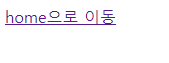
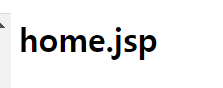
HelloController.java
package mul.cam.a;

import java.util.ArrayList;
import java.util.Date;
import java.util.List;

import org.slf4j.Logger;
import org.slf4j.LoggerFactory;
import org.springframework.stereotype.Controller;
import org.springframework.ui.Model;
import org.springframework.web.bind.annotation.RequestMapping;
import org.springframework.web.bind.annotation.RequestMethod;

import mul.cam.a.dto.HumanDto;

@Controller
public class HelloController {

	private static Logger logger = LoggerFactory.getLogger(HelloController.class);
										//방식 : GET - 파라미터 오픈 / POST - 파라미터 비밀
	@RequestMapping(value = "home.do", method = RequestMethod.GET)
	public String homeMethod() {
		//System.out.println("HelloController homeMethod() " + new Date());
		logger.info("HelloController homeMethod() " + new Date());

		return "home";
	}
home.jsp
<%@page import="mul.cam.a.dto.HumanDto"%>
<%@page import="java.util.List"%>
<%@ page language="java" contentType="text/html; charset=UTF-8"
    pageEncoding="UTF-8"%>
<!DOCTYPE html>
<html>
<head>
<meta charset="UTF-8">
<title>Insert title here</title>
</head>
<body>

<h1>home.jsp</h1>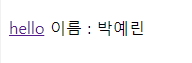
HelloController.java
//데이터를 갖고 이동
	@RequestMapping(value = "hello.do", method = RequestMethod.GET)
	public String hello(Model model) {

		//짐싸!(이동)
		String name = "박예린";
		model.addAttribute("name", name); //==request.setAttribite

		//잘가
		return "home";
	}
home.jsp
<a href="hello.do">hello</a>

<%
	String name = (String)request.getAttribute("name");

	if(name != null && !name.equals("")){ //name이 null이 아니고 빈문자가 아닐 때
	%>
	이름 : <%=name %>
	<%
	}
%>
잠깐 복습!
form -> GET, POST 둘 다 가능
href -> GET만 가능
script type="text/javascript" -> GET만 가능
location.href=""
/script>
HelloController.java
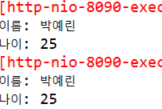
@RequestMapping(value = "world.do", method = RequestMethod.POST)
	public String world(String name, int age) {
		//String name = req.getParameter("name"); -> 서블릿 방식
		logger.info("HelloController world() " + new Date());

		System.out.println("이름: " + name);
		System.out.println("나이: " + age);

		return "home";

	}

	@RequestMapping(value = "main.do", method = RequestMethod.POST)
	public String mainMethod(HumanDto human) {
		logger.info("HelloController mainMethod() " + new Date());

		System.out.println(human.toString());

		return "home";
	}
home.jsp
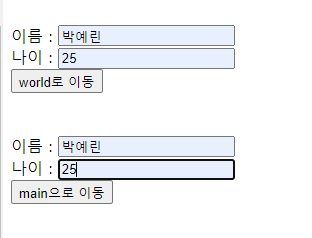
<!-- form - get,post방식 고르기 가능 -->
<form action="world.do" method="post">
이름 : <input type="text" name = "name"><br>
나이 : <input type="text" name = "age"><br>
<input type="submit" value="world로 이동">
</form>

<br><br>

<form action="world.do" method="post">
이름 : <input type="text" name = "name"><br>
나이 : <input type="text" name = "age"><br>
<input type="submit" value="main으로 이동">
</form>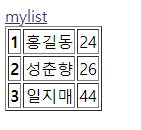

mylist.do
-list
-출력 table
HumanDto.java
package mul.cam.a.dto;

import java.io.Serializable;

public class HumanDto implements Serializable{

	private String name;
	private int age;

	public HumanDto() {

	}

	public HumanDto(String name, int age) {
		super();
		this.name = name;
		this.age = age;
	}

	public String getName() {
		return name;
	}

	public void setName(String name) {
		this.name = name;
	}

	public int getAge() {
		return age;
	}

	public void setAge(int age) {
		this.age = age;
	}

	@Override
	public String toString() {
		return "HumanDto [name=" + name + ", age=" + age + "]";
	}

}
HelloController.java
//	{method = RequestMethod.GET, method = RequestMethod.POST}
	@RequestMapping(value = "mylist.do", method = RequestMethod.GET)
	public String mylist(String message, Model model) {
	logger.info("HelloController mylist() " + new Date());

	System.out.println("message" + message);

	List<HumanDto> list = new ArrayList<>();

	list.add(new HumanDto("홍길동",24));
	list.add(new HumanDto("성춘향",26));
	list.add(new HumanDto("일지매",44));

	model.addAttribute("list",list);

	return "home";
	}
home.jsp
 <a href="mylist.do?message=하이">mylist</a>

 <%
 	List<HumanDto> list = (List<HumanDto>)request.getAttribute("list");
 	if(list != null && list.isEmpty() == false){
 		%>

 		<table border="1">
 		<%
 		for(int i=0; i<list.size(); i++){
 			HumanDto dto = list.get(i);
 		%>
 		<tr>
 			<th><%=i + 1 %></th>
 			<td><%=dto.getName() %></td>
			<td><%=dto.getAge() %></td>
 		</tr>
 		<%
 		}
 		%>
 		</table>
 		<%
 	}
 %>
개발자를 꿈꾸는 귀여운 나