팀 프로젝트 커뮤니케이션 도구로 디스코드를 사용중이었는데, organization에서 개인 레포로 push해서 배포하고 있는 상황이라 배포가 실패하더라도 해당 레포의 소유자에게만 알림이 오는 상황이었다.
이걸 디스코드 웹훅을 이용해 팀 알림으로 받을 수 있으면 좋지 않을까?
🚀 개인 레포에서 별도로 actions브랜치에 workflow를 만들고 organization에서 자동 push될 때 배포 상태 discord로 알리기
개인 레포로 push해서 배포를 하고 있는 상황이라면,
organization에 workflow를 두면 해당 브랜치와 vercel이 직접적으로 연결되어있지 않기 때문에 배포 state를 얻기가 어렵다.
그래서 우회적인 방법으로 구현한 것이 바로 push한 개인 레포에 별도 브랜치를 만들고, 워크플로우를 생성한 뒤, push할 때 실행할 로직에 해당 브랜치의 파일을 복사해서 배포되는 메인 브랜치에 넣는 로직을 추가하는 것!
나의 경우 개인 레포지토리의 develop브랜치가 vercel과 연결되어 배포되는 중이었고, actions브랜치를 만들어 해당 브랜치에 디스코드 알림 워크플로우 파일을 저장해두었다.
✅ 준비: 디스코드 채널 웹훅 url 필요
✅ organization에서 개인 레포로 push하는 워크플로우
organization에서 개인 레포(여기에서는 develop브랜치로 설정되어 있음)로 push하는 yml파일을 아래와 같이 작성했다.
name: git push into another repo to deploy to vercel

on:
  push:
    branches: [develop]

jobs:
  build:
    runs-on: ubuntu-latest

    steps:
      - name: Check Git version
        run: git --version

      - uses: actions/checkout@v2

      - name: Install mustache (to update the date)
        run: sudo apt-get update && sudo apt-get install -y ruby && sudo gem install mustache

      - name: creates output
        run: sh ./build.sh

      - name: Pushes to another repository
        id: push_directory
        uses: cpina/github-action-push-to-another-repository@main
        env:
          API_TOKEN_GITHUB: ${{ secrets.AUTO_ACTIONS }} # 개인 github 토큰
        with:
          source-directory: 'output'
          destination-github-username: 'userName' # 내 hithub계정 이름
          destination-repository-name: 'repositoryName' # vercel과 연결되어있는 레포지토리 이름
          user-email: ${{ secrets.USER_EMAIL }} # hithub계정 이메일
          commit-message: ${{ github.event.commits[0].message }}
          target-branch: develop # vercel과 연결되어있는 브랜치여야 함

# 이 아래 부분이 discord 알림을 위한 코드!
      - name: Sync actions workflows to develop branch
        run: |
          git clone https://x-access-token:${{ secrets.AUTO_ACTIONS }}@github.com/rabyeoljji/pick-toss-next.git personal-repo
          cd personal-repo

          git config --global user.name "github-actions[bot]"
          git config --global user.email "${{ secrets.USER_EMAIL }}"

          git fetch origin actions:actions
          git checkout actions # 개인 레포지토리에서 워크플로우를 저장해둔 브랜치

          mkdir -p ../output/.github/workflows

          cp -r .github/workflows/* ../output/.github/workflows/

          git checkout develop # vercel과 연결되어있는 브랜치

          mkdir -p .github/workflows
          cp -r ../output/.github/workflows/* .github/workflows/

          git add .github/workflows
          git commit -m "Sync workflows from actions to develop"
          git push origin develop

      - name: Test get variable exported by push-to-another-repository
        run: echo $DESTINATION_CLONED_DIRECTORY
✅ 워크플로우를 저장할 브랜치(여기서는 actions)를 만든 후, 아래 yml 워크플로우를 생성해 둔다.
디스코드에서 구분이 쉽도록 적절한 문구와 이모지, 색상을 넣었다.
name: Vercel Deployment Notification

on:
  deployment_status:
    branches: [ develop ]	# vercel과 연결된 브랜치

jobs:
  notify:
    runs-on: ubuntu-latest
    steps:
      - name: Discord Notification
        uses: tsickert/discord-webhook@v5.3.0
        with:
          webhook-url: ${{ secrets.DISCORD_WEBHOOK_URL }}	# ✅ 준비해놓은 디스코드 웹훅 url
          content: "Vercel 배포 상태: ${{ github.event.deployment_status.state }}"
          embed-title: "Deployment Status"
          embed-description: "${{ github.event.deployment_status.state == 'failure' && format('❌ 배포 실패: {0}', github.event.deployment_status.description) || (github.event.deployment_status.state == 'error' && format('❌ 배포 오류: {0}', github.event.deployment_status.description) || '✅ 배포 성공') }}"
          embed-color: ${{ github.event.deployment_status.state == 'success' && '65280' || '16711680' }}
          embed-fields: |
            [
              {
                "name": "Commit",
                "value": "${{ github.sha }}"
              },
              {
                "name": "Status",
                "value": "${{ github.event.deployment_status.state }}"
              },
              {
                "name": "Log URL",
                "value": "${{ github.event.deployment_status.log_url || 'Not available' }}"
              }
            ]
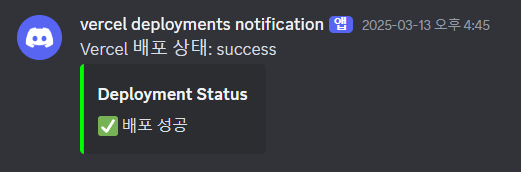
짜잔! 그러면 아래와 같이 디스코드로 알림이 오는 걸 확인할 수 있다!
(혹시 지나가다 보시는 분들 중)
더 좋은 방법이 있다면 댓글로 알려주시는 모든 개발자 분들을 환영합니다👏

⛅🛩️ 먼 길을 돌아서 온 프론트엔드 개발자 ✈️⛅