Karabiner-Elements is a powerful utility for keyboard customization on macOS Sierra (10.12) or later
Mostly used for changing the capslock to a hyper key to support more shortcuts
Here I'll be talking about how to maximize the use of the capslock key to change input sources, scroll, make more convenient direction keys and so on
Table of Contents
- caps-lock ⇒ ^⌥⇧⌘
- using caps-lock for mission control, input change, and screenshots
- making caps-lock work even as a hyper-key
- arrow key ⮕ ⌥⇧⌘ + wasd
- scroll ⮕ ⌥⇧⌘ + ijkl
All modifications are being made with karabiner's Complex Modification Settings and Mac's keyboard shortcuts
Capslock to ^⌥⇧⌘
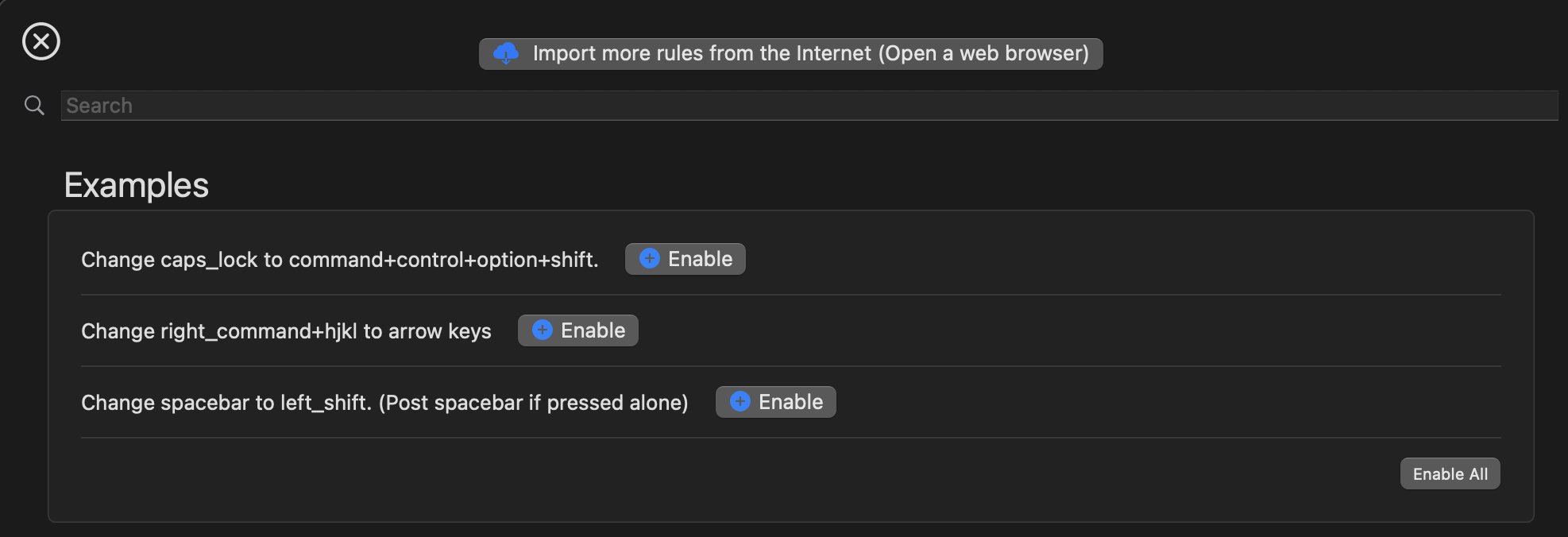
capslock to hyperkey settings already exsits in pre-defined rules:
Karabiner Element Settings>Complex Modifications>Add predefined rules- Enable
Change caps_lock to command+control+option+shift
create new shortcuts on mac
- navigate to
System Preferences>Keyboard>Keyboard Shortcuts - now change any shortcuts that you want to use with the hyper key!!
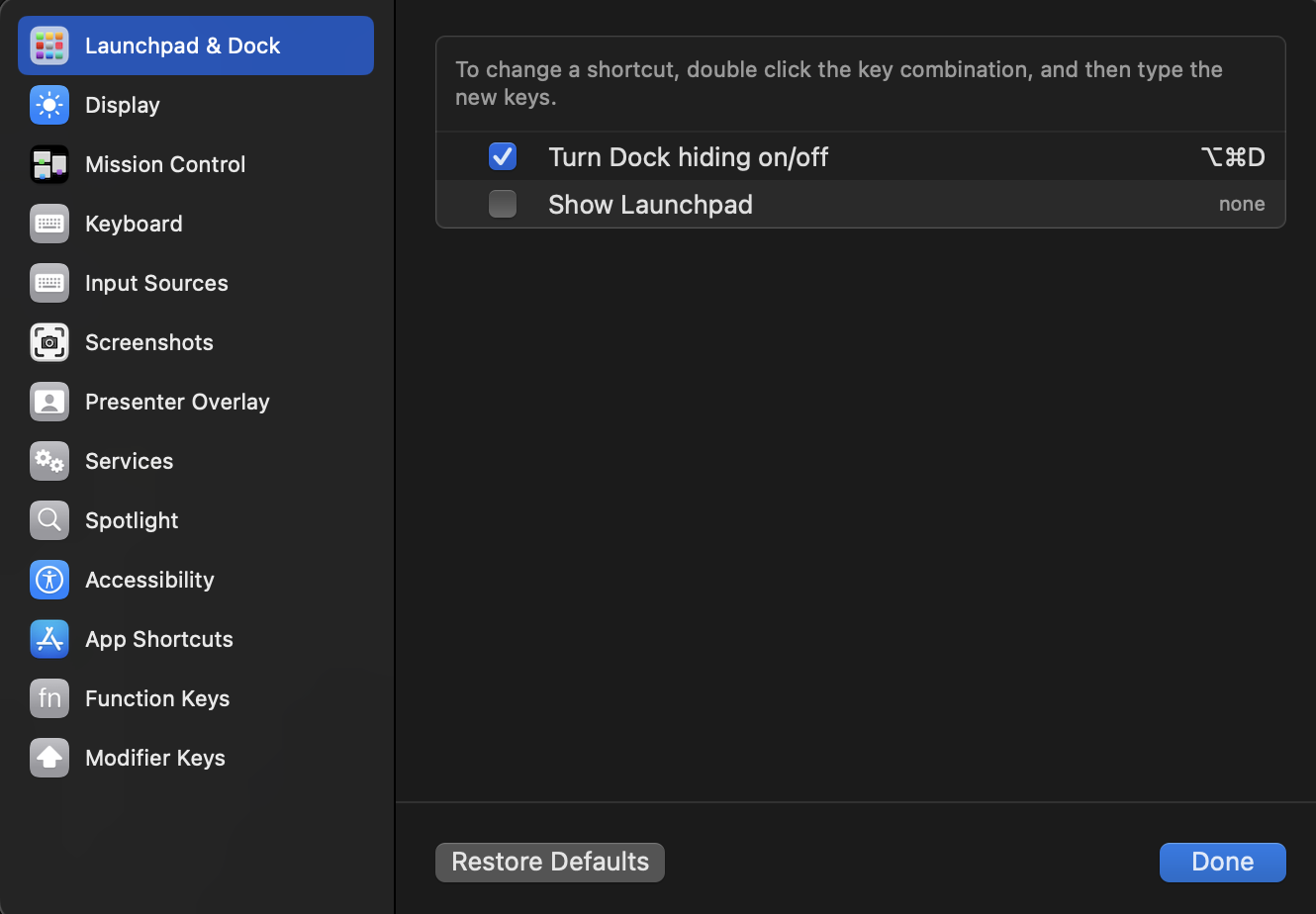
Changes I made:
- Mission Control
- mission control: ^⌥⇧⌘F
- move left a space: ^⌥⇧⌘;
- move right a space: ^⌥⇧⌘'
- Input Sources
- select next input source in input menu: ^⌥⇧⌘E
- 한영키로 바꾸는거랑 같은 기능 - select previous input source in input menu was left as it is because I still wanted ^Space as an alternative shortcut
- select next input source in input menu: ^⌥⇧⌘E
- Screenshots (only changed clipboard shortcuts)
- Copy picture of screen to the clipboard: ^⌥⇧⌘3
- Copy picture of selected area to the clipboard: ^⌥⇧⌘4
(FYI. ^⌥⇧⌘ = capslock)
still making capslock work
If you change capslock into a modifier key, it no longer works as a capslock key. In order to still use capslock, we have to adjust the settings a little bit.
Navigate to Karabiner Element Settings > Misc > Export & Import > Open config folder (~/.config/karabiner)
- open
karabiner.json - go to the "rules" section and find the rule with the description "Change caps_lock to command+control+option+shift"
- add the
to_if_alonekey to the rule - now, the capslock will work when you press it alone, and work as a hyper key when you press it with other keys!!
{
	"rules": [
		// other rules...
		{
			"manipulators": [
				{
					"description": "Change caps_lock to command+control+option+shift.",
					"from": {
						"key_code": "caps_lock",
						"modifiers": {
							"optional": [
								"any"
							]
						}
					},
					"to": [
						{
							"key_code": "left_shift",
							"modifiers": [
								"left_command",
								"left_control",
								"left_option"
							]
						}
					],
					"to_if_alone": [
						{
							"key_code": "caps_lock"
						}
					],
					"type": "basic"
				}
			]
		},
	]
}
arrow key ⮕ ⌥⇧⌘ + wasd
While karabiner offers a predefined offers "change right_command+hjkl to arrow keys," using the command key conflicted with a lot of other shortcuts i had on other apps.
So, using the our new capslock modifier key, I made some arrow keys that work when you press capslock + wasd
Add the following json to the rules section of your karabiner.json
{
	"description": "Change Command + Control + Shift + Option + W/A/S/D to arrow keys",
	"manipulators": [
		{
			"from": {
				"key_code": "a",
				"modifiers": {
					"mandatory": [
						"left_command",
						"left_control",
						"left_shift",
						"left_option"
					],
					"optional": [
						"any"
					]
				}
			},
			"to": [
				{
					"key_code": "left_arrow"
				}
			],
			"type": "basic"
		},
		{
			"from": {
				"key_code": "s",
				"modifiers": {
					"mandatory": [
						"left_command",
						"left_control",
						"left_shift",
						"left_option"
					],
					"optional": [
						"any"
					]
				}
			},
			"to": [
				{
					"key_code": "down_arrow"
				}
			],
			"type": "basic"
		},
		{
			"from": {
				"key_code": "w",
				"modifiers": {
					"mandatory": [
						"left_command",
						"left_control",
						"left_shift",
						"left_option"
					],
					"optional": [
						"any"
					]
				}
			},
			"to": [
				{
					"key_code": "up_arrow"
				}
			],
			"type": "basic"
		},
		{
			"from": {
				"key_code": "d",
				"modifiers": {
					"mandatory": [
						"left_command",
						"left_control",
						"left_shift",
						"left_option"
					],
					"optional": [
						"any"
					]
				}
			},
			"to": [
				{
					"key_code": "right_arrow"
				}
			],
			"type": "basic"
		}
	]
}
scroll ⮕ ⌥⇧⌘ + ijkl
Not having a trackpad when you're using an external keyboard proved to be a significant inconvenience for me.
Add the following to your "rules" in karabiner.json to scroll using capslock + ijkl
{
	"description": "Scroll with Command + Control + Shift + Option + I/J/K/L",
	"manipulators": [
		{
			"type": "basic",
			"from": {
				"key_code": "i",
				"modifiers": {
					"mandatory": [
						"left_command",
						"left_control",
						"left_shift",
						"left_option"
					],
					"optional": [
						"any"
					]
				}
			},
			"to": [
				{
					"mouse_key": {
						"vertical_wheel": -32
					}
				}
			]
		},
		{
			"type": "basic",
			"from": {
				"key_code": "j",
				"modifiers": {
					"mandatory": [
						"left_command",
						"left_control",
						"left_shift",
						"left_option"
					],
					"optional": [
						"any"
					]
				}
			},
			"to": [
				{
					"mouse_key": {
						"horizontal_wheel": 32
					}
				}
			]
		},
		{
			"type": "basic",
			"from": {
				"key_code": "k",
				"modifiers": {
					"mandatory": [
						"left_command",
						"left_control",
						"left_shift",
						"left_option"
					],
					"optional": [
						"any"
					]
				}
			},
			"to": [
				{
					"mouse_key": {
						"vertical_wheel": 32
					}
				}
			]
		},
		{
			"type": "basic",
			"from": {
				"key_code": "l",
				"modifiers": {
					"mandatory": [
						"left_command",
						"left_control",
						"left_shift",
						"left_option"
					],
					"optional": [
						"any"
					]
				}
			},
			"to": [
				{
					"mouse_key": {
						"horizontal_wheel": -32
					}
				}
			]
		}
	]
}
Adjust the scroll speed under "parameters":
"parameters": {
	"basic.simultaneous_threshold_milliseconds": 50,
	"basic.to_delayed_action_delay_milliseconds": 500,
	"basic.to_if_alone_timeout_milliseconds": 1000,
	"basic.to_if_held_down_threshold_milliseconds": 500,
	"mouse_motion_to_scroll.speed": 200
},