[Ajax - SPA 구현]ToDo List
AJAX (Asynchronous Javascript And XML)
AJAX
: 자바스크립트를 이용해 서버와 브라우저가 비동기 방식으로 데이터를 교환할 수 있는 통신 기능
- 브라우저가 가지고있는 XMLHttpRequest 객체를 이용해서 전체 페이지를 새로 고치지 않고도 페이지의 일부만을 위한 데이터를 로드하는 기법
- 자바스크립트를 통해서 서버에 데이터를 비동기 방식으로 요청하는 것
→ 웹페이지를 리로드하지 않고 데이터를 불러옴
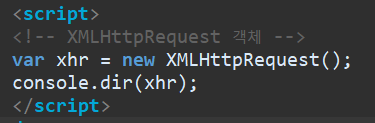
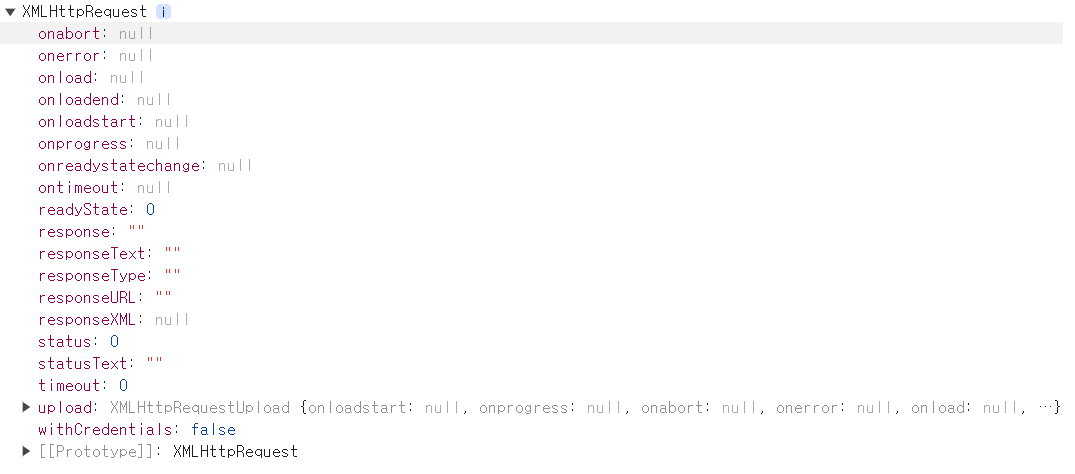
- 웹 브라우저 표준 Ajax 객체 : XMLHttpRequest
- 그 외 jQuery Ajax 함수, axios 라이브러리, fatch 라이브러리등으로 구현 가능함
Ajax로 SPA 구현 [TodoList]
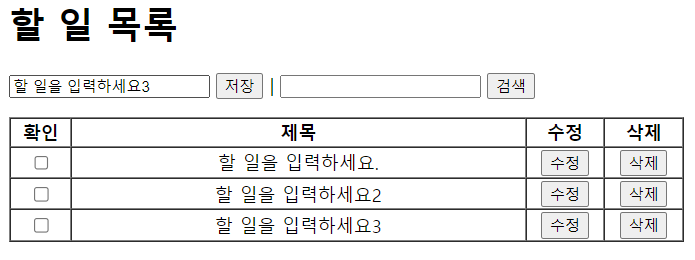
삭제버튼 구현시 유의점
- myGet() 함수 밖에서 구현하기

- 요소가 화면에 그려지기 전에 이벤트 헨들러를 추가할 수 없기 때문에 아래의 myGet()함수 안에 deleteBtnAction 함수를 구현할 수 없음
- 자바스크립트가 인터프리터 언어이기 때문
리스트를 그리는 함수
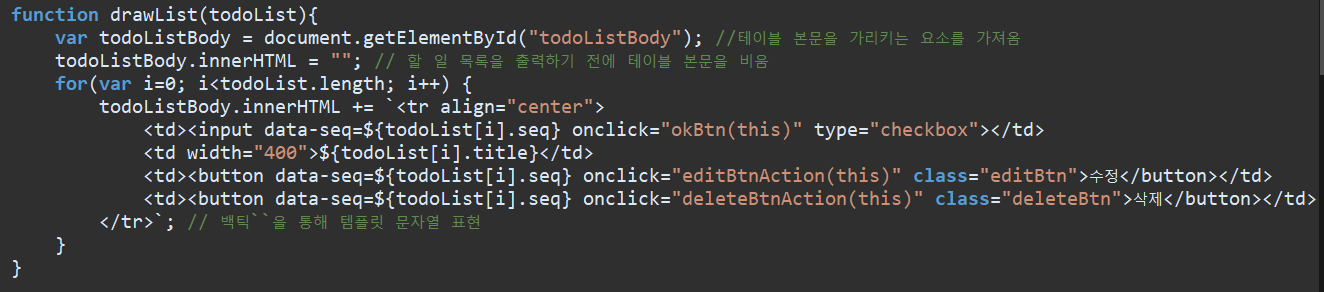
검색 시 검색 단어를 바탕으로 새로운 리스트를 만들어 테이블을 구성해야하나 처음 모든 리스트를 가져오는 코드와 중복됨
=> 중복코드를 삭제하고 함수를 만들어 코드의 재사용성을 높임
전체 코드
<!DOCTYPE html>
<html>
	<head>
		<meta charset="UTF-8">
		<title>Index</title>
	</head>
	<body>
		<h1>할 일 목록</h1>
		<p>
			<input type="text" id="newwork" value="할 일을 입력하세요."/>
			<button id="saveBtn">저장</button>
			 |
			<input type="text" id="keyword"/>
			<button id="serchBtn">검색</button>
			<br/>
		</p>

		<table width="600" border="1" cellspacing ="0">
			<tr>
				<th>확인</th>
				<th>제목</th>
				<th>수정</th>
				<th>삭제</th>
			</tr>
			<tbody id="todoListBody">
				<!-- 할 일 목록이 들어갈 부분 -->
			</tbody>

		</table>
		<!--<iframe src="todo/list.do"><</iframe>-->

		<script>
		var todoList = [];

		// 삭제
		function deleteBtnAction(btn) {
			myGet("todo/del.do?seq=" + btn.dataset.seq );
		}

		<!-- XMLHttpRequest 객체 -->

		// todoList를 가져오는 기능의 사용자 정의 함수
		function myGet(url) {
			var xhr = new XMLHttpRequest(); //XMLHttpRequest 객체를 생성
			console.dir(xhr);
			// 요청 결과가 클라이언트 페이지(index.html)에 모두 받아지면 실행

			xhr.onload = function() { //서버로부터 데이터를 받아오는 함수가 요청을 완료하면 실행되는 이벤트 핸들러

				// xhr.responseText의 데이터는 그냥 JSON 문자열
				// console.log(xhr.responseText);

				todoList = JSON.parse(xhr.responseText);  //JSON객체를 JavaScript 객체로 변환
				var todoListBody = document.getElementById("todoListBody"); //테이블 본문을 가리키는 요소를 가져옴

				todoListBody.innerHTML = ""; // 할 일 목록을 출력하기 전에 테이블 본문을 비움
				for(var i=0; i<todoList.length; i++) {
					todoListBody.innerHTML += `<tr align="center">
						<td><input type="checkbox"></td>
						<td width="400">${todoList[i].title}</td>
						<td><button data-seq=${todoList[i].seq} class="editBtn">수정</button></td>
						<td><button data-seq=${todoList[i].seq} class="deleteBtn">삭제</button></td>
					</tr>`; // 백틱``을 통해 템플릿 문자열 표현
				}
			}
			xhr.open("GET", url, true); //XMLHttpRequest 객체를 통해 GET 요청을 보냄
			xhr.send(); // 실행
		}


		const saveBtn = document.getElementById("saveBtn"); //저장 버튼과 입력 필드를 가져옴
		const newwork= document.getElementById("newwork");

		// 할 일을 저장하는 기능의 사용자 정의 함수
		function myPost(url){
			// 저장버튼이 눌러지면 실행되도록 함
			console.log("저장버튼 누름", newwork.value);

			var xhr = new XMLHttpRequest(); //XMLHttpRequest 객체를 생성하고,
			xhr.onload = function(){
				myGet("todo/list.do");
			}
			xhr.open("POST", url, true); // POST 요청을 보내서 새로운 할 일을 저장 // true는 비동기, false는 동기식
			xhr.setRequestHeader("Content-type", "application/x-www-form-urlencoded"); // post방식 사용할 때 적워줘야 함
			xhr.send("title="+newwork.value); // 실행

		}

        // <검색창에 내용을 넣으면 실시간으로 확인>
		const keywordInput = document.getElementById("keyword");
		keywordInput.onkeyup = function(event) {
			let keyword = keywordInput.value;
			//todolist의 요소중에서 title에 keyword가 포함된 요소를 검색함
			// 검색된 요소를 새 배열에 저장함
			// 새 배열의 내용을 todoList 테이블에 새로 그림
			let newTodoList = [];
			for(let i=0; i<todoList.length; i++){
				let title = todoList[i].title
				if(title.indexOf(keyword) != -1){ // 한글자라도 포함되어있을 때
					newTodoList.push(todoList[i]);
				}
			}
			// 표를 다시 그림
			drawList(newTodoList);
		}

		</script>
	</body>
</html>
추가구현 필요
- 체크박스 체크 시, title에 취소선이 갈 수 있도록 하기
- 수정버튼 클릭 시, 입력프롬프트에서 받은 값으로 기존 title값 교체하기

ByeolGyu