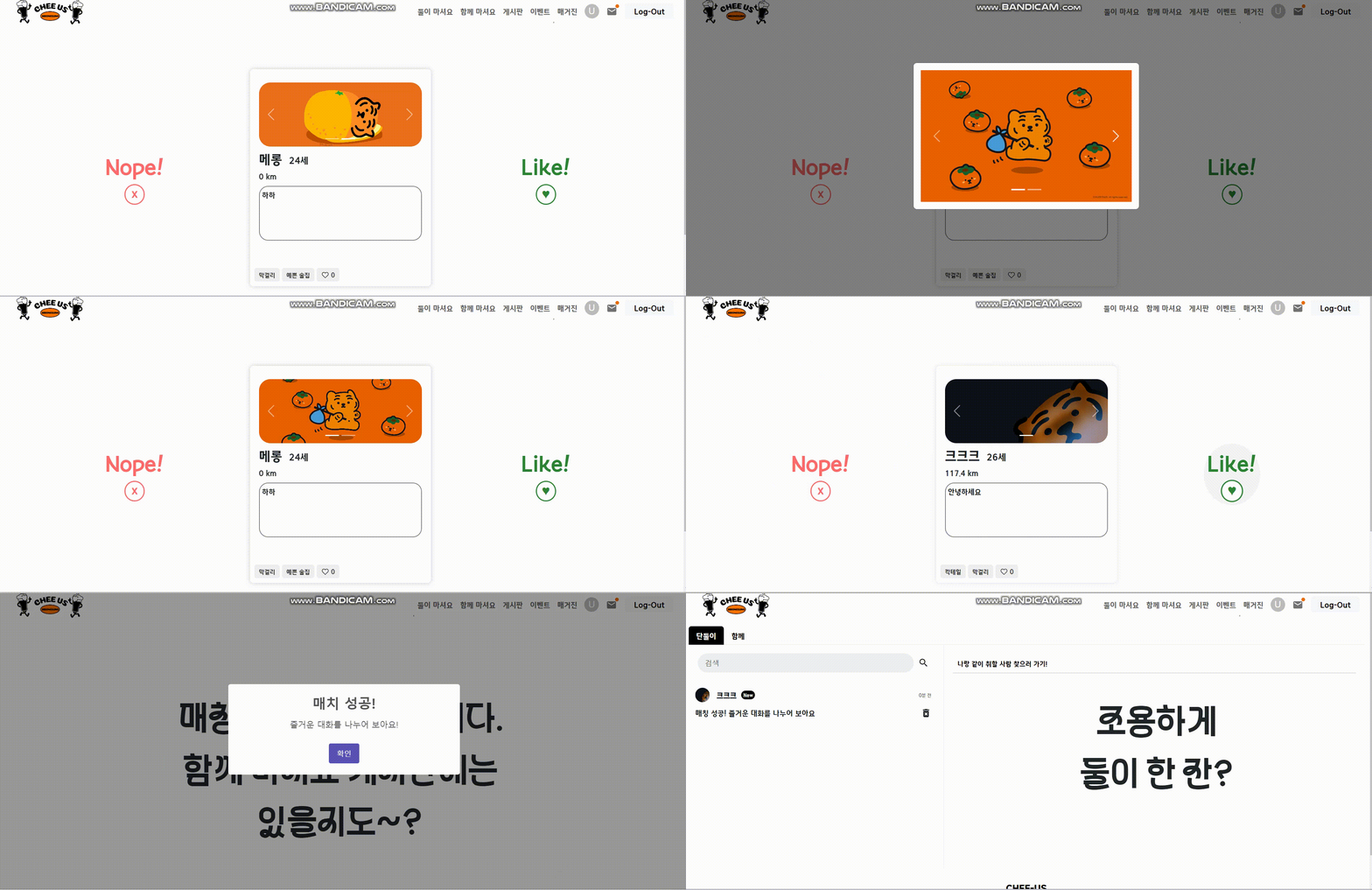
🍻 매칭 프로그램
나와 술 취향이 같은 사람, 가고 싶은 술집이 있는데 혼자 가기에는 외롭고 여럿이 가기에는 조용한 분위기를 즐기고 싶을때!
프로필과 태그, 위치 정보를 보고 술 친구를 선택 할 수 있다면?
✔ Match
✔ MatchSlice.js
초기 상태
import { createSlice, createAsyncThunk } from '@reduxjs/toolkit';
import axios from 'axios';

const initialState = {
    userLocation: null,
    likedProfiles: [], // 좋아요 누른 프로필 목록
    userProfile: null, // 현재 사용자 프로필
    locationOk: null, // 위치 정보 동의
    matchServiceAgreed: false, // 매칭 서비스 사용 동의
    profiles: [],	// 프로필 전체 목록
    status: 'idle', // 데이터 로딩 상태
    error: null,
    shuffledProfiles: [], // 무작위 프로필 목록
    currentIndex: 0, // 현재 카드 인덱스
    showMessages: [], // 스와이프 후 보일 메세지
};
비동기 작업
// 멤버 프로필을 가져오기
export const fetchUserProfiles = createAsyncThunk(
    'match/fetchUserProfiles',
    async ({ serverUrl, memberEmail }) => {
        if (!memberEmail) {
            throw new Error("Member email is required");
        }
        try {
            const response = await axios.get(`${serverUrl}/match`, { params: { email: memberEmail } });
            const profiles = response.data.map(data => {
                const imageBlob = data.imageBlob.map((blob, index) => `data:${data.imageType[index]};base64,${blob}`);
                return {
                    profile: {
                        ...data.profile,
                        popularity: data.popularity
                    },
                    imageBlob: imageBlob
                };
            });
            return profiles;
        } catch (error) {
            throw new Error(error.message);
        }
    }
);

// 위치 정보 동의
export const updateLocationPermission = createAsyncThunk(
    'match/updateLocationPermission',
    async ({ memberEmail, serverUrl, latitude, longitude, token }) => {
        const formData = new FormData();
        formData.append("email", memberEmail);
        formData.append("type", "location");
        formData.append("latitude", latitude);
        formData.append("longitude", longitude);

        const response = await axios.put(`${serverUrl}/profile/allow`, formData, {
            headers : {
                "Authorization" : `Bearer ${token}`
            },
            withCredentials : true
            }
        );
        return response.data;
    }
);

// 매칭 동의
export const updateMatchServiceAgreement = createAsyncThunk(
    'match/updateMatchServiceAgreement',
    async ({ memberEmail, serverUrl, token }) => {
        const formData = new FormData();
        formData.append("email", memberEmail);
        formData.append("type", "match");

        const response = await axios.put(`${serverUrl}/profile/allow`, formData, {
            headers : {
                "Authorization" : `Bearer ${token}`
            },
            withCredentials : true
            }
        );
        return response.data;
    }
);
리듀서
상태를 업데이트 하는 동기적인 작업
const MatchSlice = createSlice({
    name: 'match',
    initialState,
    reducers: {
        setUserLocation(state, action) { // 사용자 위치 정보 저장
            const { latitude, longitude } = action.payload.coords;
            state.userLocation = { latitude, longitude };
            state.locationOk = true;
        },
        setLocationDenied(state) { // 위치 정보 사용 거부 동의 상태 업데이트
            state.locationOk = false;
        },
        setMatchServiceAgreement(state, action) { // 매칭 서비스 동의상태 업데이트
            state.matchServiceAgreed = action.payload;
        },
        setShuffledProfiles(state, action) { // 프로필 무작위로 섞기
            state.shuffledProfiles = action.payload;
            state.showMessages = Array(action.payload.length).fill('');
            state.currentIndex = action.payload.length;
        },
        updateShowMessages(state, action) { // 카드 스와이프할 때 보여질 nope /like
            const { index, message } = action.payload;
            state.showMessages[index] = message;
        },
        decrementIndex(state) { // 현재 인덱스 감소
            state.currentIndex -= 1;
        },
        resetIndex(state) { // 현재 인덱스 리셋
            state.currentIndex = -1;
        },
    },
Extra Reducers
비동기 작업의 상태에 따라서 상태를 업데이트
extraReducers: (builder) => {
        builder
            .addCase(updateLocationPermission.fulfilled, (state, action) => { // 위치정보 동의 성공 시
                const updatedProfile = action.payload;
                state.userProfile = updatedProfile;
                state.locationOk = updatedProfile.location_ok === 1;
            })
            .addCase(updateMatchServiceAgreement.fulfilled, (state, action) => { // 매칭 서비스 동의 성공시
                const updatedProfile = action.payload;
                state.userProfile = updatedProfile;
                state.matchServiceAgreed = updatedProfile.match_ok === 1;
            })
            .addCase(fetchUserProfiles.pending, (state) => { // 프로필 로딩중
                state.status = 'loading';
            })
            .addCase(fetchUserProfiles.fulfilled, (state, action) => { // 프로필을 가져오는데 성공하면 프로필 목록 저장
                state.profiles = action.payload;
                state.status = 'succeeded';
            })
            .addCase(fetchUserProfiles.rejected, (state, action) => {
                state.error = action.error.message;
                state.status = 'failed';
            });
    },
});
selectors
상태(state)에서 필요한 데이터를 추출하는 함수
export const {
    setUserLocation,
    setLocationDenied,
    setMatchServiceAgreement,
    setShuffledProfiles,
    updateShowMessages,
    decrementIndex,
    resetIndex,
    updateConfirmedList,
    setLoggedInUserId,
} = MatchSlice.actions;

export const selectProfiles = (state) => state.match.profiles;
export const selectStatus = (state) => state.match.status;
export const selectShuffledProfiles = (state) => state.match.shuffledProfiles;
export const selectCurrentIndex = (state) => state.match.currentIndex;
export const selectShowMessages = (state) => state.match.showMessages;
export const selectUserLocation = (state) => state.match.userLocation;
export const selectLocationOk = (state) => state.match.locationOk;
export const selectMatchServiceAgreed = (state) => state.match.matchServiceAgreed;
export const selectUserProfile = (state) => state.match.userProfile;
✔ 매칭 시작 전
Match.js

-
Match.js에서 위치정보 동의 여부인
location_ok와 매칭 서비스 동의 여부인match_ok를 확인한 후 동의하지 않은 사용자는 매칭에 참여할 수 없게 설정해두었다. 동의를 한 사용자는 location_ok와 match_ok가 각각 1이 되어 매칭에 참여할 수 있다. -
매칭을 원하지 않는데 프로필이 노출 되는 것을 방지하기 위함으로, 처음 데이터 베이스를 짤 때 강조한 부분이다.
✔ 프로필 카드 불러오기 + 섞기
-
위치정보 및 매칭 서비스 사용 동의한 사용자의 프로필 카드를 필터링 하고
shuffleArray()를 사용해서 카드를 무작위로 섞는다. -
처음에는 useMemo를 사용해 프로필카드 참조를 생성하고 저장했는데, 그러면 특정 값이 변하지 않는 한 결과를 재사용 한다. 그래서 초기에 랜덤화 한 상태가 계속 유지되었고 새로고침을 해도 순서가 바뀌지 않는 문제가 발생했다.
⇒ 카드 노출 빈도를 집중되게 하지 않기 위해서 useEffect 훅을 사용하고 새로운 참조를 생성한다. 프로필 데이터가 변경되거나 로딩 상태가 변경될 때 마다 새로운 카드 순서를 생성할 수 있도록 했다.
// TinderCard.js
const TinderCards = () => {
  const dispatch = useDispatch();
  const profiles = useSelector(selectProfiles);
  const profilesStatus = useSelector(selectStatus);
  const [profileCards, setCards] = useState([]);
  const shuffledProfiles = useSelector(selectShuffledProfiles);
  const currentIndex = useSelector(selectCurrentIndex);
  const [showMessages, setShowMessages] = React.useState([]); // 스와이프 상태 메세지
  const { memberEmail, serverUrl } = useContext(AuthContext);
  const [isDataLoaded, setIsDataLoaded] = useState(false); // 데이터 로딩 여부
  const childRefs = useRef([]);  // 리랜더링 돼도 참조를 유지함

  useEffect(() => {
  const loadProfiles = async () => { // 데이터를 비동기적으로 불러옴
    if (profilesStatus === 'loading') {
      return;
    }

    if (profiles.length > 0) {
      const filteredProfiles = profiles.filter(profile =>
        profile.profile.locationOk === true &&
        profile.profile.matchOk === true &&
        profile.profile.email !== memberEmail
      );

      const shuffled = shuffleArray(filteredProfiles);
      setCards(shuffled);
      dispatch(setShuffledProfiles(shuffled));
    } else {
      setCards([]);
      dispatch(setShuffledProfiles([]));
    }

    setIsDataLoaded(true); // 데이터 로딩 완료 상태로 업데이트
  };

  loadProfiles();
}, [dispatch, profiles, profilesStatus, memberEmail]);

  // 프로필 무작위로 섞기
  const shuffleArray = (array) => {
  const shuffled = [...array];
  for (let i = shuffled.length - 1; i > 0; i--) {
    const j = Math.floor(Math.random() * (i + 1));
    [shuffled[i], shuffled[j]] = [shuffled[j], shuffled[i]];
  }
  return shuffled;
};
Math.random(): 0 이상 1 미만의 부동 소수점 난수를 생성
Math.floor(): 소수점을 제거
✔ 스와이프
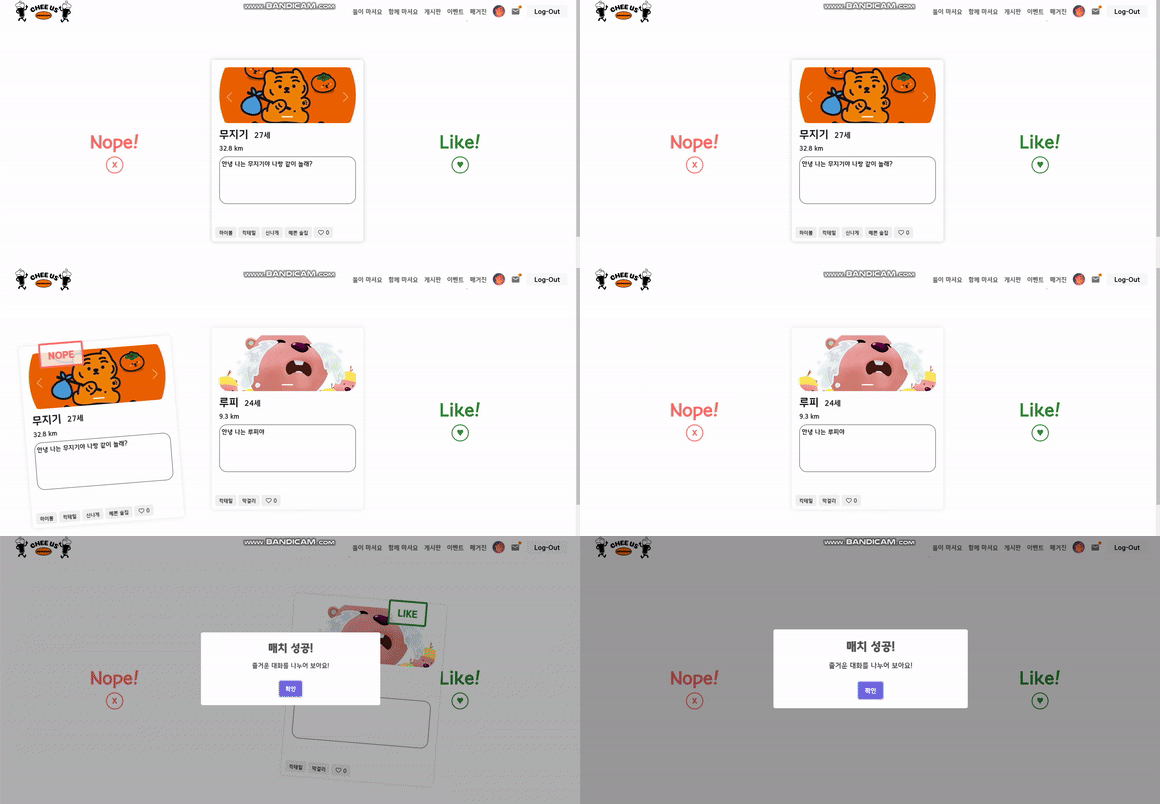
swiped()는 스와이프 방향과 프로필을 받아서 백엔드에 스와이프 정보를 전달한다.
A가 B를 like하면 member1과 member2에 A와 B가 각각 들어가고 matchState가 1로 바뀐다.
→ 그 다음 B가 A를 like하면 matchState가 2로 바뀌고 매칭이 성사된다.
→ 만약 한 명이라도 nope을 하면 matchState가 3이 되고 더 이상 서로의 카드에 나타나지 않는다.
const canSwipe = currentIndex >= 0;

const swiped = (direction, profileId, index) => {
  const newShowMessages = [...showMessages];
  newShowMessages[index] = direction === 'right' ? 'LIKE' : 'NOPE';

  const formData = new FormData();
  formData.append('member1', memberEmail);
  formData.append('member2', profileId);
  formData.append('type', direction);
  axios.post(serverUrl + "/match/swipe", formData)
  .then((res) => {
    if (res.data.matchState === 2) {
      Swal.fire({
        title: '매치 성공!',
        text: '즐거운 대화를 나누어 보아요!',
        icon: 'dark',
        confirmButtonText: '확인'
      }).then((result) => {
        if (result.isConfirmed) {
          window.location.href = `/chatpage`;
        }
      });
      sendMessage(res.data);
    }
  });

  setShowMessages(newShowMessages); //스와이프 상태 메시지 표시
  dispatch(decrementIndex()); // 인덱스 줄이기
};
✔ 스와이프 처리 함수
- childRefs.current를 통해 참조된 TinderCard 인스턴스의 swipe 메서드를 호출한다.
- 버튼을 눌러도 방향 정보와 인덱스를 전달한다.
const swipe = async (dir, index) => {
  if (!canSwipe || index < 0 || index >= profileCards.length || !childRefs.current[index]?.swipe) {
    return;
  }
  await childRefs.current[index].swipe(dir);
};

// 버튼으로 like nope했을 때
const handleSwipeLeft = async () => {
  if (!canSwipe || currentIndex <= 0) return;
  const index = currentIndex - 1;
  await swipe('left', index);
};

const handleSwipeRight = async () => {
  if (!canSwipe || currentIndex <= 0) return;
  const index = currentIndex - 1;
  await swipe('right', index);
};
✔ 인덱스 리셋
현재 카드가 화면에서 사라지면 현재 인덱스를 리셋한다.
const outOfFrame = (name, idx) => {
  if (idx === 0) {
    dispatch(resetIndex());
  }
};
✔ 메세지 전송
- 매칭 시 채팅방을 생성하고 채팅방에 매칭 성사를 알리는 메세지를 보낸다.
const sendMessage = async (data) => {
  if (!memberEmail) {
    console.log('회원정보가 없어 메세지 보낼 수 없음');
    return;
  }

  const newRoom = { // 채팅방 생성 (mongoDB에 저장)
    id: data.id,
    member1: data.member1,
    member2: data.member2,
    match: data.matchState
  };

  // system이 매칭된 사용자들에게 새 메세지를 보냄 (mongoDB에 저장)
  const newMessage = {
    sender_id: 'System',
    message: '매칭 성공! 즐거운 대화를 나누어 보아요',
    write_day: new Date().toISOString(),
    read: 0,
    chat_room_id: data.id
  };

  try {
    const createRoom = 'http://localhost:8889/api/createOneoneRoom';
    const sendMessage = 'http://localhost:8889/api/messages';
    await axios.post(createRoom, newRoom); // 각 api 엔드포인트에 post 요청
    await axios.post(sendMessage, newMessage);
  } catch (error) {
    console.error('Error sending message:', error);
  }
};
✔ 랜더링
스와이프를 어떻게 구현할 지 찾아보던 중 react-tinder-card 라이브러리를 발견했다.
npm install react-tinder-card후 쉽게 라이브러리를 사용할 수 있었다.
1) ref={(el) => (childRefs.current[index] = el)}
: TinderCard의 참조를 childRefs.current 배열에 저장한다.
→ 나중에 swipe 메서드를 호출해서 카드에 대한 스와이프 동작을 제어할 수 있다.
2) key={profile.profile.email}
: 프로필의 이메일을 사용해 카드의 고유성을 보장한다. 카드의 상태를 쉽게 추적할 수 있게 해준다.
3) onSwipe={(dir) => swiped(dir, profile.profile.email, index)}
: 카드가 스와이프 될 때 호출되는 콜백함수, 스와이프 방향에 따라서 동작을 처리한다.
swipe 함수를 호출해서 방향에 따라 백엔드에 데이터를 추가한다.
4) preventSwipe={['up', 'down']}
: up과 down 방향의 스와이프를 방지한다.
if (!isDataLoaded) { //데이터가 로드되지 않았을 때 skeleton ui를 보여줌
  return (
    <div className='skeleton-card-container'>
      <div className="profile-container-tinder">
        <ProfileSkeleton />
      </div>
    </div>
  );
}

return (
  <div className="tinderCard_container">
    {profileCards.length === 0 || !canSwipe ?(
      <div className="noMoreCardsMessage">
        <div className="noMessage">
          <div>매칭 할 카드가 없습니다.</div>
          <span style={{ color: '#FF6B6B' }}>함께 마셔요</span><span> 게시판도 둘러보세요!</span>
        </div>
      </div>
    ) : (
      <>
        <div className="cardButtonContainer">
          <div className="swipeButton">
            {canSwipe && (
              <IconButton onClick={handleSwipeLeft} disabled={!canSwipe}>
                <div className="buttonContent">
                  <div className="show-nope">Nope!</div>
                  <div className="close_button">X</div>
                </div>
              </IconButton>
            )}
          </div>
          <div className="cardContainer">
            {profileCards.map((profile, index) => (
              <TinderCard
                ref={(el) => (childRefs.current[index] = el)} // *1
                className="swipe"
                key={profile.profile.email} // *2
                onSwipe={(dir) => swiped(dir, profile.profile.email, index)} //*3
                onCardLeftScreen={() => outOfFrame(profile.profile.email, index)}
                preventSwipe={['up', 'down']}
              >
                <div className="card">
                  <div className="card-in">
                    <ProfileCard profileInfo={profile} />
                    {showMessages[index] && (
                      <div className={`infoText ${showMessages[index] === 'LIKE' ? 'like' : 'nope'}`}>
                        {showMessages[index]}
                      </div>
                    )}
                  </div>
                </div>
              </TinderCard>
            ))}
          </div>
          <div className="swipeButton">
            {canSwipe && (
              <IconButton onClick={handleSwipeRight} disabled={!canSwipe}>
                <div className="buttonContent">
                  <div className="show-like">Like!</div>
                  <div className="favorite_button">♥</div>
                </div>
              </IconButton>
            )}
          </div>
        </div>
      </>
    )}
  </div>
);