✔ 채팅방 스크롤
채팅방을 선택하거나 새 채팅이 수신되면 자동으로 ChatWindow(채팅내역)의 스크롤이 맨 하단으로 내려오도록 구현
import React, { useEffect, useRef } from 'react';

const ChatWindow = () => {
    const scrollRef = useRef(null);

    useEffect(() => {
        if (selectedChat) {
            scrollToBottom();
        }
    }, [selectedChat, selectedChat?.messages]);

    const scrollToBottom = () => {
        if (scrollRef.current) {
            const element = scrollRef.current;
            const isAtBottom = element.scrollHeight - element.scrollTop === element.clientHeight;

            if (!isAtBottom) { // 맨 아래가 아니면
                element.scrollTo({
                    top: element.scrollHeight,
                    behavior: 'smooth'
                });
            }
        }
    };

    return (
        <div className="chat active-chat" data-chat={`person${selectedChat.roomId}`} ref={scrollRef}>
            {/* 생략 */}
        </div>
    );
};

export default ChatWindow;
1. useRef
import React, { useRef } from 'react';
: useRef는 React의 훅(Hook) 중 하나로, 컴포넌트의 렌더링 간에 변경되지 않는 값을 저장하거나 DOM 요소에 직접 접근할 때 사용됨
const scrollRef = useRef(null);를 통해 DOM 요소에 대한 참조를 생성함
2. useEffect
: selectedChat 또는 selectedChat?.messages가 변경될 때마다 scrollToBottom 함수를 호출
useEffect(() => {
        if (selectedChat) {
            scrollToBottom();
        }
    }, [selectedChat, selectedChat?.messages]);
3. 스크롤 함수
: scrollRef.current를 통해 참조된 DOM 요소의 스크롤 위치를 제어
- scrollRef.current가 유효할 때, 스크롤이 현재 하단에 있는지 확인
- 스크롤이 하단에 위치하지 않으면, scrollTo 메서드를 사용하여 스크롤을 가장 아래로 부드럽게 이동
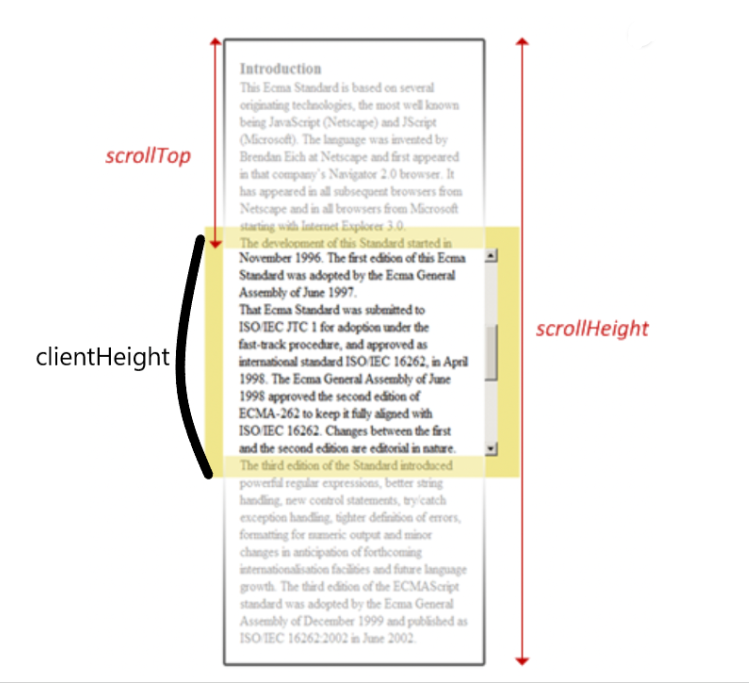
scrollHeight: 스크롤 가능한 전체 높이scrollTop: 현재 스크롤 위치clientHeight: 스크롤이 가능한 영역의 높이 중 화면에 보이는 부분의 높이element.scrollHeight - element.scrollTop: 현재 보이는 영역 아래에 남아있는 전체 내용의 높이
이 값이element.clientHeight와 같으면 현재 스크롤 위치가 가장 아래에 있다는 의미
맨 아래가 아니라면
element.scrollTo: 스크롤을 특정 위치로 이동시킴
→top: element.scrollHeight로 스크롤 위치를 요소의 전체 높이로 설정하여 스크롤을 가장 아래로 이동
top은 이동시킬 수직 위치를 의미함behavior:'smooth': 스크롤이 부드럽게 이동하도록 설정함
const scrollToBottom = () => {
        if (scrollRef.current) {
            const element = scrollRef.current;
            const isAtBottom = element.scrollHeight - element.scrollTop === element.clientHeight;

            if (!isAtBottom) { // 맨 아래가 아니면
                element.scrollTo({
                    top: element.scrollHeight,
                    behavior: 'smooth'
                });
            }
        }
    };
4. ref 속성
: ref={scrollRef}는 div 요소에 scrollRef를 할당하여 이 요소에 대한 참조를 유지
<div ref={scrollRef}></div>
- scrollRef.current를 통해 해당 요소에 접근
ByeolGyu