✔ firebase 설치
- 파이어베이스 설치할 폴더 생성
- cmd에서
node -v로 nodejs 설치되어있는지 확인 npm install -g firebase-tools로 해당 폴더에 파이어베이스 설치firefirebase --version으로 버젼 확인firebase login으로 로그인 -> firebase CLI 환경으로 로그인 됨
✔ firebase 프로젝트 생성
- cmd에서 프로젝트 생성할 폴더로 이동
firebase loginfirebase init
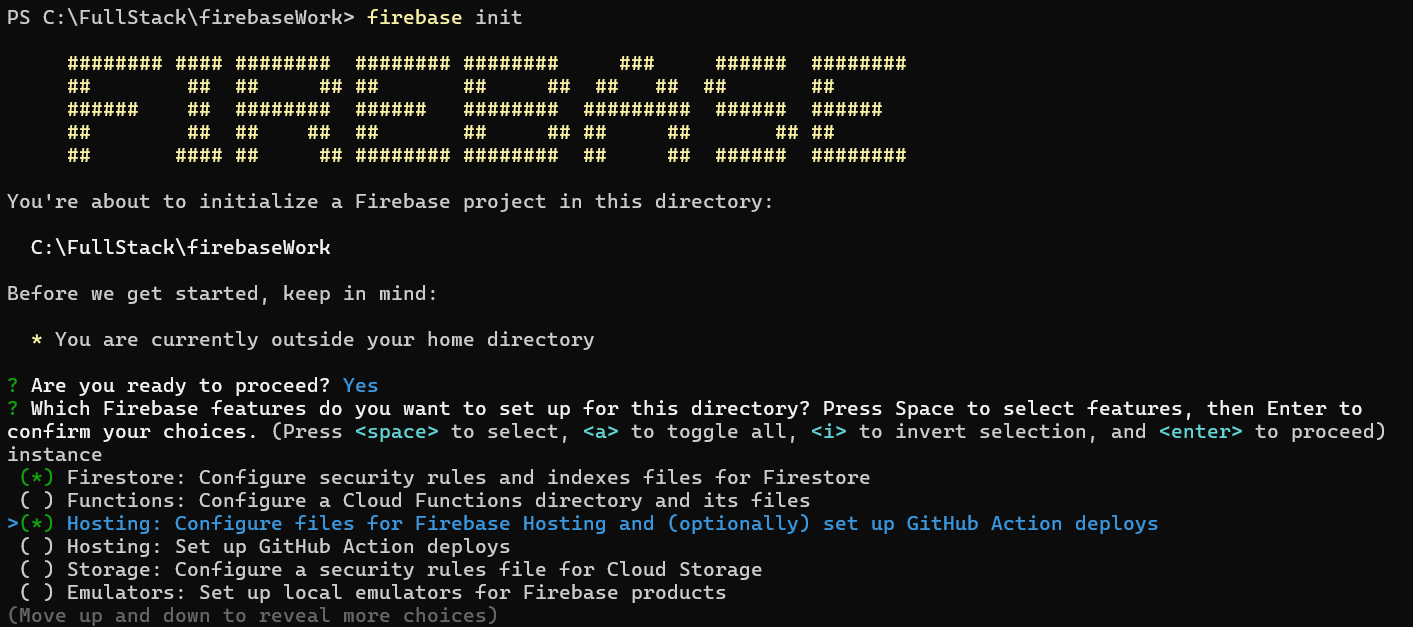
✔ firebase 프로젝트 배포
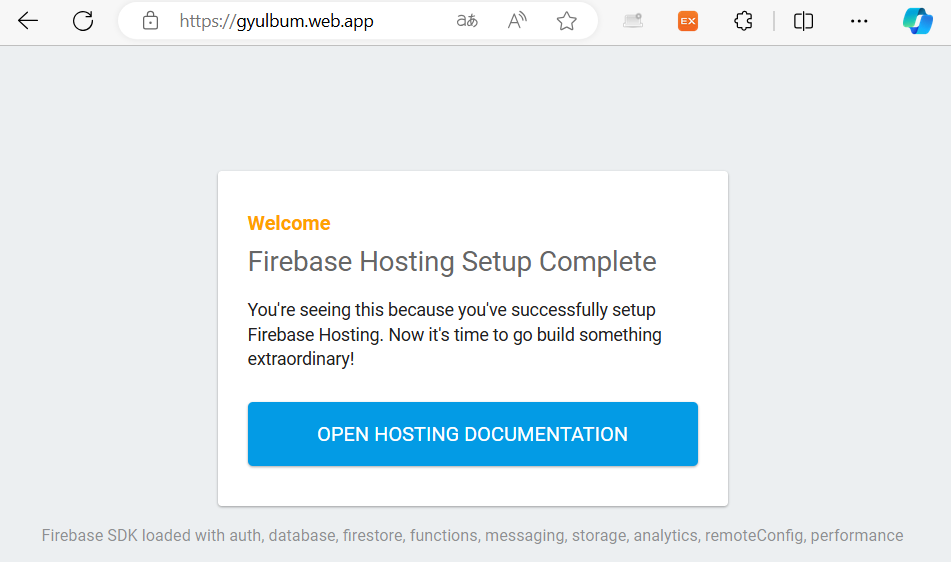
- 프로젝트 폴더의 내용을 구글 파이어베이스 호스팅해 배포
- firebase에 배포하게되면 전세계 인터넷에서 홈페이지 볼 수 있음
- cmd에
firebase deploy
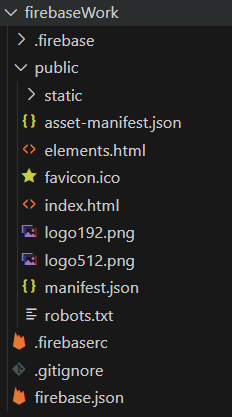
-> 워크스페이스 폴더에 생성된 public이 올라감 - Hosting URL 확인
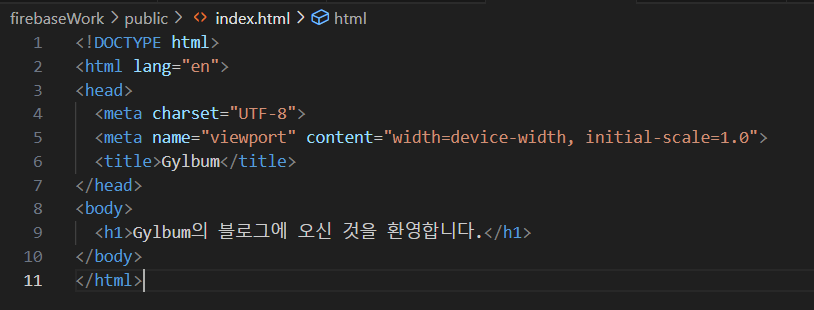
- index.html 수정해보기
-> cmd에firebase deploy하면 수정한 것 올라감
localhost에서 테스트 서버 실행
- deploy 전 로컬에서 테스트
- cmd에
firebase serve
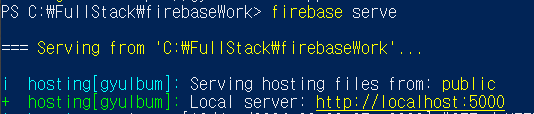
- localhost에서 확인

React 프로젝트 올리기
- react 프로젝트 생성
- react 프로젝트 빌드
npm run build - firebase의 public에 있던 파일 지우고 리액트 빌드된 파일 전체 옮기기
- localhost에서 확인
firebase deploy
✔ firebase Firestore 데이터베이스 연동
데이터베이스 만들기
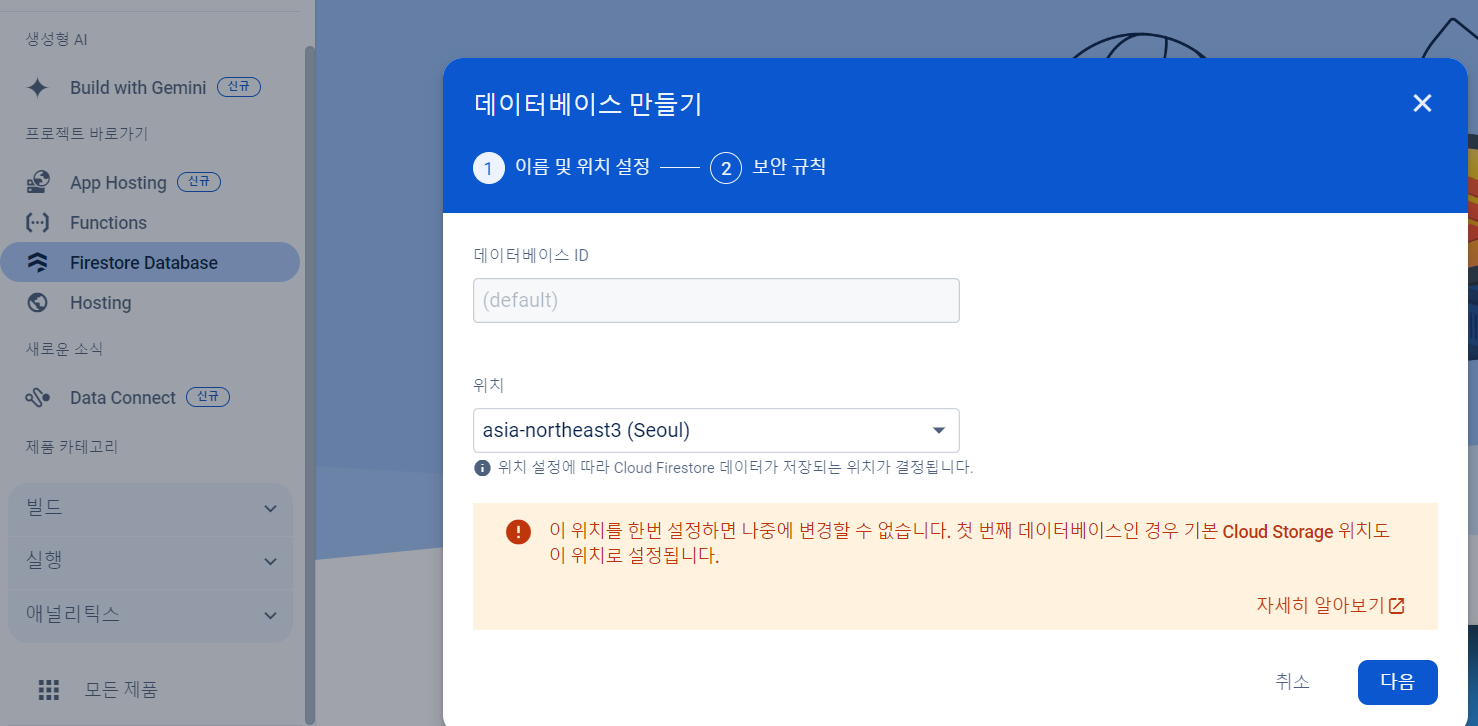
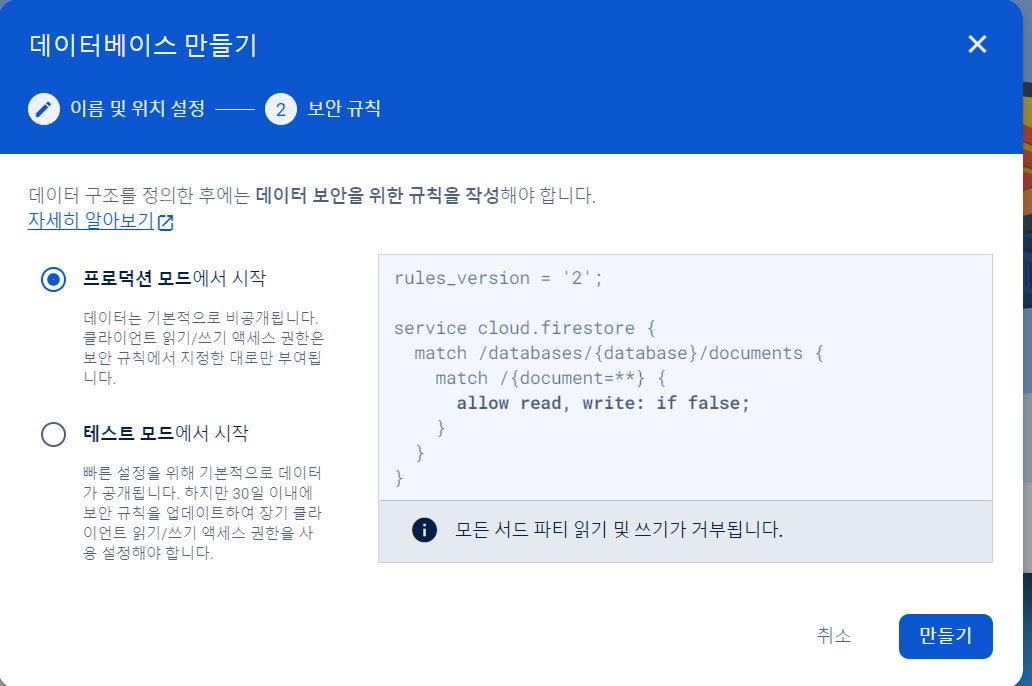
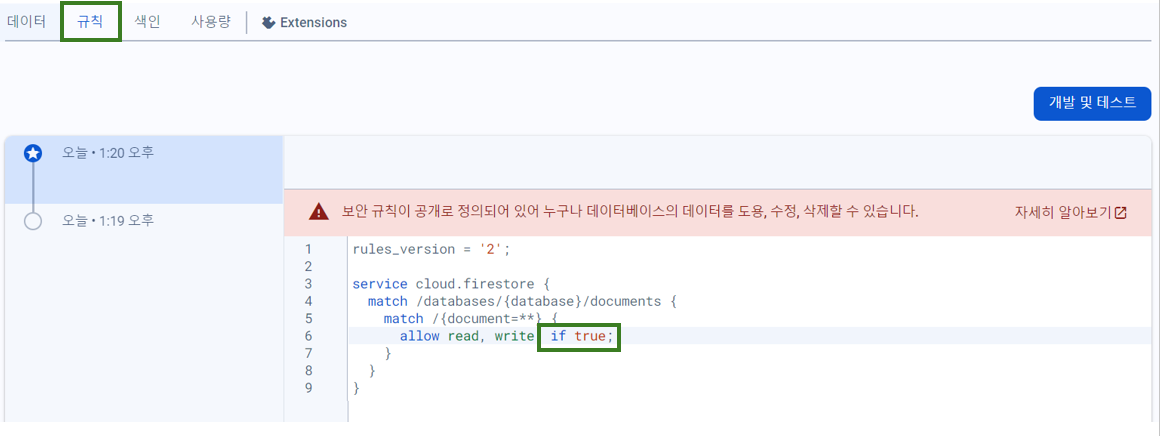
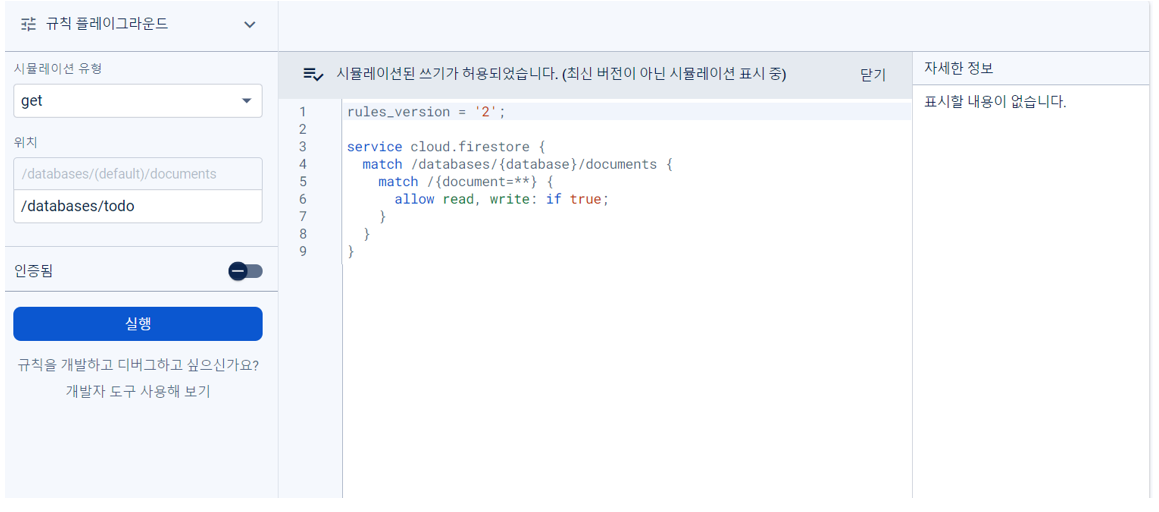
- 보안규칙에서 if true로 변경
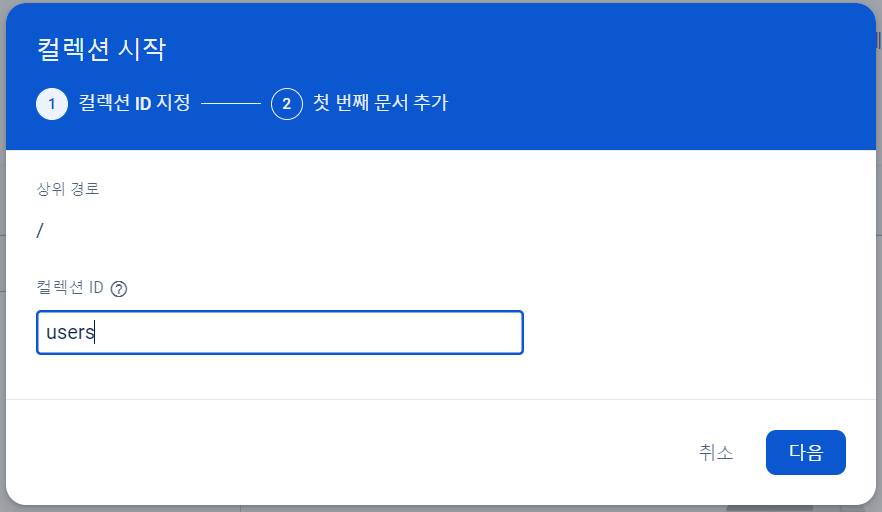
컬렉션
- 컬렉션(Collection) : oracle의 테이블
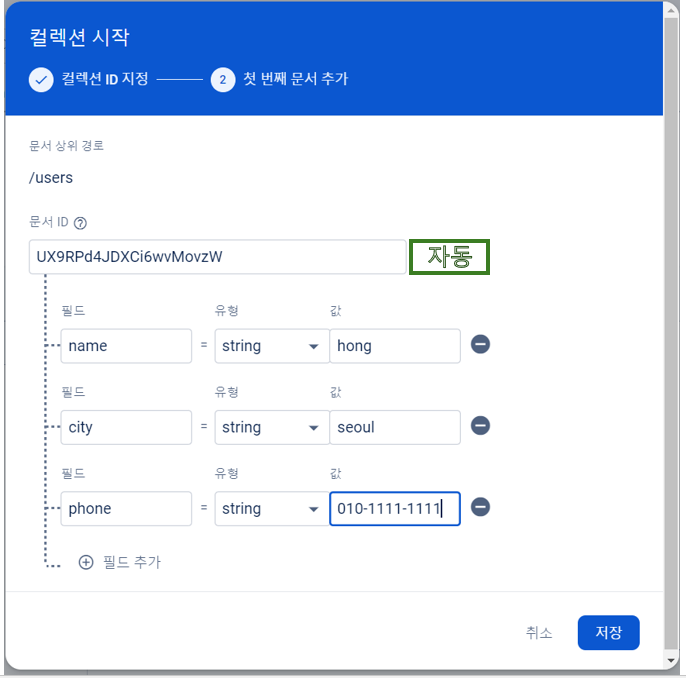
- 문서(document) : oracle의 행(row)
- Firestore의 문서는 데이터를 JSON 형식으로 저장 - 필드(Field) : Oracle의 열(Column)
- Firestore 문서 내의 각 필드는 하나의 키-값 쌍으로 데이터를 저장
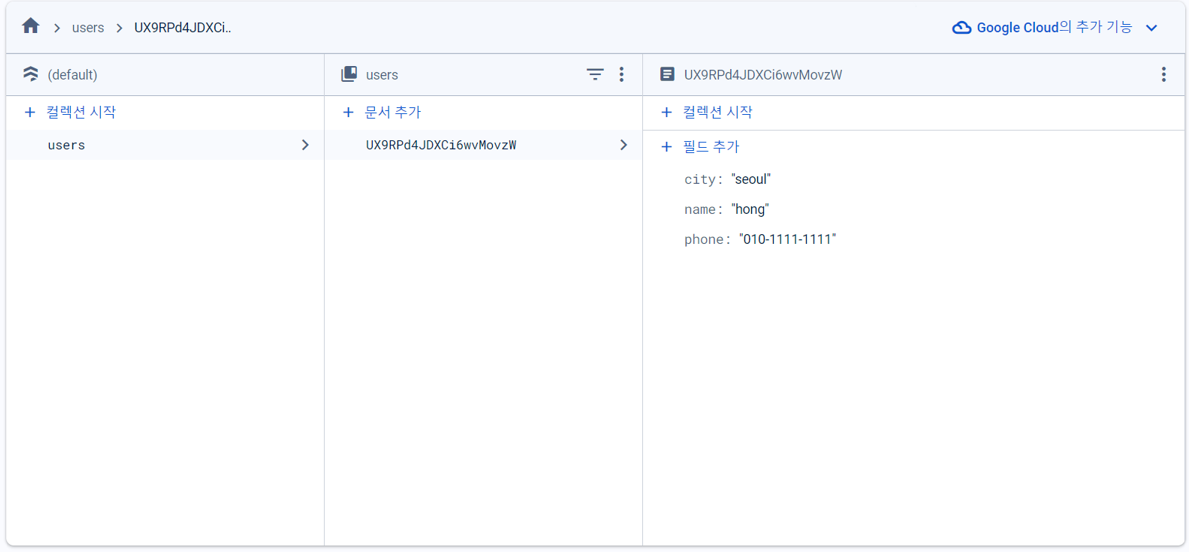
- 프로젝트 정보 확인하는 곳
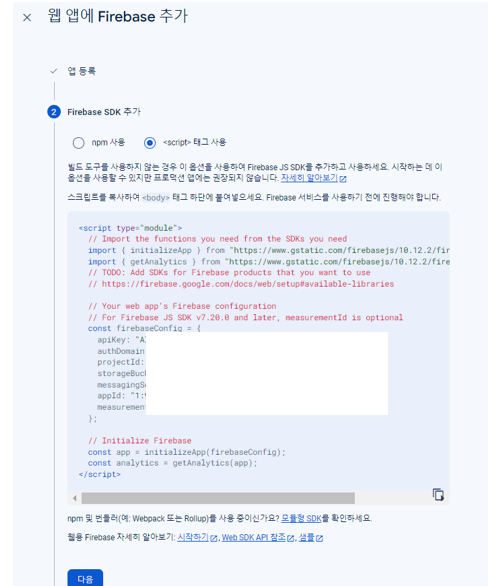
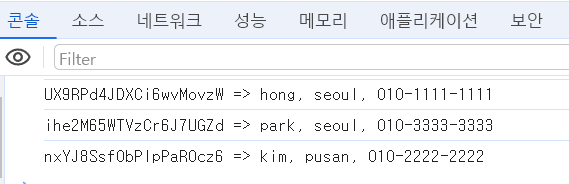
- users 컬렉션에 저장된 데이터 확인
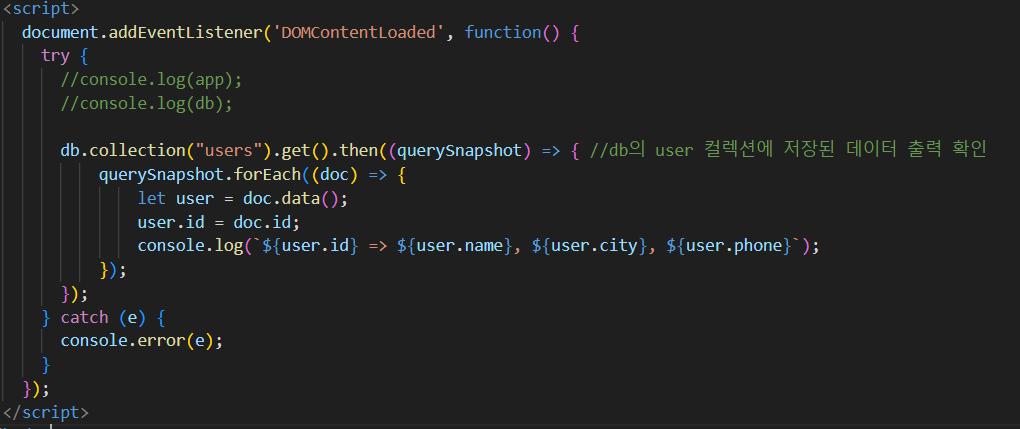
querySnapshot
: Firestore에서 데이터베이스 쿼리를 실행한 결과를 나타내는 객체document.addEventListener('DOMContentLoaded', function() {});
: HTML 문서의 콘텐츠가 모두 로드되고 DOM 트리가 완성되었을 때 실행할 함수 등록db.collection("users").get().then((querySnapshot) => {})
: Firestore의 users 컬렉션에 있는 모든 문서를 가져오고 프로미스를 반환하며 데이터가 성공적으로 로드되면then블록 내의 함수가 실행querySnapshot.forEach((doc) => { ... });
: querySnapshot에 포함된 각 문서 반환let user = doc.data();
: 각 문서의 데이터를 JSON 객체로 반환user.id = doc.id
: 문서 id를user객체에 추가console.log(${user.id} => ${user.name}, ${user.city}, ${user.phone});
: 문서 id와 함께 사용자 정보를 콘솔에 출력
기본 코드
<!DOCTYPE html>
<html>
  <head>
    <meta charset="utf-8">
    <meta name="viewport" content="width=device-width, initial-scale=1">
    <title>Welcome to Firebase Hosting</title>
    <script defer src="/__/firebase/10.12.2/firebase-app-compat.js"></script>
    <script defer src="/__/firebase/10.12.2/firebase-firestore-compat.js"></script>
    <script defer src="/__/firebase/10.12.2/firebase-storage-compat.js"></script>
    <script defer src="/__/firebase/init.js?useEmulator=true"></script>
  </head>
  <body>
    <h1>Hello world</h1>
    <script>
      document.addEventListener('DOMContentLoaded', function() {
        try {
          //console.log(app);
          //console.log(db);

          db.collection("users").get().then((querySnapshot) => { //db의 user 컬렉션에 저장된 데이터 출력 확인
              querySnapshot.forEach((doc) => {
                  let user = doc.data();
                  user.id = doc.id;
                  console.log(`${user.id} => ${user.name}, ${user.city}, ${user.phone}`);
              });
          });
        } catch (e) {
          console.error(e);
        }
      });
    </script>
  </body>
</html>

<script type="module">
  import { initializeApp } from "https://www.gstatic.com/firebasejs/10.12.2/firebase-app.js";
      const firebaseConfig = {
          // 해당 프로젝트 정보 넣는 부분
          apiKey: "정보 넣기",
          authDomain: "밑에도",
          projectId: "",
          storageBucket: "",
          messagingSenderId: "",
          appId: "",
          measurementId: ""
      };

      window.app = initializeApp(firebaseConfig);
       window.db = firebase.firestore();
  </script>

  </head>
</html>
✔ firebase storage 연동
✔ 사용자 정보 관리 페이지
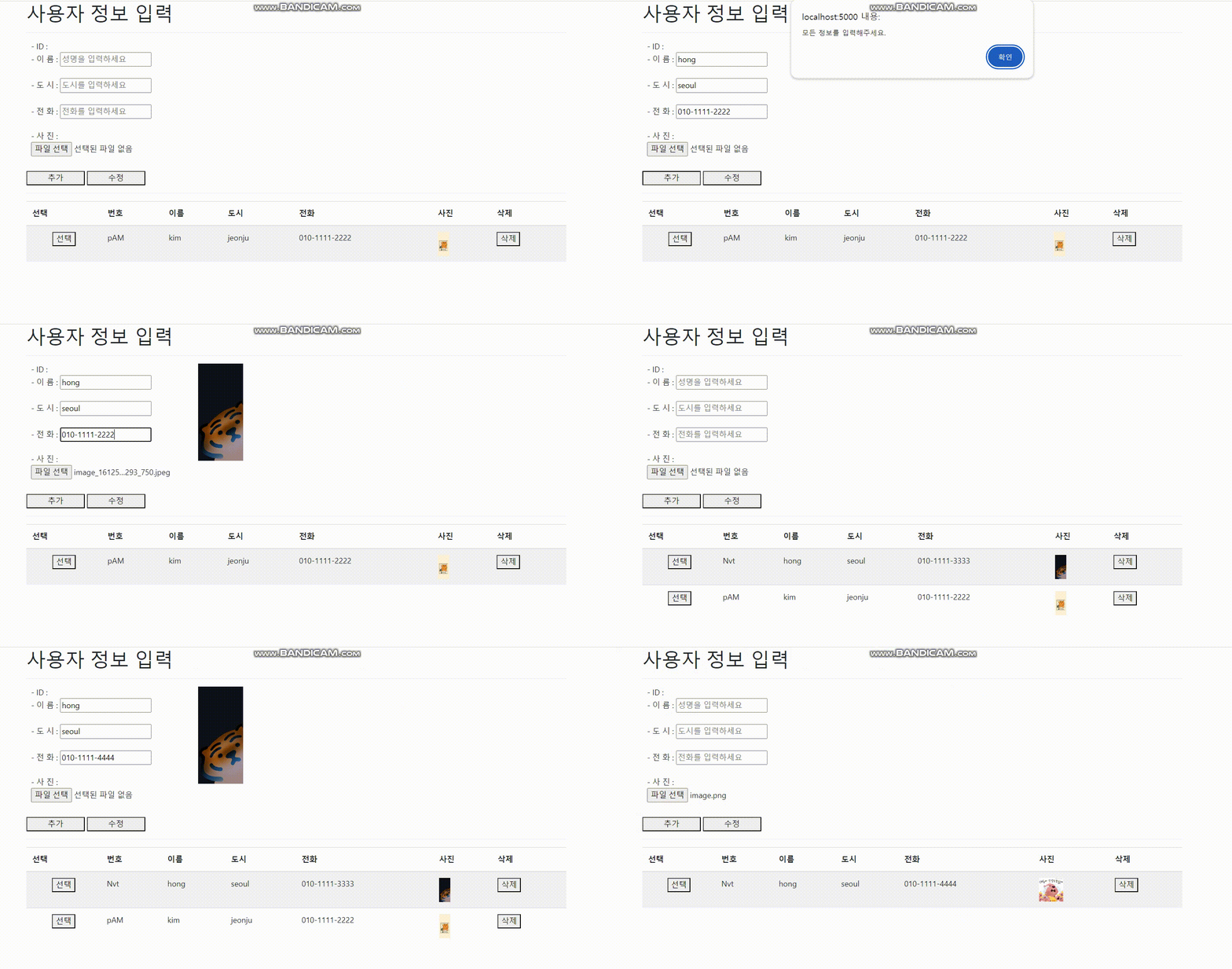
전체 코드
<!DOCTYPE html>
<html lang="ko">
<head>
  <meta charset="utf-8">
  <meta name="viewport" content="width=device-width, initial-scale=1">
  <title>Firebase Hosting에 오신 것을 환영합니다</title>
  <!-- 부트스트랩 CDN -->
  <link rel="stylesheet" href="https://cdn.jsdelivr.net/npm/bootstrap@4.6.2/dist/css/bootstrap.min.css">
  <script src="https://cdn.jsdelivr.net/npm/jquery@3.6.4/dist/jquery.slim.min.js"></script>
  <script src="https://cdn.jsdelivr.net/npm/popper.js@1.16.1/dist/umd/popper.min.js"></script>
  <script src="https://cdn.jsdelivr.net/npm/bootstrap@4.6.2/dist/js/bootstrap.bundle.min.js"></script>
  <!-- Firebase CDN -->
  <script defer src="/__/firebase/10.12.2/firebase-app-compat.js"></script>
  <script defer src="/__/firebase/10.12.2/firebase-firestore-compat.js"></script>
  <script defer src="/__/firebase/10.12.2/firebase-storage-compat.js"></script>
  <script defer src="/__/firebase/init.js?useEmulator=true"></script>

  <style>
    .input-group {
      display: flex;
      align-items: flex-start;
      margin-bottom: 10px;
    }

    .input-group img {
      max-width: 200px;
      max-height: 200px;
      display: none;
      margin-left: 50px;
    }

    .input-group .input-fields {
      margin-left: 10px;
      margin-bottom: 20px;
    }
  </style>

</head>

<body>
  <div class="container">
    <h1>사용자 정보 입력</h1>
    <hr/>
    <div>
      <div id="userInfo">
        <div class="input-group">
          <div class="input-fields">
            - ID : <br/>
            - 이 름 : <input id="name" type="text" placeholder="성명을 입력하세요" /><br /><br />
            - 도 시 : <input id="city" type="text" placeholder="도시를 입력하세요" /><br /><br />
            - 전 화 : <input id="phone" type="text" placeholder="전화를 입력하세요" /><br /><br />
            - 사 진 : <br/>
            <input type="file" id="photo" /><br/>
          </div>
          <!-- 사진 미리보기 -->
          <div id="previewContainer">
            <img id="preview" src="#" alt="사진 미리보기" style="max-width: 200px; max-height: 200px; display: none;"/>
          </div>
        </div>
        <button id="appendBtn" style="width:120px">추가</button>
        <button id="editBtn" style="width:120px">수정</button>
      </div>
    </div>
    <hr/>
    <table class="table table-striped">
      <thead>
        <tr>
          <th>선택</th>
          <th>번호</th>
          <th>이름</th>
          <th>도시</th>
          <th>전화</th>
          <th>사진</th>
          <th>삭제</th>
        </tr>
      </thead>
      <tbody id="showBox"></tbody>
    </table>
  </div>
  <script>
    // DOMContentLoaded 이벤트 발생 시 실행
    document.addEventListener('DOMContentLoaded', function() {
      var userList = []; // 사용자 목록을 저장하는 배열
      var showBox = document.getElementById("showBox");
      var appendBtn = document.getElementById("appendBtn");
      var editBtn = document.getElementById("editBtn");
      var nameElement = document.getElementById("name");
      var cityElement = document.getElementById("city");
      var phoneElement = document.getElementById("phone");
      var previewElement = document.getElementById("preview");
      var selectedUserId = null;

      // Firebase Storage 참조
      var storageRef = firebase.storage().ref();  // Firebase Storage의 참조를 가져옴

      // 파일 선택 시 미리보기
      var photoElement = document.getElementById("photo");
      photoElement.addEventListener('change', function() {
        var file = photoElement.files[0];
        if (file) {
          var reader = new FileReader();
          reader.onload = function(e) {
            previewElement.src = e.target.result;
            previewElement.style.display = 'block';
          };
          reader.readAsDataURL(file);
        }
      });

      // 사용자 추가
      appendBtn.onclick = function() {
        if (selectedUserId) {
          alert("선택된 사용자입니다. 수정하려면 수정 버튼을 눌러주세요.");
          return;
        }

        var newUser = {
          name: nameElement.value,
          city: cityElement.value,
          phone: phoneElement.value,
        };

        console.log(newUser);

        // 필드가 비어있을 때
        if (!newUser.name || !newUser.city || !newUser.phone || !photoElement.files[0]) {
          alert("모든 정보를 입력해주세요.");
          return;
        }

        // Firestore에서 중복 체크
        db.collection("users").where("phone", "==", newUser.phone).get().then((querySnapshot) => {
          if (!querySnapshot.empty) {
            console.error("Error: Phone number already exists.");
            alert("전화번호가 이미 존재합니다.");
            return;
          }

          // 중복이 없을 때, 사용자 추가
          var file = photoElement.files[0];
          var storageRef = firebase.storage().ref();
          var uploadTask = storageRef.child('user_photos/' + file.name).put(file);

          uploadTask.on('state_changed', function(snapshot) {
          }, function(error) {
            console.error("Error uploading file: ", error);
          }, function() {
            // 업로드 성공 시 파일 URL을 얻어서 Firestore에 저장
            uploadTask.snapshot.ref.getDownloadURL().then(function(downloadURL) {
              newUser.photo = downloadURL;
              db.collection("users").add(newUser)
                .then((docRef) => {
                  console.log("Document written with ID: ", docRef.id);
                  drawList();

                  // 필드 비우기
                  nameElement.value = "";
                  cityElement.value = "";
                  phoneElement.value = "";
                  photoElement.value = "";
                  previewElement.src = "#";
                  previewElement.style.display = 'none';
                })
                .catch((error) => {
                  console.error("Error adding document: ", error);
                });
            });
          });
        });
      };

      // 선택된 사용자 정보 표시 및 수정 기능
      window.selectUser = function(btn) {
        var idx = userList.findIndex((item) => item.id === btn.dataset.userid);
        if (idx !== -1) {
          var user = userList[idx];
          nameElement.value = user.name;
          cityElement.value = user.city;
          phoneElement.value = user.phone;
          selectedUserId = user.id;

          // 선택된 사용자의 사진 미리보기
          previewElement.src = user.photo; // 사용자의 사진 URL 설정
          previewElement.style.display = 'block'; // 사진 미리보기 보이기
        }
      };

       // 사용자 수정 기능
        editBtn.onclick = function() {
          if (!selectedUserId) {
            alert("수정할 사용자를 선택하세요.");
            return;
          }

          var updateUser = {
            name: nameElement.value,
            city: cityElement.value,
            phone: phoneElement.value,
          };

          // 파일을 새로 선택한 경우에만 사진 업데이트
          var file = photoElement.files[0];
          if (file) {
            var uploadTask = storageRef.child('user_photos/' + file.name).put(file);

            uploadTask.on('state_changed', function(snapshot) {
            }, function(error) {
              console.error("Error uploading file: ", error);
            }, function() {
              // 업로드 성공 시 파일 URL을 얻어서 Firestore에 저장
              uploadTask.snapshot.ref.getDownloadURL().then(function(downloadURL) {
                updateUser.photo = downloadURL;

                // 기존 사용자 정보 업데이트
                var userRef = db.collection("users").doc(selectedUserId);
                userRef.get().then(function(doc) {
                  if (doc.exists) {
                    // 기존 사용자 정보 업데이트
                    userRef.update(updateUser)
                      .then(() => {
                        console.log("Document successfully updated!");

                        confirm("사용자 정보를 업데이트 하시겠습니까?");
                        drawList();
                        // 필드 비우기
                        nameElement.value = "";
                        cityElement.value = "";
                        phoneElement.value = "";
                        photoElement.value = "";
                        previewElement.src = "#";
                        previewElement.style.display = 'none';

                        // 사용자 선택 초기화
                        selectedUserId = null;
                      })
                      .catch((error) => {
                        console.error("Error updating document: ", error);
                      });
                  } else {
                    console.error("No such document!");
                  }
                }).catch(function(error) {
                  console.error("Error getting document:", error);
                });
              });
            });
          } else {
            // 파일을 선택하지 않은 경우 기존 사진 URL 유지하고 사용자 정보 업데이트
            var userRef = db.collection("users").doc(selectedUserId);
            userRef.update(updateUser)
              .then(() => {
                console.log("Document successfully updated!");

                confirm("사용자 정보를 업데이트 하시겠습니까?");
                drawList();
                // 필드 비우기
                nameElement.value = "";
                cityElement.value = "";
                phoneElement.value = "";
                previewElement.src = "#";
                previewElement.style.display = 'none';

                // 사용자 선택 초기화
                selectedUserId = null;
              })
              .catch((error) => {
                console.error("Error updating document: ", error);
              });
          }
        };

      // 사용자 삭제 기능
      window.deleteUser = function(btn) {
        var userId = btn.dataset.userid;

        // Firestore에서 사용자 문서 가져오기
        db.collection("users").doc(userId).get().then((doc) => {
          if (doc.exists) {
            var user = doc.data();

            // Firestore에서 사용자 문서 삭제
            db.collection("users").doc(userId).delete().then(() => {
              console.log("사용자 문서 삭제 완료");

              // Firestore에서 삭제된 후 사진도 삭제
              if (user.photo) {
                // 기존 사진 URL 가져오기
                var existingPhotoUrl = user.photo;

                // 파일 URL로부터 Reference 생성
                var existingPhotoRef = firebase.storage().refFromURL(existingPhotoUrl);

                // 파일 삭제
                existingPhotoRef.delete().then(function() {
                  console.log("기존 사진 삭제 완료");

                  confirm("해당 유저를 삭제하시겠습니까?.");
                  drawList(); // 사용자 목록 다시 그리기
                }).catch((error) => {
                  console.error("기존 사진 삭제 오류:", error);
                });
              } else {
                console.log("해당 사용자의 사진이 없습니다.");
                confirm("해당 유저를 삭제하시겠습니까?.");
                drawList(); // 사용자 목록 다시 그리기
              }
            }).catch((error) => {
              console.error("해당 유저를 삭제하지 못했습니다. ", error);
            });
          } else {
            console.error("해당 유저를 찾을 수 없습니다.");
          }
        }).catch((error) => {
          console.error("사용자 문서를 가져오지 못했습니다: ", error);
        });
      };


      // 사용자 목록 그리기 함수
      function drawList() {
        try {
          db.collection("users").get().then((querySnapshot) => {
            var html = "";
            userList = [];
            querySnapshot.forEach((doc) => {
              let user = doc.data();
              user.id = doc.id;
              userList.push(user);
              html += `<tr>
                <td align="center">
                  <button data-userid="${user.id}">선택</button>
                </td>
                <td>${user.id.substring(0, 3)}</td>
                <td>${user.name}</td>
                <td>${user.city}</td>
                <td>${user.phone}</td>
                <td><img src="${user.photo}" alt="사용자 사진" style="max-width: 50px; max-height: 50px;" /></td>
                <td><button data-userid="${user.id}">삭제</button></td>
              </tr>`;
            });
            showBox.innerHTML = html; // HTML 테이블에 사용자 목록 추가
          });
        } catch (e) {
          console.error(e);
        }
      }

      drawList(); // 페이지 로드 시 사용자 목록을 초기화
    });
  </script>
</body>
</html>

<script type="module">
  import { initializeApp } from "https://www.gstatic.com/firebasejs/10.12.2/firebase-app.js";
  const firebaseConfig = {
    // Firebase 프로젝트 설정
    apiKey: "여기 설정 작성",
    authDomain: "밑에도",
    projectId: "",
    storageBucket: "",
    messagingSenderId: "",
    appId: "",
    measurementId: ""
};

  window.app = initializeApp(firebaseConfig);
  window.db = firebase.firestore(); // Firestore 인스턴스를 전역 객체에 할당
</script>
코드 뜯어보기
Firebase 참조 설정
- Firebase Storage는 파일(이미지, 동영상 등)을 저장하고 관리할 수 있는 클라우드 스토리지 서비스

firebase.storage()
: Firebase Storage 서비스에 대한 인스턴스 반환.ref()
: Firebase Storage의 루트 참조를 가져옴
→ 이 루트 참조를 통해 파일을 업로드하고 다운로드
파일 선택 시 미리보기
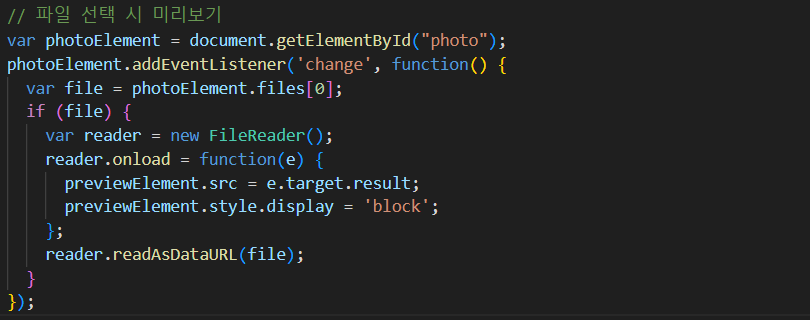
addEventListener('change', function() { })
: 파일 선택의 input 값이 변경될 때 실행될 함수 등록photoElement.files[0]
: files 속성은 FileList 객체를 반환하며, [0]은 첫 번째 선택된 파일을 나타냄
배열과 유사한 객체FileReader
: 웹 애플리케이션에서 비동기적으로 파일의 내용을 읽을 수 있는 객체
→ 파일을 읽고, 그 내용을 텍스트, 데이터 URL, 배열 버퍼 등의 형식으로 변환할 수 있음onload
: 파일 읽기 작업이 성공적으로 완료되면 실행되는 이벤트 핸들러e.target.result
: 파일 읽기 작업의 결과로 생성된 데이터 URL(URL:파일의 내용을 URL 형식으로 인코딩한 문자열)previewElement.src = e.target.result;
: 미리보기 이미지 요소(previewElement)의 src 속성을 파일의 데이터 URL로 설정하여 이미지를 표시previewElement.style.display = 'block';
: 미리보기 이미지 요소를 화면에 표시
-reader.readAsDataURL(file);
: FileReader 객체의 readAsDataURL 메서드를 호출하여 파일을 데이터 URL 형식으로 읽음
사용자 추가
새로운 사용자 객체 생성
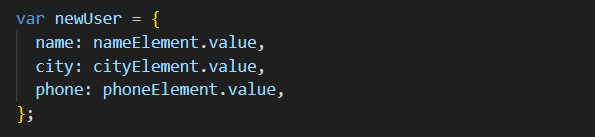
- 입력 필드에서 값을 가져와 newUser 객체생성
중복체크
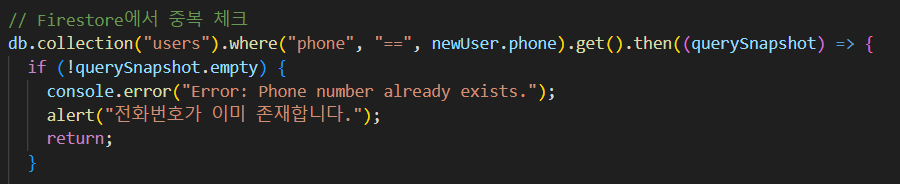
Firestore 컬렉션 참조
db.collection("users")db: Friestore 데이터 베이스에 대한 참조collection("users"): "user"라는 이름의 컬렉션 참조
쿼리 작성
.where("phone", "==", newUser.phone)
: where 메서드를 사용해 "phone" 필드가 newUser.phone과 같은 값을 가진 문서를 찾음
쿼리 실행
.get()
: .get() 메서드를 호출해 쿼리를 실행 → 일치하는 문서들을 포함하는 QuerySnapshot을 반환QuerySnapshot
: 쿼리 결과를 포함하는 객체로, 일치하는 모든 문서의 데이터를 포함
쿼리 결과 처리
then메서드
: 쿼리가 성공적으로 완료된 후에 실행되는 콜백 함수를 정의- 콜백 함수는 querySnapshot 객체를 인자로 받음
- empty 속성은 쿼리 결과에 문서가 없는 경우 true, 문서가 있는 경우 false
즉, querySnapshot.empty가 false인 경우, 즉 동일한 전화번호를 가진 문서가 이미 존재하는 경우
중복 없을 때 사용자 추가
파일 선택 및 참조 생성

파일 업로드

storageRef.child('user_photos/' + file.name)
: user_photos 폴더 안에 파일 이름으로 참조를 생성put(file)
: 파일을 해당 참조에 업로드 (비동기적 수행)uploadTask
: 업로드 작업을 추적할 수 있는 객체
업로드 완료 후 url 얻기

uploadTask.snapshot.ref.getDownloadURL()
: 업로드된 파일의 다운로드 URL을 얻는 비동기 함수downloadURL
: 업로드된 파일의 접근 가능한 URL- 이 URL을 newUser.photo에 할당하여 사용자 데이터에 포함
Firestore에 사용자 데이터 추가
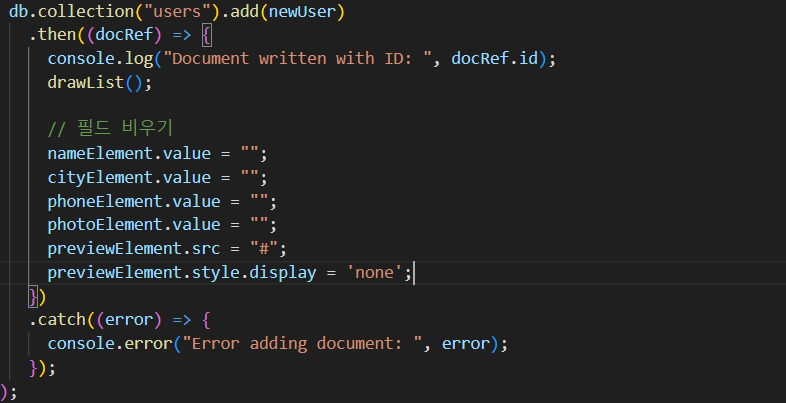
db.collection("users").add(newUser)
: newUser 객체를 "users" 컬렉션에 추가.add()메서드
:비동기적으로 동작하며, Promise 객체를 반환docRef
: 추가된 문서의 참조docRef.id새로 추가된 문서의 고유 ID
사용자 정보 선택 및 수정
사용자 선택 및 정보 표시
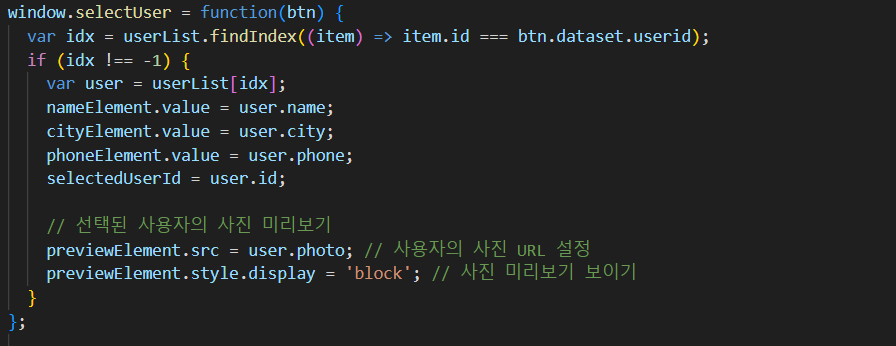
window.selectUser
: 전역 객체인 window에 함수를 할당해, 해당 함수를 전역에서 접근 가능하게 만듦userList.findIndex((item) => item.id === btn.dataset.userid);
: userList 배열에서 클릭된 버튼의 data-userid 속성과 일치하는 사용자 객체의 인덱스를 찾음
-var user = userList[idx];
: nameElement.value = user.name;를 사용해 사용자 정보를 입력 필드에 채움previewElement.src = user.photo;
: 미리보기 이미지 요소의 src 속성을 사용자의 사진 URL로 설정
파일을 새로 선택한 경우
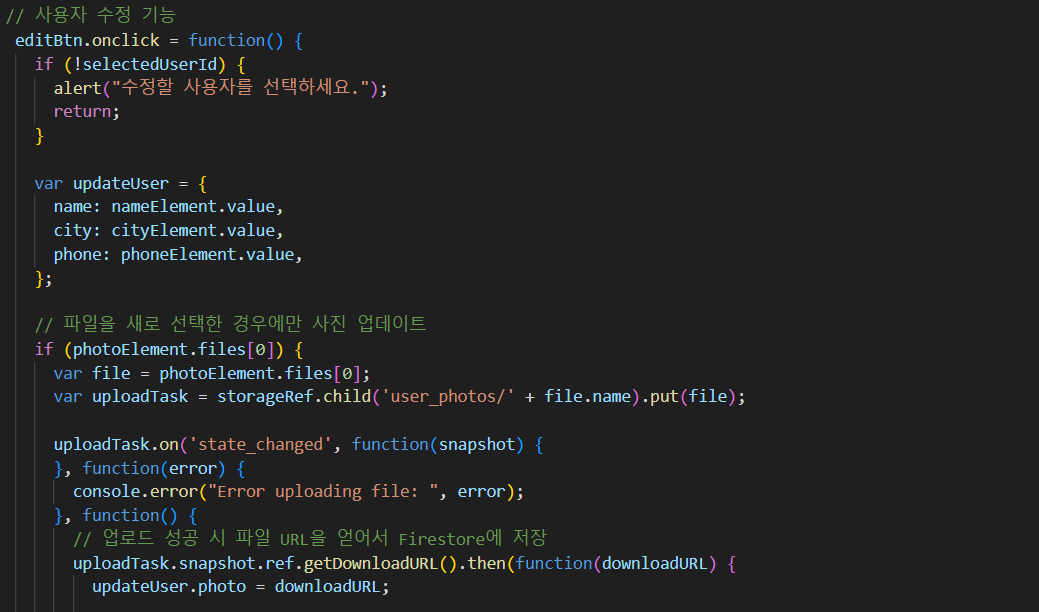
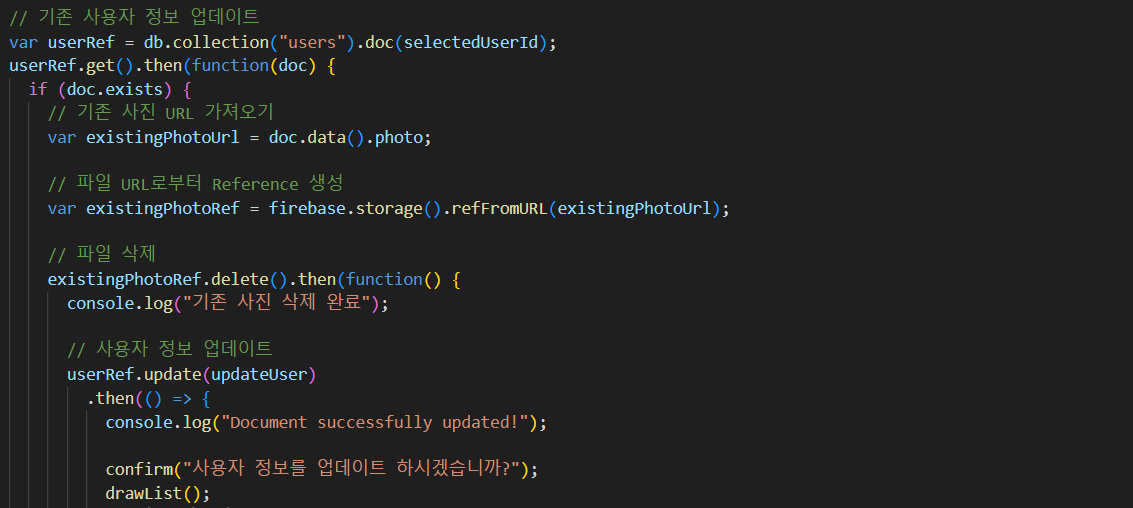
var existingPhotoUrl = doc.data().photo;
: 기존 사진 URL을 가져옴var existingPhotoRef = firebase.storage().refFromURL(existingPhotoUrl);
: 기존 사진의 참조를 생성existingPhotoRef.delete().then(function() {});
: 기존 사진을 삭제userRef.update(updateUser).then(() => {});
: 사용자 문서를 업데이트
사용자 삭제
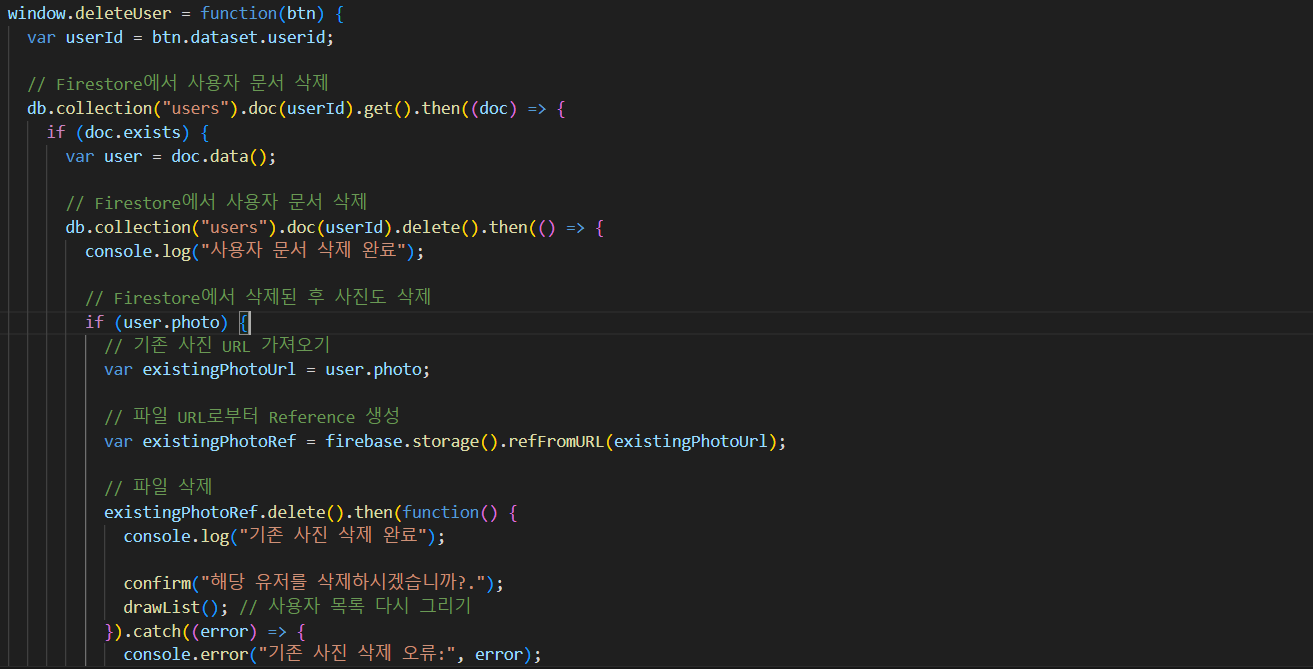
db.collection("users").doc(userId).delete().then(() => {}
: Firestore에서 해당 userId에 해당하는 문서를 삭제하는 비동기 메서드existingPhotoRef.delete().then(function() {}
: 사진을 삭제

ByeolGyu