✔ constructor (6강)
: Object 생성 기계
- constructor를 만들 때는 function 키워드를 빌려서 사용
- 일반함수와 구분하기 위해 첫글자는 대문자로
인스턴스-this는 새로 생성되는 오브젝트를 뜻함
→ 비슷한 + 독립적인 object 자료를 여러개 만들 때 코드의 양이 줄어듦
- 상속(inheritance) : constructor가 가진 속성들을 그대로 물려받아서 오브젝트를 만듦
constructor + 함수
- object 안에 함수 추가 가능
function Student(name, age){ // 일반함수랑 다름을 표시하기 위해 대문자로
  this.name = name;
  this.age = age;
  this.sayHi = function(){
    console.log(`안녕하세요 ${this.name}입니다.`)
  }
}

var student1 = new Student('kim', 15);
student1.sayHi();

var student2 = new Student('park', 20)
student2.sayHi();
예제
// Q1
function Products(name, price){
  this.name = name;
  this.price = price;
}

let product1 = new Products('shirts', 50000)
console.log(product1);
let product2 = new Products('pants', 60000)
console.log(product2);

//Q2
function Productsss(name, price){
  this.name = name;
  this.price = price;
  this.tax =  function(){
    console.log(this.price*0.1);
  }
}

let product3 = new Productsss('shirts', 50000)
product3.tax();
✔ Prototype (7강)
- construct를 만들면 prototype이라는 항목이 construct 안에 생성됨
function Student(name, age){
  this.name = name;
  this.age = age;
  this.sayHi = function(){
    console.log(`안녕하세요 ${this.gender} ${this.name}입니다.`)
  }
}

var student1 = new Student('park', 15);
var student2 = new Student('kim', 13);

console.log(Student.prototype);
construct명.prototype에 변수나 함수가있다면해당 construct에서 생성되는 새로운 오브젝트들은 물려받아서 사용함

→ 즉, prototype은 construct의 유전자 역할
prototype 데이터 추가
prototype에 오브젝트 자료형{gender : '남'}을 저장하면
construct에 '남자'라는 데이터를 추가한 것과 같음
→ student1, student2 등에서 gender라는 속성을 사용할 수 있음
function Student(name, age){
  this.name = name;
  this.age = age;
  this.sayHi = function(){
    console.log(`안녕하세요 ${this.gender} ${this.name}입니다.`)
  }
}

Student.prototype.gender = '남자 ' // 저장

var student1 = new Student('park', 15);
var student2 = new Student('kim', 13);

student1.sayHi();
student2.sayHi();
- prototype에는 값을 여러개 부여할 수도 있고 함수도 넣을 수 있음
- prototype에 추가된 데이터들은 자식들이 직접 가지는게 아니라 부모만 가지고 있음
작동원리 1
자바스크립트는 오브젝트에서 값을 출력할 때 묻는 순서
(1) 학생1에 직접 gender라는 값이 있는가?
(2) 그럼 부모 유전자에 gender라는 값이 있는가?
(3) 그럼 부모의 부모 유전자에 gender라는 값이 있는가?
(4) 그럼 부모의 부모의 부모의 유전자에 gender라는 값이 있는가?
작동원리 2
자바스크립트 내장함수 toString() 을 쓸 수 있는 이유
: 자바스크립트 array, object 들에는 붙일 수 있는 내장함수들이 많음
→ array에 arr.toString() 이렇게 붙일 수 있는 이유는 array의 부모 유전자가 toString()을 가지고 있기 때문
new 키워드
var arr = [1,2,3];
var arr = new Array(1,2,3); // 위와 같음
new Array()는 Array라는 기계로부터 자식을 하나 새로 생성하라는 뜻
→ Array로부터 생성된 자식들은 Array의 유전자에 부여되어있는 함수, 데이터들을 자유롭게 사용할 수 있음
Array.prototype
Array는 sort, map, push, forEach 등을 가지고 있어 Array의 자식들은 전부 이런 함수들을 쉽게 가져다 쓸 수 있었음
Object 자료형도 똑같이 new Object()로 만들기 때문에 부모의 prototype에 있던 함수들을 자유롭게 사용가능
prototype vs constructor
- 자식들이 값을 직접 소유하게 만들고 싶으면 constructor로 상속시키시면 되고
- 부모만 가지고 있는 것을 참조해서 쓰게 만들고 싶으면 prototype으로 상속
- 보통은 상속할 수 있는 함수 같은 것들은 prototype으로 많이 만들어놓음
✔ Prototype (8강)
prototype 특징
- prototype은 constructor 함수에만 생성
-
일반 object, array 이런거 만들어 prototype이 없습음
-
일반 object 같은걸 상속하고 싶으면
constructor함수를 만들거나Object.create()를 사용하거나
class를 사용 해야함
__proto__를 출력하면 부모의 유전자 출력 가능
- 부모로부터 생성된 자식 object들은 proto라는 속성이 있음
-__proto__을 출력해보면 부모의 prototype이 출력
→ __proto__는 부모의 prototype과 같은 의미
function Person(){
  this.name = 'Kim';
  this.age = 15;
}
var stu1 = new Person();
console.log(stu1 .__proto__);
console.log(Person.prototype);
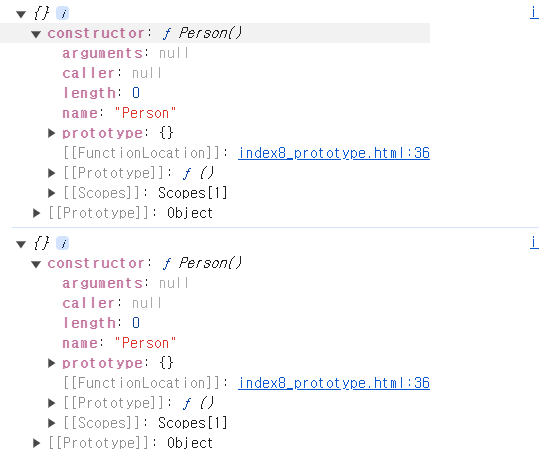
__proto__를 직접 등록하면 object끼리 상속기능을 구현가능
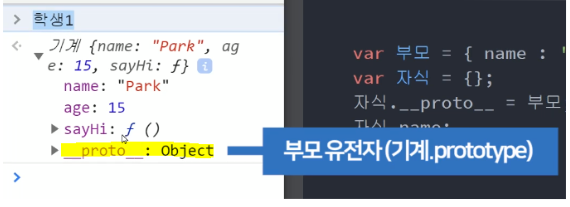
__proto__는 부모의 prototype을 의미- 그럼 어떤 object에다가
__proto__를 강제로 하나 설정하면 부모가 생김
var 부모 = { name : 'Kim' };
var 자식 = {};

자식.__proto__ = 부모;
console.log(자식.name);
부모와 자식 object를 하나씩 만들고 자식의 __proto__에 부모를 집어넣으면 자식의 부모 유전자는 { name : 'Kim' } 이라는 오브젝트가 되는 것
→ 자식은 자식.name 속성을 자유롭게 사용할 수 있음
- 콘솔창에 prototype 정보들이 항상 출력
✔ ProtoType 예제 (9강)
0번
여러 개의 object 자료를 만들고 싶을 때
function Student (name, age) {
  this.name = name,
    this.age = age,
    this.sayHi = function() {
    console.log("안녕 나는 " + this.name + "이야")
  }
}

const student1 = new Student('kim', 20);
student1.sayHi()
const student2 = new Student('Park', 21);
student2.sayHi()
const student3 = new Student('Lee', 22);
student3.sayHi()
1번
function Parent(){
  this.name='kim';
}

var a = new Parent();

a.__proto__.name='Park';
console.log(a.name); // kim
console.log(a.__proto__); // {name: 'Park'}
var a = new Parent();로 인해 a = {name : 'kim}
a.proto.name = 'Park'은 부모 prototype에 {name : 'Park'} 추가하라는 뜻
→ 내가 직접 가지고 있는 { name : 'Kim' }을우선 출력
2번
주석처리 부분은 실행되지 않는 이유
: arrow function은 this를 바깥에 있는 this를 그대로 사용하고 싶을 때 쓰는 함수이기 때문
- arrow function의 경우 함수 안에서 this 뜻이 재정의되지 않고 바깥에 있던 this를 사용
function Person(name, age){
  this.name = name;
  this.age = age;
}

// Student.prototype.sayHi = () => {
//    console.log('안녕 나는 ' + this.name + '이야');
//}

Person.prototype.sayHi1 = function(){
  console.log("안녕" + this.name);
}

var person1 = new Person('kim', 20);

console.log(Person.prototype);
person1.sayHi1();
3-1번
모든 array에 붙일 수 있는, array 내에 있는 3이라는 값을 제거해주는 함수
- array 자료형은 부모가 Array로 부터 new Array() 이런 식으로 만들어지기 때문에 Array라는 부모의 prototype에 있는 함수들을 자유롭게 가져다 쓸 수 있음
Array.prototype.remove3 = function(){
  for(var i = 0; i < this.length; i++){
    if (this[i] === 3) {
      this.splice(i, 1); //  this라는 array에서 i번째 자료를 제거
    }
  }
}
var arr = [1,2,3,4,5];
arr.remove3();

console.log(arr);
3-2번
Array.prototype.remove5 = function(){
  return this.filter(item => {
    return item !== 5;
  })
}
var arr2 = [1, 2, 3, 4, 5, 6];
newarr2 = arr2.remove5(); // filter는 새로운 값을 반환하기 때문에 값을 담아야함
console.log(newarr2)
✔ ES5방식 상속기능 (10강)
ES5 출시 때 나온 Object.create()라는 문법을 사용해 상속 기능 만들 수 있음
Object.create()
Object.create(물려받을 부모obj);
- 소괄호 안에 적은 부모object가 유전자(prototype)가 됨
var parent = {name : 'kim', age : 50};

var child = Object.create(parent); // 부모의 속성을 물려받아 사용가능
console.log(child)
자식에 값 부여
var parent = {name : 'kim', age : 50};

var child = Object.create(parent);
console.log(child)

child.age = 20; //  자식에서 값 부여
- 상속받은 50이라는 age가 출력되지 않는 이유
: 오브젝트 자료형에서 특정 자료를 꺼낼 때 묻는 순서가 있음
→
자식이라는 obj가 직접 age를 가지고 있으면 출력
- 없으면 자식의 부모 prototype을 에서 age가 거기 있으면 출력
- 거기도 없으면 부모의 부모 prototype에서 찾아서 출력
손자..
자식과 부모가 가진 모든 속성 상속 받음
var parent = {name : 'kim', age : 50};

var child = Object.create(parent); // 부모의 속성을 물려받아 사용가능
console.log(child)

child.age = 20;

var grandChild = Object.create(child);
console.log(grandChild);
✔ ES5방식 상속기능 - class (11강)
class로 만드는 constructor
class Parent {
  constructor(name){
    this.name = 'kim';
  }
}

var child = new Parent('kim');
상속가능한 함수를 추가
- 함수를 this.sayHi 이렇게 constructor 안에 추가하는 방법
- 각 인스턴스가 개별적으로 메소드를 소유하므로 메모리 사용이 비효율적일 수 있음
- 프로토타입 체인과는 무관하게 인스턴스에 속함
- prototype에 추가하는 방법
- 메모리 사용이 효율적이며, 모든 인스턴스에서 동일한 메소드를 참조
- 인스턴스에서 메소드 호출 시 프로토타입 체인을 통해 접근
class Parent {
  constructor(name){
    this.name = name;
    this.sayHi = function(){
      console.log('HI ' + this.name) // 함수 추가 방법 1 / 자식이 함수를 직접 가짐
    }
  }
  sayHello(){
    console.log('HELLO'+this.name)  // 함수 추가 방법 2 / 부모.prototype에 추가됨
    // 자식은 sayHello()라고 썼을 때 부모의 prototype에 있던 sayHelloi() 함수를 쓸 수 있음
  }
}

var child = new Parent('kim');

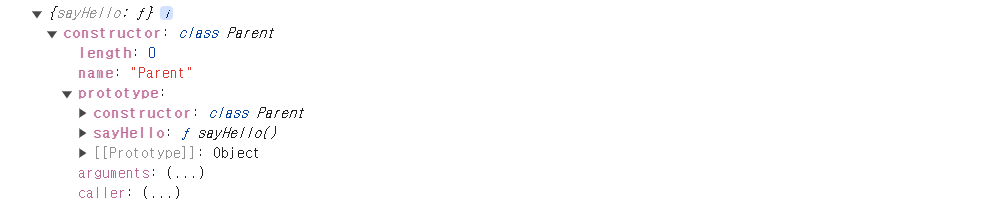
console.log(child); // 방법 2의 sayHello()는 자식 오브젝트에 출력 안됨
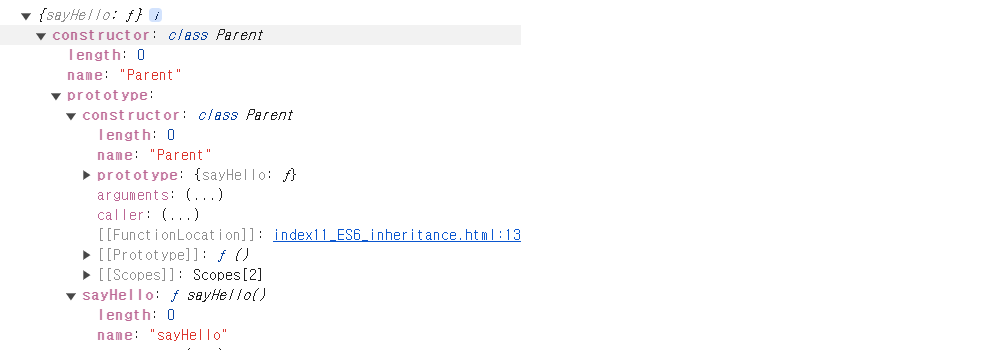
console.log(child.__proto__); // 부모.prototype이 출력
console.log(Object.getPrototypeOf(child)) // 소괄호에 담은 프로토타입 출력, 즉 부모의 프로토타입 출력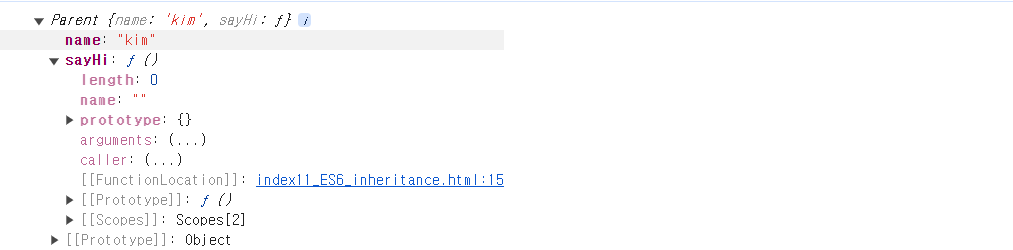
Object.getPrototypeOf()
Object.getPrototypeOf() 함수 안에 오브젝트를 넣으시면 부모 prototype을 출력함.
- 오브젝트가 대체 누구로부터 prototype을 상속받고 있는지를 알려주는 함수
__proto__라는 키워드와 비슷한 역할
프로토타입 수정
Parent.prototype.sayBye = function(){
  console.log('Bye' + this.name);
}
console.log(child)
console.log(child.__proto__);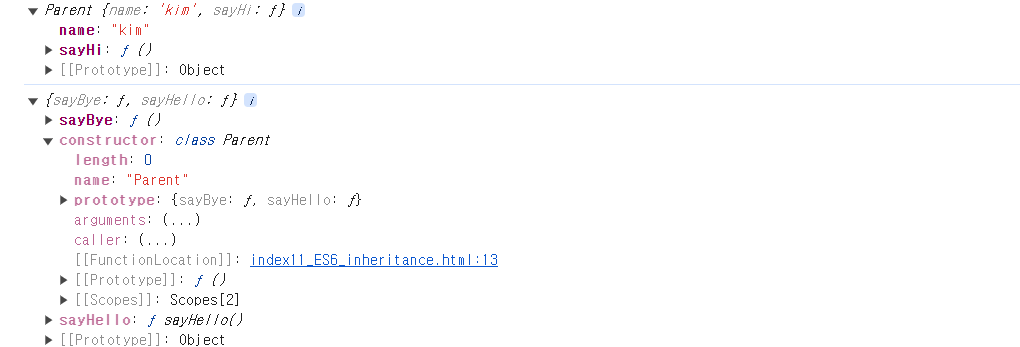
constructor안에 파라미터 추가