JavaScript
html 조작과 변경을 담당하는 언어
- 자바스크립트를 통해
- 탭, 모달 등 웹페이지 UI 만들 수 있음- 유저가 입력한 데이터 검사 가능
- 유저가 버튼 누르면 서버로 데이터 요청 가능
1. HTML 조작, 변경
- 자바스크립트 코드를 짜고 싶을 때는
<script>태그 안에 작성 <script>태그 안에 작성한 코드는 브라우저 새로고침 시 1번 실행됨
document.getElementById('???').style.color = 'red';
- ??? 부분만 바꾸면 html을 변경하고 조작할 수 있음
document.getElementById('???').style.color = 'red';
document.getElementById('???').src = 'profile.jpg';
document.getElementById("hello").style.fontSize = '16px';

- document : 문서
- . : ~의
- getElementById('hello') : id가 hello인 html 요소(element)를 찾기
- innerHTML = 'HI' : 내부 HTML에 '안녕'이라는 문자를 대입
- Selector
2. 동적 UI - Alert박스
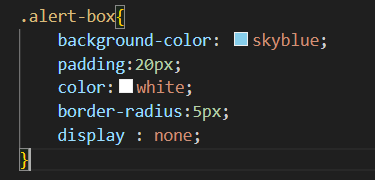
- css 첨부
:<head>태그 안에<link href="main.css" rel="stylesheet">
-
display:none(visibility : hidden)
: UI를 평소 숨기고 싶을 때 -
display:block(visibility : visible)
: UI를 보여주고 싶을 때
- 평소에는 알림창 안 보이게 -> 버튼 누르면 알림창 보이게
- x 버튼 누르면 알림창 안 보이게
<div class="alert-box" id="alert">
        알림창
        <button onclick="document.getElementById('alert').style.display='none';">❌</button>
</div>
<button onclick="document.getElementById('alert').style.display='block';">버튼</button>

3. function 문법
- function
: 특정 기능을 재사용 하기 위해 모듈화 해놓은 문법
- 함수 이름 작명 시 주의점
- 영어 소문자로 시작
- calmelCase 사용2강 코드 function으로
<body>
    <div class="alert-box" id="alert">
        알림창
        <button onclick="removeAlert()">❌</button>
    </div>
    <button onclick="popAlert()">버튼</button>

    <script>
        function popAlert (){
            document.getElementById('alert').style.display='block';
        }

        function removeAlert() {
            document.getElementById('alert').style.display='none';
        }
    </script>
</body>
4. 파라미터 문법
- 파라미터 문법을 통해 함수를 업그레이드 해 사용할 수 있음
- 3강의 함수 두 개를 하나의 함수로 만들 수 있음
<body>
    <div class="alert-box" id="alert">
        알림창
        <button onclick="popAlert('none');">❌</button>
    </div>
    <button onclick="popAlert('block');">버튼</button>
    <script>
        function popAlert(closeOpen) {
            document.getElementById('alert').style.display = closeOpen;
        }
    </script>
</body>
파라미터 문법 특징**
- 파라미터는 자유롭게 작명 가능
- 파라미터는 여러 개 사용 가능
- getElementByClassName
- getElementsByClassName('클래스명')[순서]
- 일치하는 class가 들어있는 모든 html 요소를 찾아줌
그 중 몇번째 요소를 바꿀지 순서를 붙여줌
<p class="title1"> 테스트1 </p>
<p class="title1"> 테스트2 </p>
<script>
  document.getElementsByClassName('title1')[0].innerHTML = '안녕';
</script>
4강 과제
- 버튼1 누르면 '아이디입력하세요' 라는 alert 박스가 떠야함
- 버튼2 누르면 '비번입력하세요' 라는 alert 박스가 떠야함
<body>
    <div class="alert-box" id="alert">
        <p id="title">알림창 </p>
        <button onclick="popAlert('none');">❌</button>
    </div>
    <button onclick="popAlert('block', '아이디를 입력하세요.');">버튼1</button>
    <button onclick="popAlert('block', '비밀번호를 입력하세요.');">버튼2</button>
    <script>
        function popAlert(closeOpen, title) {
            document.getElementById('alert').style.display = closeOpen;
            document.getElementById('title').innerHTML = title;
        }
    </script>
</body>
5. 이벤트 리스너 & 콜백함수
- 이벤트 리스너
- 유저가 웹페이지 접속해서 클릭, 스크롤, 키보드입력, 드래그 등을 하는 것
- onclick="" 안에 자바스크립트를 길게 짜는 것 대신 사용 가능함
- 이벤트 리스너 종류
https://developer.mozilla.org/en-US/docs/Web/Eventsid가 'close'인 요소를 클릭하면 function 코드를 실행
document.getElementsByName('close').addEventListener('click', function(){
	document.getElementById('alter').style.display = 'none';
 });
- 콜백함수
- 콜백함수 : 파라미터 자리에 들어가는 함수
- 코드를 순차적으로 실행할 때 사용
셀렉터로찾은요소.addEventListener('scroll', function(){} );
이 코드에서 두 번째 파라미터 자리에 함수가 들어감
자주 겪는 에러
1. JS 코드는 html밑에 작성
- html 파일을 읽을 때 위에서 부터 읽으므로 html을 조작하는 자바스크립트는 html 밑에 위치해야함
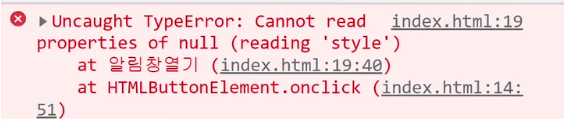
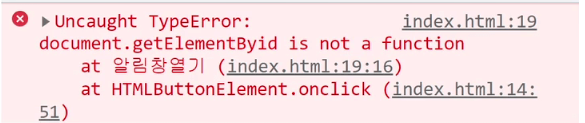
오타 주의
-
id 명이 잘못되었을 때
-
함수 명이 잘못되었을 때
코딩애플 JavaScript 입문과 웹 UI개발

ByeolGyu