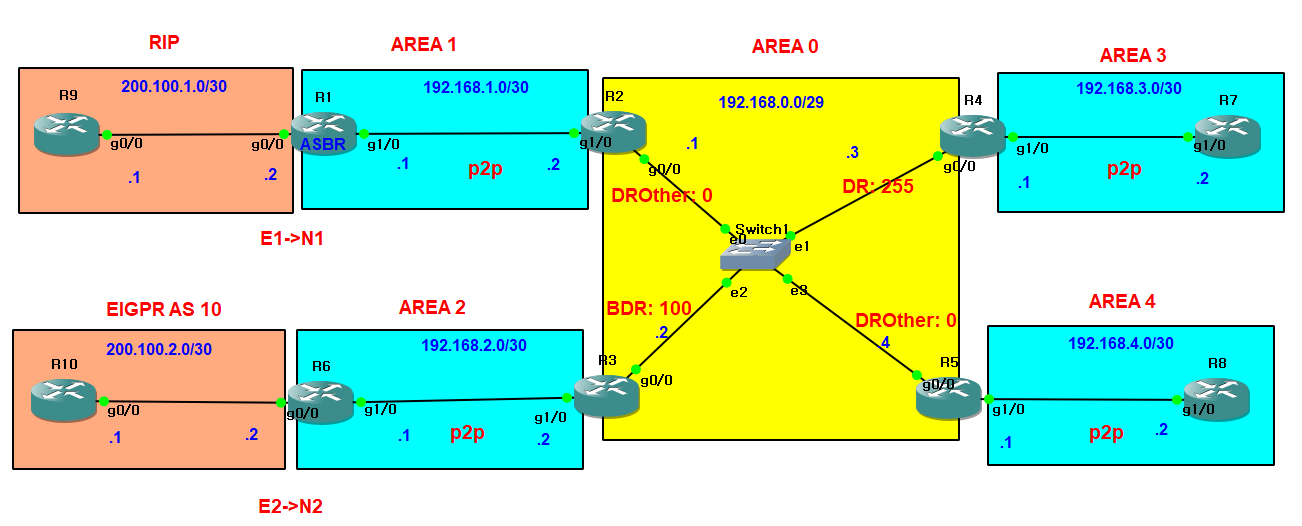
ip 입력 ospf설정 등 기본 입력등은 생략
R1 RIP 설정
version 2
network 200.100.1.0
no auto-summary
R9 RIP 설정
router rip
version 2
network 200.100.1.0
no auto-summary
R6 EIGRP 설정
router eigrp 10
network 200.100.2.0 0.0.0.3
no auto-summary
eigrp router-id 6.6.6.6
R10 EIGRP 설정
router eigrp 10
network 200.100.2.0 0.0.0.3
no auto-summary
eigrp router-id 10.10.10.10
재분배 하기
1.RIP를 OSPF로 재분배
router rip
redistribute ospf 1 만 입력하면 경로를 받지 못함
재배포되는 경로는 새 프로토콜 메트릭 체계에 맞는 값으로 변환되어야 하기 때문
R1(config)router rip
R1(config-router)#redistribute ospf 1 metric 1
RIP 홉수를 1로 설정(RIP 최대 홉수 15)
2. OSPF를 RIP로 재분배
R1#(config)router ospf 1
router-id 1.1.1.1
redistribute rip subnets metric-type 1
E1방식 사용
확인하기
R1#sh ip route

2.OSPF를 RIP로 재분배
R1(config-router)#redistribute rip subnets metric-type 1
R2에서 RIP 정보를 학습했는지 확인
R2#sh ip route

R1(config-router)#redistribute rip subnets metric-type 2

Q. 뭔차이 ?
E1방식은 변동Cost 20 + 내부링크Cost
E2방식은 고정Cost 20
상황에 따라 좋고 나쁨이 결정됨
EIGRP->OSPF
router eigrp 10
R6(config-router)#redistribute ospf 1 metric 1000000 1 255 1 1500
입력정보는 해당 인터페이스에서 확인 가능
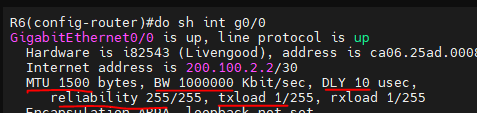
R3에서 확인


STUB 설정
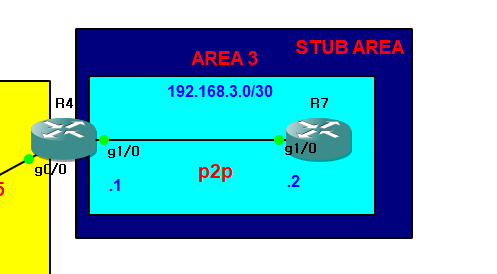
Stub Area에서는 외부 네트워크에 대한 OSPF 라우팅 정보가 전달되지 않으며, 대신 default route (0.0.0.0/0)만 사용
R7
sh ip route
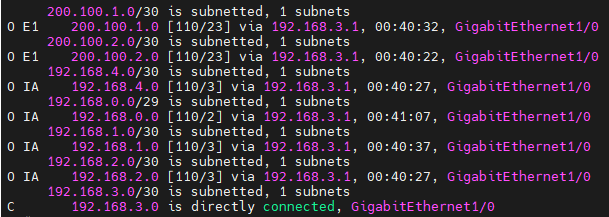
E1,E2 사라지고 기본경로(default route)로 대체
type 4,5차단
R4(config)#router ospf 1
R4(config-router)#area 3 stub
R7(config)#router ospf 1
R7(config-router)#area 3 stub
R7
sh ip route
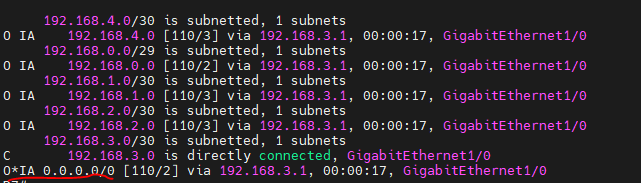
E1,E2 + IA도 차단하여 기본경로(default route)로 대체
R4(config-router)#area 3 stub no-summary
sh ip route

요약된 정보도 받지 않고 오직 default route만 받음
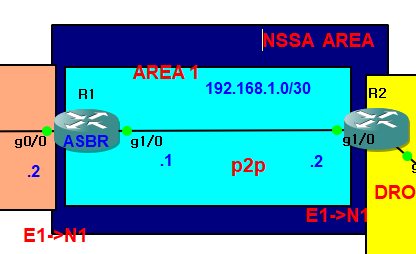
NSSA(Not So Stubby Area)
ASBR(AS Boundary Router)
Stub Area와 달리 NSSA는 외부 OSPF 정보를 일부 받아들이지만, 외부 경로 정보는 제한적
AREA 1 NSSA 설정
R1(config)#router ospf 1
R1(config-router)#area 1 nssa
R2(config)#router ospf 1
R2(config-router)#area 1 nssa
확인하기
R2#sh ip ospf
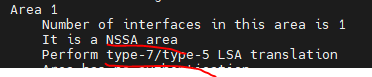
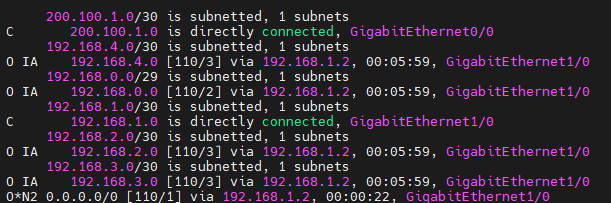
R2에서 NSSA 설정 후 E1,E2로 되어있던 외부 경로가 모두 삭제됨
200.100.2.0 경로 없어짐
삭제된 경로를 ABR에서 기본경로로 설정
R2(config)#router ospf 1
R2(config-router)#area 1 nssa default-information-originate
R1#sh ip route

E1,E2,IA 모두 차단, 기본경로로 대체
R2(config)#router ospf 1
R2(config-router)#area 1 nssa no-summary
R1#sh ip route

AREA 2 NSSA 설정
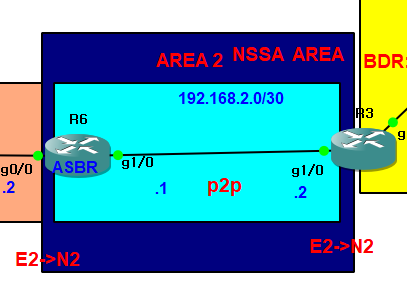
기존 경로 확인 먼저 함
R6
sh ip route
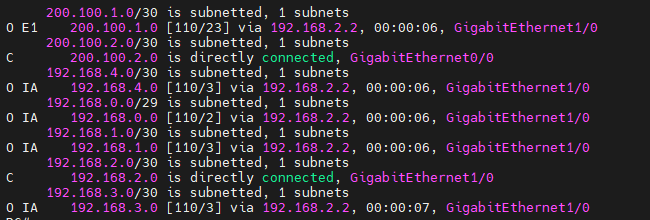
R6(config)#router ospf 1
R6(config-router)#area 2 nssa
R3
R3(config)#router ospf 1
R3(config-router)#area 2 nssa no-summary
E1,E2,IA 모두 차단, 기본경로로 대체함
R6
sh ip route

R3
sh ip ospf

Virtual Link
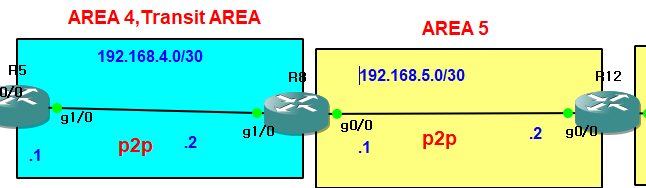
ip,ospf,p2p 설정생략
R5와 R8 사이에 가상링크 설정
R5(config)#router ospf 1
R5(config-router)#area 4 virtual-link 8.8.8.8
R8(config-if)#router ospf 1
R8(config-router)#area 4 virtual-link 5.5.5.5
R5와 R8 라우터는 virtual-link를 사용하여 OSPF 영역 4 내에서 논리적으로 연결됨
가상링크 설정 후 R12에 없던 경로들 추가로 들어옴
area 5 -> area 0 변경
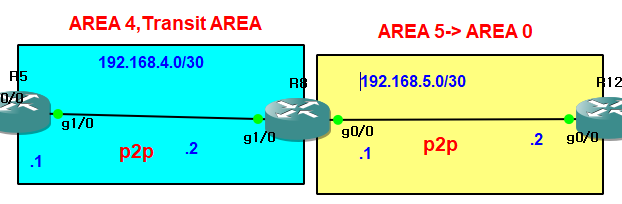
R8(config-if)#no ip ospf 1 area 5
R8(config)#router ospf 1
R8(config-router)#network 192.168.5.0 0.0.0.3 area 0
R12(config-if)#no ip ospf 1 area 5
R12(config-if)#router ospf 1
R12(config-router)#network 192.168.5.0 0.0.0.3 area 0
백본 area가 분리된 경우에도 가상링크로 연결 가능
R12#ping 200.100.1.1

OSPF 라우팅 보안
평문 인증과 MD5 인증 설명
평문 인증
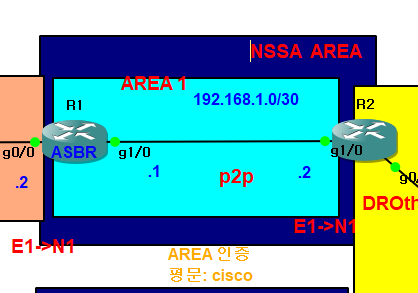
AREA 방식과 Neighbor 방식이 있다
여기서는 AREA 방식만 설명
R2(config-if)#router ospf 1
R2(config-router)#area 1 authentication
R2(config)#int g1/0
R2(config-if)#ip ospf authentication-key cisco
R1(config)#router ospf 1
R1(config-router)#area 1 authentication
R1(config)#int g1/0
R1(config-if)#ip ospf authentication-key cisco
MD5 인증
2가지 방법
1. Neighbor 인증 : 인터페이스 설정
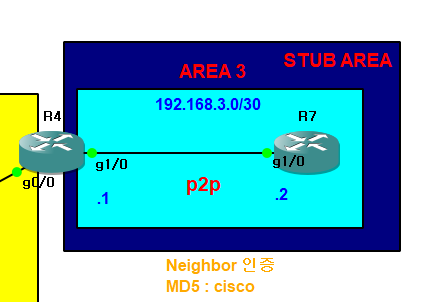
R4(config)#int g1/0
R4(config-if)#ip ospf authentication message-digest
R4(config-if)#ip ospf message-digest-key 1 md5 cisco
R7(config)#int g1/0
R7(config-if)#ip ospf authentication message-digest
R7(config-if)#ip ospf message-digest-key 1 md5 cisco
2. Area 인증
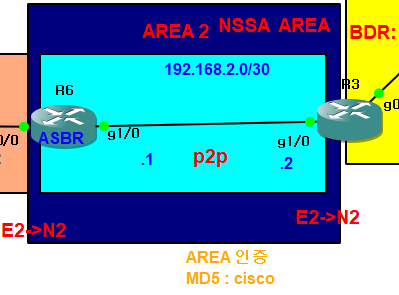
R6(config)#router ospf 1
R6(config-router)#area 2 authentication
R6(config-router)#int g1/0
R6(config-if)#ip ospf message-digest-key 1 md5 cisco 1
R3(config)#router ospf 1
R3(config-router)#area 2 authentication message-digest
R3(config-router)#int g1/0
R3(config-if)#ip ospf message-digest-key 1 md5 cisco1
MD5 인증 설정을 해도 라우터에 저장시 인증키가 암호화 되지 않음
R3#sh run | ospf message-digest

암호화하려면
R3(config)#service password-encryption
R3#sh run | ospf message-digest

가상 링크 인증키 설정

R5(config-router)#area 4 virtual-link 8.8.8.8 authentication message-digest
R5(config-router)#area 4 virtual-link 8.8.8.8 message-digest-key 1 md5 cisco
R8(config-router)#area 4 virtual-link 5.5.5.5 authentication message-digest
R8(config-router)#area 4 virtual-link 5.5.5.5 message-digest-key 1 md5 cisco
BGP 설정

static과 유사, 직접 찾아야함
R12(config)#router bgp 100
R12(config-router)#bgp router-id 1.1.1.1
R12(config-router)#neighbor 1.1.10.2 remote-as 200
R12(config-router)#network 1.1.1.0 mask 255.255.255.0
R13(config)#router bgp 200
R13(config-router)#bgp router-id 2.2.2.2
R13(config-router)#neighbor 1.1.10.1 remote-as 100
R13(config-router)#network 2.2.2.0 mask 255.255.255.0
BGP 피어 이웃와 연결을 설정
해당 피어는 BGP AS <해당번호>에 속해 있음을 나타냄
loopback 학습
bgp에서는 와일드카드x, 서브넷마스크 값 입력
이웃되어있는 bgp 확인
R12#sh ip bgp summary

내부 경로만 재분배
R12(config)#router bgp 100
R12(config-router)#redistribute ospf 1
R13#sh ip route
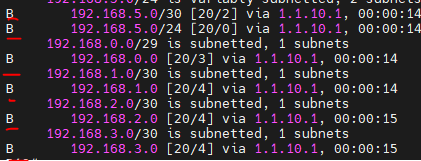
R12(config-router)#redistribute ospf 1 match internal external 1 external 2 nssa-external 1 nssa-external 2
BGP를 ospf로 재분배
R12(config-router)#router ospf 1
R12(config-router)#redistribute bgp 100 subnets
E2방식으로 분배
bgp로 핑 보낼때는 source ping으로 보내야함
bgp table에 내부 네트워크 정보만 올렸기 때문
R13(config)#router bgp 200
R13(config-router)#redistribute static #static route를 다른 bgp에 재분배
R13(config-router)#default-information originate
확인 및 핑테스트
R12#sh ip route


R2에서 학습시켜주기
R2#sh ip route

ping 8.8.8.8 불가능
R12에서 재분배
R12(config-router)#default-information originate always
R2#sh ip route

nat를 학습했지만 0.0.0.0 이 NAT1을 따라가므로 수동 설정

R12(config-router)#do clear ip bgp * soft
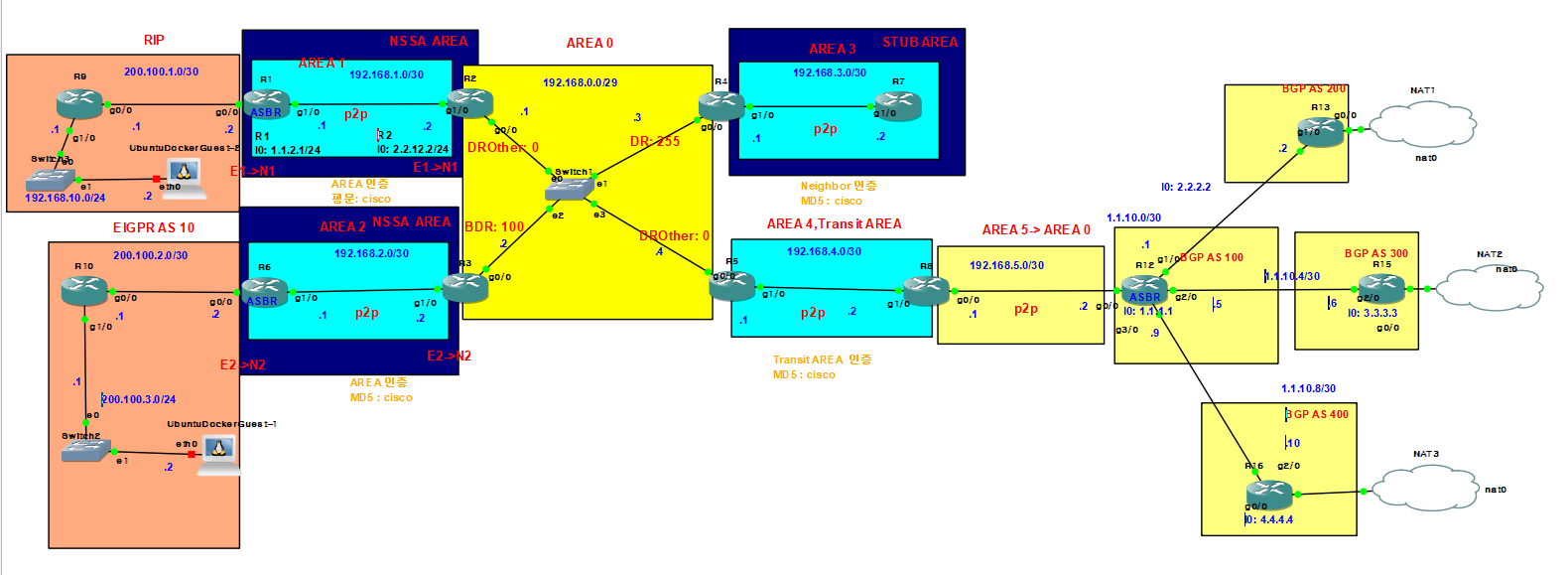
최종 완성랩
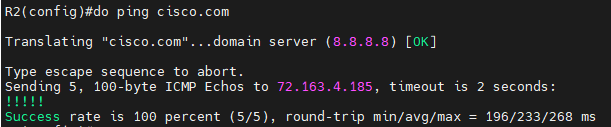
연결 도메인 테스트
R2(config)#ip domain-lookup
R2(config)#ip name-server 8.8.8.8
R2(config)#do ping cisco.com
네트워크 가중치
R16#ip route 0.0.0.0 0.0.0.0 192.168.122.1
R16(config)#router bgp 400
R16(config-router)#network 0.0.0.0
R12(config)#router bgp 100
R12(config-router)#neighbor 1.1.10.10 weight 300
R12(config-router)#neighbor 1.1.10.2 weight 200
R12(config-router)#neighbor 1.1.10.10 weight 300
R12#sh ip bgp

참고용
R12부터 sh run
interface GigabitEthernet0/0
ip address 192.168.5.2 255.255.255.0
ip ospf network point-to-point
router ospf 1
router-id 12.12.12.12
log-adjacency-changes
redistribute bgp 100 subnets
network 192.168.5.0 0.0.0.3 area 0
default-information originate always
!
router bgp 100
no synchronization
bgp router-id 1.1.1.1
bgp log-neighbor-changes
network 1.1.1.0 mask 255.255.255.0
redistribute ospf 1 match internal external 1 external 2 nssa-external 1 nssa-external 2
neighbor 1.1.10.2 remote-as 200
neighbor 1.1.10.2 weight 200
neighbor 1.1.10.6 remote-as 300
neighbor 1.1.10.10 remote-as 400
neighbor 1.1.10.10 weight 300
no auto-summary
R13
router bgp 200
no synchronization
bgp router-id 2.2.2.2
bgp log-neighbor-changes
network 2.2.2.0 mask 255.255.255.0
redistribute static
neighbor 1.1.10.1 remote-as 100
default-information originate
no auto-summary
!
ip forward-protocol nd
ip route 0.0.0.0 0.0.0.0 192.168.122.1
no ip http server
no ip http secure-server
!
!
ip nat inside source list 1 interface GigabitEthernet0/0 overload
!
access-list 1 permit any
R15
router bgp 300
no synchronization
bgp router-id 3.3.3.3
bgp log-neighbor-changes
network 0.0.0.0
network 3.3.3.0 mask 255.255.255.0
redistribute static
neighbor 1.1.10.5 remote-as 100
neighbor 1.1.10.5 default-originate
no auto-summary
ip nat inside source list 1 interface GigabitEthernet2/0 overload
!
access-list 1 permit any
R16
interface GigabitEthernet0/0
ip address dhcp
ip nat outside
ip virtual-reassembly
duplex full
speed 1000
media-type gbic
negotiation auto
!
interface GigabitEthernet1/0
no ip address
shutdown
negotiation auto
!
interface GigabitEthernet2/0
ip address 1.1.10.10 255.255.255.252
ip nat inside
ip virtual-reassembly
negotiation auto
!
interface FastEthernet3/0
no ip address
shutdown
duplex half
!
router bgp 400
no synchronization
bgp router-id 4.4.4.4
bgp log-neighbor-changes
network 0.0.0.0
network 4.4.4.0 mask 255.255.255.0
redistribute static
neighbor 1.1.10.9 remote-as 100
neighbor 1.1.10.9 default-originate
no auto-summary
!
ip forward-protocol nd
ip route 0.0.0.0 0.0.0.0 192.168.122.1
no ip http server
no ip http secure-server
!
!
ip nat inside source list 1 interface GigabitEthernet0/0 overload
!
access-list 1 permit any