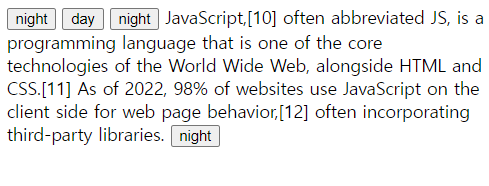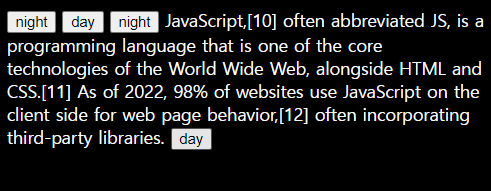
자바스크립트로 간단한 야간/주간 모드를 만드는 방법을 살펴보겠다. 또한 리팩토링을 통해 더욱 발전시킨 코드도 알아볼 것이다. 먼저 리팩토링 하기 전의 코드를 살펴보자. 버튼을 클릭할 때마다 웹페이지의 배경이 밝게 또는 어둡게, 즉 주간모드 또는 야간모드로 나타낼 것이다.
📍 기본 코드
<input id="night_day" type="button" value="night" onclick="
  if(document.querySelector('#night_day').value === 'night'){
    document.querySelector('body').style.backgroundColor = 'black';
    document.querySelector('body').style.color = 'white';
    document.querySelector('#night_day').value = 'day';
  } else{
    document.querySelector('body').style.backgroundColor = 'white';
    document.querySelector('body').style.color = 'black';
    document.querySelector('#night_day').value = 'night';
  }
">
사용자가 어느 상태에서 클릭을 했는지에 따라 조건문을 통해 웹페이지의 css가 다르다. querySelector를 통해 input창의 id를 지정하여 해당 value가 'night'이면 어둡게, 그게 아니라면('day) 밝은 배경으로 설정한 것이다.
onclick 안에서 조건문을 주었으며, 비교할 때에는 ===이지만 값을 넣을 때에는 = 1개라는 점 주의하자.
하지만 현재 코드는 비효율적인 중복이 많기 때문에 리팩토리를 통해 더욱 보완해보겠다.
📍 리팩토링
팩토링(factoring)은 공장, 리(re)는 다시 한다는 의미이다. 즉, 리팩토링이란 프로그램이 실행하는 동작은 그대로 두되, 비효율적인 코드에 대해 중복도를 낮추고 가독성을 높이며 유지/보수하기 편리하도록 코드를 다시 개선하는 것이다. 리팩토링을 계속해야 좋은 프로그램을 만들 수 있다.
위의 코드를 리팩토링 한 결과이다.
<input type="button" value="night" onclick="
  var target = document.querySelector('body')
  if(this.value === 'night'){
    target.style.backgroundColor = 'black';
    target.style.color = 'white';
    this.value = 'day';
  } else{
    target.style.backgroundColor = 'white';
    target.style.color = 'black';
    this.value = 'night';
  }
">
먼저 this를 추가해주었다. document.querySelector('#night_day') 란 결국 현재 input창 기준에서 자기 자신을 의미하기 때문에 같은 역할인 this로 문장의 길이를 줄일 수 있었다.
또한 document.querySelector('body') 도 매번 작성해주었기 때문에, target 이라는 변수를 만들어 호출함으로써 간단하게 코드를 입력하였다.
🔎 토글키 버튼을 눌렀을 때의 전후 상황 모습이다. 리팩토링한 토글키는 가장 밑의 토글키이다. 'night'에서 'day'로 value도 변경되는 것을 함께 확인할 수 있다.