1. 우선순위 큐란?
Priority Queue는 Queue와 구조가 비슷하다. Queue는 FIFO(First In First Out)구조로 먼저들어온 순서대로 데이터가 나가게 되지만 Priority Queue란 데이터의 우선순위를 정해 우선순위가 높은 순서대로 나가게된다.
우선순위 큐는 우선순위 힙으로 구현을 할 수 있다.
데이터를 삽입할 때 우선순위의 최대, 최소를 구성하여 데이터가 빠지면 중간을 계속해서 채워넣는 방식이다.
2. 우선순위 큐와 큐의 차이점
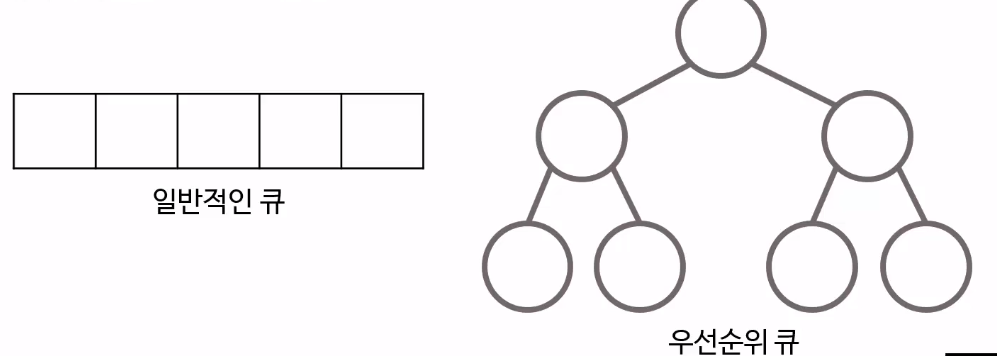
일반 큐는 선형구조를 가지고 있다.
우선순위 큐는 트리 구조로 보는 것이 합리적이다. 일반적으로 최대 힙을 이용하여 구현한다.
3. 우선순위 큐의 특징
- 우선순위 큐는 값을 비교해야하므로 null을 허용하지 않는다.
- 마찬가지로 비교할 수 없는 객체는 큐를 만들 수 없다.
- 내부구조는 이진트리 힙으로 구성되어 있다.
- 내부구조가 이진트리로 되어있어서 add() 및 poll() 메서드(추가, 삭제 메서드) 0(log(n)) 시간이 걸린다.
- AbstractQueue , AbstractCollection , Collection 및 Object클래스에서 메서드를 상속한다.
4. 우선순위 큐의 연산 과정
1. 삽입
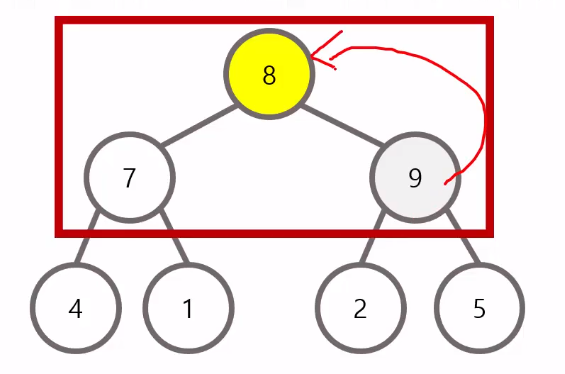
완전 이진 트리를 유지하는 형태로 순차적으로 삽입된다. 삽입 이후에는 루트 노드까지 거슬러 올라가면서 최대 힙을 구성한다.(상향식)
2. 삭제
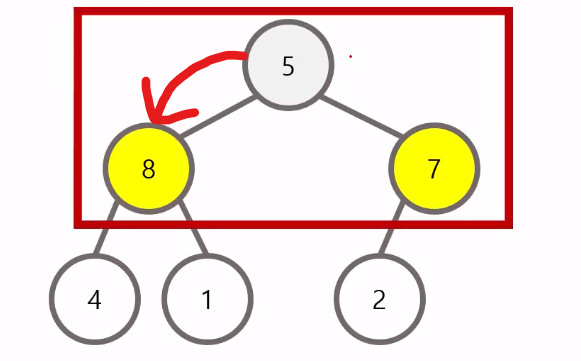
삭제할 때는 루트 노드를 삭제하고, 가장 마지막 원소를 루트 노드의 위치로 옮긴다. 삭제 이후에는 리프 노드까지 내려가면서 최대 힙을 구성한다.(하향식)
5. 기본적인 메소드
| 연산 | 설명 |
|---|---|
| add() | 우선순위 큐에 원소를 추가. 큐가 꽉 찬 경우 에러 발생 |
| offer() | 우선순위 큐에 원소를 추가. 값 추가 실패 시 false를 반환 |
| poll() | 우선순위 큐에서 첫 번째 값을 반환하고 제거, 비어있으면 null 반환 |
| remove() | 우선순위 큐에서 첫 번째 값을 반환하고 제거, 비어있으면 에러 발생 |
| isEmpty() | 우선순위 큐에서 첫 번째 값을 반환하고 제거, 비어있으면 에러 발생 |
| clear() | 우선순위 큐를 초기화 |
| size() | 우선순위 큐에 포함되어 있는 원소의 수를 반환 |
6. 우선순위 큐 사용법
1. 우선순위 큐 선언
// 기본형: 우선순위가 낮은 숫자가 먼저 나옴 (작은 숫자)
PriorityQueue<Integer> pQ = new PriorityQueue<>();

// 우선순위가 높은 숫자가 먼저 나옴 (큰 숫자)
PriorityQueue<Integer> pQ = new PriorityQueue<>(Collections.reverseOrder());
선언을 하면 기본적으로 낮은 순으로 우선순위가 결정이 된다. 반대로 선언하고 싶다면 Collections.reverseOrder() 메서드를 사용해야 한다. (Collections 메서드를 사용하려면 java.util.collections를 import 해야한다.)
2. 우선순위 큐 값 추가
import java.util.PriorityQueue;

public class PriorityQueueDemo {
	public static void main(String[] args) {
		PriorityQueue<Integer> pq = new PriorityQueue<>();

		// 1, 15, 8, 21, 25, 18, 10 값 추가
		pq.add(1);		pq.add(15);		pq.offer(10);
		pq.add(21);		pq.add(25);		pq.offer(18);
		pq.add(8);

		System.out.print(pq); // 결과 출력
	}
}

// 출력 : [1, 15, 8, 21, 25, 18, 10]
add() 메서드는 Collection클래스에서 가져오는 메서드라면, offer() Queue클래스에서 가져오는 메서드이다.
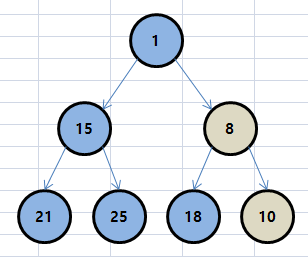
- 우선순위 큐에 숫자 8을 추가한다. 숫자 8은 부모와 비교해서 부모보다 작은 값인 경우 스왑한다. 10과 8의 위치가 변경된다.
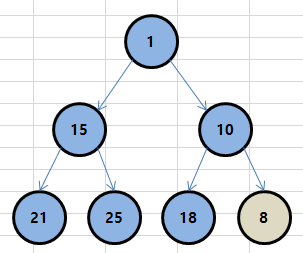
- 8은 다시 부모와 값을 비교한다. 하지만 자식 값이 더 크므로 스왑하지 않는다.
3. 우선순위 큐 값 삭제
import java.util.PriorityQueue;

public class PriorityQueueDemo {
	public static void main(String[] args) {
		PriorityQueue<Integer> pq = new PriorityQueue<>();

		// 1, 15, 8, 21, 25, 18, 10 값 추가
		pq.add(1);		pq.add(15);		pq.offer(10);
		pq.add(21);		pq.add(25);		pq.offer(18);
		pq.add(8);

		System.out.println(pq); // 결과 출력

		pq.poll();

		System.out.println(pq); // 결과 출력

		pq.remove();
		pq.remove(1);

		System.out.println(pq); // 결과 출력

		pq.clear();

		System.out.println(pq); // 결과 출력
	}
}

/* 출력
[1, 15, 8, 21, 25, 18, 10]
[8, 15, 10, 21, 25, 18]
[10, 15, 18, 21, 25]
[]
*/
poll(), remove() 메서드를 사용하면 우선순위가 가장 높은 값을 제거한다. remove(int Index) 메서드를 사용하면 Index 순위에 해당하는 값을 제거한다. clear() 메서드를 사용하면 우선순위 큐의 모든 값을 삭제한다.
- 루트 노드인 1과 마지막 노드인 10이 스왑된다.
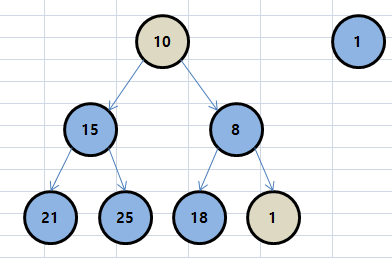
- 1을 제거하고 부모노드 10, 자식노드 15와 8을 비교하여 더 작은 값이 부모노드로 올라간다.
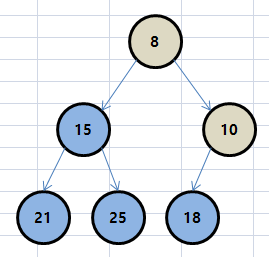
위 과정을 통해 우선순위 정렬이 된다.
4. 우선순위 큐 크기 구하기
import java.util.PriorityQueue;

public class PriorityQueueDemo {
	public static void main(String[] args) {
		PriorityQueue<Integer> pq = new PriorityQueue<>();

		// 1, 15, 8, 21, 25, 18, 10 값 추가
		pq.add(1);		pq.add(15);		pq.offer(10);
		pq.add(21);		pq.add(25);		pq.offer(18);
		pq.add(8);

		System.out.println(pq.size()); // 결과 출력
	}
}

// 출력 : 7
5. 우선순위 큐 값 출력
import java.util.Iterator;
import java.util.PriorityQueue;

public class PriorityQueueDemo {
	public static void main(String[] args) {
		PriorityQueue<Integer> pq = new PriorityQueue<>();

		// 1, 15, 8, 21, 25, 18, 10 값 추가
		pq.add(1);		pq.add(15);		pq.offer(10);
		pq.add(21);		pq.add(25);		pq.offer(18);
		pq.add(8);

		System.out.println(pq.peek()); // 결과 출력

		Iterator iterator = pq.iterator();
		while(iterator.hasNext())
			System.out.print(iterator.next() + " ");
	}
}

/* 출력
1
1 15 8 21 25 18 10
*/
Priority Queue에서 peek() 메서드를 사용하면 우선순위가 가장 높은 값을 출력한다. 전체 Queue의 값을 가져오려면 Iterator 메서드를 사용하여 가져오면 된다.

remove 메소드에서 인자 값은 index가 아니라 remove(Object o)인 객체 값입니다...;