Gradle과 IntelliJ IDEA 빌드 자동화 도구의 비교
빌드 자동화 도구
Gradle은 오픈 소스 빌드 자동화 도구이며, IntelliJ IDEA는 자체 제공하는 빌드 자동화 도구이다.
증분 빌드(Incremental Build)
이전에 빌드된 내역에서 변경된 부분만 다시 빌드하는 방식을 말한다. 증분 빌드를 할 때, 삭제된 항목에 대해서는 변경된 것으로 보지 않아 업데이트가 반영되지 않는다. 특정 클래스가 프로젝트에는 삭제되었더라도, 증분 빌드 방식으로 빌드된 파일에는 남아있을 수 있다는 말이다. Gradle과 IntelliJ IDEA는 둘 다 증분 방식을 사용하지만 Gradle은 증분 방식의 단점을 보완해서 변경 사항 뿐 아니라 삭제 사항도 반영해서 프로젝트를 빌드한다.
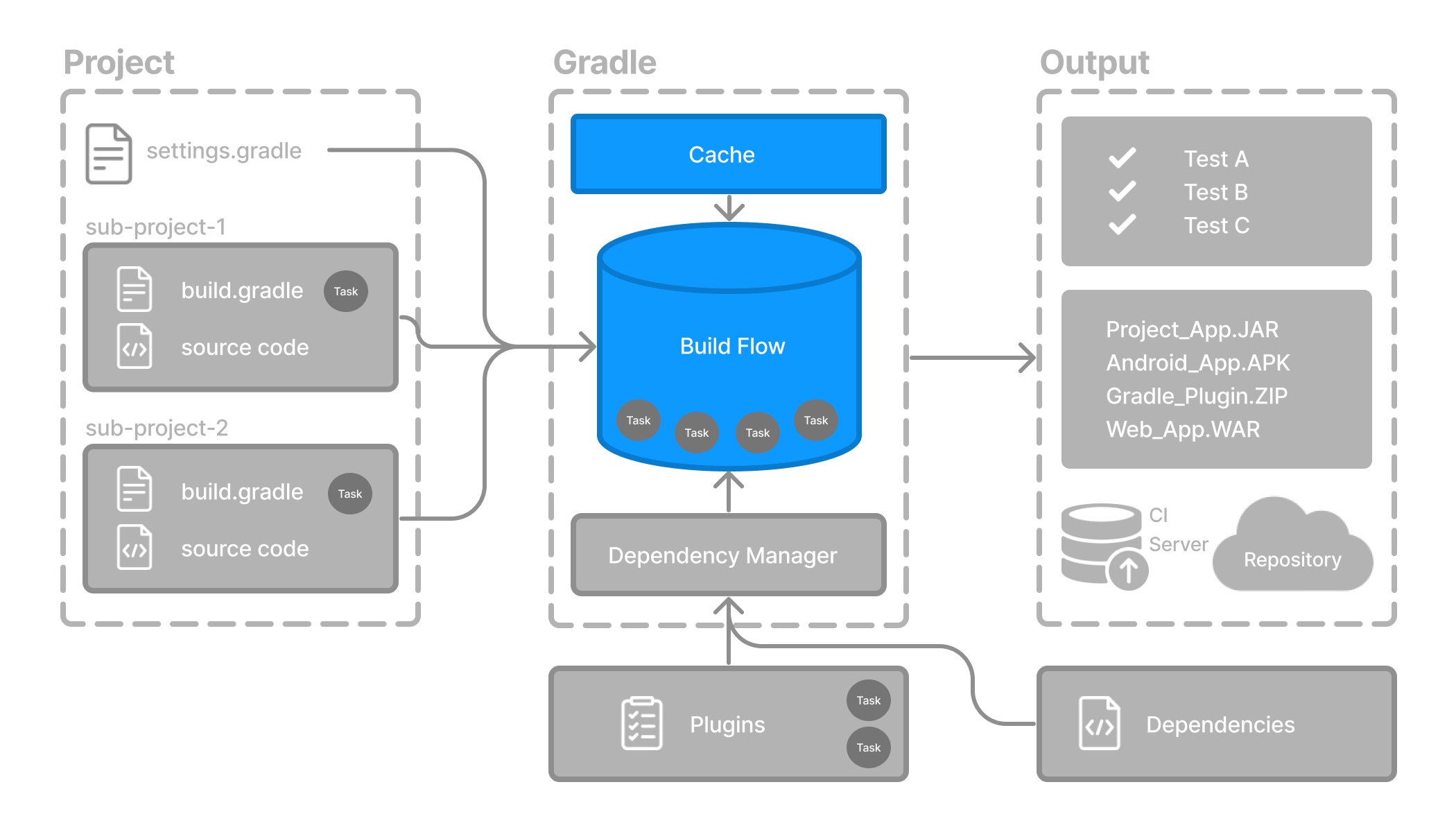
- 위) Gradle Build 과정의 도식
https://docs.gradle.org/current/userguide/part5_gradle_inc_builds.html
Gradle 공식 웹 문서에 증분 빌드에 대한 자세한 설명이 나와있다.
- Step 1. Understanding Incremental Builds
It’s important to know that Gradle optimizes your build in a variety of ways. One such optimization is called incremental builds. An incremental build is a build that avoids running tasks whose inputs did not change since the previous build, making the execution of such tasks unnecessary. For incremental builds to work, tasks must define their inputs and outputs. At build time, Gradle will determine whether the input or outputs have changed. If they have changed, Gradle will execute the task. Otherwise, it will skip execution. ...
프로젝트 구조에 따라 Gradle 빌드 또는 IntelliJ IDEA 빌드가 더 적합할 수 있다. IntelliJ IDEA는 빌드 속도가 빠르지만, 위에서 설명한 사항에 대해서 개발자가 잘 이해하고 있어야 하므로 주의하는 것이 좋다.

성실함과 끊임없는 학습을 통해 성장하는 개발자 지망생입니다. 새로운 도전과 배움을 즐기며 더 나은 코드를 꿈꿉니다.