lamda03
print ("--------------------------------------------------------------------------")
print ("--- 람다(lambda) 함수 정의  ->   1. 람다 함수 정의 예                         --")
print ("--- 3] 가변 인수를 지니는 람다 함수 정의                                       --")
print ("--------------------------------------------------------------------------")
vargs = lambda x, *args: args+args   # *args → 가변 인수
print ("vargs(1,2,3,4,5)->", vargs(1,2,3,4,5) )    # (1, 2, 3, 4, 5) → 1은 x, 나머지는 튜플형태로 args에 할당됨
vargs(1,2,3,4,5)-> (2, 3, 4, 5, 2, 3, 4, 5)
lamda04
print ("----------------------------------------------------------------------------------------------------------")
print ("--- 람다(lambda) 함수 정의  ->   2. 람다 함수 사용하기                                                        --")
print ("--- 람다 함수를 사용하는 코드 예제                                                                            --")
print ("--- 더하기, 빼기, 곱하기, 나누기에 해당하는 람다 함수 리스트 정의                                                  --")
print ("--- 인덱스 0은 첫 번째 인자 / 인덱스 2는 세 번째 인자로 곱셈 수행 / 리스트의 원소에 람다함수가 들어가고, 검색도 가능       --")
print ("-----------------------------------------------------------------------------------------------------------")

# 리스트의 원소가 람다함수로 들어감
#  index --->      0                1                 2                      3
func = [lambda x, y: x + y, lambda x, y: x - y,
        lambda x, y: x / y]
def menu():
    print ("0. add" )
    print ("1. sub" )
    print ("2. mul" )
    print ("3. div" )
    print ("4. quit" )
    return input('Select menu:')

while 1:                             # while 1 → 무한 루프
    sel = int(menu())
    print("sel->",sel)
    print("len(func)->",len(func))
    if sel < 0 or sel > len(func):  # 0보다 작은 값이거나 4보다 큰 값(-1, -2, -3, 5, 6, 7, 8)은 수행 X
        continue
    if sel == len(func):
        break                       # 중간에 break 있어, 조건 미 충족 시 무한루프를 빠져나옴
    x = int(input('First operand:') )
    y = int(input('Second operand:') )
    print ('Result =', func[sel](x,y))
파이썬 정규표현식
https://regex101.com/
정규표현식 확인하는 사이트
정규식 사용 사례
① 입력유효성 Check (e-Mail주소 맞는지)
② Text에서 특정부분 추출(우편번호등..)
③ 특정 Text 바꾸기 (사람->남자 또는 여자)
④ Text 쪼개기
- 자주 사용하는 문자 클래스
[0-9] 또는 [a-zA-Z] 등은 무척 자주 사용하는 정규 표현식.
이렇게 자주 사용하는 정규식은 별도의 표기법으로 표현.
\d - 숫자와 매치, [0-9]와 동일한 표현식이다.
\D - 숫자가 아닌 것과 매치, [^0-9]와 동일한 표현식이다.
\s - whitespace 문자와 매치, [ \t\n\r\f\v]와 동일한 표현식이다. 맨 앞의 빈 칸은 공백문자(space)를 의미.
\S - whitespace 문자가 아닌 것과 매치, [^ \t\n\r\f\v]와 동일한 표현식.
. - \n을 제외한 모든 문자 표현식.
\w - 문자+숫자(alphanumeric)와 매치, [a-zA-Z0-9_]와 동일한 표현식.
\W - 문자+숫자(alphanumeric)가 아닌 문자와 매치, [^a-zA-Z0-9_]와 동일한 표현식.
대문자로 사용된 것은 소문자의 반대임을 추측
regex01
import  re
# 1. 정규식에 search  사용 -> 매칭되는 첫번째 pattern 반환
#    compile-> pattern 을 미리 만들어 둠   , 전화번호에 해당하는 pattern
#     \d는 숫자

phonenum_regex = re.compile(r'\d\d\d-\d\d\d-\d\d\d\d')
mo=phonenum_regex.search("My Number is 010-234-1234")
print("mo.group()->" , mo.group())

print("---2. 괄호를 사용 , 정규식에 Group를 생성 , (\d\d\d) -> Group함수 사용--" )
# 2. 괄호를 사용 , 정규식에 Group를 생성 , (\d\d\d) -> Group함수 사용
mo = phonenum_regex = re.compile(r'\d\d\d-\d\d\d-\d\d\d\d')
print("mo.group(1)->", mo.groups(1))
print("mo.group(2)->", mo.groups(2))
print("mo.group(3)->", mo.groups(3))

#tuple로 전달
print("mo.groups()->" , mo.groups())


# 3. findall -> 매칭되는 모든  pattern을 List로 반환
phonenum_regex = re.compile(r'\d\d\d-\d\d\d-\d\d\d\d')
mo=phonenum_regex.findall("cell: 315-235-5679  Work : 213-234-3456")
print("3. mo->" , mo)
mo.group()-> 010-234-1234
---2. 괄호를 사용 , 정규식에 Group를 생성 , (\d\d\d) -> Group함수 사용--
mo.group(1)-> 010
mo.group(2)-> 567
mo.group(3)-> 1234
mo.groups()-> ('010', '567', '1234')
3. mo-> ['315-235-5679', '213-234-3456']
passwd_val
# 조건 8자이상 , 영문자와 숫자가 혼합

# password='' 가 문자열림을 컴파일러에 알려줌

def validate_password(password=''):
    if(len(password)) <8:  #조건이 8자 이상이여야함
        return False
    elif password.isalpha():   #이상없으면 알파벳이냐 ?
        return  False
    elif password.isnumeric():   #숫자가 있냐 ?
        return  False
    else:
        return True      #전체 문제가 없으면 true / 하나라도 있으면 false

def main():
    user_password = input('input Your Password: ')
    if validate_password(user_password):
        print('유효한 password입니다')
    else:
        print('유효하지 않는 password입니다')

main()
input Your Password: 123
유효하지 않는 password입니다
input Your Password: aaaa1234
유효한 password입니다
password_locker
import pyperclip


PASSWORDS = {
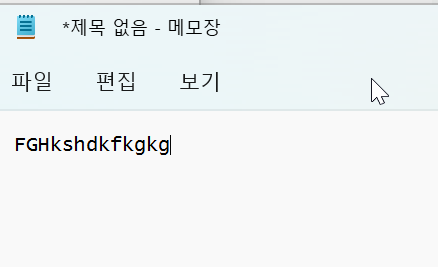
    'gmail':'FGHkshdkfkgkg',
    'naver':'ttakjt3456',
    'daum':'qwef5678'
}

def main():
    site = input('input yoer site:')
    password =PASSWORDS[site]

    if password:
        #Buffer 저장
        pyperclip.copy(password)
        print('Your password is Copied')
    else:
        print('Not Valid Site')

main()

메모장이나 아무데나 가서 붙여넣기 하면
바로 비밀번호 출력되어짐
regex02
# e-mail 추출기
# 1.pyperclip 모듈을 사용 복사와 붙여넣기
# 2.regex만듦 ,  e-mail 주소 매칭
# 3. 모든 매치를 찾는다
# 4. 매칭된 String을 하나의 문자열로 만든다
# 5. 매칭된 문자열이 없으면 간단한 메세지 출력
import  re
import pyperclip
# Create e-Mail regex  --> VERBOSE, X
# ''' -> MultiLine
email_regex = re.compile(r'''(
                            [a-zA*Z0-9._%+-] +      #username
                            @                       # @sysbol
                            [a-zA-Z0-9.-]+          # domain name
                            (\.[a-zA-Z]{2,4}){1,2}  # dot-something
                        )  ''', re.VERBOSE )


# ClipBoard에 복사된 내용에서 e-Mail Pattern과 매치되는 Text를 찾음
def find_match_list():
    text = pyperclip.paste()
    # clip Board에 있는 List를 하나씩 꺼내 matches List에 넣음
    matches = []
    print("find_match_list text-> Start...")
    print("find_match_list text->", text)
    # email에 있는 List Append
    for email in email_regex.findall(text):
        matches.append(email[0])

    print("find_match_list matches->", matches)

    return matches

# ClipBoard에 복사
def copy_result_to_clipboard(matches):
    if len(matches) > 0:
        # List하나하나가 개행되어 처리
        pyperclip.copy('\n'.join(matches))
        print('ClipBoard에 복사 됨')
    else:
        print("매칭되는 Pattern이 없음")

# ClipBoard에 복사된 내용에서 e-Mail Pattern과 매치되는 Text를 찾음
def main():
    matches = find_match_list()
    print("main matches->", matches)
    copy_result_to_clipboard(matches)

main()

.