populate란?
document의 필드값을 다른 특정collection의document로 치환하는 것을 의미한다.
schemas/user.js에서 정의한userSchema
const { Schema } = mongoose;
const userSchema = new Schema({
  name: {
    type: String,
    required: true,
    unique: true,
  },
  age: {
    type: Number,
    required: true,
  },
  married: {
    type: Boolean,
    required: true,
  },
  // 옵션이 type밖에 없는 경우, 객체 형태 생략 가능 (required는 false)
  comment: String,
  createdAt: {
    type: Date,
    default: Date.now,
  },
});schemas/comment.js에서 정의한commentSchema
const { Schema } = mongoose;
// mongoose.Schema.Types.ObjectId
const {
  Types: { ObjectId },
} = Schema;

const commentSchema = new Schema({
  commenter: {
    type: ObjectId,
    required: true,
    // sequelize의 include와 같은 기능 수행
    // ref: 'User'를 통해 commenter 필드의 값은 User 컬렉션의 ObjectId가 됨
    ref: "User",
  },
  comment: {
    type: String,
    required: true,
  },
  createdAt: {
    type: Date,
    default: Date.now,
  },
})populate하는 방법
1. 이미 만들어진 도큐먼트를 찾은 다음 특정 필드를 populate하는 방법
const comments = await Comment.find({ commenter: req.params.id })
      .populate('commenter');
res.json(comments) : 결과
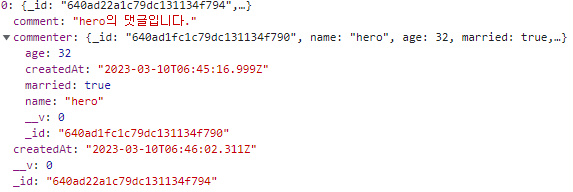
commenter 필드에 타입 objectId가 출력되는 대신 그 objectId에 해당하는 도큐먼트를 ref(여기서는 User 컬렉션에 해당)에서 찾아서 치환한다.
2. 생성한 도큐먼트를 특정 필드에 대해 populate하는 방법
const comment = await Comment.create({
      commenter: req.body.id,
      comment: req.body.comment,
});
const result = await Comment.populate(comment, { path: 'commenter' });
res.json(comments) : 결과

1번과 마찬가지로 User 컬렉션에서의 _id와 req.body.id가 같은 것을 찾아 생성한 도큐먼트의 commenter 필드를 User 컬렉션의 도큐먼트로 치환한다.

꾸준함을 잃지 말자.