jQuery
jQuery 는 아래 작업들을 편하게 만들어준다
- HTML 문서에서 Element 찾기
- HTML Content 변경하기
- 사용자의 Action 에 반응하기
- 웹 페이지의 내용을 애니메이션 하기
- 네트워크에서 새로운 컨텐츠 받아오기
jQuery 로 처리할 수 있는 Element 들의 기능들
- CSS
- Event
- Animation
- Create, Modify, Delete 등을 처리
jQuery는 크로스 브라우징을 보장해준다
- 크로스 브라우징이란 어느 브라우저를 가도 똑같이 보이게 만든 기술
jQuery 다운로드
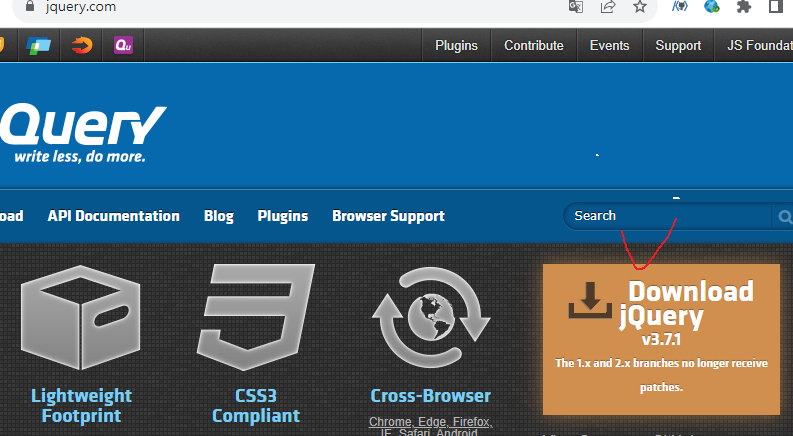
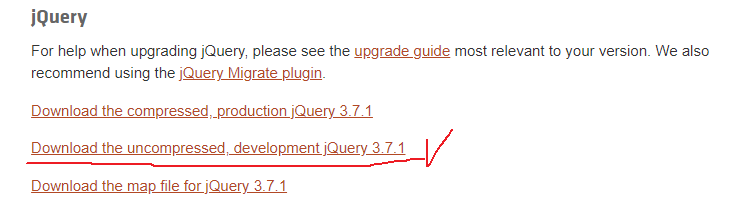

저장후 web에 넣기
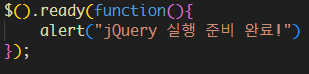
jQuery 시작하기
jQquery - Selector
     <title>jQquery - Selector</title>
    <script src="./jquery-3.7.1.js"></script>
    <script type="text/javascript">
        $().ready(function(){
            //h1 tag의 text를 get
            var text = $("h1").text() //getter
            console.log( $("h1"), text)
            //h1 tag의 text를 변경.
            $("h1").text("Where to?"); //setter

            // li DOM의 텍스트를 가져와서 출력하기
            var liText=$("li").text()
            console.log($("li"), liText)
            //li DOM의 텍스트를 변경하기
            // $("li").text("seoul")

            //id가 destinations 인 DOM을 가져와서 내부 내용을 출력
            var destinationsText=$("#destinations").text()
            var destinationsHTML=$("#destinations").html()
            console.log($("#destinations"))
            console.log(destinationsText,destinationsHTML)
            //id가 destinations 인 DOM의 TEXT를 변경
            // $("#destinations").text("EMTY")
            // $("#destinations").text("<li>EMTY</li>")

            //id가 detinations인 DOM의 HTML을 변경
            // $("#destinations").html("EMTY")
            // $("#destinations").html("<li>EMTY</li>")

            //id가 destinations인 DOM의 CSS를 변경
            // $("#destinations").css("background-color","red")//getter

            //하위 요소 셀렉팅
            //id가 destinations인 DOM 아래에 있는 모든 li를 찾아서 배경색을 바꾼다.
            $("#destinations li").css("background-color", "yellow")
            // $("#destinations li").css("display","inline-block")
            $("#destinations>li").css("background-color", "blue")
        });
    </script>
</head>
<body>
    <h1>Where do you want to go?</h1>
    <p>Plan your next aventure.</p>
    <hr />
    <h1>Where do you want to go?</h1>
    <h2>Travel Destinations</h2>
    <p>Plan your next adventure.</p>
    <ul id="destinations">
        <li>Rome</li>
        <li>
            <ul id="france">
                <li>Paris</li>
            </ul>
        </li>
        <li class="promo">Rio</li>
    </ul>
</body>
jQuery- Traversing
 <script src="./jquery-3.7.1.js"></script>
    <script type="text/javascript">
        $().ready(function(){
            //#destinations li 모든 li
            $("#destinations").find("li").css({
                backgroundColor:"#CCC",
                "font-weight":"bold",
                fontSize:"25pt",
                color : "red"
            })
            //#destinations >li  destinations 아래있는 li만
            $("#destinations").children().css({
                color:"green"
            })
            //첫번째 li의 폰트를 나눔고딕으로 변경.
            $("#destinations").children("li").first().css("font-family","궁서체")

            //id가 destinations인 DOM의 부모에게 배경색을 회색으로 변경시킨다.
            $("#destinations").parent().css("background-color","gray")
        })


    </script>
</head>
<body>
    <h1>Where do you want to go?</h1>
    <p>Plan your next aventure.</p>
    <hr />
    <h1>Where do you want to go?</h1>
    <h2>Travel Destinations</h2>
    <p>Plan your next adventure.</p>
    <ul id="destinations">
        <li>Rome</li>
        <li>
            <ul id="france">
                <li>Paris</li>
            </ul>
        </li>
        <li class="promo">Rio</li>
    </ul>
</body>
Dom handling
<title>Dom handling</title>
    <style type="text/css">
        body{
            background-color: #0c0e23;
            color: white;
            padding: 20px;
        }
        h1{
            margin: 0px;
            font-size: 20pt;
        }
        h3{
            margin: 0px;
            color:#BBB;
            font-weight: 12pt;
        }
        .flex-box{
            display: flex;
            flex-direction: row;
            margin:25px 0px;
        }
        .flex-box h2.plan-title{
            font-size: 16pt;
            color: #BBB;
            margin: 5px;
        }
        .flex-box p.comments-title{
            padding: 0px;
            margin: 0px;
            font-size: 11pt
        }
        .flex-box ul.comments{
            padding: 0px;
            margin: 0px;
            color: #999;
            font-size: 11pt;
        }
        .flex-box ul.comments>li{
            list-style: none;
        }
        .flex-box .big-button{
            width: 100%;
            padding: 5px;
            background-color: #0F0;
            color: #333;
            font-weight: bold;
            border: 0px;
            margin-top: 10px;
        }
        .flex-box > .plan{
            background-color: #000A;
            padding: 10px 10px 30px 10px;
        }

        .contact{
            text-align: center;
            font-weight: bold;
        }
    </style>
    <script src="./jquery-3.7.1.js"></script>
    <script type="text/javascript">
        $().ready(function(){
            $("button.big-button").click(function(){
                var newP=$("<p>From $.399.99</p>")
                $("div.plan").append(newP)
                $("button.big-button").remove()
            })
        })

    </script>
</head>
<body>
    <h1>Vacation Packages</h1>
    <h3>jQquery Travels</h3>
    <div class="flex-box">
        <div class="plan">
            <h2 class="plan-title">Hawaiian vacation</h2>
            <p class="comments-title">Comments on this deal:</p>
            <ul class="comments">
                <li>"Amazing Deal!"</li>
                <li>"Can't wait to take this trip!"</li>
            </ul>
            <button class="big-button">GET PRICE</button>
        </div>
    </div>
    <div class="contact">Call us at 1-555-jquery-air to make a reservation today!</div>
</body>