
Introduction
RxJava, Kotlin Flow, LiveData, RxSwift, Combine 등 Reactive 프로그래밍에서는 "데이터 흐름"이 핵심입니다.
하지만 이 흐름들이 항상 같은 방식으로 작동하는 건 아니에요.
Reactive에서 가장 중요한 개념 중 하나가 바로 Cold Stream과 Hot Stream입니다.
🌊 Cold Stream이란?
❄️ 개념
Cold Stream은 "데이터 생성"과 "데이터 소비"가 완전히 연결되어 있는 스트림입니다.
즉, 누군가 구독(Subscribe or Collect)을 해야만 흐름이 시작됩니다.
이런 스트림은 각 구독자마다 독립적인 실행을 하기 때문에,
같은 스트림을 여러 번 구독하면 매번 새롭게 실행됩니다.
✅ 핵심 특징
- 데이터는 구독할 때 생성
- 각 구독자마다 독립적인 실행
- 이전 값은 기억되지 않음
대표적인 예시:
RxJava: Observable, Single, Maybe
Kotlin: Flow, suspend fun
💡 비유로 이해하기
“콜드 스트림은 전자레인지다. 내가 버튼을 눌러야 요리가 시작된다.”
→ 내가 작동시켜야 흐름이 시작됨
🔥 Hot Stream이란?
🔥 개념
Hot Stream은 데이터가 생성되기 시작한 시점과 무관하게 언제든지 소비될 수 있는 스트림입니다.
즉, 데이터는 이미 흐르고 있으며, 구독자는 그 흐름에 "탑승"하는 것이에요.
이 스트림은 여러 구독자와 동일한 데이터 흐름을 공유하고,
어떤 구독자는 이미 지나간 데이터는 놓칠 수도 있습니다.
✅ 핵심 특징
- 이미 실행되고 있는 데이터 흐름
- 모든 구독자가 같은 스트림을 공유
- 과거 데이터를 놓칠 수 있음
대표적인 예시:
RxJava: Subject, ConnectableObservable
Kotlin: StateFlow, SharedFlow
💡 비유로 이해하기
“핫 스트림은 "버스". 이미 운행 중이고, 중간 정류장에서 타면 앞 정류장은 놓친다.”
→ 스트림은 계속 흐르고 있고, 구독 시점은 ‘정류장’일 뿐
📱 Android/Kotlin에서의 Cold & Hot 적용
🧊 Kotlin에서의 Cold Stream – Flow
- 기본적으로 Flow {}는 Cold Stream입니다.
- collect를 호출해야만 실제 로직이 실행됩니다.
- 서버 요청, DB 조회 같은 작업에 적합합니다.
✅ 예시코드
suspend fun main() {
    val coldFlow = flow {
        println("Flow started")
        emit("Hello")
    }
    coldFlow.collect { println("Collector 1: $it") }
    coldFlow.collect { println("Collector 2: $it") }
}
✅ 결과

coldFlow.collect를 두 번 호출했더니, flow 안의 로직도 두 번 실행되었죠.
즉, 매 구독마다 흐름이 새롭게 시작되며, 이전 실행과는 완전히 독립적입니다.
🔥 Kotlin에서의 Hot Stream – StateFlow, SharedFlow
StateFlow
-
초기 값을 반드시 지정해야 합니다.
-
항상 최신 값을 저장하고, 구독자가 collect를 시작하면 즉시 현재 값을 전달합니다.
-
ViewModel의 상태 관리에 매우 적합합니다.
✅ 예시코드
 suspend fun main() {
    val state = MutableStateFlow("Initial")
    state.value = "Update"
    state.collect { println("Collected: $it") }
}
✅ 결과

SharedFlow
- 상태가 아니라 이벤트 전파용 스트림입니다.
- 값을 저장하지 않으며, emit된 값을 실시간으로 공유합니다.
- 클릭 이벤트, 네비게이션 요청, 메시지 전파 등에 적합합니다.(단발성)
suspend fun main() {
    val shared = MutableSharedFlow<String>()
    // 구독자 없을 때 emit한 값은 전달되지 않음
    shared.emit("Old")
    shared.collect { println("Collected: $it") }
    shared.emit("New")
    // 출력: Collected: New
}
🔄 Cold → Hot으로 전환하는 방법
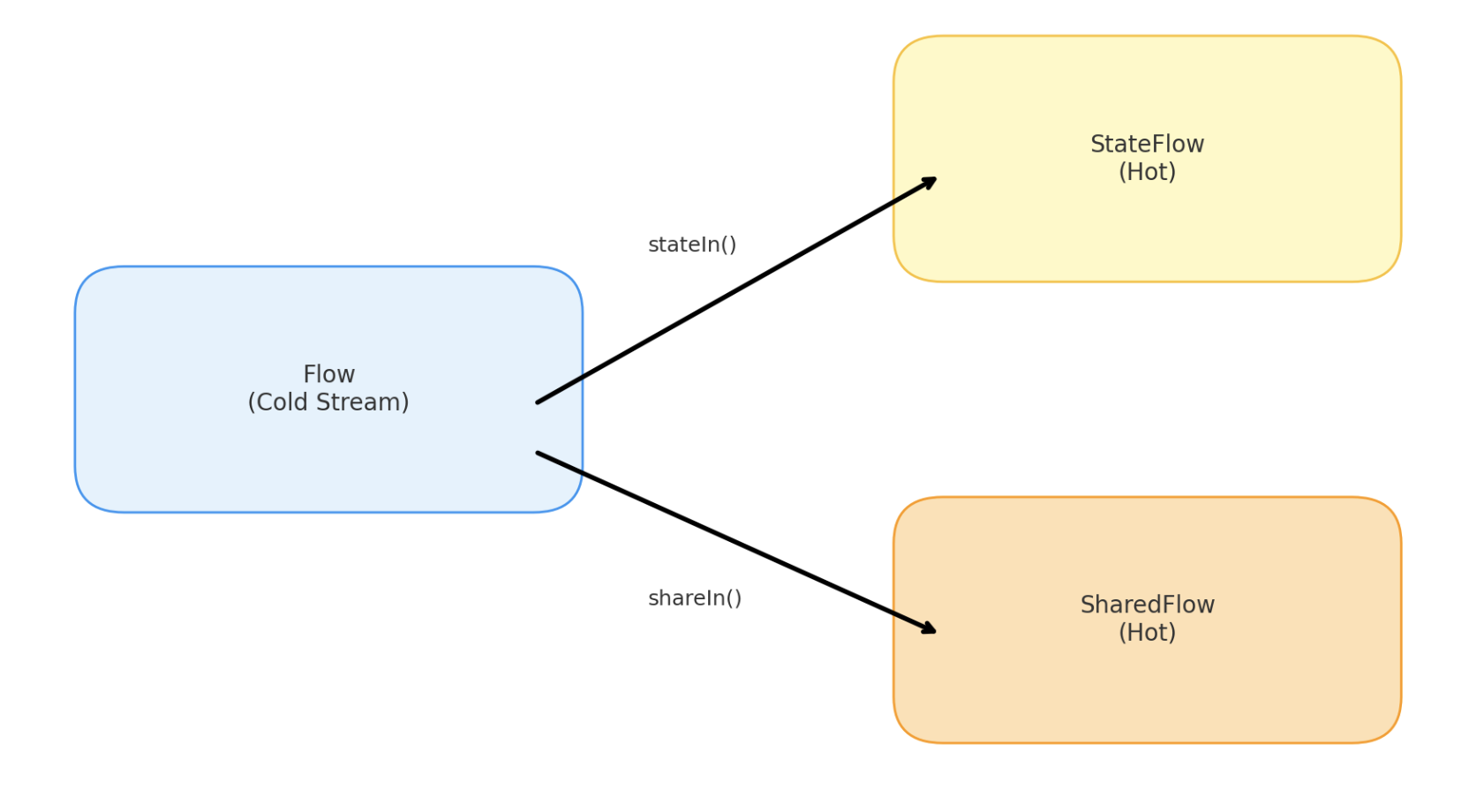
Kotlin에서 Flow를 여러 구독자와 공유하고 싶다면 stateIn 또는 shareIn을 사용해서 Hot으로 전환할 수 있어요.
- stateIn(): Flow → StateFlow 변환, 상태 저장용
- shareIn(): Flow → SharedFlow 변환, 이벤트 브로드캐스트용
👀 변환 흐름도
✅ 예시코드
fun main() = runBlocking {
    println("=== Start ===\n")

    val scope = this // runBlocking의 CoroutineScope를 scope로 사용

    launchColdFlowExample()

    println("\n------------------------\n")
    launchStateFlowExample(scope)

    println("\n------------------------\n")
    launchSharedFlowExample(scope)

    println("\n=== End ===")
}

/**
 * flow { ... } 블록은 collect()가 호출되기 전까지는 아무 일도 일어나지 않는다.
 * collect()를 호출하는 순간 비로소 내부 로직이 실행되고, emit()된 값이 전달된다.
 * collect()를 두 번 호출하기 때문에, "Cold Flow started"가 두 번 출력된다.
 * */
// ❄️ Cold Flow
suspend fun launchColdFlowExample() {
    println("🧊 Cold Flow Example")

    val coldFlow = flow {
        println("Cold Flow started")
        emit("Value from Cold Flow")
    }

    coldFlow.collect { println("Cold Collector #1: $it") }
    coldFlow.collect { println("Cold Collector #2: $it") }
}

/**
 * Flow를 stateIn()을 통해 Hot Stream인 StateFlow로 변환하는 과정을 보여주는 예제.
 * stateIn()은 Flow의 흐름을 내부적으로 collect하여 최신 값을 보관하는 StateFlow로 전환함.
 * started = SharingStarted.Eagerly 설정 때문에, stateFlow는 collect()가 호출되지 않아도 즉시 실행을 시작.
 * 따라서 delay(1000) 이후 collect()를 호출했음에도, "Value from Cold Flow (for StateFlow)"가 미리 생성되어 즉시 전달.
 * */
// 🔥 StateFlow 변환
suspend fun launchStateFlowExample(scope: CoroutineScope) {
    println("🔥 StateFlow Example")

    val coldFlow = flow {
        println("Generating data for StateFlow")
        delay(500)
        emit("Value from Cold Flow (for StateFlow)")
    }

    val stateFlow = coldFlow.stateIn(
        scope = scope,
        started = SharingStarted.Eagerly,
        initialValue = "Initial State"
    )

    delay(1000) // emit 완료까지 대기
    stateFlow.take(1).collect {
        println("StateFlow Collector: $it")
    }
}

/**
 * Flow를 shareIn()을 통해 Hot Stream인 SharedFlow로 전환하는 과정.
 * shareIn()은 Flow를 내부적으로 collect하여, 이벤트를 여러 구독자에게 broadcast할 수 있도록 변환.
 * started = SharingStarted.Eagerly 덕분에 sharedFlow는 scope가 시작되자마자 실행되며 값을 emit.
 * replay = 1 설정을 통해 최근 1개의 값을 보관하므로, 구독자가 뒤늦게 collect하더라도 가장 최근 값을 받을 수 있게됨.
 * */
// 🔥 SharedFlow 변환
suspend fun launchSharedFlowExample(scope: CoroutineScope) {
    println("🔥 SharedFlow Example")

    val coldFlow = flow {
        println("Generating data for SharedFlow")
        delay(500)
        emit("Value from Cold Flow (for SharedFlow)")
    }

    val sharedFlow = coldFlow.shareIn(
        scope = scope,
        started = SharingStarted.Eagerly,
        replay = 1
    )

    delay(1000) // emit 완료 후 collect 시작
    sharedFlow.take(1).collect {
        println("SharedFlow Collector: $it")
    }
}
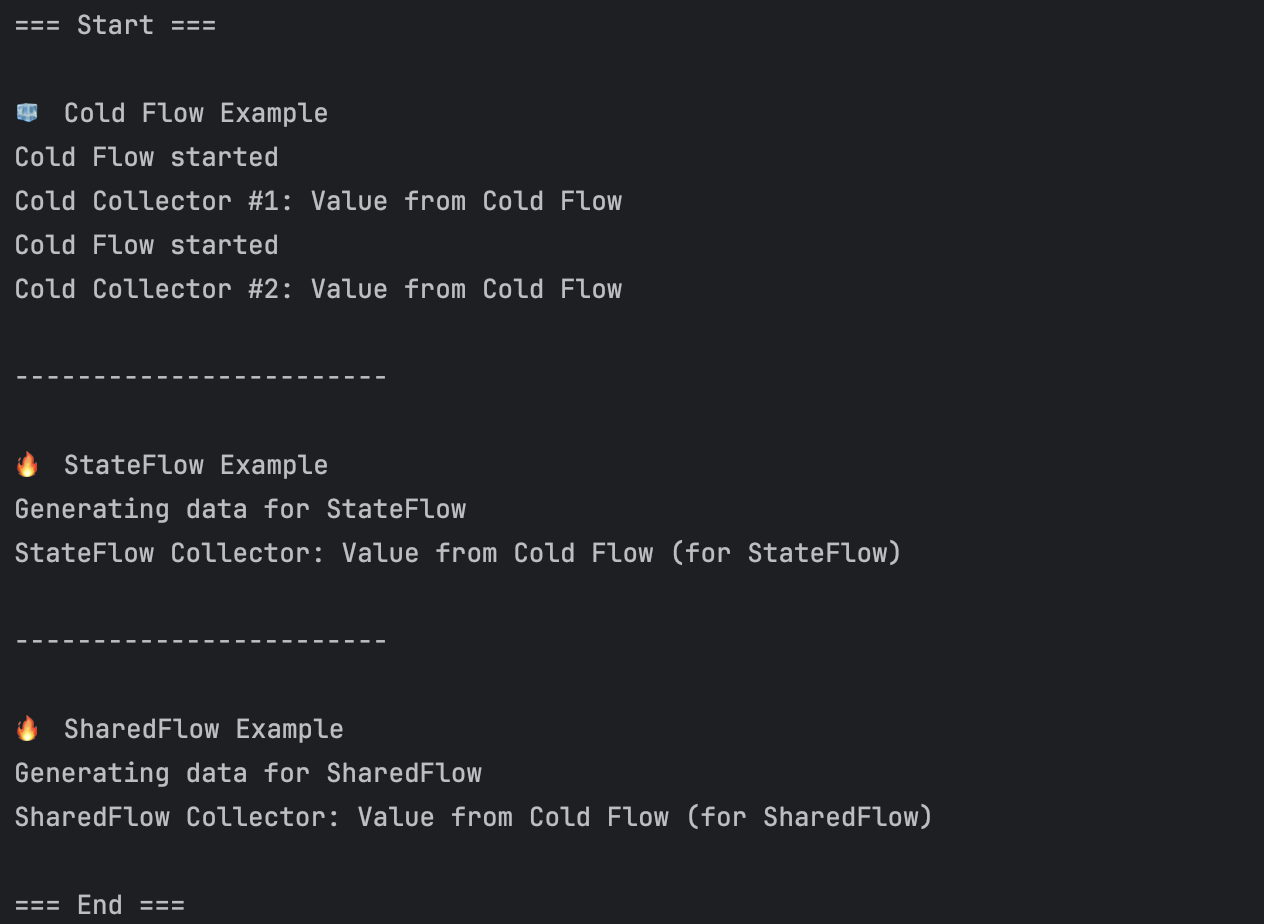
✅ 결과
정리
- Cold Flow는 매 collect 시점마다 새로 실행된다.
- Hot Stream으로 변환하면 흐름은 scope 실행 시점에 이미 시작된다.
- 이후 collect한 구독자는 이미 실행된 흐름의 결과를 받을 수 있다.
🔍 Cold vs Hot Stream 차이점
면접 때 만약 차이점을 물어본다면 저는 아래와 같이 답변할 것 입니다.
-
Cold Stream은 내가 요청할 때 비로소 데이터를 주는 스트림입니다.
매번 요청하면 새로운 흐름이 생성되고, 다른 사람과 공유하지 않습니다. -
Hot Stream은 이미 누군가가 실행시킨 흐름을 나도 함께 구독하는 구조입니다.
흐름은 중단되지 않고 계속되며, 구독자들은 실시간 또는 최근의 일부 값만 볼 수 있습니다.
✅ 그러면 어떤 스트림을 언제 써야 할까?
- 서버에서 한 번 받아오는 데이터 → Cold Stream (Flow)
- UI의 상태를 유지하면서 화면 전환에도 값이 유지되어야 함 → Hot Stream (StateFlow)
- 버튼 클릭, Toast 메시지 같은 일회성 이벤트 → Hot Stream (SharedFlow)
🧾 마치며..
Cold, Hot Stream은 단순한 개념 같지만, 실제 코드와 연결되면 많은 실수의 원인이 됩니다.
이 개념을 정확히 이해하면 효율적인 데이터 흐름, 리소스 절약, 의도한 UI 상태 처리가 가능해져요.
안드로이드에서 비동기 흐름을 다룰 때, "지금 내가 만들고 있는 흐름은 Cold일까, Hot일까?"
이 질문 하나로 앱의 동작이 훨씬 명확해질 수 있습니다.