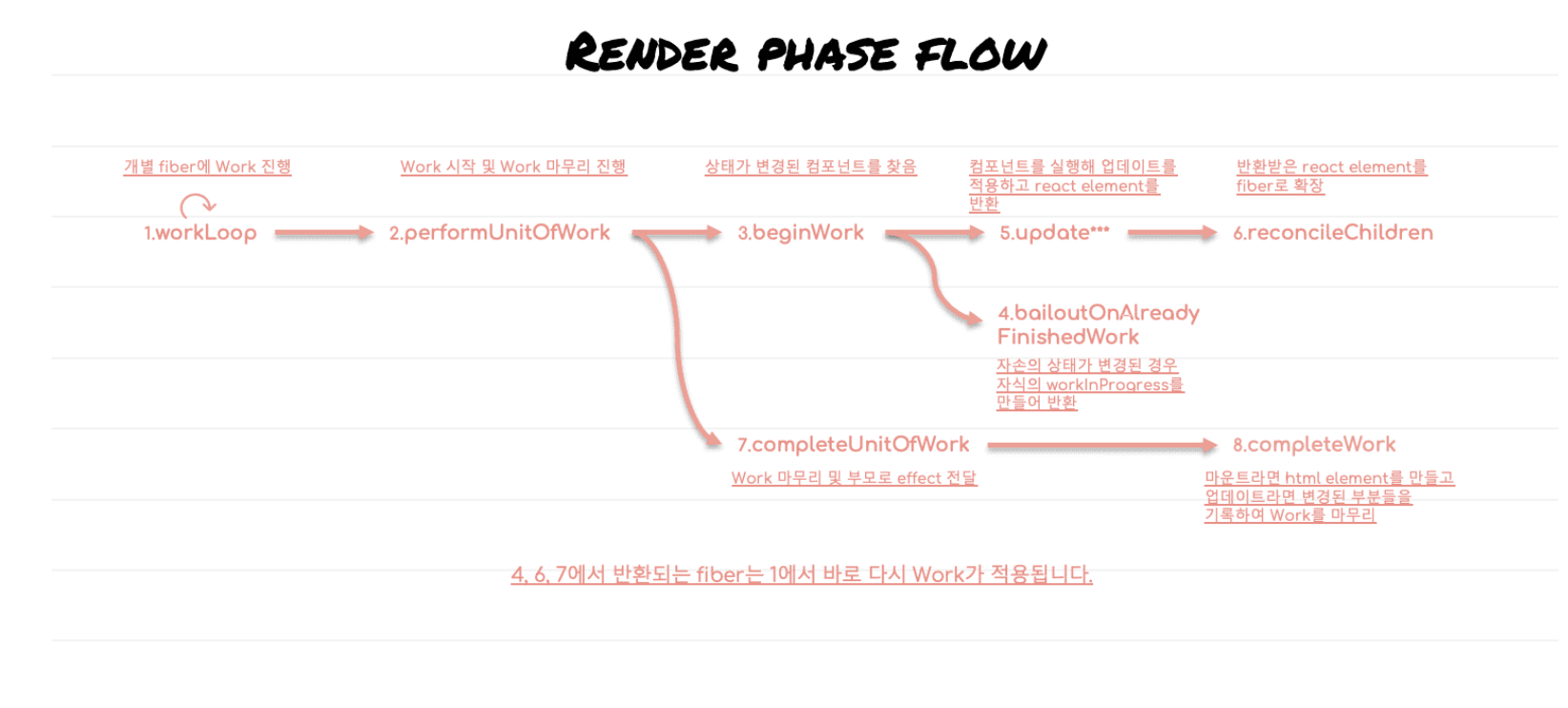
오랜만이네
performUnitOfWork
function performUnitOfWork(unitOfWork: Fiber): Fiber | null {
  const current = unitOfWork.alternate
// current / unitofWork -> 현재 작업중인 fiber node
  let next = beginWork(current, unitOfWork, renderExpirationTime)
// 다 끝나면 작업중인 노드의 pendingProps를 memoizedProps로 옮김
  unitOfWork.memoizedProps = unitOfWork.pendingProps
  // next가 null이라는 얘기는 leaf node라는 얘기
  if (next === null) {
    // work를 마무리시키고 부모로 effect 전달
    next = completeUnitOfWork(unitOfWork)
  }

  ReactCurrentOwner.current = null
  return next
}
- App, Todo, Input의 fiber들은 모두 bailout을 통해 기존 current를 그대로 가져와서 workInProgress로 사용합니다.
- Input 컴포넌트를 호출하여 input과 button을 담고 있는 Fragment를 반환받습니다. key가 없으므로 바로 벗겨내어 배열을 얻고 배열에 대한 재조정 작업을 시작합니다.
- 배열 원소 중 재사용 가능한 경우 current에서 props만 교체하여 workInProgress를 만들어 냅니다. 다른 원소들도 같은 처리가 적용되며 동시에 sibling으로 연결해 준 후 첫번째 자식만 반환합니다.
- 반환된 첫 번째 자식인 input을 대상으로 Work를 진행합니다.
beginWork(input)는 null을 반환하며 이번 포스트에서 분석할 Work 마무리 단계를 거치게 됩니다.
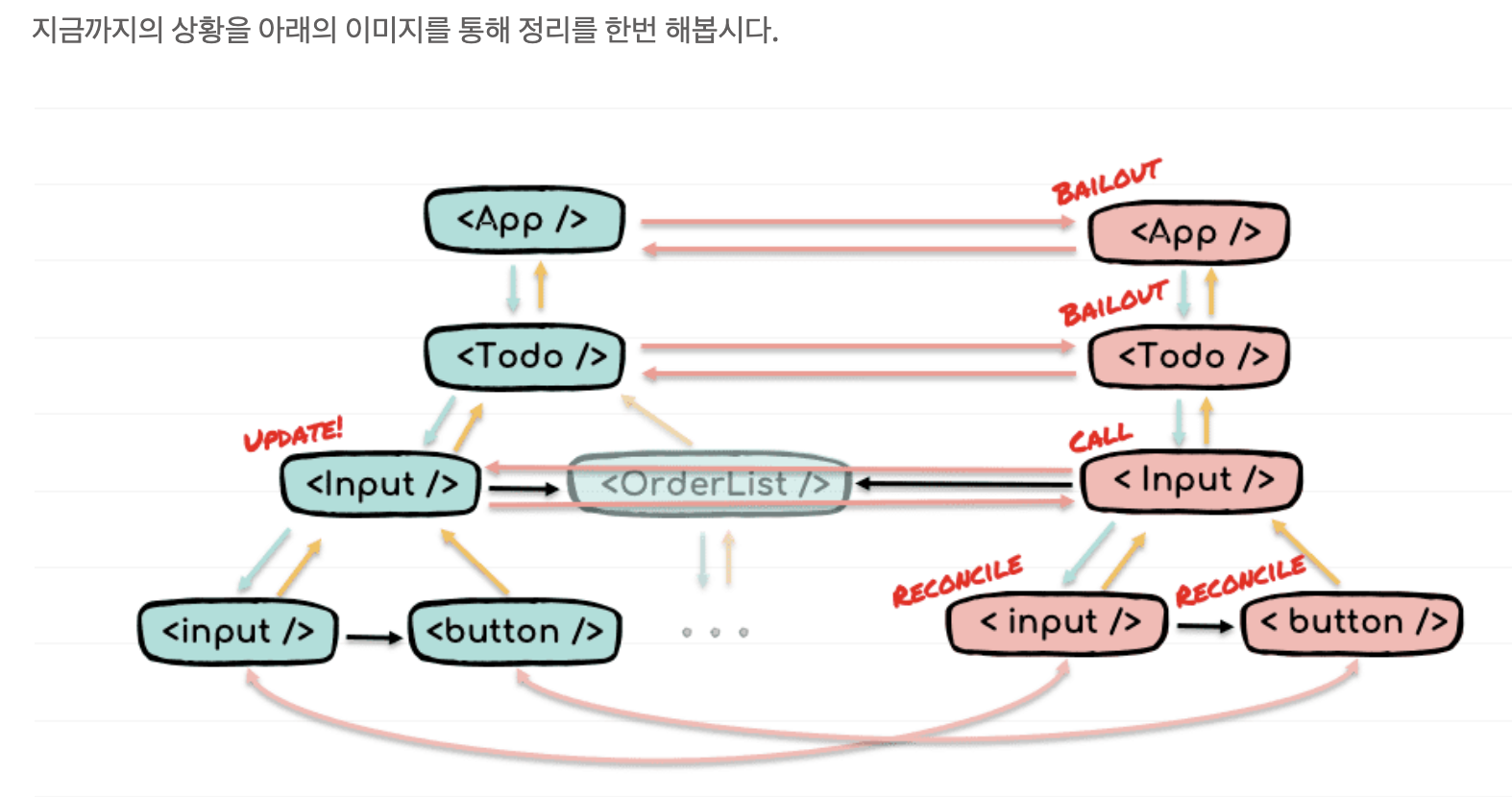
App에서 업데이트가 발생하여 전체 컴포넌트가 호출된다고 가정하면 호출의 순서는 전위 순회와 같습니다.
App -> Todo -> Input -> OrderList 입니다.
input과 button, ol 등 호스트 컴포넌트는 호출 대상이 아니므로 제외했습니다.Work 마무리 순서는 후위 순회와 같습니다.
input -> button -> Input … -> Todo -> App
completeUnitOfWork()
function completeUnitOfWork(unitOfWork: Fiber): Fiber | null {
  workInProgress = unitOfWork // fiber !
  do {
    const current = workInProgress.alternate // current
    const returnFiber = workInProgress.return // parent
	// workinProgress fiber가 에러없이 완전히 렌더링된 상태면
    // completeWork를 실행시키시오.
    if ((workInProgress.effectTag & Incomplete) === NoEffect) {
      completeWork(current, workInProgress, renderExpirationTime);
      if (returnFiber !== null && (returnFiber.effectTag & Incomplete) === NoEffect) {...}
    } else {
      // Work를 진행하던 중 에러가 발생한 경우.
    }

    const siblingFiber = workInProgress.sibling
    if (siblingFiber !== null) {
      // 형제가 존재한다면 Work를 진행하기 위해 반환한다.
      return siblingFiber
    }
    // 부모로 올라간다.
    workInProgress = returnFiber
      // 루트노드이면 break;
  } while (workInProgress !== null)

  return null
}
HTML element create
completeWork()
function completeWork(current, workInProgress, renderExpirationTime) {
  const newProps = workInProgress.pendingProps
  switch (workInProgress.tag) {
    case IndeterminateComponent:
    case SimpleMemoComponent:
    case FunctionComponent:
    case ClassComponent: {
      break;
    }
    /*...*/
    case HostComponent: {
      var rootContainerInstance = getRootHostContainer(); // Host root를 가지고 온다.
      const type = workInProgress.type;
      // 이미 렌더링이 되어 있는 fiber에 props가 변경된 경우
      // ex <div class="old-class"> -> <div class="new-class">
      if (current !== null && workInProgress.stateNode != null) {
        // 업데이트
        // props만 변경할꺼기때문에 updateHostComponent를 사용
        // updateHostComponent(...);
      } else {
        // newFiber로 새로 만들어진 fiber들
        // fiber -> element 생성
        let instance = createInstance(
          type,
          newProps,
          rootContainerInstance,
          workInProgress,
        );
		// fiber -> element 자식들도 연결시키기
        appendAllChildren(instance, workInProgress, false, false);
        // 이후 stateNode에서 instance 참조하기
        workInProgress.stateNode = instance;

        // event binding
        // type이 button, input, select, textarea면
        // effecttag를 update 달아줘라
        if (finalizeInitialChildren(instance, type, newProps, rootContainerInstance)) {
          markUpdate(workInProgress);
        }
      }
      break;
    }
    /*...*/
  }
}
createInstace()
function createInstance(
  type,
  props,
  rootContainerInstance, // Host root
  internalInstanceHandle // workInProgress
) {
// document.createElement() 동치
  const domElement = createElement(
    type,
    props,
    rootContainerInstance
  )
  // 호스트 영역에서 리액트에 접근할 수 있도록 fiber와 props를 element에 저장하는 부분
  precacheFiberNode(internalInstanceHandle, domElement)
  updateFiberProps(domElement, props)
    // 두 function은 너무 어려워서 패스
  return domElement
}
appendAllChildren()
function appendAllChildren(parent, workInProgress) {

  let node = workInProgress.child

  while (node !== null) {
    // 호스트 컴포넌트
    if (node.tag === HostComponent || node.tag === HostText) {
      appendInitialChild(parent, node.stateNode) // parent.appendChild(node.stateNode)
      // parent.push(child)라고 생각하면 됨.
    // 이외 컴포넌트
    } else if (node.child !== null) {
      node.child.return = node
      // 호스트 컴포넌트를 찾기 위해 한 단계 밑으로 내려 간다.
      node = node.child
      continue
    }

    // 내려갔던 만큼 다시 위로 올라간다.
    while (node.sibling === null) {
      // 형제가 더이상 없고 부모가 workInProgress라면 모든 경로를 탐색하였음을 뜻함.
      if (node.return === null || node.return === workInProgress) {
        return
      }
      node = node.return
    }

    // 형제로 이동한다.
    node.sibling.return = node.return
    node = node.sibling
  }
}
// Todo 예제를 보면서 appendAllChildren 알고리즘 이해하기
// 중요 host컴포넌트먼저 element로 변환되고 최종적으로 나머지 fiber가 연결됨
finalizeInitialChildren(), markUpdate()
function finalizeInitialChildren(
  domElement: Instance, // 현재 fiber -> element
  type: string,
  props: Props,
  rootContainerInstance: Container // host root element
): boolean {
    // event props를 element로 연결
  setInitialProperties(domElement, type, props, rootContainerInstance)
  return shouldAutoFocusHostComponent(type, props) // auto focus 여부
}

function shouldAutoFocusHostComponent(type: string, props: Props): boolean {
  switch (type) {
    case 'button':
    case 'input':
    case 'select':
    case 'textarea':
      return !!props.autoFocus
  }
  return false
}

function markUpdate(workInProgress: Fiber) {
  workInProgress.effectTag |= Update;
}
//  DOM 요소(호스트 컴포넌트)의 초기 속성들을 설정하는 역할을 하는 함수
function setInitialProperties(
  domElement: Element, // fiber -> element
  tag: string, // type
  rawProps: Object, // props
  rootContainerElement: Element | Document // root
): void {
  let props: Object
  // 이벤트 바인딩(reconciler_5 Synthetic event)
  switch (tag) {
    case 'img':
    case 'image':
    case 'link':
    // trapBubbledEvent -> 명시된 이벤트만 element에 바인딩
      trapBubbledEvent(TOP_ERROR, domElement)
      trapBubbledEvent(TOP_LOAD, domElement)
      props = rawProps
      break
    case 'form':
      trapBubbledEvent(TOP_RESET, domElement)
      trapBubbledEvent(TOP_SUBMIT, domElement)
      props = rawProps
      break
    case 'input':
    // initWrapperState -> input 태그 초기화
    // isControll -> 먼저 checkbox인지 아니면 radio인지 확인하고
    // checked 속성 활성화 여부파악 => 제어컴포넌트 확인
      ReactDOMInputInitWrapperState(domElement, rawProps)
    // 호스트 컴포넌트(DOM 요소)로서의 속성들을 결정하고 반환하는 함수
      props = ReactDOMInputGetHostProps(domElement, rawProps)
      trapBubbledEvent(TOP_INVALID, domElement)
    // ensureListeningTo -> 명시된 이벤트이외에도 해당 이벤트와 의존성을 가지고 있는 이벤트를 document에 이벤트 위임 형식으로 바인딩
      ensureListeningTo(rootContainerElement, 'onChange')
      break
    /*...*/
    default:
      props = rawProps
  }
  // attribute 추가
// 호스트 컴포넌트가 가지고 있는 props를 element에 적용하는 함수
  setInitialDOMProperties(
    tag,
    domElement,
    rootContainerElement,
    props,
    isCustomComponentTag
  )
}
setInitialDOMProperties()
function setInitialDOMProperties(
  tag: string, // type
  domElement: Element, // element
  rootContainerElement: Element | Document, // root
  nextProps: Object, // element에 담아야할 props
  isCustomComponentTag: boolean
): void {
  for (const propKey in nextProps) {
    // 실제 property인 지 확인(상속 받지 않는 프로퍼티)
    if (!nextProps.hasOwnProperty(propKey)) {
      continue
    }
	// nextProp은 value
    // ex) nextprops = { className = "my-class", id = "my-id" }
    const nextProp = nextProps[propKey]
	// { color: 'red', fontSize: '16px' }
    if (propKey === STYLE) {
      setValueForStyles(domElement, nextProp)
    }
    // { __html: '<div>Hello</div>' } => innerHTML할 떄 사용
    // why dangerously
    // innerHTML을 사용하면 악의적인 스크립트가 HTML 코드에 포함되어 실행(XSS 공격)
    else if (propKey === DANGEROUSLY_SET_INNER_HTML) {
      const nextHtml = nextProp ? nextProp[HTML] : undefined
      if (nextHtml != null) {
        setInnerHTML(domElement, nextHtml)
      }
    }
    //  <div>hello</div>에서의 hello
    // 전부 문자로 처리해야하기때문, number이 들어오면 문자로 형변환
    else if (propKey === CHILDREN) {
      if (typeof nextProp === 'string') {
        setTextContent(domElement, nextProp)
      } else if (typeof nextProp === 'number') {
        setTextContent(domElement, '' + nextProp)
      }
    }
    // event listener인지 확인
    // onClick = () => ()
    else if (registrationNameModules.hasOwnProperty(propKey)) {
      if (nextProp != null) {
        ensureListeningTo(rootContainerElement, propKey)
      }
    }
    // 나머지 { className = "my-class", id = "my-id" }
    else if (nextProp != null) {
      setValueForProperty(domElement, propKey, nextProp, isCustomComponentTag)
    }
  }
}
까먹을 지 모르겠지만 지금까지가 HTML element 생성이다.
HTML element update
function completeWork(current, workInProgress, renderExpirationTime) {
  // const newProps = workInProgress.pendingProps
  switch (workInProgress.tag) {
    /*...*/
    case HostComponent: {
      // var rootContainerInstance = getRootHostContainer();
      // const type = workInProgress.type;
      if (current !== null && workInProgress.stateNode != null) {
        // current와 workInProgress 사이의 차이점을
        // 찾아내 Commit phase에서 소비할 수 있도록 가공
        // element 업데이트
        updateHostComponent(
          current,
          workInProgress,
          type,
          newProps,
          rootContainerInstance,
        );
      } else {
        /*
        element 생성
        let instance = createInstance(...);
        appendAllChildren(instance, ...);
        ...
        */
    }
    /*...*/
  }
}
updateHostComponent(), prepareUpdate
function updateHostComponent(
 current: Fiber, // current
 workInProgress: Fiber, // workInProgress
 type: Type, // class
 newProps: Props, // workInProgress.pendingProps
 rootContainerInstance: Container
) {
 const oldProps = current.memoizedProps
 // 경로 최적화를 이용한 경우 변경된 부분이 없으므로
 // 지속적으로 확인하는 거 신기하네..
 // workInprogress.pendingProps === current.memoziedProps
 if (oldProps === newProps) {
   return
 }
// 현재 Fiber 노드와 연결된 실제 DOM 요소나 컴포넌트 인스턴스
 const instance: Instance = workInProgress.stateNode
   // 추가, 수정, 삭제 해야 될 속성 maybe effectTag
   // 업데이트 전 준비해야함을 명시하기 위해서 + 확장 용이성
   // 바로 diffProperties로 접근하는 게 아니고
   // 한 번 거쳐서 diff로 접근함.
 const updatePayload = prepareUpdate(
   instance,
   type,
   oldProps,
   newProps,
   rootContainerInstance
 )
 workInProgress.updateQueue = updatePayload
 if (updatePayload) {
   // workInProgress.effectTag를 update 달아줌
   markUpdate(workInProgress)
 }
}

// 삭제: current를 기준으로 workInProgress에 없다면 삭제이다.
// 추가, 수정: workInProgress를 기준으로 current에 없다면 추가, 값이 다르다면 수정이다.
function prepareUpdate(
 domElement: Instance,
 type: string,
 oldProps: Props,
 newProps: Props,
 rootContainerInstance: Container,
 hostContext: HostContext
): null | Array<mixed> {
 return diffProperties(
   domElement,
   type,
   oldProps,
   newProps,
   rootContainerInstance
 )
}
diffProperties()
function diffProperties(
  domElement: Element, // workInprogress Element
  tag: string, // type
  lastRawProps: Object, // oldProps
  nextRawProps: Object, // newProps
  rootContainerElement: Element | Document // root
): null | Array<mixed> {
  // 변경점을 담을 저장소로 [[key, value], ...]의 형태를 취함.
  let updatePayload: null | Array<any> = null

  let lastProps: Object // oldProps
  let nextProps: Object // newProps

  // 기본 속성 추가
  // type에 따라 기본 값 초기 셋팅하기
  switch (tag) {
    case 'input':
      lastProps = ReactDOMInputGetHostProps(domElement, lastRawProps)
      nextProps = ReactDOMInputGetHostProps(domElement, nextRawProps)
      updatePayload = []
      break
    // option, select, textarea...
  }

  let propKey
  let styleName
  let styleUpdates = null // style은 임시 변수를 두고 변경점을 추출하여 담아둔다.
  // style은 순회하기 전에는 삭제되었는지 수정되었는지 추가되었는지 알 수 없음.

  // 삭제
  // oldProps를 순회하면서 newProps와 비교해 삭제해야할 게 존재한다면
  // oldProp
  for (propKey in lastProps) {
    if (
      // 헷갈리지 않기 switch문을 통해 lastProps와 nextprops 값 할당받음
      // new에는 존재하는데, old에는 존재하지 않으면 삭제가 아니다.
      nextProps.hasOwnProperty(propKey) || // old에는 존재하고 new에도 존재하면 같은 속성이 그대로 존재하는 거니깐 삭제는 아님.
      !lastProps.hasOwnProperty(propKey) ||
      lastProps[propKey] == null // 개발자가 null로 명시한 상태
    ) {
      continue
    }
    // 이하 workInProgress에는 존재하지 않는 속성들이므로 모두 삭제해준다.
    if (propKey === STYLE) {
      const lastStyle = lastProps[propKey]
      for (styleName in lastStyle) {
        if (lastStyle.hasOwnProperty(styleName)) {
          if (!styleUpdates) {
            styleUpdates = {}
          }
          styleUpdates[styleName] = ''
        }
      }
    }
    // style이 아닌 나머지 props 삭제하는 과정
    // 더 헷갈릴 수도 있으니 부가 설명함
    // updatePayload가 빈 배열이면 빈배열에 push함,
    // 배열에 키값이 존재하면 propkey와 null을 통해 push함
    else {
      /(updatePayload = updatePayload || [])/.push(propKey, null)
    }
  }

  	// 추가, 수정
	// 여기서 주의사항 삭제할 때는 lastProps를 순회함 - oldProps
	// 하지만 추가 / 수정은 lastProps가 아닌 ! nextProps를 순회함. - newProps
  for (propKey in nextProps) {
    const nextProp = nextProps[propKey]
    // old props가 없을수도 있으니, 조건문을 통해서 lastProp 할당
    const lastProp = lastProps != null ? lastProps[propKey] : undefined
    if (
      // newProps 프로토타입 상속에 의해 만들어지거나,
      // newPropValue랑 oldPropValue가 동일하게 존재하거나
      // newPropValue에 null로 할당 그리고 oldPropValue에 null 할당이면
      // 추가나 수정된 게 아님.
      !nextProps.hasOwnProperty(propKey) ||
      nextProp === lastProp ||
      (nextProp == null && lastProp == null)
    ) {
      continue
    }

    if (propKey === STYLE) {
      // style은 추가, 수정, 삭제가 동시에 일어날 수 있음.
      // current에만 존재하면 삭제하면 그만이지만 그렇지 않을 경우 모든 케이스에 대한 처리가 필요함.
      // 추가, 삭제, 수정
      if (lastProp) {
        for (styleName in lastProp) {
          // 삭제
          if (
            // last엔 존재하고, next에는 존재하지 않으면
            // style 삭제해라
            lastProp.hasOwnProperty(styleName) &&
            (!nextProp || !nextProp.hasOwnProperty(styleName))
          ) {
            // 쭉 삭제하는 코드 위와 동일
            if (!styleUpdates) {
              styleUpdates = {}
            }
            styleUpdates[styleName] = ''
          }
        }
        // 추가, 수정
        for (styleName in nextProp) {
          if (
            // next에는 존재하고, last와 next의
            // style key에 대한 value가 다르면 => (수정)
            nextProp.hasOwnProperty(styleName) &&
            lastProp[styleName] !== nextProp[styleName]
          ) {
            if (!styleUpdates) {
              styleUpdates = {}
            }
            // 업데이트해야할 style value를 next value로 최신화
            styleUpdates[styleName] = nextProp[styleName]
          }
        }
      }
      // lastprop가 존재하지 않는다면
      // 즉 nextprop는 무조건 존재(현재 nextprops 순회중)
      // lastprops가 존재하지 않으면
      // newProps가 추가되었다는 의미
      else {
        if (!styleUpdates) {
          if (!updatePayload) {
            updatePayload = []
          }
          // 이건 easy [[key, value], ...]
          updatePayload.push(propKey, styleUpdates)
        }
        // style이 아에 추가되었으니깐
        // 그대로 style을 갖다 쓰기
        styleUpdates = nextProp
      }
    }
    // 여기까지가 propKey === style인 경우
    else if (propKey === DANGEROUSLY_SET_INNER_HTML) {
      const nextHtml = nextProp ? nextProp[HTML] : undefined
      const lastHtml = lastProp ? lastProp[HTML] : undefined

      if (nextHtml != null) {
        if (lastHtml !== nextHtml) {
          // nextHTML은 존재하는데 last와 다르다면 수정되었다는 소리
          (updatePayload = updatePayload || []).push(
            propKey,
            toStringOrTrustedType(nextHtml) // return '' + nextHtml
            // 최종적으로 수정된 innerHTML을 updatePayload에 저장
          )
        }
      }
    }
    // 여기까지가 propKey가 innerHtml인 경우
    else if (propKey === CHILDREN) {
      if (
        lastProp !== nextProp &&
        (typeof nextProp === 'string' || typeof nextProp === 'number')
      ) {
        (updatePayload = updatePayload || []).push(propKey, '' + nextProp)
      }
    }
    // eventListener
    else if (registrationNameModules.hasOwnProperty(propKey)) {
      if (nextProp != null) {
        ensureListeningTo(rootContainerElement, propKey)
      }
      if (!updatePayload && lastProp !== nextProp) {
        updatePayload = []
      }
    }
    // 나머지
    else {
      (updatePayload = updatePayload || []).push(propKey, nextProp)
    }
  }

  // style 변경점을 가지고 있는 styleUpdates를 마지막으로 추가하면서 마무리한다.
// style은 삭제 이후에 또 삭제가 될 수 있기때문에 마지막에 push하기
  if (styleUpdates) {
    (updatePayload = updatePayload || []).push(STYLE, styleUpdates)
  }
  return updatePayload
}
Side-Effect 연결시키기
그냥,,, 위로 올라가면서 연결된다로 이해했음.
effectTag들을 연결시킴
function completeUnitOfWork(unitOfWork: Fiber): Fiber | null {
  /* 나머지 코드 생략 */
  // returnFiber는 Parent Fiber
  if (
    // 부모 fiber가 존재하면서(root node가 아님) 작업 중에 오류가 발생하지 않았다면
      returnFiber !== null &&
      (returnFiber.effectTag & Incomplete) === NoEffect
    ) {
    // effect list의 head를 위로 올린다.
    // 부모의 effectTag가 존재하지 않는다면
    // 현재 effecttag가 연결되어 있지 않는 상태
      if (returnFiber.firstEffect === null) {
        returnFiber.firstEffect = workInProgress.firstEffect
      }
    // 서브 트리의 effect list를 부모 list 뒤에 연결한다.
    // 현재 lastEffect가 존재하고, 부모 lastEffect가 존재하면
    // 부모 lastEffect 다음으로 현재 first를 연결시키고
    // 부모 lastEffect가 존재하지 않으면 부모 lasteffect에
    // 현재 lastEffect를 할당
      if (workInProgress.lastEffect !== null) {
        if (returnFiber.lastEffect !== null) {
          returnFiber.lastEffect.nextEffect = workInProgress.firstEffect
        }
        returnFiber.lastEffect = workInProgress.lastEffect
      }
    // 둘다 부수효과가 있다는 가정하에
    // 여기 위는 workInProgress fiber의 자식들을 return에 연결
    // 여기 밑은 workInProgress fiber 자기자신을 return에 연결
      // 자신도 side-effect를 품고 있다면 부모 list에 연결한다.
      const effectTag = workInProgress.effectTag
      // effectTag가 존재하면 performedWork는 0상태
      if (effectTag > PerformedWork) {
        if (returnFiber.lastEffect !== null) {
          returnFiber.lastEffect.nextEffect = workInProgress
        }
        else {
          returnFiber.firstEffect = workInProgress
        }
        returnFiber.lastEffect = workInProgress
      }
    }
}
!정리!
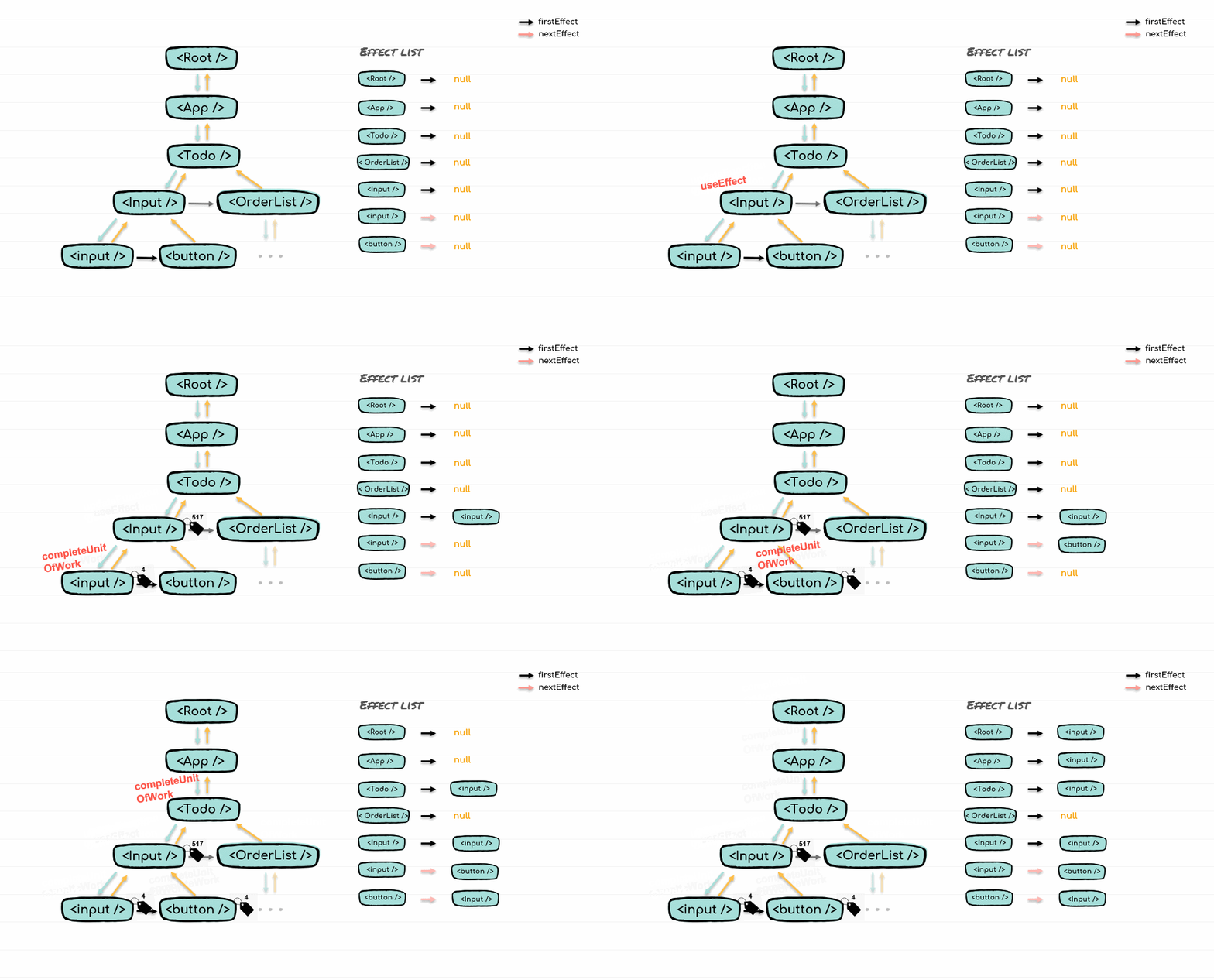
- input 값을 입력한다.
- ...

성실(誠實)한 사람만이 목표를 성실(成實)한다