HTML 공간 분할-3
레이아웃
HTML 레이아웃(Layout)
- 레이아웃(layout)이란 특정 공간에 여러 구성 요소를 보기 좋게 효과적으로 배치하는 작업을 의미한다.
웹 페이지의 레이아웃은 웹 사이트의 외관을 결정짓는 매우 중요한 요소이다.
출처 : https://www.tcpschool.com/html/html_space_layouts
- HTML에서는 다음과 같은 방법으로 레이아웃을 작성할 수 있습니다.
- div 요소를 이용한 레이아웃
- HTML5 레이아웃
- table 요소를 이용한 레이아웃
레이아웃 영역
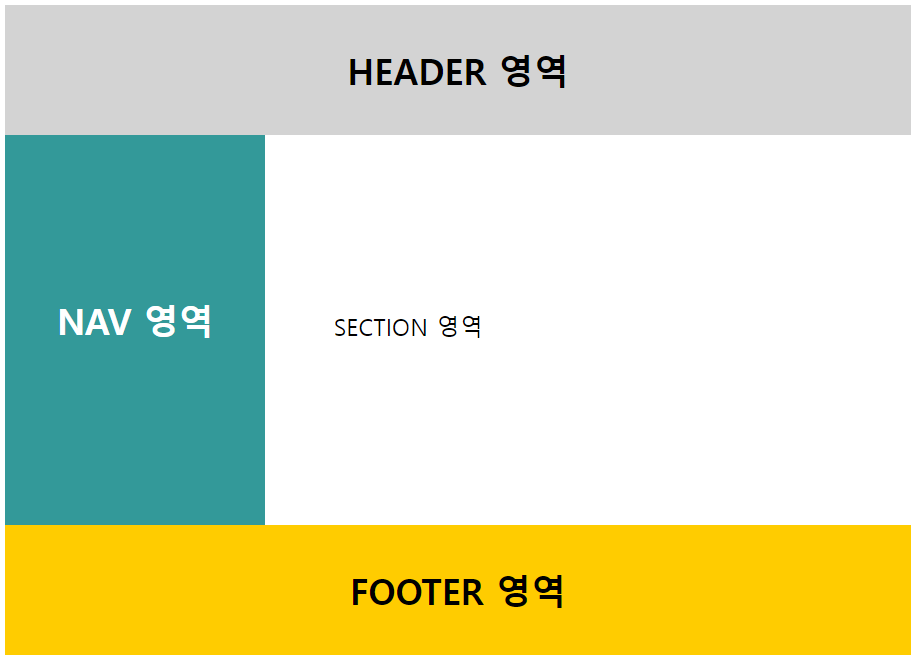
div 요소를 이용한 레이아웃
div 요소는 CSS 스타일을 손쉽게 적용할 수 있으므로, 레이아웃을 작성하는데 자주 사용된다.
<head>
	<meta charset="UTF-8">
	<title>HTML Layouts</title>
	<style>
		#header {
			background-color:lightgrey;
			height:100px;
		}
		#nav {
			background-color:#339999;
			color:white;
			width:200px;
			height:300px;
			float:left;
		}
		#section {
			width:200px;
			text-align:left;
			float:left;
			padding:10px;
		}
		#footer {
			background-color:#FFCC00;
			height:100px;
			clear:both;
		}
		#header, #nav, #section, #footer { text-align:center; }
		#header, #footer { line-height:100px; }
		#nav, #section { line-height:240px; }
	</style>
</head>

<body>

	<h1>div 요소를 이용한 레이아웃</h1>
	<div id="header">
		<h2>HEADER 영역</h2>
	</div>
	<div id="nav">
		<h2>NAV 영역</h2>
	</div>
	<div id="section">
		<p>SECTION 영역</p>
	</div>
	<div id="footer">
		<h2>FOOTER 영역</h2>
	</div>

</body>
HTML5 레이아웃
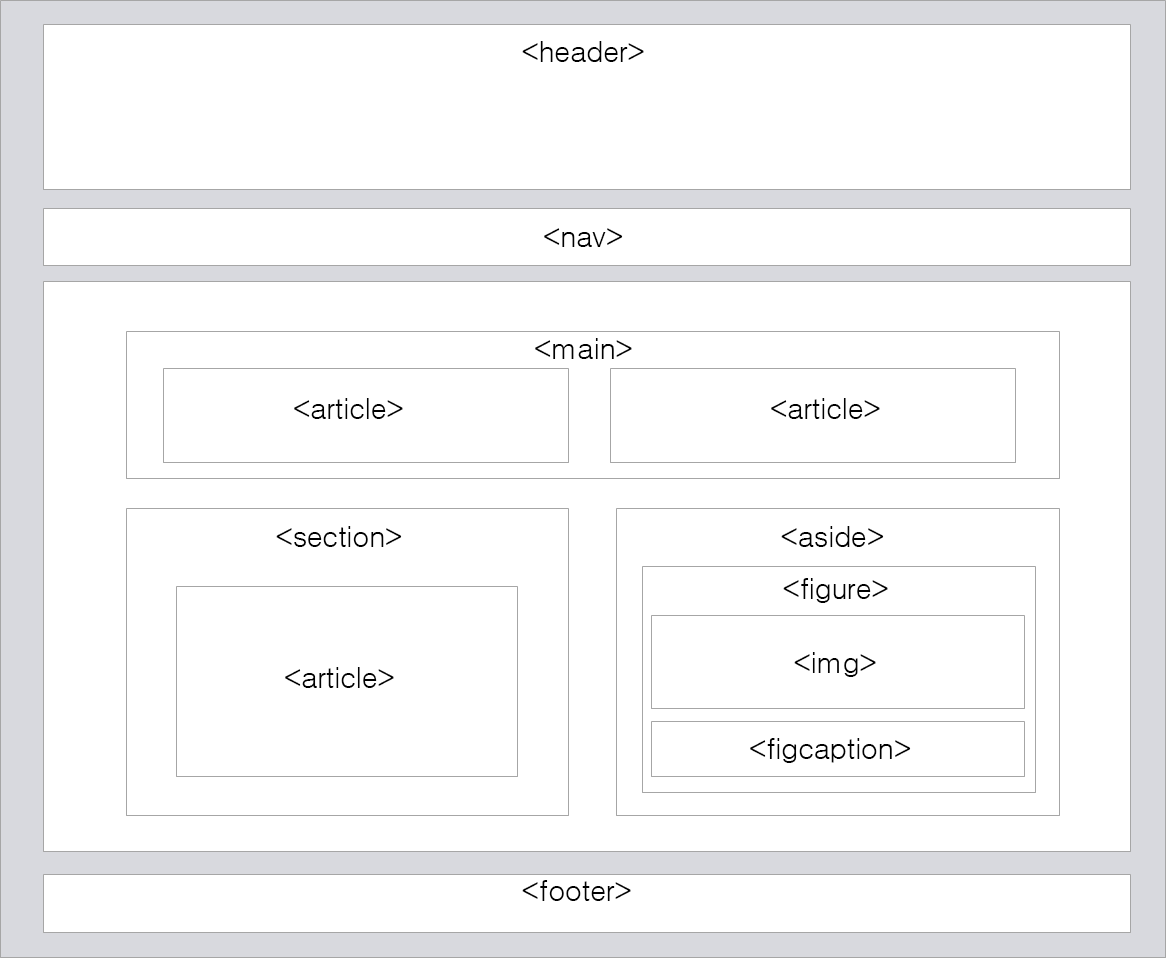
- HTML5에서는 웹 페이지의 레이아웃만을 위한 별도의 새로운 요소들을 제공한다.
이러한 요소들을 의미(semantic) 요소라고 한다.
출처 : https://www.tcpschool.com/html/html_space_layouts
<head>
	<meta charset="UTF-8">
	<title>HTML Layouts</title>
	<style>
		header {
			background-color:lightgrey;
			height:100px;
		}
		nav {
			background-color:#339999;
			color:white;
			width:200px;
			height:300px;
			float:left;
		}
		section {
			width:200px;
			text-align:left;
			float:left;
			padding:10px;
		}
		footer {
			background-color:#FFCC00;
			height:100px;
			clear:both;
		}
		header, nav, section, footer { text-align:center; }
		header, footer { line-height:100px; }
		nav, section { line-height:240px; }
	</style>
</head>

<body>

	<h1>HTML5 레이아웃</h1>
	<header>
		<h2>HEADER 영역</h2>
	</header>
	<nav>
		<h2>NAV 영역</h2>
	</nav>
	<section>
		<p>SECTION 영역</p>
	</section>
	<footer>
		<h2>FOOTER 영역</h2>
	</footer>

</body>-
HTML5에서 제공하는 레이아웃만을 위한 의미(semantic) 요소는 다음과 같습니다.
의미 요소 설명 <header>HTML 문서나 섹션(section) 부분에 대한 헤더(header)를 정의함. <nav>HTML 문서의 탐색 링크를 정의함. <section>HTML 문서에서 섹션(section) 부분을 정의함. <article>HTML 문서에서 독립적인 하나의 글(article) 부분을 정의함. <aside>HTML 문서에서 페이지 부분 이외의 콘텐츠(content)를 정의함. <footer>HTML 문서나 섹션(section) 부분에 대한 푸터(footer)를 정의함.
table 요소를 이용한 레이아웃
-
table 요소를 이용하여 레이아웃을 작성하는 방법은 오래전에 사용하던 방식이며, 현재는 거의 사용하지 않는다. 💢
음.. 알아야 하는 걸까?
table 요소는 레이아웃을 만들기 위해 설계된 요소가 아니므로, 테이블로 작성된 레이아웃은 수정이 매우 힘듭니다.<table width="100%" style="text-align:center; border:none"> <tr> <td colspan="2" style="background-color:lightgrey"><h2>Header 영역</h2></td> </tr> <tr> <td style="background-color:#339999; color:white; width:20%"><h2>Nav 영역</h2></td> <td style="height:200px; text-align:left"><p>Section 영역</p></td> </tr> <tr> <td colspan="2" style="background-color:#FFCC00"><h2>Footer 영역</h2></td> </tr> </table>
Header 영역 |
|
Nav 영역 |
Section 영역 |
Footer 영역 |
- 따라서 되도록이면 table 요소로 레이아웃을 작성하지 말아야 합니다.
나는 사람들을 치료해주는 '약'과 같은 존재가 되고 싶다.