
REST-API
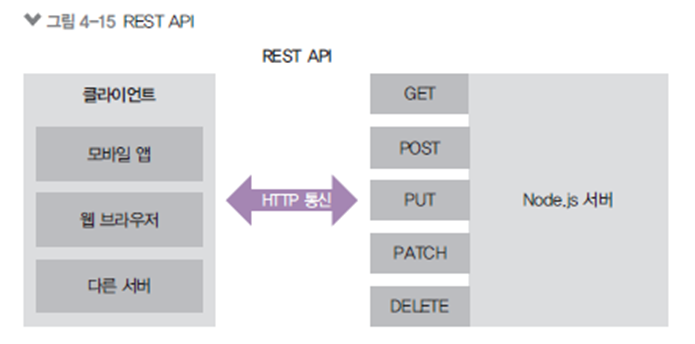
서버에 요청을 보낼 때는 주소를 통해 요청의 내용을 표현
- /index.html이면 index.html을 보내달라는 뜻
- 항상 html을 요구할 필요는 없음
- 서버가 이해하기 쉬운 주소가 좋음
REST API(Representational State Transfer)
- 서버의 자원을 정의하고 자원에 대한 주소를 지정하는 방법
- /user이면 사용자 정보에 관한 정보를 요청하는 것
- /post면 게시글에 관련된 자원을 요청하는 것
HTTP 요청 메서드
- GET: 서버 자원을 가져오려고 할 때 사용
- POST: 서버에 자원을 새로 등록하고자 할 때 사용(또는 뭘 써야할 지 애매할 때)
- PUT: 서버의 자원을 요청에 들어있는 자원으로 치환하고자할 때 사용 (전체 수정)
- PATCH: 서버 자원의 일부만 수정하고자 할 때 사용 (부분 수정)
- DELETE: 서버의 자원을 삭제하고자할 때 사용
http 프로토콜
클라이언트가 누구든 서버와 HTTP 프로토콜로 소통 가능
- IOS, 안드로이드, 웹이 모두 같은 주소로 요청 보낼 수 있음
- 서버와 클라이언트의 분리
RESTful
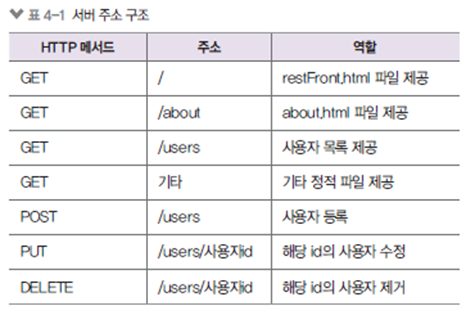
- rest api를 사용한 주소 체계를 이용하는 서버 (체계적)
- GET /user는 사용자를 조회하는 요청, POST /user는 사용자를 등록하는 요청
rest 서버 만들기
  try {
    if (req.method === 'GET') {
      if (req.url === '/') {
        const data = await fs.readFile(path.join(__dirname, 'restFront.html'));
        res.writeHead(200, { 'Content-Type': 'text/html; charset=utf-8' });
        return res.end(data);
      } else if (req.url === '/about') {
        const data = await fs.readFile(path.join(__dirname, 'about.html'));
        res.writeHead(200, { 'Content-Type': 'text/html; charset=utf-8' });
        return res.end(data);
      } else if (req.url === '/users') {
        res.writeHead(200, { 'Content-Type': 'application/json; charset=utf-8' });
        return res.end(JSON.stringify(users));
      }
요청이 무엇으로 날라오는 지 req.method === 'GET 이러한 식으로 진행이 됨
위의 코드를 보면 method가 'GET'이고 url이 '/' 일 때 restFront.html 파일을 읽어라 라는 뜻이 된다.
또한 url이 다른 페이지일 때 마찬가지로 fs를 이용해서 다른 html 파일들을 읽어서 보여 보내주게 된다.
const http = require('http');
const fs = require('fs').promises;
const path = require('path');

const users = {}; // 데이터 저장용

http.createServer(async (req, res) => {
  try {
    if (req.method === 'GET') {
      if (req.url === '/') {
        const data = await fs.readFile(path.join(__dirname, 'restFront.html'));
        res.writeHead(200, { 'Content-Type': 'text/html; charset=utf-8' });
        return res.end(data);
      } else if (req.url === '/about') {
        const data = await fs.readFile(path.join(__dirname, 'about.html'));
        res.writeHead(200, { 'Content-Type': 'text/html; charset=utf-8' });
        return res.end(data);
      } else if (req.url === '/users') {
        res.writeHead(200, { 'Content-Type': 'application/json; charset=utf-8' });
        return res.end(JSON.stringify(users));
      }
      // /도 /about도 /users도 아니면
      try {
        const data = await fs.readFile(path.join(__dirname, req.url));
        return res.end(data);
      } catch (err) {
        // 주소에 해당하는 라우트를 못 찾았다는 404 Not Found error 발생
      }
    } else if (req.method === 'POST') {
      if (req.url === '/user') {
        let body = '';
        // 요청의 body를 stream 형식으로 받음
        req.on('data', (data) => {
          body += data;
        });
        // 요청의 body를 다 받은 후 실행됨
        return req.on('end', () => {
          console.log('POST 본문(Body):', body);
          const { name } = JSON.parse(body);
          const id = Date.now();
          users[id] = name;
          res.writeHead(201, { 'Content-Type': 'text/plain; charset=utf-8' });
          res.end('등록 성공');
        });
      }
    } else if (req.method === 'PUT') {
      if (req.url.startsWith('/user/')) {
        const key = req.url.split('/')[2];
        let body = '';
        req.on('data', (data) => {
          body += data;
        });
        return req.on('end', () => {
          console.log('PUT 본문(Body):', body);
          users[key] = JSON.parse(body).name;
          res.writeHead(200, { 'Content-Type': 'text/plain; charset=utf-8' });
          return res.end(JSON.stringify(users));
        });
      }
    } else if (req.method === 'DELETE') {
      if (req.url.startsWith('/user/')) {
        const key = req.url.split('/')[2];
        delete users[key];
        res.writeHead(200, { 'Content-Type': 'text/plain; charset=utf-8' });
        return res.end(JSON.stringify(users));
      }
    }
    res.writeHead(404);
    return res.end('NOT FOUND');
  } catch (err) {
    console.error(err);
    res.writeHead(500, { 'Content-Type': 'text/plain; charset=utf-8' });
    res.end(err.message);
  }
})
  .listen(8082, () => {
    console.log('8082번 포트에서 서버 대기 중입니다');
  });
GET
- GET 메서드에서 /, /about 요청 주소는 페이지를 요청하는 것이므로 HTML 파일을 읽어서 전송합니다. AJAX 요청을 처리하는 /users에서는 users 데이터를 전송합니다. JSON 형식으로 보내기 위해 JSON.stringify를 해주었습니다. 그 외의 GET 요청은 CSS나 JS 파일을 요청하는 것이므로 찾아서 보내주고, 없다면 404 NOT FOUND 에러를 응답합니다.
POST, PUT
- POST와 PUT 메서드는 클라이언트로부터 데이터를 받으므로 특별한 처리가 필요합니다. req.on('data', 콜백)과 req.on('end', 콜백) 부분인데요. 3.6.2절의 버퍼와 스트림에서 배웠던 readStream입니다. readStream으로 요청과 같이 들어오는 요청 본문을 받을 수 있습니다. 단, 문자열이므로 JSON으로 만드는 JSON.parse 과정이 한 번 필요합니다.
DELETE
- DELETE 메서드로 요청이 오면 주소에 들어 있는 키에 해당하는 사용자를 제거합니다.
아무데도 안 걸리는 경우
해당하는 주소가 없을 경우 404 NOT FOUND 에러를 응답합니다.

Notion에 정리된 공부한 글을 옮겨오는 중입니다... (진행중)