Introduction
I have had two experiences of improving systems by introducing queues in practice. This article covers the second case, focusing on "Why was a queue needed, how was it applied, and what changed?"
(Teams-related code examples are based on actual services, but some information has been modified for security purposes.)
Service Introduction
The service covered in this article is a Microsoft Teams webhook processing system.
It consists of multiple processes, but the core is two things:
- Webhook storage and transmission process – Receives webhooks from Microsoft, stores them, then passes them to the processing process
- Processing process – Calls Microsoft Graph API based on the passed data to manipulate Teams apps according to business requirements
The two processes are connected through asynchronous communication, constituting a consistency verification and automation system that detects changes occurring in Teams in real-time and automatically adjusts settings according to service policies.
Reasons for Introducing Queues
There are various reasons for using queues. Usually, there are multiple reasons such as asynchronous processing, load distribution, reduced coupling between systems, and fault isolation.
The core reasons for introducing queues in this service were three:
-
Resource Conflict Prevention
Webhooks for the same teamId were coming in simultaneously to multiple endpoints, causing Graph API call conflicts or data overwriting during parallel processing. We placed queues to separate the same resources for sequential processing and different resources for parallel processing. -
Process Buffer
The processing server's Graph API call speed was slower than the webhook reception speed, creating bottlenecks. The queue acted as an intermediate buffer, separating collection and processing to ensure stability. -
High Throughput Requirements
We needed to stably process more than 200 webhooks per second. Through a queue-based structure, we could guarantee throughput and secure resource independence.
Problem Occurrence
At that time, the system was structured to receive and process webhooks from Microsoft Teams.
The operation flow was as follows:
- Events related to team activities occur in Microsoft Teams
- Webhooks are sent simultaneously to 2 endpoints
- The webhook transmission process parses and passes to the processing process
- The processing server executes Graph API calls for the same teamId in parallel
- Conflicts and data overwriting occur due to simultaneous processing of the same resource
Why Was the Parallel Processing Method Problematic?
The root cause of the problem was in Node.js's asynchronous I/O processing method.
Node.js executes JavaScript in a single thread, but delegates I/O requests to the background through the event loop.
- Network requests are delegated to kernel's asynchronous I/O functions (epoll, kqueue, IOCP, etc.).
- Some operations like file system, DNS are executed in libuv thread pool (default 4 threads).
In other words, the event loop doesn't process requests serially but throws them to kernel/thread pool simultaneously and executes callbacks when completed.
Because of this, when Graph API requests for the same teamId come in simultaneously, the event loop processes them in parallel without guaranteeing order.
The results:
- Resource conflicts: Conflicts occur when modifying the same resource simultaneously
- Data overwriting: Changes from one request are immediately overwritten by another request
- Consistency broken: Final data remains inconsistent
Infrastructure Introduction Proposal and Realistic Choice
Initially, I proposed solving the problem by introducing message queue infrastructure like Kafka, BullMQ.
This method was the cleanest and could guarantee scalability.
But the team situation at that time was different.
There weren't enough resources to operate additional infrastructure, and the team lead also made the decision that "infrastructure introduction is difficult right now."
Eventually, we had to make a realistic choice.
Instead of message queue systems, we chose the method of directly implementing data structure queues at the code level for improvement.
This was the path that could solve the problem with the least cost and was also a method the team could maintain without burden.
Applying Memory Queues
We decided on the direction of using memory queues, but we went through several attempts to figure out what design method would be most efficient.
1) Single Memory Queue Attempt
We processed all tasks serially in one queue.
class SingleQueue {
  constructor() {
    this.queue = [];
    this.processing = false;
  }

  async addTask(task) {
    this.queue.push(task);
    if (!this.processing) {
      await this.processQueue();
    }
  }

  async processQueue() {
    this.processing = true;
    while (this.queue.length > 0) {
      const task = this.queue.shift();
      await task();
    }
    this.processing = false;
  }
}Problem: Bottlenecks occurred due to overall serial processing → throughput dropped sharply.
2) Multi-Queue Distributed Method (Hash-based)
We distributed to N queues based on teamId hash values.
class DistributedQueue {
  constructor(queueCount = 4) {
    this.queues = Array.from({ length: queueCount }, () => []);
    this.processing = Array(queueCount).fill(false);
  }

  getQueueIndex(teamId) {
    return teamId.hashCode() % this.queues.length;
  }

  async addTask(teamId, task) {
    const queueIndex = this.getQueueIndex(teamId);
    this.queues[queueIndex].push(task);
    // ...
  }
}Problem: Same resources are processed sequentially in the same queue, but since multiple resources are mixed in one queue, if an error occurs during processing of a specific resource, the entire queue gets delayed.
3) Independent Queue by teamId (Final Solution)
We dynamically created dedicated queues for each teamId.
Inactive queues are automatically cleaned up after a certain time.
class TeamQueueManager {
  constructor() {
    this.queues = new Map(); // teamId → task array
    this.processing = new Set(); // teamId (currently processing)
    this.lastActivity = new Map(); // teamId → last used timestamp

    // Clean up unused queues every 10 minutes
    setInterval(() => this.cleanupQueues(), 10 * 60 * 1000);
  }

  getQueue(teamId) {
    if (!this.queues.has(teamId)) {
      this.queues.set(teamId, []);
    }
    this.lastActivity.set(teamId, Date.now());
    return this.queues.get(teamId);
  }

  isProcessing(teamId) {
    return this.processing.has(teamId);
  }

  startProcessing(teamId) {
    this.processing.add(teamId);
  }

  finishProcessing(teamId) {
    this.processing.delete(teamId);
  }

  cleanupQueues() {
    const now = Date.now();
    const maxIdle = 10 * 60 * 1000; // 10 minutes
    for (const [teamId, last] of this.lastActivity.entries()) {
      if (now - last > maxIdle) {
        console.log(`🗑️ [Cleanup] Team ${teamId} queue removed`);
        this.queues.delete(teamId);
        this.processing.delete(teamId);
        this.lastActivity.delete(teamId);
      }
    }
  }
}Results:
- Same teamId: Sequential processing → prevents resource conflicts
- Different teamId: Parallel processing → maximizes throughput
- Independent: Errors in specific teams don't affect other teams
Memory Usage Verification
The first thing I worried about when directly implementing memory queues was memory usage.
Since hundreds of webhooks come in per second, whether we could handle the data accumulating in queues was key.
So I calculated based on actual data size and processing requirements:
Webhook data size: about 468 bytes (≈0.46 KB)
Processing requirements per second: 200
Maximum memory usage: 468 × 200 = 93.6 KB
Server memory: 24G
The calculation result showed that even at maximum, it was only at the 93.6KB level.
This was a negligible amount in a 24GB memory server, and when analyzing actual service traffic, it didn't significantly exceed this range.
In other words, memory usage wasn't a concern.
Realistic Approach to Data Loss
The biggest disadvantage of memory queues is data loss when the server stops.
But this wasn't a fatal problem in this service.
The reasons are as follows:
-
Webhooks always provide latest data
- After receiving Teams webhooks, querying the corresponding resource always brings the latest state.
- For example, even if we miss 3 out of 5 consecutive webhooks, we can synchronize to the latest state by querying based on the last webhook.
-
Compensated by batch synchronization
- We operated a batch program that verifies consistency and synchronizes Teams app data with server data once a day.
-
Automatic recovery possible
- Even if the server goes down and comes back up, it can automatically recover to the latest state with just one subsequent webhook.
👉 In other words, it was a structure where the final state could always be consistently aligned through subsequent events or batch operations, even if "a few intermediate events disappear."
Final Architecture
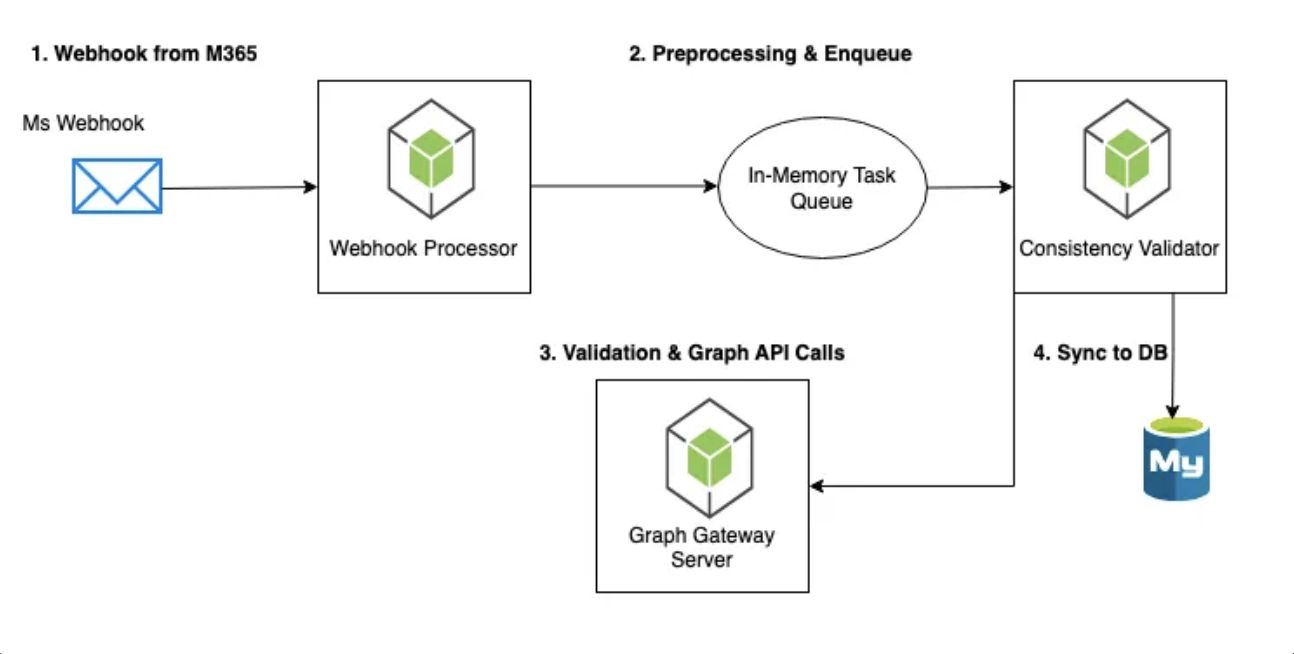
Results
By applying memory queues, we achieved the following results:
-
Eliminated resource conflicts
The problem of parallel Graph API call conflicts for the sameteamIdcompletely disappeared. -
Improved throughput
We could stably process more than 500 webhooks per second, improving throughput by about 200% compared to before. -
Error isolation
Processing failures in specific teams don't propagate to other teams, operating safely in team-unit isolated states. -
Secured operational stability
Even when webhooks temporarily concentrated, queues acted as buffers, enabling stable processing without failures.
Error Handling Strategy
We didn't implement separate retry logic even when errors occurred.
Since webhooks always reflect the latest data, they automatically recover through subsequent webhooks or batch synchronization processes.
Therefore, we only log errors, and operators can align consistency through manual synchronization APIs when necessary.
Scalability Considerations
While memory queues were sufficient now, if the service grows rapidly, the following limitations would emerge:
- Server memory limitations: Memory burden increases as queue data grows
- Data loss risk: Queue data disappears when the server goes down
- No distributed processing: Single server-based, so limited scalability
Future Expansion Plans
To overcome these limitations, we considered introducing message queue infrastructure like Kafka in the long term.
By applying teamId-based partition routing, we could expand the "teamId-unit sequential processing" model we implemented now.
// Example of teamId-based partition routing when introducing Kafka
const kafka = require('kafkajs');

const producer = kafka.producer();
const consumer = kafka.consumer({ groupId: 'teams-webhook-processors' });

const partition = teamId.hashCode() % 4;
await producer.send({
  topic: 'teams-webhooks',
  partition,
  messages: [{ key: teamId, value: JSON.stringify(webhookData) }],
});
The team lead is also aware of this part and has plans to introduce infrastructure step by step according to service scale.
In Production and What It Meant to Me
This architecture is currently operating stably in the production environment, processing more than 200 webhooks per second.
Although it's not a complete message queue system, it had great meaning in that it perfectly meets current service requirements and is a solution the team can handle best.
Especially if the case covered in Part 1 was closer to over-engineering driven by technical greed,
this time I could make a balanced choice considering realistic constraints.
In that I solved immediate problems while implementing at a level the team could maintain, I personally felt growth and development.
In other words, this experience was my second practical experience that allowed me to develop the power of "designing optimal architecture within real-world constraints" beyond simple technical implementation.