
본 글은 Getting the user's attention with alerts and action sheets (애플 공식 문서)를 한국어로 번역하여 옮긴 글입니다.
사용자에게 중요한 정보를 보여주거나 사용자가 중요한 선택을 하도록 하세요.
Overview
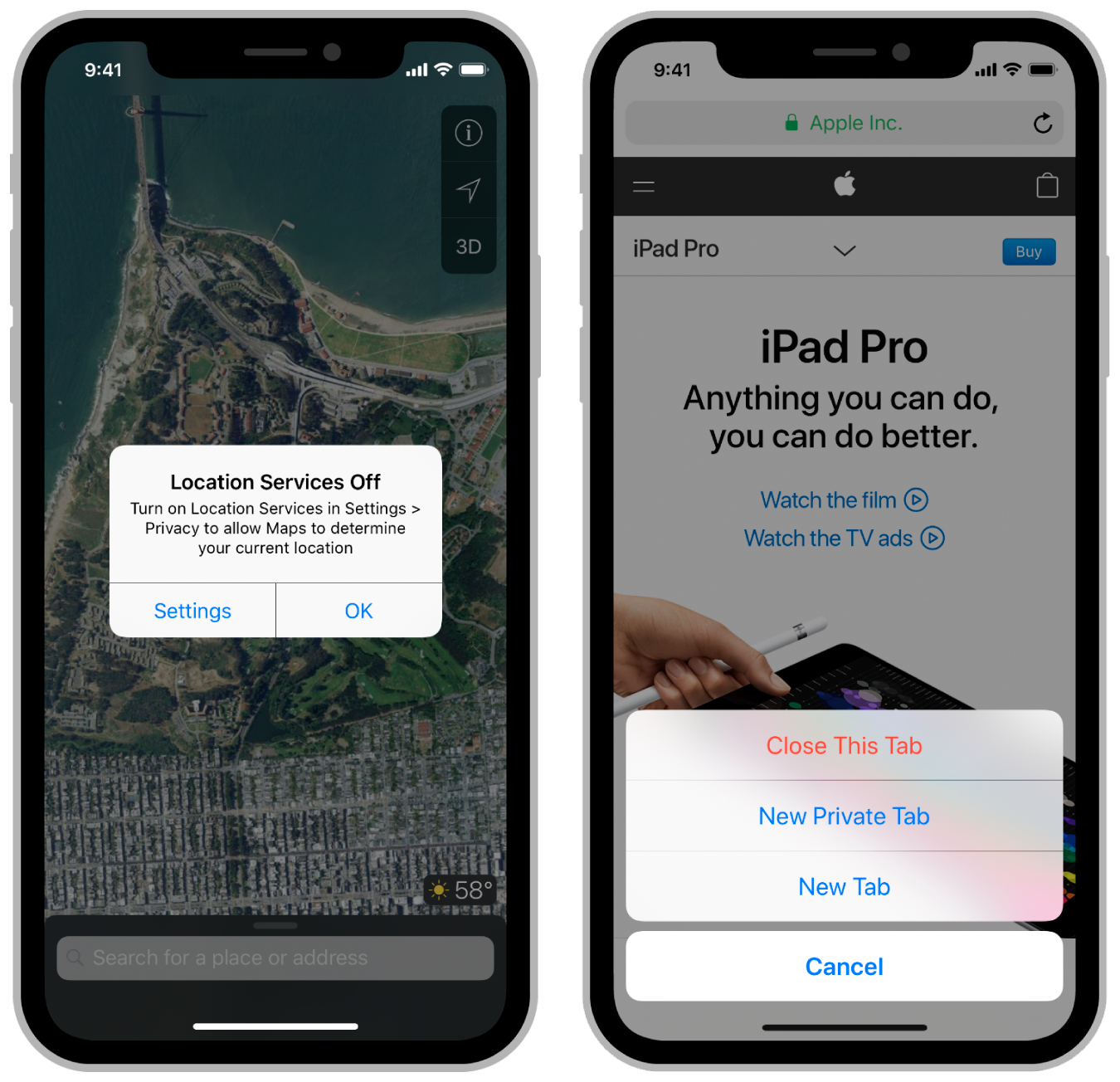
앱이 추가적인 정보를 필요로 하거나 사용자의 확인이 필요하다면 얼럿(alert)이나 액션 시트(action sheet)를 표시하세요. 얼럿과 액션 시트는 사용자에게 메시지를 표시하기 위해 앱의 일반적인 플로우를 막습니다. 아래 이미지에서, 왼쪽 이미지는 얼럿을 보여주고 오른쪽 이미지는 액션 시트를 보여줍니다. 사용자는 나열된 옵션의 하나를 선택하여 얼럿이나 액션 시트를 닫을 수 있습니다.
🟡 Important
얼럿과 액션 시트는 앱의 플로우를 막기에, 정말 필요로 할 때 최소한으로 사용하세요. 언제 사용할 지에 대한 자세한 가이드라인은 Human Interface Guidelines를 참조하세요.
얼럿과 액션 시트를 표시하려면, 아래 예제와 같이 UIAlertController 객체를 생성하고 구성한 후에, present(_:animated:completion:) 메서드를 호출하세요. 얼럿 컨트롤러(alert controller)를 구성하는 것은 사용자에게 보여주기를 원하는 타이틀과 메시지와 사용자가 선택할 수 있는 액션(action)을 포함합니다. 얼럿 컨트롤러를 표시하기 전에 적어도 하나의 액션을 UIAlertAction 객체로 추가해야 합니다.
@IBAction func agreeToTerms() {
	// Create the action buttons for the alert.
    let defaultAction = UIAlertAction(title: "Agree", style: .defualt) { (action) in
    	// Respond to user selection of the action.
    }
   	let cancelAction = UIAlertAction(title: "Disagree", style: .cancel) { (action) in
    	// Respond to user selection of the action.
    }

    // Create and configure the alert controller.
    let alert = UIAlertController(title: "Terms and Condition",
    	message: "Click Agree to accept the terms and conditions.",
        preferredStyle: .alert)
    alert.addAction(defaultAction)
    alert.addACtion(cancelAction)

    self.present(alert, animated: true) {
    	// The alert was presented
    }
}
Present an action sheet on iPad
UIKit은 iPad에서 액션 시트를 팝오버(popover) 안에 표시하도록 요구합니다. 아래 이미지는 하단 버튼(bar button item)에 고정된 액션 시트를 보여줍니다.
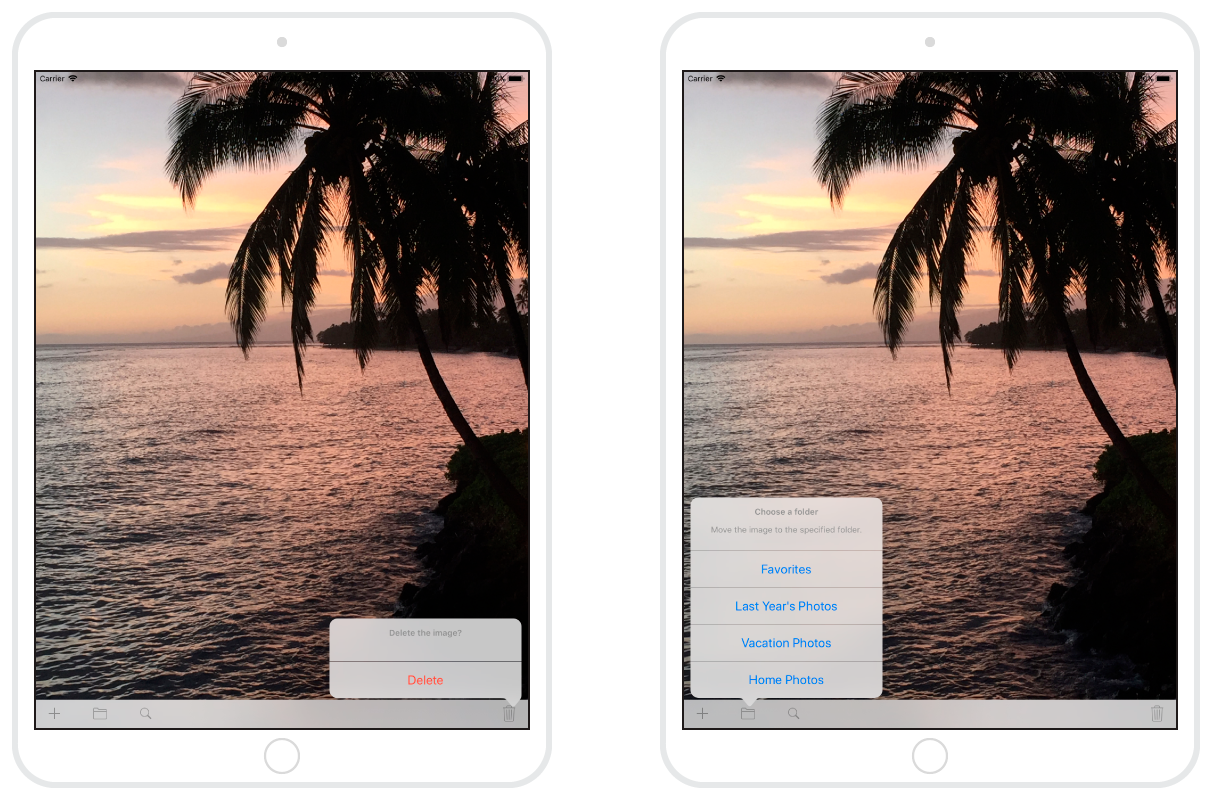
액션 시트를 팝오버로 표시하려면, 얼럿 컨트롤러의 popoverPresentationController 프로퍼티를 사용하여 팝오버의 고정 포인트(anchor point)를 명시하세요. 기기에 상관없이 이 프로퍼티를 안전하게 구성할 수 있습니다. 즉, 아래 코드는 iPad에서 액션 시트를 팝오버로 표시하고 iPhone에서는 슬라이드 업 방식으로 액션 시트를 표시합니다.
@IBAction func deleteItem() {
	let destroyAction = UIAlertAction(title: "Delete", style: .destructive) { (action) in
    	// Respond to user selection of the action
    }
    let cancelAction = UIAlertAction(title: "Cancel", style: .cancel) { (action) in
    	// Respond to user selection of the action
    }

    let alert = UIAlertAction(title: "Delete the image?",
    	message: "",
        preferredStyle: .actionSheet)
    alert.addAction(destroyAction)
    alert.addAction(cancelAction)

    // On iPad, action sheets must be presented from a popover.
    alert.popoverPresentationController?.barButtonItem = self.trashButton

    self.present(alert, animated: true) {
    	// The alert was presented
    }
}
⚪️ Note
액션 집합에 UIAlertAction.Style.cancel 스타일로 구성된 버튼이 포함되어 있다면, UIKit은 액션 시트를 팝오버로 표시할 때 해당 버튼을 제거합니다. 팝오버 바깥 아무 곳이나 탭하면 취소 버튼의 클릭과 동일한 효과가 발생하며, 액션 핸들러도 호출됩니다.
