개요
제작할 게임에서 사용될 아이템 시스템을 구현한다
목표
- 아이템은 다음과 같은 속성을 가진다
| 요소명 | 유형 | 선언명 | 예시 |
|---|---|---|---|
| 이름 | string | itemName | 한손 검 |
| 분류 | ItemType | itemType | OneHanded_Weapon |
| 등급 | int | itemGrade | 1 |
| 태그 1 | TagData | itemTag1 | Cursed |
| 태그 2 | TagData | itemTag2 | Fire |
| 태그 3 | TagData | itemTag3 | Dwarven |
| 가격 | int | itemPrice | 100 |
| 아이템 아이콘 | Sprite | itemIcon |  |
| 아이템 설명 | string | itemDescribtion | 모험가들이 애용하는 한손 검 |
-
같은 아이템이라면 기본 정보(이름, 분류, 아이템 아이콘, 아이템 설명, 기본 가격)은 공유하지만
등급, 태그, 가격 속성은 생성될 때 무작위로 부여되도록 만들고 싶었다
└ 또한 등급이 결정되는 확률이나 붙을 수 있는 태그를 아이템마다 각각 다르게 만들고 싶었다
예) '강철 한손검'은 '고급' 등급이 나올 확률이 20%지만, '고블린 단검'은 '고급' 등급이 나올 확률 0% -
따라서 인게임 내 실제 생성된 아이템을 구현할 Item 클래스와
아이템의 기본 정보, 등급 확률, 붙을 수 있는 태그 등이 담긴 ItemTemplate 스크립터블 오브젝트 클래스를 만들 것이다
구현
Item 스크립트 생성
using UnityEngine;
using UnityEngine.UI;

[System.Serializable]
public class Item
{
    public string itemName; //아이템 이름
    public ItemType itemType; //아이템 분류
    public int itemGrade; //아이템 등급
    public TagData itemTag1; //아이템 태그 1
    public TagData itemTag2; //아이템 태그 2
    public TagData itemTag3; //아이템 태그 3
    public int itemPrice; //아이템 가격

    public Sprite itemIcon; //아이템 아이콘
    public string itemDescribtion; //아이템 설명 텍스트

}
ItemType enum 생성
- ItemType은 단순히 어떤 아이템 분류인지만 결정하기 때문에 enum으로 제작한다
using UnityEngine;

public enum ItemType
{
    OneHanded_Weapon,
    TwoHanded_Weapon,
    Ranged_Weapon,
    Magic_Weapon,
    Light_Armor,
    Heavy_Armor,
    Potion,
    Stuff
}
TagData 스크립터블 오브젝트
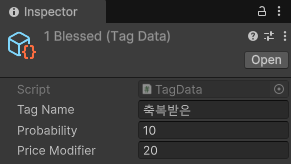
- TagData는 어떤 태그인지 결정하는 것 뿐만 아니라 태그가 붙을 확률, 해당 태그로 오르는 아이템 가격도 포함하기 때문에 스크립터블 오브젝트 클래스로 제작한다
using UnityEngine;

[CreateAssetMenu(fileName = "TagData", menuName = "Item/Create New Tag")]
public class TagData : ScriptableObject
{
    public string TagName; //태그 이름
    public float Probability; //태그가 붙을 확률 (%)
    public float PriceModifier; // 가격 변동 값 (%)
}- 이후 스크립터블 오브젝트를 생성해 인스펙터에서 정보를 입력해 준다
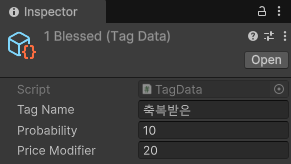
ItemTemplate 스크립터블 오브젝트
using System.Collections.Generic;
using UnityEngine;
using UnityEngine.UI;
[CreateAssetMenu(fileName = "ItemTemplate", menuName = "Item/Create New ItemTamplate")]
public class ItemTamplate : ScriptableObject
{
public string ItemNameTemplate; //아이템 이름
public ItemType itemTypeTemplate; //아이템 분류
public int BasePrice; //기본 가격
[Header("등급 확률 (%)")]
public float grade0Chance;
public float grade1Chance;
public float grade2Chance;
public float grade3Chance;
[Header("가능한 태그 목록")]
public List<TagData> possibleTag1;
public List<TagData> possibleTag2;
public List<TagData> possibleTag3;
public Sprite ItemIconTemplate; //아이템
public string ItemDescribtionTemplate;
}이후 스크립터블 오브젝트를 생성해 인스펙터에서 정보를 입력해 준다
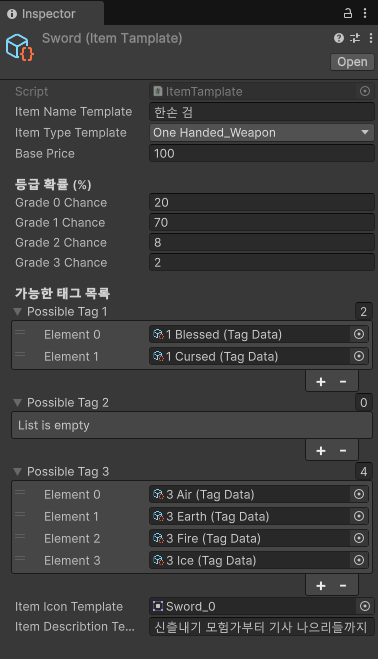
ItemGenerator 스크립트 생성
using UnityEngine;
using System.Collections.Generic;

public class ItemGenerator : MonoBehaviour
{
    // 아이템 템플릿 참조
    public ItemTamplate itemTemplate;

    public Item ItemGenerate()
    {
        // 새 아이템 생성
        Item newItem = new Item();

        // 1. 아이템 이름과 분류, 아이콘, 설명을 템플릿에서 그대로 가져오기
        newItem.itemName = itemTemplate.ItemNameTemplate;
        newItem.itemType = itemTemplate.itemTypeTemplate;
        newItem.itemIcon = itemTemplate.ItemIconTemplate;
        newItem.itemDescribtion = itemTemplate.ItemDescribtionTemplate;

        // 2. 아이템 등급을 확률에 맞게 설정
        newItem.itemGrade = DetermineItemGrade();

        // 3. 아이템 태그를 확률에 맞게 설정
        newItem.itemTag1 = GetRandomTag(itemTemplate.possibleTag1);
        newItem.itemTag2 = GetRandomTag(itemTemplate.possibleTag2);
        newItem.itemTag3 = GetRandomTag(itemTemplate.possibleTag3);

        // 4. 아이템 가격 계산
        newItem.itemPrice = CalculateItemPrice(newItem);

        //디버그용
        LogItemInfo(newItem);
        Debug.Log("Item Generated");

        return newItem;
    }

    // 아이템 등급을 확률에 맞게 결정하는 함수
    private int DetermineItemGrade()
    {
        float[] gradeChances = new float[]
        {
            itemTemplate.grade0Chance,
            itemTemplate.grade1Chance,
            itemTemplate.grade2Chance,
            itemTemplate.grade3Chance
        };

        float gradeChance = Random.Range(0f, 100f);
        float cumulativeChance = 0f;

        for (int i = 0; i < gradeChances.Length; i++)
        {
            cumulativeChance += gradeChances[i];
            if (gradeChance <= cumulativeChance)
            {
                return i; // 해당 등급 반환
            }
        }

        return 0; // 기본값 (예: 확률이 0일 때는 grade 0으로 설정)
    }

    private TagData GetRandomTag(List<TagData> possibleTags)
    {
        // 태그가 하나도 없다면 null 반환
        if (possibleTags == null || possibleTags.Count == 0)
            return null;

        float totalProbability = 0f;
        foreach (var tag in possibleTags)
            totalProbability += tag.Probability;

        // 태그가 없을 확률 계산
        float noTagProbability = 100f - totalProbability;

        // 0~100 사이의 랜덤 값 생성
        float randomValue = Random.Range(0f, 100f);

        // 태그가 없을 확률 체크
        if (randomValue < noTagProbability)
            return null;

        // 태그 확률 범위 조정
        randomValue -= noTagProbability;

        // 확률을 누적하며 태그 선택
        foreach (var tag in possibleTags)
        {
            if (randomValue <= tag.Probability)
                return tag;
            randomValue -= tag.Probability;
        }

        return null; // (이론상 도달할 수 없음)
    }

    // 아이템 가격 계산 함수
    private int CalculateItemPrice(Item newItem)
    {
        // 기본 가격
        float basePrice = itemTemplate.BasePrice;

        // 등급에 따른 가격 변동
        float gradePriceModifier = GetGradePriceModifier(newItem.itemGrade);

        // 태그에 따른 가격 변동 (누적)
        float tagPriceModifier = 0f;

        // 각 태그의 PriceModifier를 더함
        if (newItem.itemTag1 != null)
        {
            tagPriceModifier += newItem.itemTag1.PriceModifier;
        }
        if (newItem.itemTag2 != null)
        {
            tagPriceModifier += newItem.itemTag2.PriceModifier;
        }
        if (newItem.itemTag3 != null)
        {
            tagPriceModifier += newItem.itemTag3.PriceModifier;
        }

        // 최종 가격 = 기본 가격 * (1 + 등급 가격 변동 + 태그 가격 변동)
        float finalPrice = basePrice * (1 + gradePriceModifier / 100 + tagPriceModifier / 100);

        // 가격을 정수로 반환
        return Mathf.RoundToInt(finalPrice);
    }

    // 등급에 따른 가격 변동을 계산하는 함수
    private float GetGradePriceModifier(int grade)
    {
        switch (grade)
        {
            case 0: return -20f;  // 등급 0: -20%
            case 1: return 0f;    // 등급 1: 0%
            case 2: return 50f;   // 등급 2: +50%
            case 3: return 100f;  // 등급 3: +100%
            default: return 0f;   // 기본값
        }
    }

    // 생성된 아이템 정보 출력 함수
    private void LogItemInfo(Item item)
    {
        string itemInfo = $"Item Name: {item.itemName}\n" +
                          $"Item Type: {item.itemType}\n" +
                          $"Item Grade: {item.itemGrade}\n" +
                          $"Item Price: {item.itemPrice}\n";

        // 태그 정보 출력
        string tagInfo = "Tags: ";
        if (item.itemTag1 != null)
            tagInfo += item.itemTag1.TagName + " ";
        if (item.itemTag2 != null)
            tagInfo += item.itemTag2.TagName + " ";
        if (item.itemTag3 != null)
            tagInfo += item.itemTag3.TagName + " ";

        itemInfo += tagInfo;

        // Debug.Log에 출력
        Debug.Log(itemInfo);
    }
}- 아이템 시스템 기획에 나와있는 절차대로 Item 클래스를 만들 스크립트
└ 1. 이름, 분류, 아이콘, 설명을 템플릿에서 그대로 가져온다
└ 2. 템플릿에 명시된 확률에 따라 아이템의 등급을 결정한다
└ 3. 템플릿에 명시된 가능한 태그를 확률에 따라 아이템에 추가한다
└ 4. 등급과 태그에 따른 가격 가중치를 반영해 아이템의 최종 가격을 결정한다
결과

- ItemGenerator의 절차에 따라 아이템이 생성된다