ROS2 Topic
1. Topic 기본
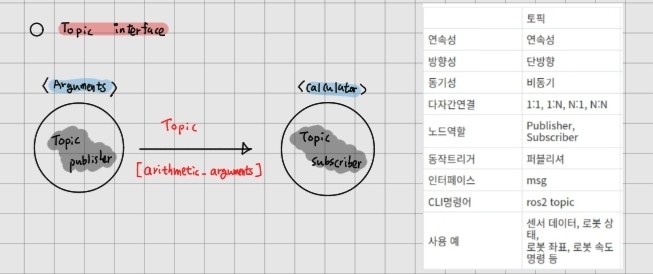
- Topic은 노드가 msg를 교환하는 버스 역할을 수행
- ROS graph의 필수적인 요소
- 비동기식, 연속성, 단방향 메시지 송수신 방식
- Publisher/Subscriber 간의 통신
- 1:1, 1:N, N:1, N:N 가능
- 노드는 하나 이상의 토픽을 퍼블리시하고 서브스크라이브하는 역할을 동시 수행 가능
2. Topic 관련 명령어
2.1 topic 기초 명령어
$ ros2 run turtlesim turtlesim_node

$ ros2 topic list -t # 현재 개발환경에서 동작 중인 모든 노드들의 토픽 정보 확인 가능(-t 옵션은 각 메시지의 형태를 함께 표시 가능)

$ ros2 topic echo <topic_name> # 특정 토픽의 메시지 내용을 실시간으로 표시, (모든 메시지는 SI 단위를 기본으로 사용)

$ ros2 topic bw <topic_name># 송수신 받는 토픽 메시지의 초당 대역폭 확인 가능

$ ros2 topic hz <topic_name># 토픽의 전송 주기 확인

$ ros2 topic delay <topic_name> # 토픽 지연 시간 확인

$ ros2 topic pub <topic_name> <msg_type> "<args>"# 토픽을 퍼블리시하는 명령어

$ ros2 topic pub --once <topic_name> <msg_type> "<args>" # 한번만 발행

$ ros2 topic pub --rate1 <topic_name> <msg_type> "<args>" # 1hz 주기로 발행
위의 코드들은 다음 ex_calculator 실습 코드 실행 후 확인해보고 분석하고자 한다.
2.1 Topic bag
- rosbag: 퍼블리시되는 토픽을 파일 형태로 저장하고 필요할 때 저장된 토픽을 다시 불러와 동일한 주기로 재생하는 기능
ros2 bag record <topic_name1> <topic_name2> <topic_name3> ...

$ ros2 bag record /turtle1/cmd_vel # 종료는 ctrl+c
$ ros2 bag record -o <file_name> <topic_name> # bag file_name 지정하여 저장

$ ros2 bag info <bag_file_name> # 저장된 rosbag 파일의 정보를 확인

$ ros2 bag play <bag_file_name> # 저장된 bag 파일의 실행
3. Topic publisher
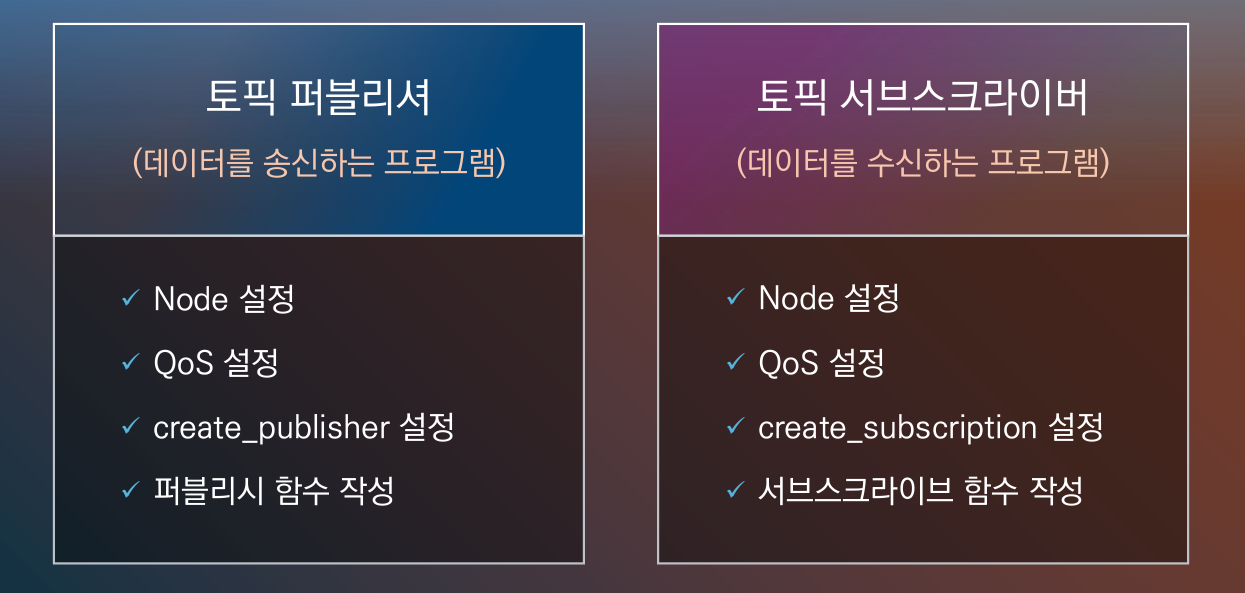
topic publish를 위해서는 노드 생성부터 msg 생성, 발행, 종료까지 여러 기능이 필요하며 생성할 msg의 종류와 주기 등에 따라 선택적으로 편집을 진행해야 합니다. 아래는 topic 내용을 중점으로 일반화된 내용으로 정리한 것입니다. (python)
3.1 Publisher code 필수 기능
- ROS2 초기화 및 노드 생성 --> Node 객체 생성 및 rclpy.init() 필요
import rclpy
from rclpy.node import Node
.
.
.
def main(args=None):
	rclpy.init(args=args) # ros2 초기화
node = PublisherNode() # PublisherNode는 Camel case에 의해 지은 class 이름, node는 클래스의 인스터스를 참조하기 위한 변수 이름-
QoS 설정 --> 선택적인 옵션으로 메시지의 신뢰성, 전달방법 등을 설정 가능(QoSProfile 사용)
- 주로 아래의 4개의 속성으로 구성
parameter explanation option Reliability 메시지 전송의 신뢰성 설정 RELIABLE OR BEST_EFFORT Durability 메시지의지속성 설정 VOLATILE/TRANSIENT_LOCAL/SYSYEM_DEFAULT History 메시지를 유지하는 방식 KEEP_LAST/KEEP_ALL Depth 메시지 큐의 크기
from rclpy.qos import QoSProfile
from rclpy.qos import QoSDurabilityPolicy
from rclpy.qos import QoSHistoryPolicy
from rclpy.qos import QoSReliabilityPolicy
.
.
.
class PublisherNode(Node):

  QOS_RKL10V=QoSProfile(
              reliability=QoSReliabilityPolicy.RELIABLE,
              history=QoSHistoryPolicy.KEEP_LAST,
              depth=qos_depth,
durability = QoSDurabilityPolicy.VOLATILE)- Publish 생성 --> create.publisher() 메서드를 통해 메시지 타입과 이름을 지정
self.publisher_name = self.create_piublisher(msg_type, topic_name, qos_profile)- timer or event msg --> msg를 주기적으로 발행하기 위한 설정
self.timer = self.create_timer(interval_seconds, self.callback_function)- msg 생성 및 발행 --> msg 객체를 생성하고 필요한 데이터 필드를 채워 publish() 메서드를 통해 발행
msg = Messagetype() # .msg 파일을 작성하여 패키지 빌드하여 사용가능
msg.data_field = value # 각 변수들의 value를 설정
self.publish_name.publish(msg) # - 종료 처리 및 노드 실행
rclpy.spin() # 노드 실행
node.destory_node()
rclpy.shutdown() # 노드 종료
3.2 일반화 코드
import rclpy
from rclpy.node import Node
from std_msgs.msg import MessageType  # 예: String, Int32, Float64 등
from rclpy.qos import QoSProfile, QoSReliabilityPolicy, QoSHistoryPolicy

class PublisherNode(Node):
    def __init__(self):
        super().__init__('node_name')  # 노드 이름 설정

        # QoS 설정 (선택적)
        qos_profile = QoSProfile(
            reliability=QoSReliabilityPolicy.RELIABLE,
            history=QoSHistoryPolicy.KEEP_LAST,
            depth=10  # 메시지 큐의 깊이
        )

        # 퍼블리셔 생성
        self.publisher = self.create_publisher(MessageType, 'topic_name', qos_profile)

        # 타이머 생성 및 콜백 함수 설정 (주기적 발행)
        self.timer = self.create_timer(1.0, self.publish_message)  # 1초마다 메시지 발행

    def publish_message(self):
        msg = MessageType()
        msg.data = "Hello, ROS 2!"  # 메시지 데이터 필드 설정
        self.publisher.publish(msg)
        self.get_logger().info('Publishing: "%s"' % msg.data)

def main(args=None):
    rclpy.init(args=args)
    node = PublisherNode()
    try:
        rclpy.spin(node)  # 노드 실행
    except KeyboardInterrupt:
        pass
    finally:
        node.destroy_node()
        rclpy.shutdown()

if __name__ == '__main__':
    main()
ex_calculator 실습 코드
4. Topic Publisher - arithmetic/argument.py
4.1 Library import
- topic msg를 정의한 파일을 불러와 참조
- rclpy, node 생성을 위한 호출
- Qos 프로파일 설정을 위한 라이브러리
import random  # create random number library
from ros_study_msgs.msg import ArithmeticArgument # msg type file import
# rcl_interfaces.msg: basic interface msg type of ros2
from rcl_interfaces.msg import SetParametersResult # parameter setting result
import rclpy
from rclpy.node import Node
# define Qos profile
from rclpy.qos import QoSDurabilityPolicy
from rclpy.qos import QoSHistoryPolicy
from rclpy.qos import QoSProfile
from rclpy.qos import QoSReliabilityPolicy
4.2 class 정의
4.2.1 class 정의 및 node 상속
- Argument 클래스는 ROS2의 Node 클래스를 상속
- 생성자는 노드의 이름을 argument로 초기화
class Argument(Node):
    def __init__(self):
        super().__init__('argument')
4.2.2 파라미터 선언 - param 기능
- QoS depth 및 random_num에 대한 최소 및 최대 값을 위한 파라미터 선언
- 선언한 파라미터를 인스턴스 변수에 저장
self.declare_parameter('qos_depth', 10)  # 파라미터 선언
qos_depth = self.get_parameter('qos_depth').value # 파라미터 인스턴스화

self.declare_parameter('min_random_num', 1)
self.min_random_num = self.get_parameter('min_random_num').value

self.declare_parameter('max_random_num', 10)
self.max_random_num = self.get_parameter('max_random_num').value
4.2.3 QoS 프로파일 설정
- rclpy.qos 모듈의 QosProfile 클래스를 이용하여 QoS설정
QOS_RKL10V = QoSProfile(
    reliability=QoSReliabilityPolicy.RELIABLE,
    history=QoSHistoryPolicy.KEEP_LAST,
    depth=qos_depth,
    durability=QoSDurabilityPolicy.VOLATILE
)
4.2.4 Publisher 선언
- 제일 중요한 설정!!!
- 참조한 ArithmeticArgument 메시지 타입을 사용하는 퍼블리셔 생성
self.arithmetic_argument_publisher = self.create_publisher(
    ArithmeticArgument, # msg type
    'arithmetic_argument', # msg name
    QOS_RKL10V # QoS 프로파일
)
4.2.5 타이머 설정
- 1초 간격으로 publish_random_arithmetic_arguments 메서드를 호출하는 타이머 생성
- 임의의 산술 인자를 퍼블리시
self.timer = self.create_timer(1.0, self.publish_random_arithmetic_arguments)4.2.6 메시지 퍼블리시
- 타이머로 동작하는 콜백함수
- 1초마다 msg 변수를 ArithmeticArgument() 클래스로 생성
- get_clock().now().to_msg() 함수를 통해여 토픽이 생성된 시간을 msg.stamp에 기록
- 랜덤함수를 통해 0~9까지의 숫자를 float로 변환하여 a,b에 저장
def publish_random_arithmetic_arguments(self):
    msg = ArithmeticArgument()  # 객체 생성
    msg.stamp = self.get_clock().now().to_msg()  # 현재 시간 저장
    msg.argument_a = float(random.randint(self.min_random_num, self.max_random_num))
    msg.argument_b = float(random.randint(self.min_random_num, self.max_random_num))
    self.arithmetic_argument_publisher.publish(msg)
    self.get_logger().info('Published argument a: {0}'.format(msg.argument_a))
    self.get_logger().info('Published argument b: {0}'.format(msg.argument_b))
4.2.7 파라미터 업데이트
- 주어진 파라미터 리스트를 순회하여 min_random_num and max_random_num의 값을 업데이트
- 파라미터가 성공적으로 업데이트되면 SetParmatersResult를 반환
def update_parameter(self, params):
    for param in params:
        if param.name == 'min_random_num' and param.type_ == param.Type.INTEGER:
            self.min_random_num = param.value
        elif param.name == 'max_random_num' and param.type_ == param.Type.INTEGER:
            self.max_random_num = param.value
    return SetParametersResult(successful=True)
4.2.8 노드 및 ROS2 종료
def main(args=None):
    rclpy.init(args=args)
    try:
        argument = Argument()
        try:
            rclpy.spin(argument)
        except KeyboardInterrupt:
            argument.get_logger().info('Keyboard Interupt (SIGINT)')
        finally:
            argument.destroy_node()
    finally:
        rclpy.shutdown()

if __name__ =='__main__':
    main()
5. Subscriber
5.1 Library import
import time
from ros_study_msgs.msg import ArithmeticArgument
from rclpy.callback_groups import ReentrantCallbackGroup # callback 그룹을 정의하는 클래스, 동시에 여러 콜백을 실행할 수 있게함
from rclpy.node import Node
from rclpy.qos import QoSDurabilityPolicy
from rclpy.qos import QoSHistoryPolicy
from rclpy.qos import QoSProfile
from rclpy.qos import QoSReliabilityPolicy
5.2 class 정의
-
calculator 클래스를 선언하고 Node 클래스를 상속하여 생성자에서 calculator 노드 이름으로 초기화
-
QoSProfile 클래스를 이용하여 설정
class Calculator(Node):

    def __init__(self):
        super().__init__('calculator')
        self.argument_a = 0.0
        self.argument_b = 0.0
        self.callback_group = ReentrantCallbackGroup()

        self.declare_parameter('qos_depth', 10)
        qos_depth = self.get_parameter('qos_depth').value

        QOS_RKL10V = QoSProfile(
            reliability=QoSReliabilityPolicy.RELIABLE,
            history=QoSHistoryPolicy.KEEP_LAST,
            depth=qos_depth,
            durability=QoSDurabilityPolicy.VOLATILE)
5.3 Subscriber 선언
- create_subscription 함수를 이용하여 서브스크라이버로 선언하는 부분
- get_arithmetic_argument라는 콜백함수를 두어 퍼블리셔로부터 메시지를 서브스크라이브할 때마다 실행되는 함수를 지정함
- ReentrantCallbackGroup --> 콜백함수를 병렬로 실행할 수 있게 해주며 MultiThreadExecutor와 함께 사용됨
self.arithmetic_argument_subscriber = self.create_subscription(
            ArithmeticArgument, # 메시지 타입
            'arithmetic_argument', # 토픽 이름
            self.get_arithmetic_argument, # 콜백 함수
            QOS_RKL10V, # QoS 프로파일
            callback_group=self.callback_group) # 콜백 그룹 지정
5.4 콜백함수, subscribe
- publisher와 같은 구조
- 단, subcriber는 arithmetic_argument 토픽이름에 ArithmeticArgument 타입의 메시지를 서브스크라이브하면 실행되는 함수
- publish는 msg는 퍼블리시할때마다 실행되는 콜백함수임
def get_arithmetic_argument(self, msg):
        self.argument_a = msg.argument_a
        self.argument_b = msg.argument_b
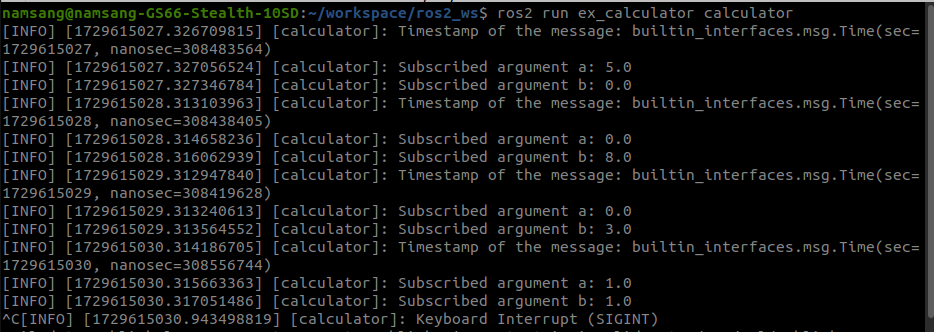
        self.get_logger().info('Timestamp of the message: {0}'.format(msg.stamp))
        self.get_logger().info('Subscribed argument a: {0}'.format(self.argument_a))
        self.get_logger().info('Subscribed argument b: {0}'.format(self.argument_b))
topic subscriber code
import time
from ros_study_msgs.msg import ArithmeticArgument

from rclpy.callback_groups import ReentrantCallbackGroup
from rclpy.node import Node
from rclpy.qos import QoSDurabilityPolicy
from rclpy.qos import QoSHistoryPolicy
from rclpy.qos import QoSProfile
from rclpy.qos import QoSReliabilityPolicy

class Calculator(Node):

    def __init__(self):
        super().__init__('calculator')
        self.argument_a = 0.0
        self.argument_b = 0.0
        self.callback_group = ReentrantCallbackGroup()

        # Declare QoS depth parameter and get its value
        self.declare_parameter('qos_depth', 10)
        qos_depth = self.get_parameter('qos_depth').value

        # Define QoS settings
        QOS_RKL10V = QoSProfile(
            reliability=QoSReliabilityPolicy.RELIABLE,
            history=QoSHistoryPolicy.KEEP_LAST,
            depth=qos_depth,
            durability=QoSDurabilityPolicy.VOLATILE)

        # Create a subscription to the 'arithmetic_argument' topic
        self.arithmetic_argument_subscriber = self.create_subscription(
            ArithmeticArgument,
            'arithmetic_argument',
            self.get_arithmetic_argument,
            QOS_RKL10V,
            callback_group=self.callback_group)

    def get_arithmetic_argument(self, msg):
        # Callback for receiving arithmetic arguments from the subscriber
        self.argument_a = msg.argument_a
        self.argument_b = msg.argument_b
        self.get_logger().info('Timestamp of the message: {0}'.format(msg.stamp))
        self.get_logger().info('Subscribed argument a: {0}'.format(self.argument_a))
        self.get_logger().info('Subscribed argument b: {0}'.format(self.argument_b))

def main(args=None):
    import rclpy
    rclpy.init(args=args)
    calculator = Calculator()
    try:
        rclpy.spin(calculator)
    except KeyboardInterrupt:
        calculator.get_logger().info('Node interrupted by user.')
    except Exception as e:
        calculator.get_logger().error(f'An error occurred: {e}')
    finally:
        calculator.get_logger().info('Shutting down the node...')
        calculator.destroy_node()
        rclpy.shutdown()
추가 정리
- callback_group
- 지정 x =[MutuallyExclusiveCallbackGroup]--> 한번에 하나의 콜백함수만 실행하도록 허용
- 지정 o =ReentrantCallbackGroup--> 제한없이 콜백함수를 병렬로 실행할 수 있게 해줌

공부하는 거북이