1. action
action goal을 지정하는 액션 클라이언트와 액션 목표를 받아 특정 태스크를 수행하면서 중간 결과값에 해당하는 action feedback과 최종 결과값에 해당하는 action result를 전송하는 action server 작성
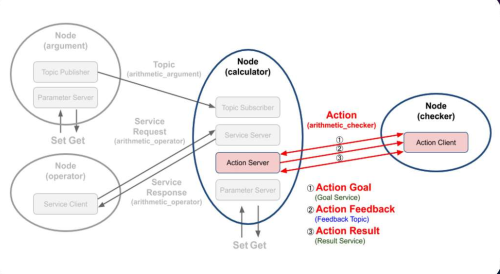
2. action 관련 명령어
'''action'''
$ ros2 action list # 실행 중인 액션 이름 표시
$ ros2 action info # 실행중인 액션이 정보 표시

$ ros2 action goal # 액션의 목표지정
$ ros2 action send_goal <action_name><action_type>"<values>" # 액션 목표 전달
$ ros2 action send_goal /turtle1/rotate_absolute turtelsim.action.RotateAbsolute "{theta:1.5708}"
3. action_server code
- calculator node 내에서 각 연산을 기록하고 액션 서버로 동작하도록 선언
 self.arithmetic_action_server = ActionServer(
 	self,
    ArithmeticChecker,
   'arithmetic_checker',
    self.execute_checker,
callback_group=self.callback_group)ActionServer: rclpy.action 모듈의 ActionServer 클래스를 이용항 액션 서버로 선언ArithmeticChecker: action type'arithmetic_checker': action nameself.execute_checker: callback funtioncallback_group=self.callback_group: multithread setting
4. action_callback_function - execute_checker
def execute_checker(self, goal_handle):
        self.get_logger().info('Execute arithmetic_checker action!')
        feedback_msg = ArithmeticChecker.Feedback()
        feedback_msg.formula = []
        total_sum = 0.0
        goal_sum = goal_handle.request.goal_sum
        while total_sum < goal_sum:
            total_sum += self.argument_result
            feedback_msg.formula.append(self.argument_formula)
            self.get_logger().info('Feedback: {0}'.format(feedback_msg.formula))
            goal_handle.publish_feedback(feedback_msg)
            time.sleep(1)
        goal_handle.succeed()
        result = ArithmeticChecker.Result()
        result.all_formula = feedback_msg.formula
        result.total_sum = total_sum
        return result
goal_handle
: rclpy.action 모듈의 ServerGoalHandle 클래스로 생성된 액션 상태 처리용
- succeed(완료)/abort(실패, 중단)/cancled(작업 취소) 등의 액션 상태 관련 함수 호출 가능- publish_feedback 피드백 퍼블리시 가능
self.get_logger().info('Execute arithmetic_checker action!): 액션 시작 로그feedback_msg = ArithmeticChecker.Feedback(): 액션 피드백 메시지 생성feedback_msg.formula = []: 피드백 메시지의 formula 필드 초기화goal_sum = goal_handle.request.goal_sum: 액션 목표값 불러오기while total_sum < goal_sum:~time.sleep(1)
: total_sum이 goal_sum에 도달할 때까지 반복하는 루프feedback_msg.formula.append(self.argument_formula): 연산 결과에 해당하는 수식을 추가goal_handle.publish_feedback(feedback_msg): 현재까지의 피드백(feedback_msg)을 클라이언트에 전송, 중간 상태 확인
goal_handle.succeed: 목표값에 도달 시 액션이 성공적으로 완료됨을 알림result = ArithmeticChecker.Result(): 최종 결과 메시지 생성result.all_formula = feedback_msg.formula: 최종 결과 메시지의 all_formula 필드에 모든 수식 리스트 저장result.total_sum = total_sum: 최종 결과 메시지의 total_sum 필드에 누적 하계 저장return result: 액션의 최종결과 반환
5. action_server 실행 코드
5.1 main.py
import rclpy
from rclpy.executors import MultiThreadedExecutor

from ex_calculator.calculator.calculator import Calculator


def main(args=None):
    rclpy.init(args=args)
    try:
        calculator = Calculator()
        executor = MultiThreadedExecutor(num_threads=4)
        executor.add_node(calculator)
        try:
            executor.spin()
        except KeyboardInterrupt:
            calculator.get_logger().info('Keyboard Interrupt (SIGINT)')
        finally:
            executor.shutdown()
            calculator.arithmetic_action_server.destroy()
            calculator.destroy_node()
    finally:
        rclpy.shutdown()


if __name__ == '__main__':
main()- 다중 스레드 환경에서 노드를 실행하고 액션 서버가 동작하도록 설정
5.2 checker.py
5.2.1 import
from action_msgs.msg import GoalStatus # 액션 상태 정의 msg 타입
from ros_study_msgs.action import ArithmeticChecker
from rclpy.action import ActionClient
from rclpy.node import Node
5.2.2 class 정의
class Checker(Node):
    def __init__(self):
        super().__init__('checker')
        self.arithmetic_action_client = ActionClient(
          self,
          ArithmeticChecker,
          'arithmetic_checker')
5.2.3 send_goal_total_sum
    def send_goal_total_sum(self, goal_sum):
        wait_count = 1
        while not self.arithmetic_action_client.wait_for_server(timeout_sec=0.1):
            if wait_count > 3:
                self.get_logger().warning('Arithmetic action server is not available.')
                return False
            wait_count += 1
        goal_msg = ArithmeticChecker.Goal()
        goal_msg.goal_sum = (float)(goal_sum)
        self.send_goal_future = self.arithmetic_action_client.send_goal_async(
            goal_msg,
            feedback_callback=self.get_arithmetic_action_feedback)
        self.send_goal_future.add_done_callback(self.get_arithmetic_action_goal)
return True- 액션 목표를 액션 서버에 전송하고 액션 피드백 및 결과값을 받기 위한 콜백함수를 지정하는 함수
ArithmerticChecker.Goal(): 액션 메세지 goal_msg 선언, goal_msg.goal_sum과 같이 액션 목표값 설정send_goal_async: 액션 메시지를매개변수로 넣고 액션 피드백을 전달 받기 위한 콜백함수로get_arithmetic_acton_feedback함수 지정
| code | role |
|---|---|
arithmetic_action_client | 액션 클라이언트 선언 |
send_goal_future | 액션 목표값 전달 함수 선언 |
get_arithmetic_action_feedback | 액션 피드백값 콜백 함수 선언 |
get_arithmetic_action_goal | 액션 상태값 콜백 함수 선언 |
get_arithmetic_action_result | 액션 결과값 콜백 함수 선언 |
5.2.4 get_arithmetic_action_feedback
- 액션 피드백을 서버로 부터 전달받아 해당 콜백함수를 실행하여 터미널 창에 출력
def get_arithmetic_action_feedback(self, feedback_msg):
        action_feedback = feedback_msg.feedback.formula
        self.get_logger().info('Action feedback: {0}'.format(action_feedback))
5.2.5 get_arithmetic_action_goal
- 비동기 future task로 선언한
send_goal_future의 add_done_callback 함수를 통해 액션 서버가 액션 목표값을 전달받고 문제가 없다면 액션 결과값 콜백함수를 선언
def get_arithmetic_action_goal(self, future):
        goal_handle = future.result()
        if not goal_handle.accepted:
            self.get_logger().warning('Action goal rejected.')
            return
        self.get_logger().info('Action goal accepted.')
        self.action_result_future = goal_handle.get_result_async()
        self.action_result_future.add_done_callback(self.get_arithmetic_action_result)
5.2.6 get_arithmetic_action_result
- 비동기 future task로 현재의 상태값(status)과 결과값(result)을 받고, 상태 값이 STATUS_SUCCEEDED 일 때 액션서버로부터 전달 받은 액션 결과값인 계산식(action_result.all_formula)과 연산 합계(action_result.total_sum)를 터미널 창에 출력
def get_arithmetic_action_result(self, future):
        action_status = future.result().status
        action_result = future.result().result
        if action_status == GoalStatus.STATUS_SUCCEEDED:
            self.get_logger().info('Action succeeded!')
            self.get_logger().info(
                'Action result(all formula): {0}'.format(action_result.all_formula))
            self.get_logger().info(
                'Action result(total sum): {0}'.format(action_result.total_sum))
        else:
            self.get_logger().warning(
                'Action failed with status: {0}'.format(action_status))
공부하는 거북이