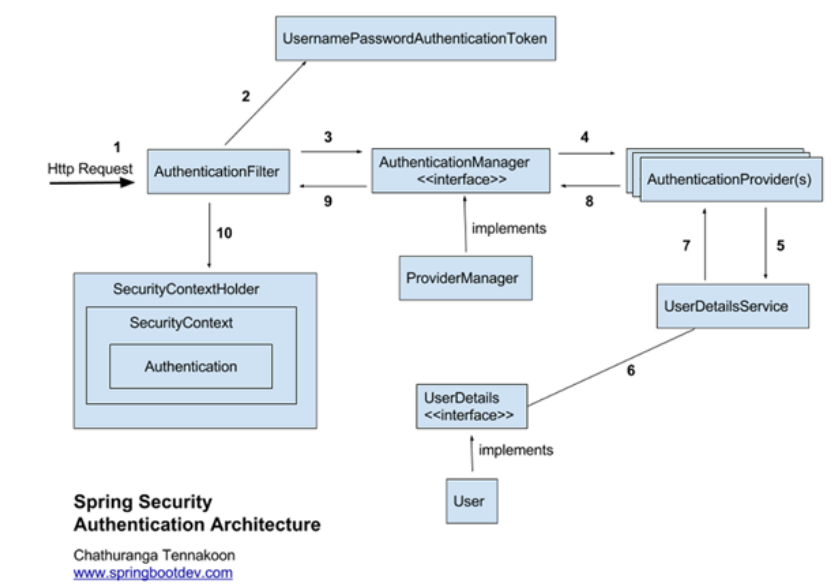
인증 흐름
1. 사용자의 인증 요청 (Http Request)
- 사용자가 로그인 폼에서
username과password를 입력한 뒤, 서버로 요청을 보냄. - 이때,
AuthenticationFilter(예:UsernamePasswordAuthenticationFilter)가 이 요청을 처리할 준비를 함.
2. AuthenticationFilter에서 UsernamePasswordAuthenticationToken 생성
- Spring Security는 필터 체인을 통해 가장 먼저 인증 관련 요청을 가로채서 처리함.
- 해당 요청에서
username과password를 추출하여, 인증 전 상태의UsernamePasswordAuthenticationToken객체를 생성함. - 이 토큰에는
principal과credentials만 포함되며, 아직 인증은 이루어지지 않음.
3. AuthenticationManager(ProviderManager)에게 Token 전달
- 생성된
UsernamePasswordAuthenticationToken은AuthenticationManager의 구현체인ProviderManager에게 전달됨. - Spring Security 설정에 따라 여러
AuthenticationProvider들이 등록될 수 있음.
4. AuthenticationProvider(들)을 순회하며 인증 시도
ProviderManager는 내부에 등록된 여러AuthenticationProvider중, 현재 요청을 처리할 수 있는 Provider를 찾아 인증을 위임함.- 기본적으로
DaoAuthenticationProvider가 많이 사용되며, 이 단계에서 실제 사용자 정보를 확인함.
5. UserDetailsService를 통해 DB 혹은 외부 리소스에서 사용자 정보 조회
DaoAuthenticationProvider는UserDetailsService를 사용해 DB(또는 다른 저장소)에서 사용자 정보를 가져옴.- 일반적으로
UserDetailsService인터페이스를 구현한CustomUserDetailsService같은 클래스를 만들어 원하는 DB 쿼리 로직을 작성함.
6. UserDetails 객체 생성
UserDetailsService는 DB 조회 결과를 바탕으로UserDetails객체(대부분User클래스를 상속한 객체)를 반환함.- 이 객체에는
username,password,enabled,authorities(권한 정보) 등이 포함됨.
7. AuthenticationProvider가 UserDetails와 입력받은 정보 비교
- Provider는 전달받은
UserDetails와 사용자가 입력한 비밀번호를 비교하여 일치 여부, 계정 잠금 상태 등을 검사함. - 내부적으로
BCryptPasswordEncoder등 암호화 기법을 사용해 비교하며, 반드시 동일한 인코더를 사용해야 함.
8. 인증 성공 시 Authentication 객체 반환
- 인증에 성공하면,
ProviderManager를 통해 최종적으로 인증된Authentication객체를 반환함. - 이 객체에는 사용자의 권한 정보, 인증 방식, 그리고 기타 세부 정보가 포함됨.
9. AuthenticationFilter로 다시 Authentication 객체 반환
- 필터 체인 상에서 최초에 생성된
AuthenticationFilter(예:UsernamePasswordAuthenticationFilter)로 인증 결과가 반환됨.- 인증 성공 시: 반환된
Authentication객체를SecurityContext에 저장하고, 성공 핸들러(AuthenticationSuccessHandler)가 동작하거나 지정된 URL로 리다이렉트함. - 인증 실패 시: 실패 핸들러(
AuthenticationFailureHandler)가 동작하거나 에러 페이지로 리다이렉트함.
- 인증 성공 시: 반환된
10. SecurityContext에 Authentication 저장
- 성공적으로 인증된
Authentication객체는SecurityContextHolder.getContext().setAuthentication(...)를 통해SecurityContext에 저장됨. - 이후 애플리케이션의 Controller, Service 등에서
SecurityContextHolder.getContext().getAuthentication()을 통해 현재 사용자 정보를 조회할 수 있음.
내부 구성 요소 설명
Authentication
- 역할: 현재 접근하는 주체의 정보와 권한(Authorities)을 담는 인터페이스로, 인증 여부 등 보안 정보를 포함함.
- 주요 메서드:
getAuthorities(): 사용자 권한 목록 반환.getCredentials(): 주로 비밀번호나 인증 토큰 반환.getDetails(): 추가 인증 관련 정보 반환.getPrincipal(): 사용자 정보 반환.isAuthenticated(): 인증 여부 확인.setAuthenticated(boolean): 인증 상태 설정.
UsernamePasswordAuthenticationToken
Authentication인터페이스를 구현한 클래스로, 폼 기반 인증 시 사용됨.- 구분:
- 인증 전: 사용자 ID(주로
username)와 비밀번호만 포함하며,isAuthenticated()는false로 설정됨. - 인증 후: 인증 성공 후 권한 정보가 추가되어
isAuthenticated()가true로 변경됨.
- 인증 전: 사용자 ID(주로
public class UsernamePasswordAuthenticationToken extends AbstractAuthenticationToken {
    private final Object principal;
    private Object credentials;

    // 인증 전: 사용자 ID와 비밀번호만 보유
    public UsernamePasswordAuthenticationToken(Object principal, Object credentials) {
        super(null);
        this.principal = principal;
        this.credentials = credentials;
        setAuthenticated(false);
    }

    // 인증 후: 권한 정보 포함, 인증된 상태로 생성
    public UsernamePasswordAuthenticationToken(Object principal, Object credentials,
            Collection<? extends GrantedAuthority> authorities) {
        super(authorities);
        this.principal = principal;
        this.credentials = credentials;
        super.setAuthenticated(true);
    }
}
AuthenticationManager & ProviderManager
AuthenticationManager:
- 인증 처리를 위한 인터페이스로,
authenticate(Authentication)메서드를 통해 인증을 시도함.
public interface AuthenticationManager {
    Authentication authenticate(Authentication authentication) throws AuthenticationException;
}
ProviderManager:
- AuthenticationManager의 기본 구현체로, 내부에 여러 AuthenticationProvider를 보유하고 순차적으로 호출하여 인증을 수행함.
public class ProviderManager implements AuthenticationManager {
    private List<AuthenticationProvider> providers;

    public List<AuthenticationProvider> getProviders() {
        return this.providers;
    }

    @Override
    public Authentication authenticate(Authentication authentication) throws AuthenticationException {
        for (AuthenticationProvider provider : getProviders()) {
            if (provider.supports(authentication.getClass())) {
                Authentication result = provider.authenticate(authentication);
                if (result != null) {
                    return result;
                }
            }
        }
        throw new AuthenticationException("Authentication failed");
    }
}
AuthenticationProvider
- 실제 인증 로직을 수행하는 컴포넌트로, 전달받은 Authentication 객체를 기반으로 인증을 수행한 후, 인증된 Authentication 객체를 반환함.
public interface AuthenticationProvider {
    Authentication authenticate(Authentication authentication) throws AuthenticationException;
    boolean supports(Class<?> authentication);
}
UserDetailsService & UserDetails
UserDetailsService
- 사용자 이름을 기반으로 사용자 정보를 조회하여 UserDetails 객체를 반환하는 인터페이스.
public interface UserDetailsService {
    UserDetails loadUserByUsername(String username) throws UsernameNotFoundException;
}
UserDetails
- 사용자 정보를 담는 인터페이스로, AuthenticationProvider가 인증 성공 시 이를 활용하여 인증된 토큰을 생성함.
public interface UserDetails extends Serializable {
    Collection<? extends GrantedAuthority> getAuthorities();
    String getPassword();
    String getUsername();
    boolean isAccountNonExpired();
    boolean isAccountNonLocked();
    boolean isCredentialsNonExpired();
    boolean isEnabled();
}
SecurityContextHolder 및 SecurityContext
SecurityContext:
- 현재 요청의 인증 정보를 보관하는 컨테이너.
SecurityContextHolder:
- ThreadLocal을 사용하여 각 요청마다 별도의 SecurityContext를 유지하며, 애플리케이션 전반에서 현재 사용자 정보를 조회할 수 있도록 함.
SecurityContextHolder.getContext().setAuthentication(authentication);
SecurityContextHolder.getContext().getAuthentication();
GrantedAuthority
- 현재 사용자가 가진 권한(예: ROLE_ADMIN, ROLE_USER)을 나타냄.
UserDetailsService에서 로드된 권한 정보를 기반으로 접근 제어나 권한 검증을 수행함.

이상억