

💡알고가기
Node.js → 브라우저가 아닌 환경에서 JavaScript를 실행할 수 있게 해주는 런타임
axios → 웹사이트에 HTTP 요청( Node.js는 브라우저가 아니기 때문에 fetch가 내장되어 있지않음 )
cheerio → jQuery처럼 문서 탐색 및 파싱기능
⚙️셋팅
- Node.js 프로젝트의 설정 파일인 package.json을 생성
- axios cheerio 설치
npm init -y
npm install axios cheerio
✏️코드 작성
- index.js
const axios = require("axios");
const cheerio = require("cheerio");
const fs = require("fs"); // 파일 시스템 접근
const path = require("path");

const TARGET_URL = "https://news.naver.com/section/101"; // 경제뉴스 경로

const OUTPUT_DIR = path.join(__dirname, "data"); // 추출 저장한 폴더
const OUTPUT_FILE = path.join(OUTPUT_DIR, "headlines.json"); // 추출 저장할 파일

async function crawlNaverNews() {
    try {
      const { data } = await axios.get(TARGET_URL, {
        headers: {
          "User-Agent": "Mozilla/5.0" // 네이버는 user-agent 없으면 차단할 수 있음
        }
      });
      const $ = cheerio.load(data);

      const headlines = [];
      const date = $(".ct_lnb_date").text().trim() || "날짜 없음"; //날짜 데이터 상단에 있음

      // 주요 뉴스 섹션 선택
      $(".sa_text a").each((_, el) => {
        const title = $(el).text().trim();
        const link = $(el).attr("href");

        // 상대 경로일 경우 절대 경로로 보정
        const fullLink = link?.startsWith("http") ? link : `https://news.naver.com${link}`;

        headlines.push({ title, link: fullLink, date });
      });

      if (!headlines.length) {
        console.log("헤드라인을 찾을 수 없습니다. 구조가 바뀌었을 수 있습니다.");
        return;
      }

      // 출력
      console.log("네이버 뉴스 헤드라인:");
      headlines.forEach((h, i) => {
        console.log(`${i + 1}. ${h.title}`);
        console.log(`   ${h.link}`);
      });

      // 디렉토리 없으면 생성
      if (!fs.existsSync(OUTPUT_DIR)) {
        fs.mkdirSync(OUTPUT_DIR);
      }

      // 파일 저장
      fs.writeFileSync(OUTPUT_FILE, JSON.stringify(headlines, null, 2));
      console.log(`\n저장 완료: ${OUTPUT_FILE}`);
    } catch (err) {
      console.error("크롤링 실패:", err.message);
    }
  }

  crawlNaverNews();
▶️코드 실행
node index.js👍결과
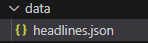
디렉토리도 생성 되었고 그 안에 json파일도 생성되었다
그리고 출력된 결과
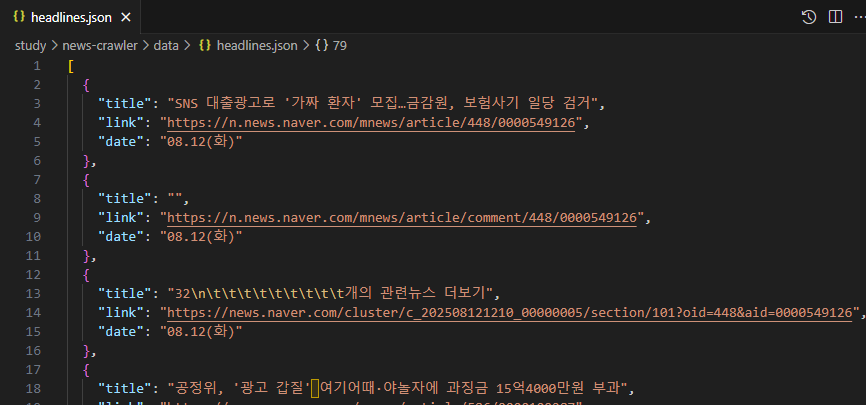
Node.js + axios + cheerio 사용해서 간단한 웹 크롤러 만드는 법을 설명합니다.
- 네이버 뉴스에 요청보내 DOM을 읽어 원하는 타이틀 추출 기능
이 글과 코드를 보시고 개선할 부분이나 궁금한 점이 있으면 편하게 댓글이나 메시지로 알려주세요.💪
여러분의 피드백 덕분에 더 나은 콘텐츠를 만들 수 있습니다.
함께 성장해 나가요!

개발은모르겠고일단기록