파이어 베이스 실습
파이어베이스 초기 세팅
1. 스크립트 타입에 module 추가해야 FireBase를 사용할 수 있음
<script type="module">
- 스크립트에 module이 붙는 순간 onclick이 작동하지 않는다
- 또한 스크립트가 가장 나중에 호출된다.
(그래서 $(document).ready 가 필요가 없다 어짜피 다 로딩이 되고 나서 실행이 되기 때문)
2. 초기 세팅 코드 붙여넣기
// Firebase SDK 라이브러리 가져오기
        import { initializeApp } from "https://www.gstatic.com/firebasejs/9.22.0/firebase-app.js";
        import { getFirestore } from "https://www.gstatic.com/firebasejs/9.22.0/firebase-firestore.js";
        import { collection, addDoc } from "https://www.gstatic.com/firebasejs/9.22.0/firebase-firestore.js";
        import { getDocs } from "https://www.gstatic.com/firebasejs/9.22.0/firebase-firestore.js";
        // For Firebase JS SDK v7.20.0 and later, measurementId is optional


        const firebaseConfig = {
            apiKey: "AIzaSyC4qDBozLNhesNOdzR9CzXqmRHGoJOmYFI",
            authDomain: "fir-test-d8241.firebaseapp.com",
            projectId: "fir-test-d8241",
            storageBucket: "fir-test-d8241.appspot.com",
            messagingSenderId: "720568215633",
            appId: "1:720568215633:web:e25948c891b9f83b893070",
            measurementId: "G-RS6MT0BLR5"
        };


        // Firebase 인스턴스 초기화
        const app = initializeApp(firebaseConfig);
        const db = getFirestore(app);
3. 저장하고 싶은 데이터를 firebase가 운영하는 firestore 데이터베이스에 넣어줘야한다.
아래 코드를 스크립트 코드 안에 작성하여 데이터베이스와 연결한다. $("#postingbtn").click(async function () {
// 넣고 싶은 데이터 선언 방식
// 변수 선언 = 값을 넣는 태그의 아이디값
let img1 = $('#img').val();
let title1 = $('#title1').val();
let content1 = $('#star').val();
let date1 = $('#reason').val();
let doc = {
// '파이어베이스에 뜨는 제목' : 저장된 값 쌍으로 선언
'이미지': img1,
'타이틀': title1,
'별': content1,
'코멘트': date1
};
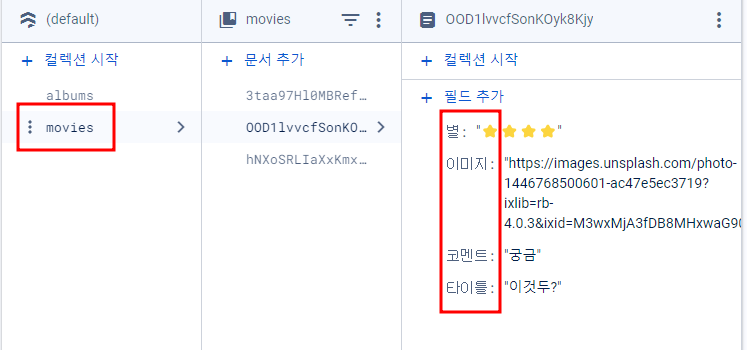
//movies 라는 데이터집합을 생성하여 그 안에 데이터를 넣겠다
await addDoc(collection(db, "movies"), doc);
alert('저장완료');
window.location.reload();
}) 4. 결과
파이어 베이스에 아래 형태로 사용자가 입력한 데이터가 담긴다.