개인프로젝트2 - Emotional Diary
감정일기
작업 날짜: 2025.01.15 ~ 2025.01.18
깃허브 : https://github.com/wldud7788/emotional-diary
배포링크: https://emotional-diary-tau.vercel.app/
[라우터 설정]
function App() {
  return (
    <DiaryProvider>
      <Routes>
        <Route path="/" element={<Home />} />
        <Route path="/new" element={<New />} />
        <Route path="/diary/:id" element={<Diary />} />
        <Route path="/edit/:id" element={<Edit />} />
        <Route path="*" element={<Notfound />} />
      </Routes>
    </DiaryProvider>
  );
}
[DiaryContext.jsx]
function reducer(state, action) {
  switch (action.type) {
    case "CREATE":
      return [action.data, ...state];
    case "UPDATE":
      return state.map((item) =>
        String(item.id) === String(action.data.id) ? action.data : item
      );
    case "DELETE":
      return state.filter((item) => String(item.id) !== String(action.id));
    default:
      return state;
  }
}
export const DiaryStateContext = createContext();
export const DiaryDispatchContext = createContext();

export const DiaryProvider = ({ children }) => {
  const [data, dispatch] = useReducer(reducer, MOCKDATA);
  const idRef = useRef(3);

  const onCreate = (createDate, emotionId, content) => {
    dispatch({
      type: "CREATE",
      data: {
        id: idRef.current++,
        //  ..생략
      },
    });
  };

  const onUpdate = (targetId, createDate, emotionId, content) => {
    dispatch({
      type: "UPDATE",
      data: {
        id: targetId,
        //  ..생략
      },
    });
  };

  const onDelete = (targetId) => {
    dispatch({
      type: "DELETE",
      id: targetId,
    });
  };

  const memoized = useMemo(() => {
    return { onCreate, onUpdate, onDelete };
  }, []);

  return (
    <DiaryStateContext.Provider value={data}>
      <DiaryDispatchContext.Provider value={memoized}>
        {children}
      </DiaryDispatchContext.Provider>
    </DiaryStateContext.Provider>
  );
};-
ContextAPI
DiaryStateContext와 DiaryDispatchContext로 상태와 상태 변경 함수 관리, 컴포넌트 트리 내에서 일기 데이터와 관련된 함수를 쉽게 공유
-
리듀서 함수
리듀서 함수를 사용하여 상태관리 -
useRef훅
useRef 훅을 사용하여 새로운 일기를 생성할 때 사용할 ID관리
idRef.curreent는 현재 id값을 유지하며, 새로운 일기가 생성될 때마다 증가 -
최적화
useMemo훅을 사용하여 onCreate,onUpdate, onDelete함수를 메모제이션하여, 함수들이 초기화된 후에는 재성성되지 않도록 하여 성능을 최적화
이로인해 불필요한 렌더링을 방지 -
Context Provider
DiaryProvider 컴포넌트는 DiaryStateContext.Provider와 DiaryDispatchContext.Provider를 사용하여 자식 컴포넌트에 상태와 함수를 제공 children prop을 통해 이 Provider를 감싸는 모든 컴포넌트가 이 상태와 함수에 접근 가능
[홈 화면]
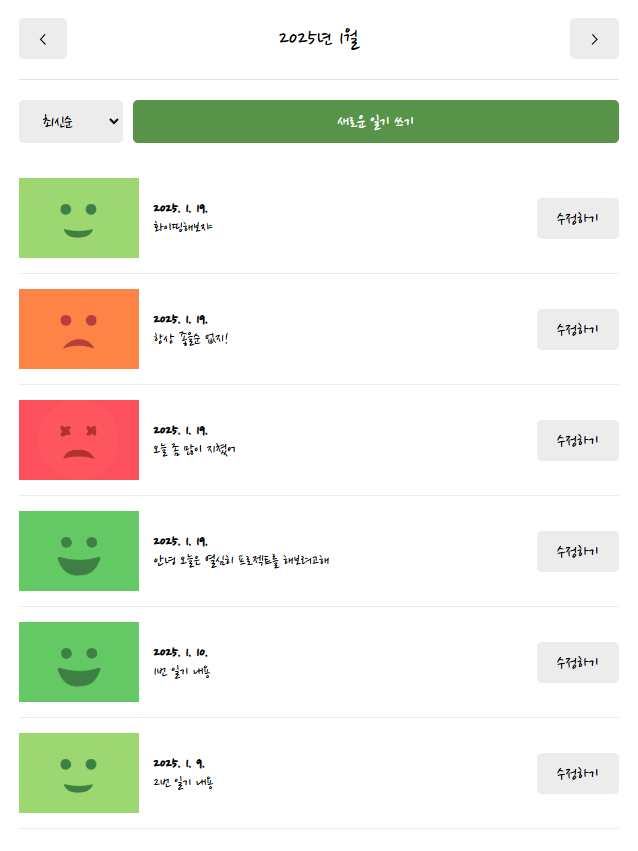
const getMonthlyData = (pivotDate, data) => {
  const beginTime = new Date(
    pivotDate.getFullYear(),
    pivotDate.getMonth(),
    1,0,0,0
  ).getTime();
  const endTime = new Date(
    pivotDate.getFullYear(),
    pivotDate.getMonth() + 1,
    0,23,59,59 // 0일로 설정하여 전날을 표시 ex) 12월의 0일이면 11월 마지막 날짜
  ).getTime();

  // 구한 beginTime 과 endTime사이에 있는 날짜를 가지고 있는 데이터를 필터링하여
  // 해당 타이틀에 표시된 날짜에 맞는 다이어리 리스트 표시
  return data.filter(
    (item) => beginTime <= item.createDate && endTime >= item.createDate
  );
};
const Home = () => {
  const data = useContext(DiaryStateContext);
  // 기준이 되늘 날짜
  const [pivotDate, setPivotDate] = useState(new Date());

  const monthlyData = getMonthlyData(pivotDate, data);

  const onIncreaseMonth = () => {
    setPivotDate(new Date(pivotDate.getFullYear(), pivotDate.getMonth() + 1));
  };
  const onDecreaseMonth = () => {
    setPivotDate(new Date(pivotDate.getFullYear(), pivotDate.getMonth() - 1));
  };
  return (
    <div>
      // 헤더에는 현재 날짜를 표시해줌
      // leftChild에 담긴 Button이 클릭되었을 때 이전 날짜로 이동
      // rightChild에 담긴 Button이 클릭되었을 때 다음 날짜로 이동
      <Header
        title={`${pivotDate.getFullYear()}년 ${pivotDate.getMonth() + 1}월`}
        leftChild={<Button text={"<"} onClick={onDecreaseMonth} />}
        rightChild={<Button text={">"} onClick={onIncreaseMonth} />}
      />
      <DiaryList data={monthlyData} />
    </div>
  );
};
[다이어리 화면]
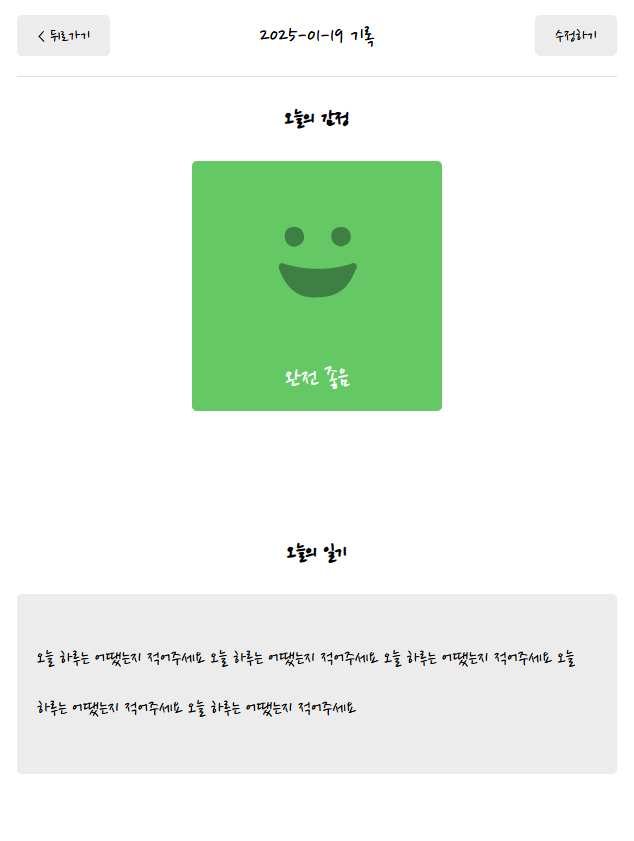
const Diary = () => {
  const params = useParams();
  const nav = useNavigate();
  const curDiaryItem = useDiary(params.id);

  if (!curDiaryItem) {
    return <div>데이터 로딩중...!</div>;
  }
  const { createDate, emotionId, content } = curDiaryItem;
  const title = getStringedDate(new Date(createDate));
  return (
    <div>
      <Header
        title={`${title} 기록`}
        leftChild={<Button onClick={() => nav(-1)} text={"< 뒤로가기"} />}
        rightChild={
          <Button onClick={() => nav(`/edit/${params.id}`)} text={"수정하기"} />
        }
      />
      <Viewer emotionId={emotionId} content={content} />
    </div>
  );
};- useParams훅 사용
useParams()를 통해 URL파라미터를 가져오고 현재 다이어리 항목의 ID를 가져온다. - useDiary 커스텀훅 호출
params.id를 매개전수를 전달한 커스텀훅을 호출하여 해당 다이어리 항목을 가져온다.
// useDiary.jsx 커스텀훅
const useDiary = (id) => {
const data = useContext(DiaryStateContext);
const [curDiaryItem, setCurDiaryItem] = useState();
const nav = useNavigate();

  useEffect(() => {
    const currentDiaryItem = data.find(
      (item) => String(item.id) === String(id)
    );
    if (!currentDiaryItem) {
      window.alert("존재하지 않는 일기입니다.");
      nav("/", { replace: true });
    }
    setCurDiaryItem(currentDiaryItem);
  }, [id]);
  return curDiaryItem;
};-
로딩 상태처리
curDiaryItem이 아직 로딩중이거나 유효하지 않은 경우 로딩 메시지를 표시 -
날짜 포맷팅
const title = getStringedDate(new Date(createDate));
createDate를 Date객체로 변환 후 이를 문자열으로 변환하여 제목으로 사용
getStringedDate함수를 사용하여 사람이 읽기 쉬운 형식으로 변환
[새로운 일기 쓰기]
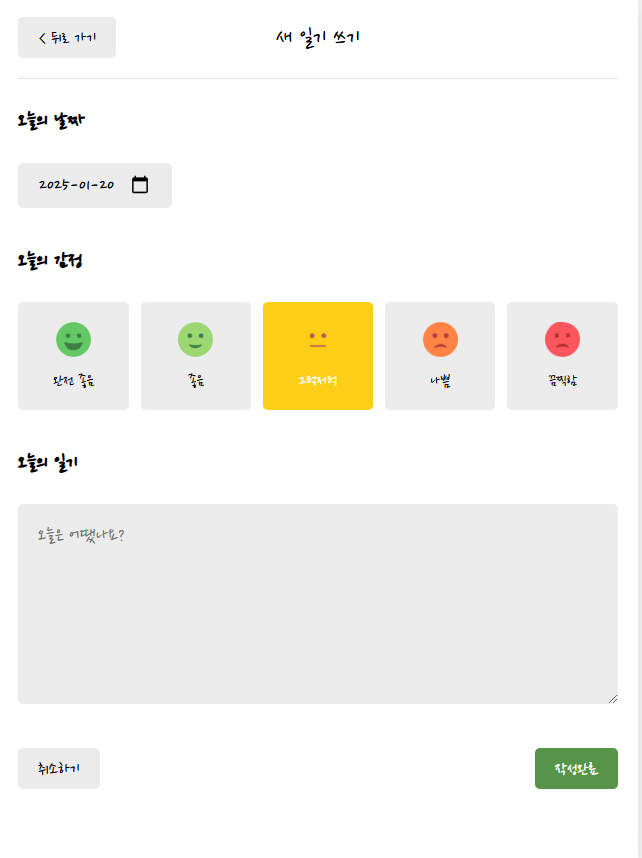
usePageTitle("새 일기 쓰기");

  const onSubmit = (input) => {
    onCreate(input.createDate.getTime(), input.emotionId, input.content);
    // 뒤로가기 방지해주는 옵션 : replace
    nav("/", { replace: true });
  };
  return (
    <div>
      <Header
        title={"새 일기 쓰기"}
        leftChild={<Button text={"< 뒤로 가기"} onClick={() => nav(-1)} />}
      />
      <Editor onSubmit={onSubmit} />
    </div>
);- usePageTitle훅을 사용
현재 페이지의 제목을 새일기 쓰기로 설정 - 제출 처리 함수
input매개변수를 받아 onCreate함수 호출(날짜를 밀리초로 변환하여 전달) - repalce: true를 사용하여 뒤로가기 방지
[수정하기 화면]
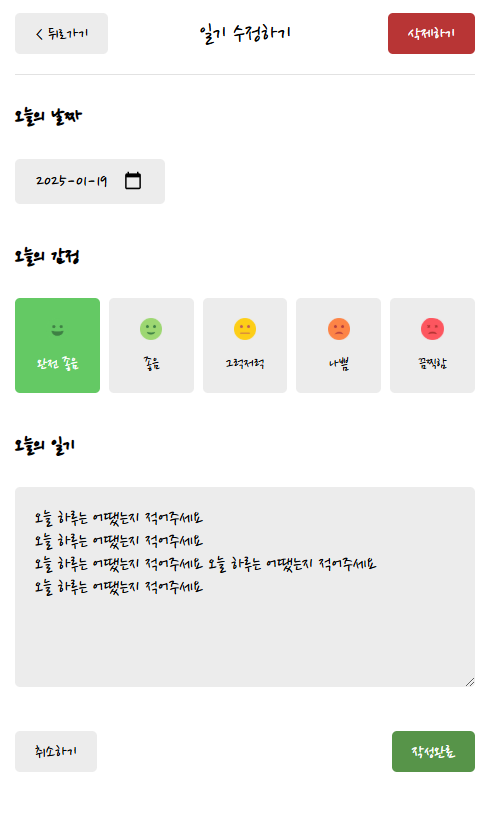
전체 코드는 길어서 생략
- 입력 변화 처리
onChangeInput함수를 사용하여 입력 필드의 값이 변경될 때 호출
e.target.name을 통해 어떤 필드가 변경되었는지 확인하고 해당 값을 없다잍, 만약 변경된 필드가 createDate라면 값을 Date객체로 반환
const onChangeInput = (e) => {
    let name = e.target.name;
    let value = e.target.value;

    if (name === "createDate") {
      value = new Date(value);
    }

    setInput({
      ...input,
      [name]: value,
    });
};- 제출 버튼 클릭 처리
제출 버튼 클릭 시 onClickSubmitButton함수호출
현재 입력 상태인 input을 매개변수로 전달
다이어리 리스트 출력 옵션(최신순, 오래된 순)
const [sortType, setSortType] = useState("");

  const onChangeSortType = (e) => {
    setSortType(e.target.value);
  };

  const getSortedDate = () => {
    return data.toSorted((a, b) => {
      // a-b가 1이면 오름차순
      // a-b가 -1이면 내림차순
      // a-b는 기본적으로 오름차순 정렬을 의미
      if (sortType === "oldest") {
        return Number(a.createDate) - Number(b.createDate);
      } else {
        return Number(b.createDate) - Number(a.createDate);
      }
    });
};- getSortedDate함수를 통해 선택된 정렬 기준에 따라 다이어리 목록 정렬