개념
- 실제 나는 1명인데 나라는 존재가 수많은 사이트에 가입한 숫자만큼 존재하고 개인정보가 노출되어 있다.
- 개인정보를 지키기에는 한군데에서 관리를 하는 것이 유리하다
- 대형 포털 사이트에서 관리(네이버, 카카오, 구글)
예시
- 우리가 어떤 프로젝트를 통해 A라는 서비스를 만들면 회원가입을 하지 않고 네이버나 카카오에 아이디가 이미 존재하기 때문에 네이버or 카카오 아이디로 로그인을 하게되면
- 인증 처리에 대한 수고를 없앨 수 있다.
- ⇒ 회원탈퇴, 회원가입, 회원로그인, 휴먼계정 같은 모든 로직을 우리가 처리하지 않고 네이버나 카카오에 위임하는 것이다.
- 하지만 단점이 존재한다.
- 우리가 쇼핑몰을 운영하다고 생각해보자. 네이버에서 내 정보에 대해 한정되어 가지고 있다면 우리가 필요한 정보를 넘겨받을 수 없다.
- 쇼핑몰 회원 등급 데이터 등을 연동하는 서비스를 만들 필요가 있다.
OAuth란?
- Open Auth : 인증 처리를 대신해준다.
- 카카오 로그인 요청을 하게되면 클라이언트가 카카오 서버(api서버)쪽으로 다이렉트하게 로그인 요청을 하게 된다.
- 그러면 카카오 서버(api서버)는 클라이언트에게 카카오로그인창 → 개인정보 동의 창을 넘겨준다.
- 클라이언트가 이제 다 제출을 하면 카카오(api서버) 서버에서 ‘정상’ 회원 일 시 우리가 만든 서비스 서버로 callback을 해준다.
- callback과 함께 code를 준다.
- → 여기서 끝내면 인증 처리 완료
- 이제 우리가 만든 서비스 서버는 받아 놓은 code값을 통해서 code 값을 보내면서 카카오의 자원 서버에 데이터를 요청할 수 있는 권한을 요청할 수 있다
- 그럼 api서버가 access_token을 돌려준다.
- 내 서비스 서버가 사용자 정보를 받을 권한을 부여받는다.
용어정리
- 클라이언트 - 리소스 오너
- 서비스 서버 - 클라이언트 : 카카오 api서버 입장에서는 한명의 클라이언트다.
- 카카오 api 서버 - 인증서버
- 카카오 자원 서버 - 리소스 서버
스프링에서 공식 지원하는 OAuth 주체
- 페이스북
- 구글
스프링은 OAuth2 Client Library를 제공하고 있다.
뿐만 아니라, 리소스 서버가 될 수 있는 라이브러리도 제공한다.
카카오 로그인을 해보자!
인증 코드 받기
정상로그인 인증 완료

브라우저 화면은 404 에러가 발생한다.
⇒ 해당 주소에 대한 컨트롤러를 만들지 않았으므로
Access token 받기
- 필수 파라미터 값들을 담아 POST 로 요청. 요청 성공 시, 응답은 JSON 객체로 Redirect URI에 전달되며 두 가지 종류의 사용자 토큰 값과 타입, 초 단위로 만료 시간을 포함한다.
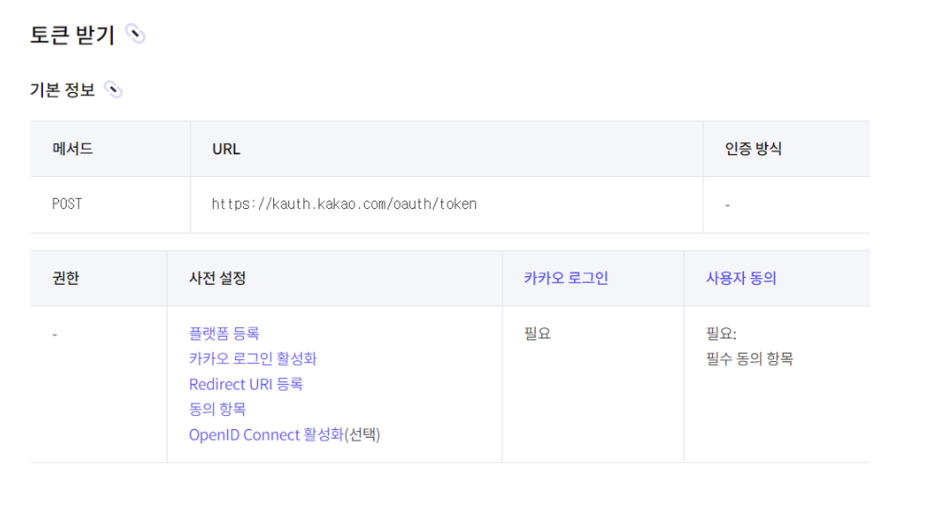
- 토큰 뒤에 주소에 전달할 내용은 없다
- GET 방식이 아니기 때문에 Http body에 데이터를 전달 하기 때문!
- body에 5가지 데이터를 담아야한다
- grant_type=authorization_code
- client_id=ad84ad8a4b339a01703a6fe593708a23
- redirect_uri=http://localhost:9000/login/oauth2/code/kakao
- code={동적임}
- client_secret - 필수가 아니라 담지 않음
처음 발급받아본 kakaoLogin. access-token, refresh-token
감격이다.

이제 access_token을 받았다는 것의 의미가 무엇인가?
- 서비스 서버가 이제 카카오 리소스 서버에 접근해서 사용자의 데이터를 가져올 수 있다는 것을 의미한다.
package com.example.demo.domain.auth.presentation;

import org.springframework.http.HttpEntity;
import org.springframework.http.HttpHeaders;
import org.springframework.http.HttpMethod;
import org.springframework.http.ResponseEntity;
import org.springframework.stereotype.Controller;
import org.springframework.util.LinkedMultiValueMap;
import org.springframework.util.MultiValueMap;
import org.springframework.web.bind.annotation.GetMapping;
import org.springframework.web.bind.annotation.RequestParam;
import org.springframework.web.bind.annotation.ResponseBody;
import org.springframework.web.bind.annotation.RestController;
import org.springframework.web.client.RestTemplate;

@Controller
public class KakaoController {

    @ResponseBody
    @GetMapping("/login/oauth2/code/kakao")
    public String kakaoCallback(@RequestParam("code") String code) {

        // Post 요청 라이브러리
        RestTemplate rt = new RestTemplate();
        HttpHeaders headers = new HttpHeaders();
        headers.add("Content-type", "application/x-www-form-urlencoded;charset=utf-8");

        // http 바디 오브젝트 생성
        MultiValueMap<String, String> params = new LinkedMultiValueMap<>();
        params.add("grant_type", "authorization_code");
        params.add("client_id", "4fdffd9fe5c823d1281774537a737c40");
        params.add("redirect_uri", "http://localhost:9000/login/oauth2/code/kakao");
        params.add("code", code);

        // httpHeader와 httpBody를 하나의 오브젝트에 담기
        HttpEntity<MultiValueMap<String, String>> kakaoTokenRequest =
                new HttpEntity<>(params, headers);

        // 실제 요청 Http post 방식 그리고 response 변수에 응답 받는다
        ResponseEntity<String> response = rt.exchange(
                "https://kauth.kakao.com/oauth/token",
                HttpMethod.POST,
                kakaoTokenRequest,
                String.class
        );

        return "카카오 토큰 요청 완료: 토큰 요청에 대한 응답" + response;
    }

    @GetMapping("/")
    public String index() {
        return "index"; // index.html 파일의 이름 (확장자 제외)을 리턴합니다.
    }
}
자원 서버에 접근해서 개인정보를 가져 온 결과
package com.example.demo.domain.auth.presentation;

import com.example.demo.domain.auth.domain.OAuthToken;
import com.fasterxml.jackson.annotation.JsonIgnoreProperties;
import com.fasterxml.jackson.core.JsonProcessingException;
import com.fasterxml.jackson.databind.JsonMappingException;
import com.fasterxml.jackson.databind.ObjectMapper;
import org.springframework.http.HttpEntity;
import org.springframework.http.HttpHeaders;
import org.springframework.http.HttpMethod;
import org.springframework.http.ResponseEntity;
import org.springframework.stereotype.Controller;
import org.springframework.util.LinkedMultiValueMap;
import org.springframework.util.MultiValueMap;
import org.springframework.web.bind.annotation.GetMapping;
import org.springframework.web.bind.annotation.RequestParam;
import org.springframework.web.bind.annotation.ResponseBody;
import org.springframework.web.bind.annotation.RestController;
import org.springframework.web.client.RestTemplate;

@Controller
@JsonIgnoreProperties(ignoreUnknown = true)
public class KakaoController {

    @ResponseBody
    @GetMapping("/login/oauth2/code/kakao")
    public String kakaoCallback(@RequestParam("code") String code) {

        // Post 요청 라이브러리
        RestTemplate rt = new RestTemplate();
        HttpHeaders headers = new HttpHeaders();
        headers.add("Content-type", "application/x-www-form-urlencoded;charset=utf-8");

        // http 바디 오브젝트 생성
        MultiValueMap<String, String> params = new LinkedMultiValueMap<>();
        params.add("grant_type", "authorization_code");
        params.add("client_id", "4fdffd9fe5c823d1281774537a737c40");
        params.add("redirect_uri", "http://localhost:9000/login/oauth2/code/kakao");
        params.add("code", code);

        // httpHeader와 httpBody를 하나의 오브젝트에 담기
        HttpEntity<MultiValueMap<String, String>> kakaoTokenRequest =
                new HttpEntity<>(params, headers);

        // 실제 요청 Http post 방식 그리고 response 변수에 응답 받는다
        ResponseEntity<String> response = rt.exchange(
                "https://kauth.kakao.com/oauth/token",
                HttpMethod.POST,
                kakaoTokenRequest,
                String.class
        );

        ObjectMapper objectMapper = new ObjectMapper();

        OAuthToken oauthToken = null;

        try {
            oauthToken = objectMapper.readValue(response.getBody(), OAuthToken.class);
        } catch (JsonMappingException e) {
            e.printStackTrace();
        } catch (JsonProcessingException e) {
            e.printStackTrace();
        }

        System.out.println("카카오 엑세스 토큰:" + oauthToken.getAccess_token());

        RestTemplate rt2 = new RestTemplate();

        HttpHeaders headers2 = new HttpHeaders();
        headers2.add("Authorization", "Bearer " + oauthToken.getAccess_token());
        headers2.add("Content-type", "application/x-www-form-urlencoded;charset=utf-8");

        // httpHeader와 httpBody를 하나의 오브젝트에 담기
        HttpEntity<MultiValueMap<String, String>> kakaoProfileRequest =
                new HttpEntity<>(headers2);

        // 실제 요청 Http post 방식 그리고 response 변수에 응답 받는다
        ResponseEntity<String> response2 = rt2.exchange(
                "https://kapi.kakao.com/v2/user/me",
                HttpMethod.POST,
                kakaoProfileRequest,
                String.class
        );

        return response2.getBody();
    }

    @GetMapping("/")
    public String index() {
        return "index"; // index.html 파일의 이름 (확장자 제외)을 리턴합니다.
    }
}
결과
// 20230902013029
// http://localhost:9000/login/oauth2/code/kakao?code=8z6R4ZyF0B-Q3YcWnM_3ZEzhaE-1Ymi_T4A0RbamKQc1LEGHzs4jnHHxUqnz7D3NX44oGwoqJVIAAAGKUZTuiA

{
  "id": 2999867942,
  "connected_at": "2023-09-01T07:56:44Z",
  "kakao_account": {
    "has_email": true,
    "email_needs_agreement": false,
    "is_email_valid": true,
    "is_email_verified": true,
    "email": "needfire3534@naver.com"
  }
}
서비스기업 가고 싶은 대학생