Firebase Auth
Firebase의 Authentication을 이용하면 인증 기능을 쉽게 구현 가능하다.
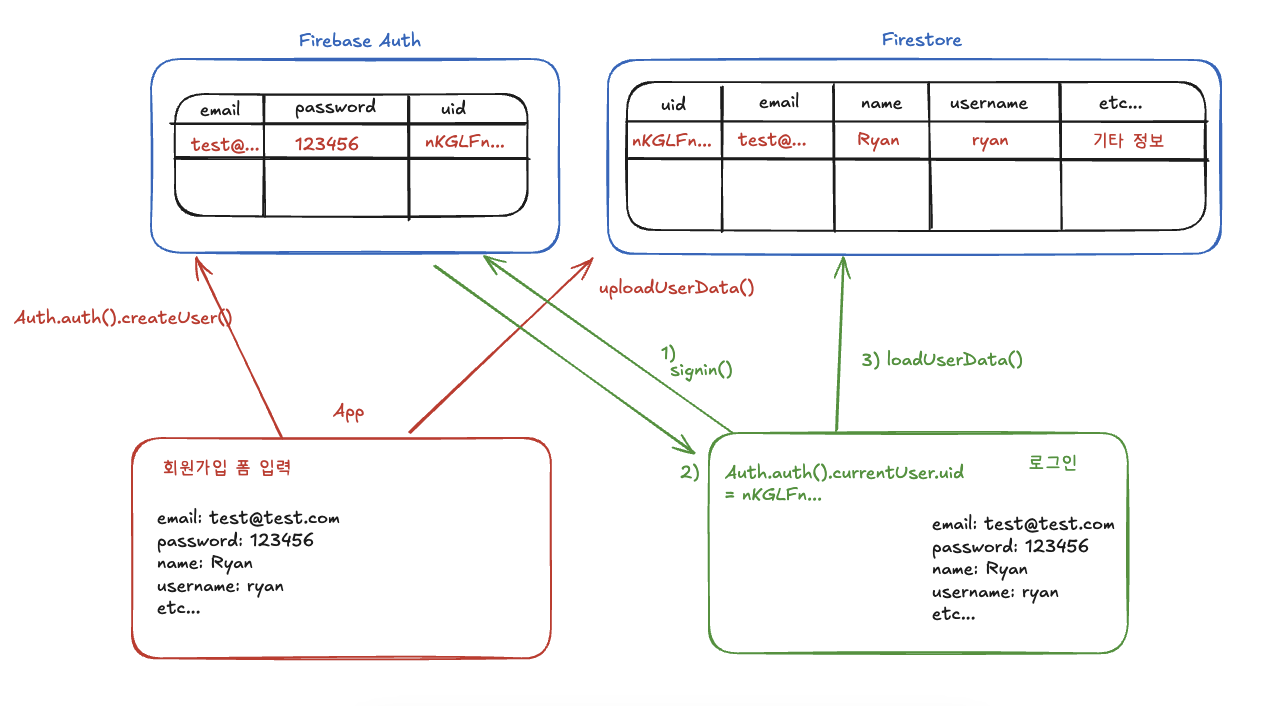
기본적으로 Auth객체로 아래와 같이 createUser를 실행하면 Firebase Authentication에 유저의 이메일과 패스워드, UID정보가 저장되며 로그인으로 간주한다.
Firebase Authentication은 이메일, 패스워드, uid만 저장한다. 나머지 부가 유저정보는 firestore에 유저객체를 저장해야한다. 그리고 로그인된 유저세션 정보의 uid값을 Firestore에서 조회하는 방식으로 진행한다. (이미지 참고)
import FirebaseAuth

class SignupViewModel {
	email: ""
    password: ""

    func createUser() async{
    	do {
        	try await Auth.auth().createUser(withEmail: email, password: password)
        } catch {

        }
    }
}
로그인으로 간주된다는 것은 Auth.auth().currentUser 객체의 값이 nill이 아니라는 것이다
그렇다면 로그인여부에따라 다른 뷰를 보여준다면 currentUser객체를 이용하면 되는것인가?
정답부터 말하면 아니다. Firebase와 같은 외부 패키지는 SwiftUI의 뷰를 바인딩시키지 않는다.
뷰모델에 새로운 변수를 할당해 currentUser세션 정보를 저장해서 View에 동적으로 적용하더라도, 로그아웃과 같은 기능에 다시 nill로 의도적으로 초기화해야하며, 앱을 다시 켤 경우 초기화가 되는 등의 문제가 있다.
대안) Singleton pattern 기반의 Manager 클래스
Singleton pattern
class 내에서 static let shared(관례적 네이밍) = 인스턴스() 를 싱글톤으로 선언할 경우 클래스.shared로 접근하는 모든 인스턴스는 같은 객체를 참조하게 된다
@MainActor
class Dog {
    var name = "강아지"
    static let shared = Dog() // 하나의 인스턴스만 가지도록 함. 싱글톤
}

let dog1 = Dog.shared // static은 이렇게 바로 접근 가능
dog1.name = "고양이"

let dog2 = Dog.shared
print(dog2.name) // 고양이로 출력됨.
즉, 하나의 currentUser세션을 사용해서 인증정보를 관리할 수 있다.
적용 (Manager 클래스)
AuthManager를 생성한다. 뷰모델, 뷰에서 AuthManager의 shared객체만 사용한다.
import Firebase
import FirebaseAuth
import Foundation

struct User: Codable {
    let id: String
    let email: String
    var username: String
    var name: String
    var bio: String?
    var profileImageUrl: String?
}

@Observable
class AuthManager {
    static let shared = AuthManager() // 인스턴스화 하지 않도록
    var currentAuthUser: FirebaseAuth.User?
    var currentUser: User?

    init() {
        currentAuthUser = Auth.auth().currentUser
        // 앱이 처음 시작될때 currentUserSession은 다시 nil로 초기화가 되기때문에 Auth.auth().currentUser가 존재한다면 앱의 시작 지점에 사용
        Task {
            await loadUserData()
        }
    }

    func createUser(email: String, password: String, name: String, username: String) async {
        do {
            let result = try await Auth.auth().createUser(withEmail: email, password: password)
            currentAuthUser = result.user
            guard let userId = currentAuthUser?.uid else { return }
            await uploadUserData(userId: userId, email: email, username: username, name: name)

        } catch {
            print(error.localizedDescription)
        }
    }

    func uploadUserData(userId: String, email: String, username: String, name: String) async {
        let user = User(id: userId, email: email, username: username, name: name)
        currentUser = user
        do {
            let encodedUser = try Firestore.Encoder().encode(user)
            try await Firestore.firestore().collection("users").document(user.id).setData(encodedUser) // firestore에 유저 정보 업로드
        } catch {
            print(error.localizedDescription)
        }
    }

    func signin(email: String, password: String) async {
        do {
            let result = try await Auth.auth().signIn(withEmail: email, password: password)
            currentAuthUser = result.user
            await loadUserData()
        } catch {
            print(error.localizedDescription)
        }
    }

    func loadUserData() async {
        guard let userId = currentAuthUser?.uid else { return }
        do {
            currentUser = try await Firestore.firestore().collection("users").document(userId).getDocument(as: User.self) // as: User.self는 User타입으로 데이터를 가져온다
            print(currentUser)
        } catch {
            print(error.localizedDescription)
        }
    }

    func signout() {
        do {
            try Auth.auth().signOut()
            currentAuthUser = nil
            currentUser = nill
        } catch {
            print(error.localizedDescription)
        }
    }
}
로그인 유무 분기
if AuthManager.shared.currentUserSession != nill {
	메인페이지 보여주세요
} else {
	로그인 페이지 보여주세요
}
ViewModel
@Observable
class SignupViewModel {
    var email = ""
    var password = ""
    var name = ""
    var username = ""

    func createUser() async {
        await AuthManager.shared.createUser(email: email, password: password, name: name, username: username)
        // 계정 생성 이후 TextField값 초기화
        email = ""
        password = ""
        name = ""
        username = ""
    }
}