29일차 내용 정리
JavaScript
push( )
- 배열에 item을 추가하는 기능
<script>
  const names = ["유재석", "박명수", "정준하"];
  names.push("정형돈");
  names.push("노홍철");
</script>(5) ['유재석', '박명수', '정준하', '정형돈', '노홍철']concat( )
- 배열을 이용해 또 다른 배열을 return
<script>
	const names2 = names.concat("추가1");
	const names3 = names.concat("추가2", "추가3", "추가4");
</script>(6) ['유재석', '박명수', '정준하', '정형돈', '노홍철', '추가1']
(8) ['유재석', '박명수', '정준하', '정형돈', '노홍철', '추가2', '추가3', '추가4']names == names2 ➜ false⭐ push : 단순히 item을 추가
concat : names 에 있는 item을 이용해 새로운 배열을 얻어낸다spread 연산자
- 해당 배열 안에 배열에 저장된 item을 펼쳐 끝에 item을 추가
const names4 = [...names, "나야"];(6) ['유재석', '박명수', '정준하', '정형돈', '노홍철', '나야']sort( )
- 배열의 요소를 정렬
- 매개변수로 비교 함수를 전달해 비교 함수의 반환값에 따라 요소들의 자리를 바꿔 정렬
<script>
	const nums = [20,30,10,50,40];
	nums.sort((a,b)=>{
		return a-b;
	});
</script>(5) [10, 20, 30, 40, 50]⭐ a-b : 오름차순 정렬, b-a : 내림차순 정렬JAVA
JDBC
Connection : DB 연결 객체
PreparedStatement : DB에 sql문을 대신 실행해주는 객체
DBConnector 클래스 설계
- Oracle DB에 접속할 수 있는 Connection 객체를 반환
import java.sql.Connection;
import java.sql.DriverManager;

public class DBConnector {
	// Connection 객체를 리턴해주는 메소드
	public Connection getConn() {
		Connection conn = null;
		try {
			//오라클 드라이버 로딩 (ojdbc...jar 파일이 있어야 아래의 코드가 동작한다)
			Class.forName("oracle.jdbc.driver.OracleDriver");
			//접속할 DB 의 정보 @아이피주소:port번호:db이름
			String url="jdbc:oracle:thin:@localhost:1521:xe";
			//계정 비밀번호를 이용해서 Connection 객체의 참조값 얻어오기
			conn=DriverManager.getConnection(url, "scott", "TIGER");
			//예외가 발생하지 않고 여기까지 실행순서가 내려오면 접속 성공이다.
			System.out.println("Oracle DB 접속 성공");
		} catch (Exception e) {
			e.printStackTrace();
		}
		return conn;
	}
}
DBConnector 활용
Connection conn;
conn = new DBConnector().getConn();
PreparedStatement 파라미터(?) 바인딩 정리
?: 실행할 SQL문에 값이 들어갈 파라미터setInt,setString등 setXXX() 메서드를 사용해 ? 에 값을 삽입
// salary 범위 설정
int minSal = 2000;
int maxSal = 3000;

Connection conn;
PreparedStatement pstmt;
ResultSet rs;

try {
	conn = new DBConnector().getConn();

	// 실행할 SQL 문 (급여가 minSal ~ maxSal 인 사원 조회)
	String sql = """
			SELECT empno, ename, sal
			FROM emp
			WHERE sal BETWEEN ? AND ?
        	""";
	pstmt = conn.prepareStatement(sql);

// ? 에 값 바인딩 (첫 번째 ?, 두 번째 ?)
	pstmt.setInt(1, minSal); // 첫 번째 ? → minSal 값
	pstmt.setInt(2, maxSal); // 두 번째 ? → maxSal 값
	rs = pstmt.executeQuery();
	while(rs.next()) {
			int empno = rs.getInt("empno");
			String ename = rs.getString("ename");
			int sal = rs.getInt("sal");

			String info = String.format("사원번호:%d 사원이름:%s 급여:%d", empno, ename, sal);
			System.out.println(info);
	}
} catch (Exception e) {
	e.printStackTrace();
}
executeUpdate()
INSERT,UPDATE,DELETE같은 데이터 변경 SQL 실행 시 사용- 변화된 row 수 반환
// INSERT 할 데이터 준비
String name = "누구세요";
String addr = "어디 사세요";

Connection conn;
PreparedStatement pstmt;

try {
	conn = new DBConnector().getConn();

	// 실행할 SQL 문 (급여가 minSal ~ maxSal 인 사원 조회)
	String sql = """
  			INSERT INTO member(num, name, addr)
  			VALUES(member_seq.NEXTVAL, ?, ?)
			""";
	pstmt = conn.prepareStatement(sql);
	pstmt.setString(1, name);
	pstmt.setString(2, addr);

	int rowCount = pstmt.executeUpdate();
	if(rowCount>0) {
		System.out.println("작업 성공");
	}else {
			System.out.println("작업 실패");
	}
} catch (Exception e) {
	e.printStackTrace();
}
DTO
- 여러 개의 필드를 하나의 객체로 묶어 데이터를 전달하는 역할
- 데이터를 담는 순수 객체 필드로 getter와 setter로만 이루어진다
➜ 파라미터 관리 편리
package test.dto;

public class MemberDto {
	private int num;
	private String name;
	private String addr;

	public MemberDto() {}

	public int getNum() { return num; }

	public void setNum(int num) { this.num = num; }

	public String getName() { return name; }

	public void setName(String name) { this.name = name; }

	public String getAddr() { return addr; }

	public void setAddr(String addr) { this.addr = addr; }
}- 활용
package test.main;

import java.sql.Connection;
import java.sql.PreparedStatement;

import test.dto.MemberDto;
import test.util.DBConnector;

public class MainClass07 {
	// member 테이블에 회원 한 명의 정보를 추가하는 메소드를 만든다고 생각해 보자
	public static void insert(MemberDto dto) {
		Connection conn;
		PreparedStatement pstmt;
		try {
			conn = new DBConnector().getConn();
			String sql = """
					INSERT INTO member(num, name, addr)
					VALUES(member_seq.NEXTVAL, ?, ?)
					""";
			pstmt = conn.prepareStatement(sql);
			pstmt.setString(1, dto.getName());
			pstmt.setString(2, dto.getAddr());

			// sql 문에 실행하고 변화된 (추가된, 수정된, 삭제된) row 의 갯수 리턴받기
			int rowCount = pstmt.executeUpdate();
			if(rowCount>0) {
				System.out.println("작업 성공");
			}else {
				System.out.println("작업 실패");
			}
		} catch (Exception e) {
			e.printStackTrace();
		}
	}

	public static void main(String[] args) {
		// DB 에 추가할 회원의 정보라고 가정하자 (member table)
		String name = "누구세요2";
		String addr = "어디 사세요2";

		// 회원의 이름과 주소를 MemberDto 객체에 담는다
		MemberDto dto = new MemberDto();
		dto.setName(name);
		dto.setAddr(addr);
		// 메소드 호출하면서 전달
		insert(dto);
	}
}
try catch finally
- Connection, PreparedStatement, ResultSet 은 사용 후 반드시 닫아야 한다
외 여부와 상관없이 리소스 누수 방지 가능
Connection conn = null;
PreparedStatement pstmt = null;

try {
	conn = new DBConnector().getConn();
	String sql = "...";
	pstmt = conn.prepareStatement(sql);
	// SQL 실행
} catch (Exception e) {
	e.printStackTrace();
} finally {
	try {
		if(pstmt != null) pstmt.close();
		if(conn != null) conn.close();
	} catch (Exception e) {
		e.printStackTrace();
	}
}
-
Window ➜ Preferences click
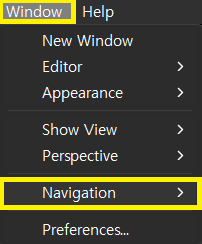
-
temp 검색 ➜ Java ➜ Editor ➜ Templates ➜ New click
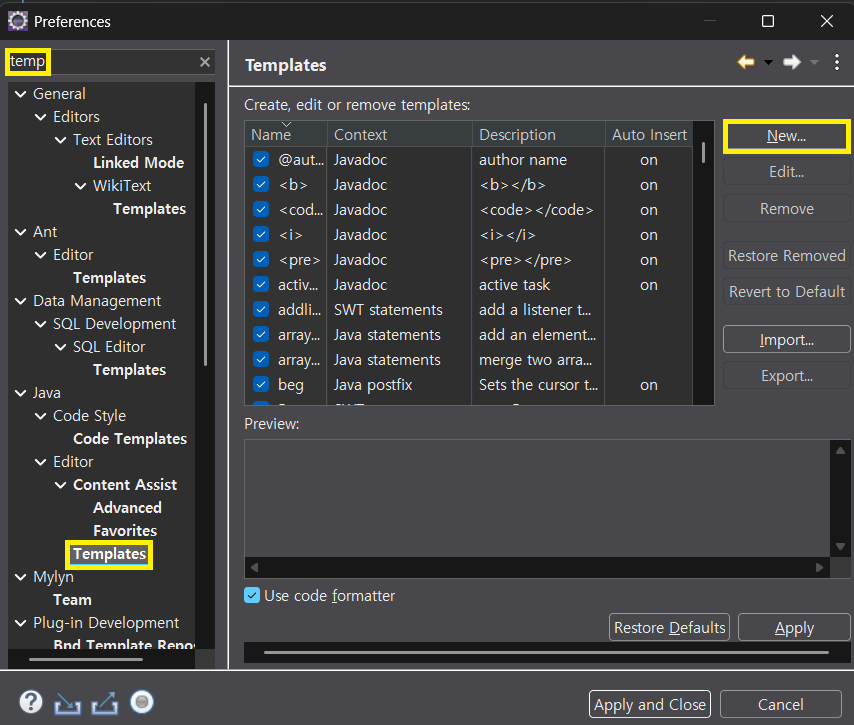
-
Name ➜ Description ➜ Patten 순으로 작성 후 OK ➜ Apply and Close click
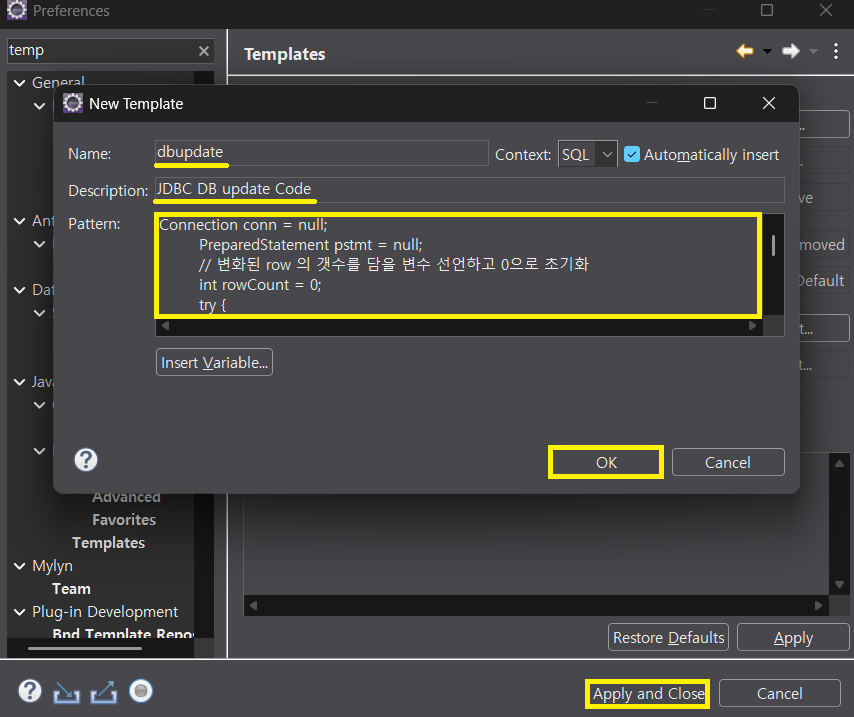
Eclipes 단축키 Tip
ctrl + shift + o : import 자동 정리
DAO 패턴
- DB 작업을 전담하는 객체
- 코드 중복 방지, 유지 보수 용이
insert
// 회원 한 명의 정보를 DB 에 저장하고 성공 여부를 리턴하는 메소드
public boolean insert(MemberDto dto) {
	Connection conn = null;
	PreparedStatement pstmt = null;
	// 변화된 row 의 갯수를 담을 변수 선언하고 0으로 초기화
	int rowCount = 0;
	try {
		conn = new DBConnector().getConn();
		String sql = """
				INSERT INTO member(num, name,  addr)
				VALUES(member_seq.NEXTVAL, ?, ?)
		""";
		pstmt = conn.prepareStatement(sql);
		pstmt.setString(1, dto.getName());
		pstmt.setString(2, dto.getAddr());
		// sql 문에 실행하고 변화된 (추가된, 수정된, 삭제된) row 의 갯수 리턴받기
		rowCount = pstmt.executeUpdate();
	} catch (Exception e) {
		e.printStackTrace();
	} finally {
		try {
			if (pstmt != null) pstmt.close();
			if (conn != null) conn.close();
		} catch (Exception e) {}
	}
		// 변화된 rowCount 값을 조사해서 작업의 성공 여부를 알아 낼 수 있다
	if (rowCount > 0) {
		return true; // 작업 성공이라는 의미에서 true return
	} else {
		return false; // 작업 실패라는 의미에서 false return
	}
}
delete
// 회원 한 명의 정보를 DB 에서 삭제하고 성공여부를 리턴하는 메소드public boolean deleteByNum(int num) {
	Connection conn = null;
	PreparedStatement pstmt = null;
	// 변화된 row 의 갯수를 담을 변수 선언하고 0으로 초기화
	int rowCount = 0;
	try {
		conn = new DBConnector().getConn();
		String sql = """
				DELETE FROM member
				WHERE num = ?
		""";
		pstmt = conn.prepareStatement(sql);
		pstmt.setInt(1, num);

		// sql 문에 실행하고 변화된 (추가된, 수정된, 삭제된) row 의 갯수 리턴받기
		rowCount = pstmt.executeUpdate();
	} catch (Exception e) {
		e.printStackTrace();
	} finally {
		try {
			if (pstmt != null) pstmt.close();
			if (conn != null) conn.close();
		} catch (Exception e) {}
	}
	// 변화된 rowCount 값을 조사해서 작업의 성공 여부를 알아 낼 수 있다
	if (rowCount > 0) {
		return true; // 작업 성공이라는 의미에서 true return
	} else {
		return false; // 작업 실패라는 의미에서 false return
	}
}
update
// 회원 한 명의 정보를 DB 에서 수정하고 성공 여부를 리턴하는 메소드
public boolean update(MemberDto dto) {
	Connection conn = null;
	PreparedStatement pstmt = null;
	// 변화된 row 의 갯수를 담을 변수 선언하고 0으로 초기화
	int rowCount = 0;
	try {
		conn = new DBConnector().getConn();
		String sql = """
				UPDATE member
				SET name = ?, addr = ?
				WHERE num = ?
		""";
		pstmt = conn.prepareStatement(sql);
		pstmt.setString(1, dto.getName());
		pstmt.setString(2, dto.getAddr());
		pstmt.setInt(3, dto.getNum());

		// sql 문에 실행하고 변화된 (추가된, 수정된, 삭제된) row 의 갯수 리턴받기
		rowCount = pstmt.executeUpdate();
	} catch (Exception e) {
		e.printStackTrace();
	} finally {
		try {
			if (pstmt != null) pstmt.close();
			if (conn != null) conn.close();
		} catch (Exception e) {}
	}
	// 변화된 rowCount 값을 조사해서 작업의 성공 여부를 알아 낼 수 있다
	if (rowCount > 0) {
		return true; // 작업 성공이라는 의미에서 true return
	} else {
		return false; // 작업 실패라는 의미에서 false return
	}
}
select
// 회원 전체 목록을 select 해서 List 에 담아서 리턴하는 메소드
public List<MemberDto> selectAll(){
	// 회원정보를 누적시킬 ArrayList 객체 미리 준비하기
	List<MemberDto> list = new ArrayList<>();

	Connection conn = null;
	PreparedStatement pstmt = null;
	ResultSet rs = null;
	try {
		conn = new DBConnector().getConn();
		// 실행할 sql 문
		String sql = """
				SELECT num, name, addr
				FROM member
				ORDER BY num ASC
		""";
		pstmt = conn.prepareStatement(sql);

		// select 문 실행하고 결과를 ResultSet 으로 받아온다
		rs = pstmt.executeQuery();
		// 반복문 돌면서 ResultSet 에 담긴 데이터를 추출해서 리턴해줄 객체에 담는다
		while(rs.next()) {
			// cursor 가 위치한 곳의 회원정보를 저장할 MemberDto 객체 생성
			MemberDto dto = new MemberDto();
			dto.setNum(rs.getInt("num"));
			dto.setName(rs.getString("name"));
			dto.setAddr(rs.getString("addr"));
			// 회원 한 명의 정보가 담긴 새로운 MemeberDto 객체의 참조값을 List 에 누적시키기
			list.add(dto);
		}
	}catch (Exception e) {
		e.printStackTrace();
	}finally {
		try {
			if(rs != null) rs.close();
			if(pstmt != null) pstmt.close();
			if(conn != null) conn.close();
		}catch(Exception e) {}
	}
	return list;
}
public MemberDto getByNum(int num) {
// MemberDto 객체의 참조값을 담을 지역변수를 미리 받는다
MemberDto dto = null;
// 필요한 객체를 담을 지역변수를 마리 만든다
Connection conn = null;
PreparedStatement pstmt = null;
ResultSet rs = null;
try {
conn = new DBConnector().getConn();
// 실행할 sql 문
String sql = """
SELECT num, name, addr
FROM member
WHERE num = ?
""";
pstmt = conn.prepareStatement(sql);
// ? 에 값 바인딩
pstmt.setInt(1, num);
// select 문 실행하고 결과를 ResultSet 으로 받아온다
rs = pstmt.executeQuery();
// 반복문 돌면서 ResultSet 에 담긴 데이터를 추출해서 리턴해줄 객체에 담는다
while (rs.next()) {
dto = new MemberDto();
dto.setNum(num); // 번호는 매개변수에 있는 내용을 담으면 된다
dto.setName(rs.getString("name"));
dto.setAddr(rs.getString("addr"));
}
} catch (Exception e) {
e.printStackTrace();
} finally {
try {
if (rs != null) rs.close();
if (pstmt != null) pstmt.close();
if (conn != null) conn.close();
} catch (Exception e) {}
}
return dto;
}Scanner 로 DB insert
import java.util.Scanner;

import test.dao.MemberDao;
import test.dto.MemberDto;

public class MainClass08 {
	public static void main(String[] args) {
		Scanner scan = new Scanner(System.in);

		System.out.print("이름 입력:");
		String name = scan.nextLine();

		System.out.print("주소 입력:");
		String addr = scan.nextLine();

		// MemberDao 객체를 이용해서 DB 에 저장하려면?

		// MemberDto 객체를 생성해서
		MemberDto dto = new MemberDto();
		// 입력한 이름과 주소를 담고
		dto.setName(name);
		dto.setAddr(addr);

		// MemberDao 객체의 insert() 메소드를 활용해서 DB 에 저장한다
		MemberDao dao = new MemberDao();
		// 메소드는 작업의 성공 여부를 리턴
		boolean isSuccess = dao.insert(dto);
		if(isSuccess) {
			System.out.println(name+"님의 정보를 성공적으로 DB에 저장했습니다");
		}else {
			System.out.println("저장 실패");
		}
	}
}
JFrame
⚠️ this 와 f 의 차이

   this : 현재 실행중인 객체 본인
   f : main( ) 에서 만든 참조 변수 = 외부에서 그 객체를 가리키는 이름

   ➜ 둘다 같은 객체를 가리키지만 사용 위치가 다르다
package test.frame;
import javax.swing.JFrame;
public class MemberFrame extends JFrame {
// 생성자
public MemberFrame() {
this.setTitle("회원 정보");
this.setBounds(100, 100, 800, 500);
this.setDefaultCloseOperation(EXIT_ON_CLOSE);
this.setVisible(true);
}
public static void main(String[] args) {
MemberFrame f = new MemberFrame();
f.setTitle("회원 정보");
f.setBounds(100,100,800,500);
f.setDefaultCloseOperation(EXIT_ON_CLOSE);
f.setVisible(true);
}
}
JLabel : 텍스트 라벨 출력 컴포넌트
JTextField : 텍스트 입력 필드
JPanel : 여러 UI 컴포넌트를 그룹으로 묶어 배치
JLabel : 텍스트 라벨을 출력하는 컴포넌트. 여기서는 이름, 주소 라벨을 표시
- JFrame을 통해 DB 데이터 활용
package test.frame;

import java.awt.BorderLayout;
import java.awt.Color;

import javax.swing.JButton;
import javax.swing.JFrame;
import javax.swing.JLabel;
import javax.swing.JPanel;
import javax.swing.JTextField;

import test.dao.MemberDao;
import test.dto.MemberDto;

public class MemberFrame extends JFrame{
	// 필요한 필드 정의하기
	JTextField inputName, inputAddr;

	// 생성자
	public MemberFrame() {
		// 레이아웃 설정
		setLayout(new BorderLayout());

		// JLable 2개
		JLabel label1 = new JLabel("이름");
		JLabel label2 = new JLabel("주소");

		// JTextField 1개
		inputName = new JTextField(10);
		inputAddr = new JTextField(10);

		// JButton 1개
		JButton insertBtn = new JButton("저장");

		// 패녈에 UI 배치
		JPanel panel = new JPanel();
		panel.add(label1);
		panel.add(inputName);
		panel.add(label2);
		panel.add(inputAddr);
		panel.add(insertBtn);

		// 패널의 배경색 설정
		panel.setBackground(Color.orange);
		// 패널을 프레임의 위쪽에 배치
		add(panel, BorderLayout.NORTH);

		insertBtn.addActionListener((e)->{
			MemberDto dto = new MemberDto();
			dto.setName(inputName.getText());
			dto.setAddr(inputAddr.getText());

			MemberDao dao = new MemberDao();

			boolean isSuccess = dao.insert(dto);
			if(isSuccess) {
				System.out.println(dto.getName()+"의 정보를 성공적으로 DB에 저장했습니다");
			} else {
				System.out.println("실패");
			}
		});

	}
	public static void main(String[] args) {
		MemberFrame f = new MemberFrame();
		f.setTitle("회원 정보");
		f.setBounds(100,100,800,500);
		f.setDefaultCloseOperation(EXIT_ON_CLOSE);
		f.setVisible(true);
	}
}

학원 공부 내용 정리