35일차 내용 정리
CSS
작성 위치
- External CSS
<link rel="stylesheet" href="./css/custom.css">@charset "utf-8": 한글을 이상한 문자열로 인식하지 않도록 방지- html 페이지에서
<style> </style>요소 안에 작성하는 문법과 동일
@charset "utf-8";

p{
    border: 1px solid red;
}- Interal CSS
<style>
	div{
		margin-top: 100px;
        color: #ff0000;
	}
</style>- Inline CSS
<div style="background-color: yellow;">css 를 배워 보아요</div>⭐ 우선순위
Inline > Internal > External페이지 검사로 css 확인
element style=inline css
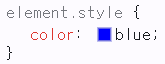
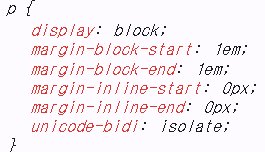
em: 물려받은 글자의 크기, default 글자의 크기 16px의 n배margin-block-start=margin-top
margin-block-end=margin-bottom
margin-inline-start=margin-left
maring-inline-end=margin-right
선택자
| 선택자 | 설명 |
|---|---|
* | 전체 선택자 |
. | 클래스 선택자 |
# | 아이디 선택자 |
, | 다중 선택자 |
띄어쓰기 | 자손 선택자 |
> | 자식 선택자 |
가상 클래스 선택자
hover
- 요소에 마우스를 올렸을 때
button:hover { ... }focus
- 요소에 포커스가 갔을 때
button:focus { ... }:nth-child()
- 선택한 요소가 형제 요소 중 몇 번째인지 기준으로 선택
nth=n번째- ( ) 안에는 숫자, 수열 표현식, 키워드 등이 들어간다
ul li:first-child { ... }odd
- 홀수 번째
ul li:nth-child(odd) { ... }even
- 짝수 번째
ul li:nth-child(even) { ... }JAVA
Servers/contex.xml 문서의 내용
- tomcat 서버는 start 될 때 context.xml 문서를 로딩해서 동작 준비
<Resource name="jdbc/myoracle" auth="Container"
              type="javax.sql.DataSource" driverClassName="oracle.jdbc.OracleDriver"
              url="jdbc:oracle:thin:@127.0.0.1:1521:xe"
              username="scott" password="TIGER" maxTotal="20" maxIdle="10"
              maxWaitMillis="-1"/>
➜ 여기에 설정된 정보대로 DB에 접속을 하여 Connection 객체를 얻어내서 Connection Pool 로 관리
⭐ 해당 정보들이 다 맞아야 Tomcat이 DB 연결 풀을 정상적으로 준비할 수 있다
    jdbc/myoracle = data source 의 이름
    @127.0.0.1:1521:xe = DB 접속 정보 (ip 주소)
    username="scott" password="TIGER" = 계정 정보
DbcpBean 클래스
- context.xml 문서에 정의한 data source의 이름을 이용해서 DataSource 객체를 얻어낸다
Context initContext = new InitialContext();
Context envContext = (Context) initContext.lookup("java:comp/env");
DataSource ds = (DataSource) envContext.lookup("jdbc/myoracle");
DAO에서 Connection 객체가 필요하다면
Connection conn = new DbcpBean().getConn();<Tomcat Server가 관리하는 Connection Pool>
----------------------------
|  o					   |
|			o			   |
|	o			  o        |
|     	 o                 |
|    o	   ↖  ↗           |
|     	↖ Connection 객체  |
----------------------------
			  ⤷ Oracle DB와 연결된 객체
➜ 관리되는 객체 중에 하나가 return
- Connection 객체를 이용해서 원하는 작업을 하고
- 사용이 끝나면 conn.close() 해서 Connection 객체를 다시 Connection Pool 에 반납하면 된다
DB ➜ 클라이언트
조회
<ul>
	<li><a href="${pageContext.request.contextPath}/member/list.jsp">회원 목록</a></li>
</ul><%
// 1. MemberDao 객체를 사용해 회원 목록 가져오기
List<MemberDto> list = new MemberDao().selectAll();
// 2. 응답한다
%><div class="container">
<h1>회원 목록</h1>
<table border="1">
<thead>
<tr>
<th>번호</th>
<th>이름</th>
<th>주소</th>
</tr>
</thead>
<tbody>
<%for(MemberDto tmp : list){%>
<tr>
<td><%=tmp.getNum()%></td>
<td><%=tmp.getName()%></td>
<td><%=tmp.getAddr()%></td>
</tr>
<%}%>
</tbody>
</table>
</div>추가
<a href="${pageContext.request.contextPath}/member/insertform.jsp">회원 추가</a><div class="container">
<h1>회원 추가 양식</h1>
<form action="${pageContext.request.contextPath}/member/insert.jsp" method="post">
<div>
<label for="name">이름</label>
<input type="text" name="name" id="name" />
</div>
<div>
<label for="addr">주소</label>
<input type="text" name="addr" id="addr" />
</div>
<button type="submit">추가</button>
</form>
</div>- form 안에 있는 submit 버튼을 누르면
- input 요소에 입력한 이름과 주소가 name, addr 이라는 파라미터명으로
- /member/insert.jsp 페이지가 요청이 되면서 전송된다
- insert.jsp
<%
	// 1. 폼 전송되는 추가할 회원의 이름과 주소를 추출한다
	String name = request.getParameter("name");
	String addr = request.getParameter("addr");

	// DB 에 저장하기 위해 name, addr 를 MemberDto 객체에 담늗다
	MemberDto dto = new MemberDto();
	dto.setName(name);
	dto.setAddr(addr);

	// 2. DB 에 저장한다
	MemberDao dao = new MemberDao();
	Boolean isSuccess = dao.insert(dto);

	// 3. 클라이언트에게 응답
%>
<%if(isSuccess) { %>
<p>
<strong><%=name%></strong>님의 정보를 성공적으로 저장했습니다
<a href="${pageContext.request.contextPath}/member/list.jsp">확인</a>
</p>
<% }else {%>
<p>
회원 정보 저장 실패
<a href="${pageContext.request.contextPath}/member/insertform.jsp">다시 입력하기</a>
</p>
<%} %>삭제
<td><a href="${pageContext.request.contextPath}/member/delete.jsp?num=<%=tmp.getNum()%>">삭제</a></td><%
// GET 방식 파라미터로 전달되는 회원의 번호 얻어내기
int num = Integer.parseInt(request.getParameter("num"));
//삭제할 회원 정보를 삭제하고
MemberDao dao = new MemberDao();
dao.deleteByNum(num);
// 응답한다
%><script>
alert("삭제 완료");
location.href = "${pageContext.request.contextPath}/member/list.jsp";
</script>수정
<td><a href="updateform.jsp?num=<%=tmp.getNum()%>">수정</a></td><%
// 1. GET 방식 파라미터로 전달되는 수정할 회원의 번호를 읽어온다
int num = Integer.parseInt(request.getParameter("num"));
// 2. MemberDao 객체를 이용해서 수정할 회원의 정보를 얻어온다
MemberDto dto = new MemberDao().getByNum(num);
// 3. 수정할 회원의 정보를 수정 양식으로 응답한다
%><div class="container">
<h1>회원정보 수정 양식</h1>
<form action="${pageContext.request.contextPath}/member/update.jsp" method="post">
<div>
<label for="num">번호</label>
<input type="text" name="num" id="num" value="<%=dto.getNum()%>" readonly/>
</div>
<div>
<label for="name">이름</label>
<input type="text" name="name" id="name" value="<%=dto.getName()%>"/>
</div>
<div>
<label for="addr">주소</label>
<input type="text" name="addr" id="addr" value="<%=dto.getAddr()%>"/>
</div>
<button type="submit">수정</button>
<button type="reset">취소</button>
</form>
</div>- update.jsp
<%
	// 1. form 전송되는 수정할 회원의 정보를 추출한다
	int num = Integer.parseInt(request.getParameter("num"));
	String name = request.getParameter("name");
	String addr = request.getParameter("addr");

	// 2. MemberDao 객체를 이용해서 DB 에 수정반영하기
	MemberDto dto= new MemberDto();
	dto.setNum(num);
	dto.setName(name);
	dto.setAddr(addr);
	MemberDao dao = new MemberDao();
	boolean isSuccess = dao.update(dto);

	// 3. 응답하기
%>
<%if(isSuccess) { %>
<p>
<strong><%=num%></strong>번 회원의 정보를 수정했습니다
<a href="list.jsp">확인</a>
</p>
<% }else {%>
<p>
수정 실패 <a href="updateform.jsp?num=<%=num%>">다시 수정하러 가기</a>
</p>
<%} %>📁 회원 관리 System
회원의 번호, 이름, 주소
목록보기, 추가하기, 수정하기, 삭제하기 기능 구현
📦 DB
member 테이블, member_seq 시퀸스📦 class
MemberDto, MemberDao📦 jsp
/member/list.jsp
/member/inserform.jsp
/member/insert.jsp
/member/delete.jsp
/member/updateform.jsp
/membe/update.jsp
실습하기
📁 도서관리 System
번호(PK), 제목, 저자, 출판사
목록보기, 추가하기, 수정하기, 삭제하기 기능 구현
📦 DB
book 테이블, book_seq 시퀸스📦 class
BookDto, BookDao📦 jsp
도서 목록 보기 : /book/list.jsp
도서 추가 양식 : /book/insertform.jsp
도서 추가 하기 : /book/insert.jsp
도서 삭제 하기 : /book/delete.jsp
도서 수정 양식 : /book/updateform.jsp
도서 수정 하기 : /book/update.jsp- 테이블 & 시퀸스 생성
CREATE TABLE book(
	num NUMBER PRIMARY KEY,
	title VARCHAR2(300),
	author VARCHAR2(100),
	publisher VARCHAR2(100)
);

CREATE SEQUENCE book_seq;- class 생성
- BookDto
public class BookDto {
	private int num;
	private String title;
	private String author;
	private String publisher;

	public BookDto(){

	}

	public int getNum() {
		return num;
	}

	public void setNum(int num) {
		this.num = num;
	}

	public String getTitle() {
		return title;
	}

	public void setTitle(String title) {
		this.title = title;
	}

	public String getAuthor() {
		return author;
	}

	public void setAuthor(String author) {
		this.author = author;
	}

	public String getPublisher() {
		return publisher;
	}

	public void setPublisher(String publisher) {
		this.publisher = publisher;
	}
}- BookDao
package test.dao;

import java.sql.Connection;
import java.sql.PreparedStatement;
import java.sql.ResultSet;
import java.util.ArrayList;
import java.util.List;

import test.dto.BookDto;
import test.util.DbcpBean;

public class BookDao {

	public List<BookDto> selectAll(){
		List<BookDto> list = new ArrayList<>();

		Connection conn = null;
		PreparedStatement pstmt = null;
		ResultSet rs= null;

		try {
			conn = new DbcpBean().getConn();
			String sql = """
				SELECT num, title, author, publisher
				FROM book
				ORDER BY num;
				""";
			pstmt =  conn.prepareStatement(sql);
			rs = pstmt.executeQuery();
			while(rs.next()) {
				BookDto dto = new BookDto();
				dto.setNum(rs.getInt("num"));
				dto.setTitle(rs.getString("title"));
				dto.setAuthor(rs.getString("author"));
				dto.setPublisher(rs.getString("publisher"));

				list.add(dto);
			}
		}catch (Exception e) {
			e.printStackTrace();
		} finally {
			try {
				if(rs != null) rs.close();
				if(pstmt != null) pstmt.close();
				if(conn != null) conn.close();
			} catch (Exception e) { }
		}
		return list;
	}

	public boolean insert(BookDto dto) {
		Connection conn = null;
		PreparedStatement pstmt = null;
		int rowCount = 0;
		try {
			conn = new DbcpBean().getConn();
			String sql = """
				INSERT INTO book(num, title, author, publisher)
				VALUES(boo_seq.NEXTVAL, ?, ?, ?)
				""";
			pstmt = conn.prepareStatement(sql);
			pstmt.setString(1, dto.getTitle());
			pstmt.setString(2, dto.getAuthor());
			pstmt.setString(3, dto.getPublisher());

			rowCount = pstmt.executeUpdate();
		} catch (Exception e) {
			e.printStackTrace();
		} finally {
			try {
				if(pstmt != null) pstmt.close();
				if(conn != null) conn.close();
			} catch (Exception e) {}
		}

		if(rowCount>0) {
			return true;
		} else {
			return false;
		}
	}

	public boolean deleteByNum(int num) {
		Connection conn = null;
		PreparedStatement pstmt = null;
		int rowCount = 0;
		try {
			conn = new DbcpBean().getConn();
			String sql = """
				DELETE FROM book
				WHERE num = ?
				""";
			pstmt = conn.prepareStatement(sql);
			pstmt.setInt(1, num);
			rowCount = pstmt.executeUpdate();

		} catch (Exception e) {
			e.printStackTrace();
		} finally {
			try {
				if(pstmt != null) pstmt.close();
				if(conn != null) conn.close();
			} catch (Exception e) { }
		}
		if(rowCount > 0) {
			return true;
		} else {
			return false;
		}
	}

	public boolean update(BookDto dto) {
		Connection conn = null;
		PreparedStatement pstmt = null;
		int rowCount = 0;
		try {
			conn = new DbcpBean().getConn();
			String sql = """
				UPDATE book
				SET title = ?, author = ?, publisher = ?
				WHERE num = ?
				""";
			pstmt = conn.prepareStatement(sql);
			pstmt.setString(1,dto.getTitle());
			pstmt.setString(2, dto.getAuthor());
			pstmt.setString(3, dto.getPublisher());
			pstmt.setInt(4, dto.getNum());

			rowCount = pstmt.executeUpdate();
		} catch (Exception e) {
			e.printStackTrace();
		} finally {
			try {
				if(pstmt != null) pstmt.close();
				if(conn != null) conn.close();
			}catch (Exception e) { }
		}
		if(rowCount>0) {
			return true;
		} else {
			return false;
		}
	}

	public BookDto getByNum(int num) {
		BookDto dto  = null;

		Connection conn = null;
		PreparedStatement pstmt = null;
		ResultSet rs = null;
		try {
			conn = new DbcpBean().getConn();
			String sql = """
				SELECT title, author, publisher
				FROM book
				WHERE num = ?
				""";
			pstmt = conn.prepareStatement(sql);
			pstmt.setInt(1, num);
			rs = pstmt.executeQuery();

			if(rs.next()) {
				dto = new BookDto();
				dto.setNum(num);
				dto.setTitle(rs.getString("title"));
				dto.setAuthor(rs.getString("author"));
				dto.setPublisher(rs.getString("publisher"));
			}
		} catch (Exception e) {
			e.printStackTrace();
		} finally {
			try {
				if(rs != null) rs.close();
				if(pstmt != null) pstmt.close();
				if(conn != null) conn.close();
			} catch (Exception e) { }
		}
		return dto;
	}
}- 도서 목록 보기
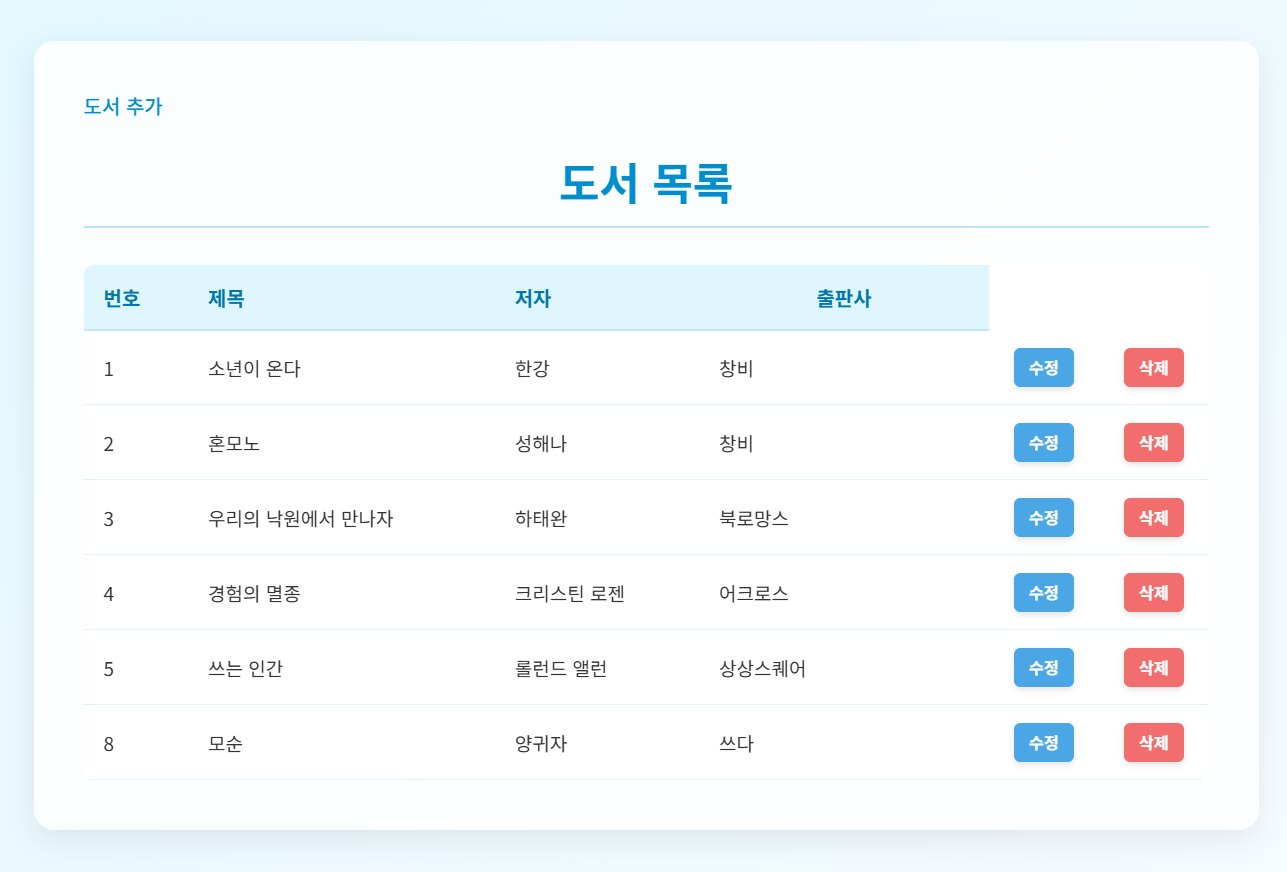
<%@page import="test.dao.BookDao"%>
<%@page import="test.dto.BookDto"%>
<%@page import="java.util.List"%>
<%@ page language="java" contentType="text/html; charset=UTF-8"
    pageEncoding="UTF-8"%>
<%
	List<BookDto> list = new BookDao().selectAll();

%>
<!DOCTYPE html>
<html>
<head>
<meta charset="UTF-8">
<title>/book/list.jsp</title>
</head>
<body>
	<div class="container">
		<h1>도서 목록</h1>
		<table>
			<thead>
				<tr>
					<th>번호</th>
					<th>제목	</th>
					<th>저자</th>
					<th>출판사</th>
				</tr>
			</thead>
			<tbody>
				<% for(BookDto tmp : list){%>
					<tr>
						<td><%=tmp.getNum()%></td>
						<td><%=tmp.getTitle()%></td>
						<td><%=tmp.getAuthor()%></td>
						<td><%=tmp.getPublisher()%></td>
					</tr>
				<%}%>
			</tbody>
		</table>
	</div>
</body>
</html>- 도서 추가 양식
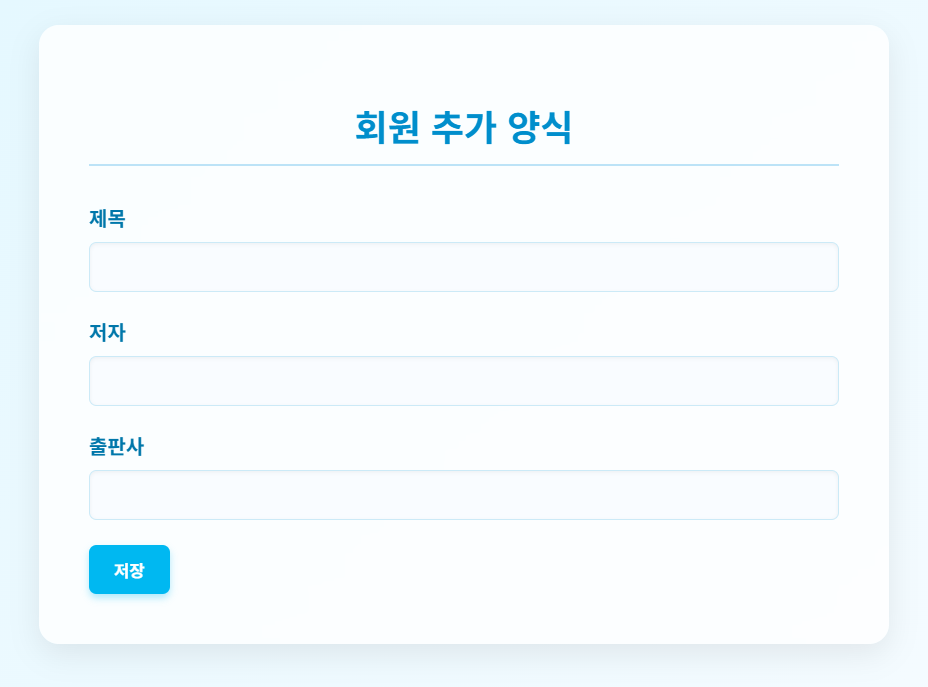
<a href="${pageContext.request.contextPath}/book/insertform.jsp">도서 등록</a><div class="container">
<h1>회원 추가 양식</h1>
<form action="${pageContext.request.contextPath}/book/insert.jsp" method="post">
<div>
<label for="title">제목</label>
<input type="text" name="title" id="title"/>
</div>
<div>
<label for="author">저자</label>
<input type="text" name="author" id="author" />
</div>
<div>
<label for="publisher">출판사</label>
<input type="text" name="publisher" id="publisher" />
</div>
<button type="submit">등록</button>
</form>
</div>- 도서 추가하기
<%
	String title = request.getParameter("title");
	String author = request.getParameter("author");
	String publisher = request.getParameter("publisher");

	BookDto dto = new BookDto();
	dto.setTitle(title);
	dto.setAuthor(author);
	dto.setPublisher(publisher);

	BookDao dao = new BookDao();
	boolean isSuccess = dao.insert(dto);
%>
<%if(isSuccess) {%>
<p>
<strong>"<%=title%>" 의 도서 정보를 등록했습니다</strong>
<br>
<a href="${pageContext.request.contextPath}/book/list.jsp">목록 확인</a>
</p>
<%} else {%>
<p>
<strong>도서 등록 실패</strong>
<br>
<a href="${pageContext.request.contextPath}/book/insertform.jsp">다시 시도</a>
</p>
<%}%>- 도서 삭제하기
<td><a href="${pageContext.request.contextPath}/book.delete.jsp?num=<%=tmp.getNum()%>">삭제</a></td><%
int num = Integer.parseInt(request.getParameter("num"));
BookDao dao = new BookDao();
dao.deleteByNum(num);
// 새로운 경로로 요청을 다시 하라고 응답
String cPath = request.getContextPath();
// HttpServletResponse 객체의 메소드를 이용해서 도서 목록 페이지를 다시 요청
// (페이지 refresh 효과)
response.sendRedirect(cPath+"/book/list.jsp");
%> /book/list.jsp ➜ /book/delete.jsp ➜ /book/list.jsp
여기서 삭제를 누르면 이동 redirect 이동- 도서 수정 양식
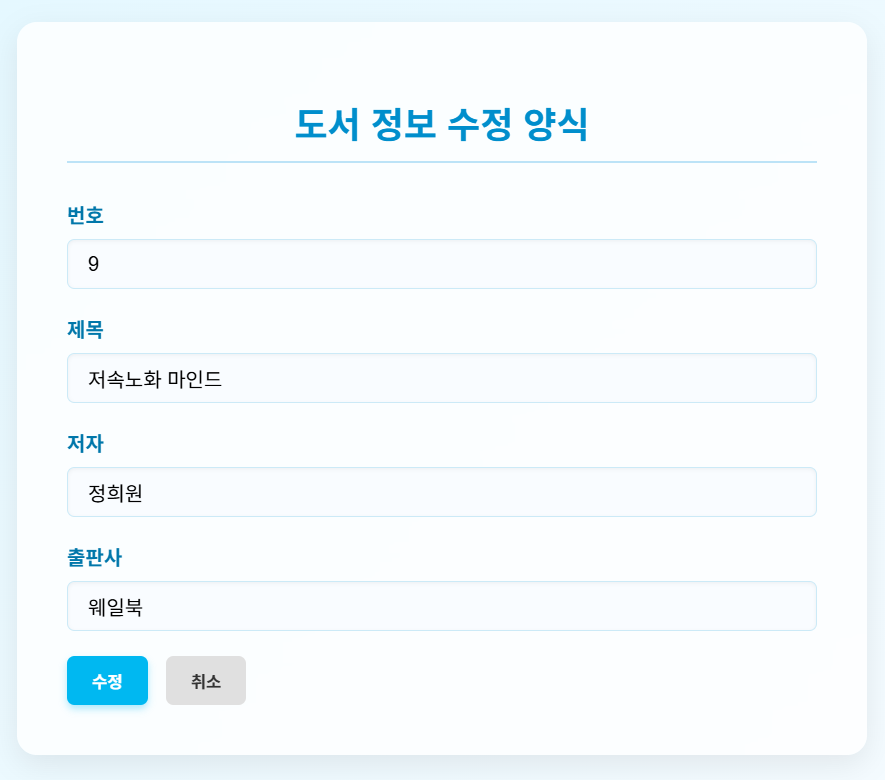
<td><a href="${pageContext.request.contextPath}/book/updateform.jsp?num=<%=tmp.getNum()%>">수정</a></td><%
int num = Integer.parseInt(request.getParameter("num"));
BookDto dto = new BookDao().getByNum(num);
%><div class="container">
<h1>도서 정보 수정 양식</h1>
<form action="${pageContext.request.contextPath}/book/update.jsp">
<div>
<label for="num">번호 </label>
<input type="text" name="num" id="num" value="<%=dto.getNum()%>" readonly/>
</div>
<div>
<label for="title">제목</label>
<input type="text" name="title" id="title" value="<%=dto.getTitle()%>"/>
</div>
<div>
<label for="author">저자</label>
<input type="text" name="author" id="author" value="<%=dto.getAuthor()%>"/>
</div>
<div>
<label for="publisher">출판사</label>
<input type="text" name="publisher" id="publisher" value="<%=dto.getPublisher()%>" />
</div>
<button type="submit">수정</button>
<button type="reset">취소</button>
</form>
</div>- 도서 수정하기
<%
	int num = Integer.parseInt(request.getParameter("num"));
	String title = request.getParameter("title");
	String author = request.getParameter("author");
	String publisher = request.getParameter("publisher");

	BookDto dto = new BookDto();
	dto.setNum(num);
	dto.setTitle(title);
	dto.setAuthor(author);
	dto.setPublisher(publisher);
	BookDao dao = new BookDao();
	boolean isSuccess = dao.update(dto);
%><script>
// 여기에 작성한 문자열은 클라이언트 웹브라우저가 JS로 평가해 해석
<%if(isSuccess) { %>
alert("<%=title%> 도서의 정보를 수정했습니다");
// JS 를 이용해서 페이지 이동 (redirect 효과를 낼 수 있다)
location.href="list.jsp";
<% }else {%>
alert("수정 실패");
// 다시 수정 폼으로 이동 시키기
location.href="updateform.jsp?num=<%=num%>";
<%} %>
</script>
학원 공부 내용 정리