85일차 내용 정리
{값 && <></>}
> true && false
false

> false && "kim"
false

> true && "kim"
'kim'

> null && "kim"
null

> 0 && "kim"
0

> undefined && "kim"
undefined

> "" && "kim"
''
회원 정보 수정
- UserController 에
update메소드 생성- 회원 정보 수정 요청 처리
multipart/form-data요청이기 때문에@RequestBody어노테이션을 붙이지 않는다 (파일 업로드 처리)
@PatchMapping("/user")
public ResponseEntity<Void> update(UserDto dto){
	// userName 은 전송이 안되기 때문에 spring security 로 부터 얻어내기
	String userName = SecurityContextHolder.getContext().getAuthentication().getName();
	dto.setUserName(userName);
	userService.updateUser(dto);
	return ResponseEntity.noContent().build();
}
➜ UserDto 에서 필드명과 input 속성의 name 요소가 같아야 한다
private MultipartFile profileFile;<input type="file" name="profileFile"/>- UserUpdateForm.jsx 에
handleSubmit에 alert &navigate코드 추가
const navigate = useNavigate();alert("가입정보 수정 완료");
navigate("/user")- application.properties 에 파일 업로드 코드 추가
# 업로드 파일의 최대 크기
spring.servlet.multipart.max-file-size=50MB
# 업로드 요청의 최대 크기 (파일의 크기 + 폼 전송되는 문자열)
spring.servlet.multipart.max-request-size=60MB- BsNavBar.jsx 에 링크 수정
<Nav.Link as={NavLink} to="/board">Board</Nav.Link>게시글
spring08 의 BoardDto 와 BoardListResponse , CommentDto, BoardMapper, BoardDaom, BoardDaoImpl, CommentDao, CommentDaoImpl, BoardService, BoardServiceImpl, CommentService, CommentServiceImpl 복사해서 Spring10 에 붙여넣기
목록
- BoardController 생성
- 의존 객체 생성자 주입 받기
@RequestMapping("/v1")
@RestController
@RequiredArgsConstructor
public class BoardController {

	private final BoardService boardService;
	private final CommentService commentService;
}- BoardController 에
list메소드 생성- 게시글 목록 요청 처리
@GetMapping("/board")
public BoardListResponse list(@RequestParam(defaultValue = "1") int pageNum, BoardDto dto) {
	return boardService.getBoardList(pageNum, dto);
}
➜ public BoardListResponse : json 문자열로 변환 되어서 응답한다
{
	"list" : [{}, {}, {}, ...],
    "startPageNum":1,
    "endPageNum":5,
    ...
}- SecurityConfig 에
securityFilterChain메소드에config안에 코드 추가
.requestMatchers(HttpMethod.GET, "/v1/board").permitAll()- BoardDto 에
createAt의 데이터 타입을LocalDateTime으로 변경 &@JsonFormat어노테이션 추가
@JsonFormat(shape = JsonFormat.Shape.STRING, pattern = "yyyy년 MM월 dd 일 HH:mm")
private LocalDateTime createdAt;- pages 폴더 안에 Board.jsx 생성
function Board() {
    return <>

    </>
}- index.jsx 에
Board라우트 경로 추가
{path:"/board", element:<Board/>}- Board.jsx 에
useState코드 추가- 글 정보를 state 로 관리
const [pageInfo, setPageInfo] = useState({
	list:[]
});- Board.jsx 에
useEffect코드 추가- 컴포넌트 활성화 되는 시점에 page 정보 얻어오기
useEffect(() => {
	api.get("/v1/board")
	.then(res => {
		setPageInfo(res.data)
	})
	.catch(err => {
	console.log(err);
	});
}, []);- 게시글 목록을 보여주는 테이블 코드 추가
<table className="table table-bordered">
	<thead>
		<tr>
			<th>글번호</th>
			<th>작성자</th>
			<th>제목</th>
			<th>조회수</th>
			<th>작성일</th>
		</tr>
	</thead>
	<tbody>
		{pageInfo.list.map(item =>
			<tr key={item.num}>
				<td>{item.num}</td>
                <td>{item.writer}</td>
                <td>{item.title}</td>
                <td>{item.viewCount}</td>
                <td>{item.createdAt}</td>
  			</tr>
		)}
	</tbody>
</table>
글 작성
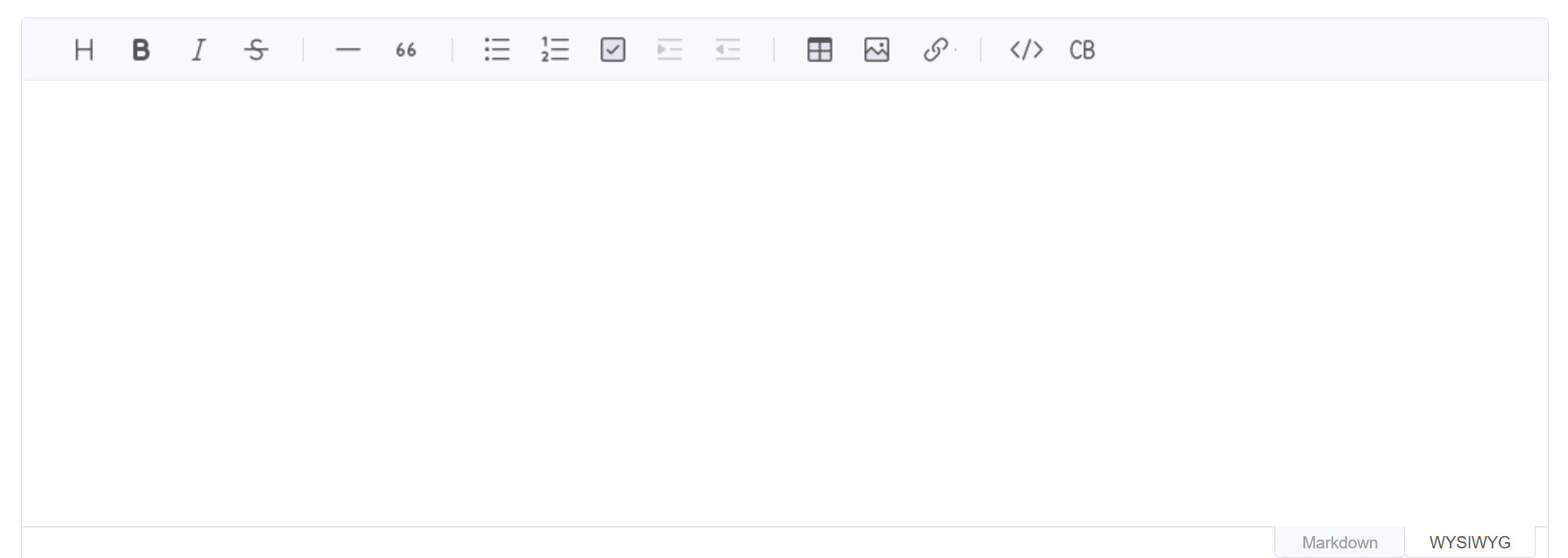
- VSCODE 에 toast ui 설치
npm install @toast-ui/editor- components 폴더 안에 ToastEditor.jsx 생성
value,height,onChange라는props를 전달할 수 있다value: 초기값height: 높이 (기번 400px)onChange:change이벤트가 일어났을 때 실행할 함수
- Toast UI Editor 가 필요한 컴포넌트에서 import 해서 사용하면 된다
<ToastEditor value={초기값} height="500px" onChange={() => {}}/>
import '@toast-ui/editor/dist/toastui-editor.css';
import Editor from '@toast-ui/editor';
import { useEffect, useRef } from 'react';

export default function ToastEditor({ value = '', height='400px', onChange }) {
    const elRef = useRef(null);
    const instRef = useRef(null);

    useEffect(() => {
        if (!elRef.current) return;
        instRef.current = new Editor({
        el: elRef.current,
        height:height,
        initialEditType: 'wysiwyg',
        previewStyle: 'vertical',
        initialValue: value,
        events: {
            onChange?.(instRef.current.getHTML()),
        },
        });
        return () => instRef.current?.destroy();
    }, []);

    return <div ref={elRef} />;
}
➜ onChange?.(instRef.current.getHTML()), 해당 코드를 한 줄 코딩한다면?
// 만일 props 로 전달된 함수가 있으면
if(onChange){
	// 해당 함수 호출하면서 현재까지 작성한 내용을 얻어와서 전달한다
	onChange(instRef.current.getHTML());
}
- pages 폴더 안에 BoardForm.jsx 생성
function BoardForm() {
    return (
        <div>

        </div>
    );
}- index.jsx 에
BoardForm라우트 경로 추가
{path:"/board/new", element:<ProtectedRoute><BoardForm/></ProtectedRoute>}- Board.jsx 에 글 작성 링크 추가
<NavLink to="/board/new">새글 작성</NavLink>- BoardForm.jsx 에 폼 &
ToastUI작성
<h1>게시글 작성 양식</h1>
<form action="/v1/board" method="post">
	<div className="mb-2">
		<label className="form-label" htmlFor="title">제목</label>
		<input className="form-control" type="text" name="title" id="title"/>
	</div>
	<div className="mb-2">
		<label className="form-label" htmlFor="editor">내용</label>
		<ToastEditor/>
	</div>
  	<button className="btn btn-success btn-sm" type="submit">저장</button>
</form>useState추가- 작성한 글 제목과 내용을 상태값으로 관리
const [state, setState] = useState({
	title:"",
	content:""
});handleTitleChange함수 추가- 제목을 수정했을 때 실행할 함수
const handleTitleChange  = (e) => {
	// 함수형 setState 를 이용해서 상태값을 변경
	setState(prev => ({
		...prev,
        title:e.target.value
	}));
};handleContentChange함수 추가- 내용을 작성했을 때 실행할 함수 (작성한 내용을 함수의 매개변수에 전달 받도록 한다)
const handleContentChange = (content) => {
	setState(prev => ({
		...prev,
		content
    }));
};
➜ 함수형 setState : 무조건 동작
객체형 setState: 상황에 따라 동작을 하거나 동작하지 않는다
setState({
	...state,
    title:e.target.value
});
⚠️ 만일 객체형 setState 를 사용한다면?
- name 이 원래 kim 이었기 때문에 kim이 출력
- 실제로 현재 상태는 name 이 park 으로 바꿔져있는 상태
let name = "kim";

function printName(){
	console.log(name);
}

useFunc(printName);

function test(){
	name = "park";
}
function useFunc(f){
f();
}handleSubmit함수 추가- 폼 제출 버튼을 눌렀을 때 실행할 함수
const handleSubmit = async (e) => {
	e.preventDefault();
	try{
		await api.post("/v1/board", state)
	} catch(err){
		console.log(err);
	}
};- form 에
onSubmit& input 에onChange& ToastEditor 에onChange이벤트 추가
<form onSubmit={handleSubmit} action="/v1/board" method="post"><input onChange={handleTitleChange} className="form-control" type="text" name="title" id="title"/><ToastEditor onChange={handleContentChange}/>useNavigate함수 추가
const navigate = useNavigate();handleSubmit함수 안에try-catch 문&async, await코드 추가
const handleSubmit = async (e) => {
	e.preventDefault();
    try{
		const res = await api.post("/v1/board", state);
		alert("글 저장 완료");
		// 글 자세히 보기로 이동
		navigate(`/board/${res.num}`);
	} catch(err){
		console.log(err);
	}
};- BoardController 에
save메소드 생성- 게시글 저장 요청 처리
@PostMapping("/board")
public BoardDto save(@RequestBody BoardDto dto) {
  	// 글 작성자
	String userName = SecurityContextHolder.getContext().getAuthentication().getName();
	dto.setWriter(userName);
	// 서비스를 이용해서 저장
	boardService.createContent(dto);
	return dto;
}
목록 페이징 처리
- Board.jsx 에
range함수 추가- 페이징 UI 를 만들때 사용할 배열을 리턴해주는 함수
function range(start, end) {
	const result = [];
    for (let i = start; i <= end; i++) {
		result.push(i);
    }
    return result;
}pageArray코드 추가- 페이지 번호를 출력할 때 사용하는 숫자를 배열에 미리 준비한다
const pageArray = range(pageInfo.startPageNum, pageInfo.endPageNum);useNavigate함수 추가
const navigate = useNavigate();useSearchParams함수 추가
const [params] = useSearchParams();pageMove함수 추가
-페이지를 이동하는 함수
const pageMove = (num) => {
	// 현재 URLSearchParams 를 복사하고
    const qs = new URLSearchParams(params);
    // pageNum 만 교체 한다
    qs.set("pageNum", num);

    navigate(`/board?${qs.toString()}`);
};Pagination코드 추가
<Pagination>
    <Pagination.Item
        onClick={() => pageMove(pageInfo.startPageNum - 1)}
        disabled={pageInfo.startPageNum === 1}
    >
        Prev
    </Pagination.Item>
    {
        pageArray.map(num =>
            <Pagination.Item
                onClick={() => pageMove(num)}
                active={pageInfo.pageNum === num}
            >
                {num}
            </Pagination.Item>
        )
    }
    <Pagination.Item
        onClick={() => pageMove(pageInfo.endPageNum + 1)}
        disabled={pageInfo.endPageNum === pageInfo.totalPageCount}
    >
        Next
    </Pagination.Item>
</Pagination>useEffect함수 안에 추가
// params 정보를 읽어온다
const pageNum = params.get("pageNum"); // null 일 수 있다
const search = params.get("search"); // null 일 수 있다
const keyword = params.get("keyword"); // null 일 수 있다

// api 서버에 요청할 query 문자열 구성
const qs = new URLSearchParams(); // 객체 생성 후 하나씩 setting
if (pageNum) {
    qs.set("pageNum", pageNum);
}
if (keyword) {
    qs.set("search", search);
    qs.set("keyword", keyword);
}
console.log(qs.toString());

api.get(`/v1/board?${qs.toString()}`)
    .then(res => {
        setPageInfo(res.data)
    })
    .catch(err => {
        console.log(err);
    })
}, [params]);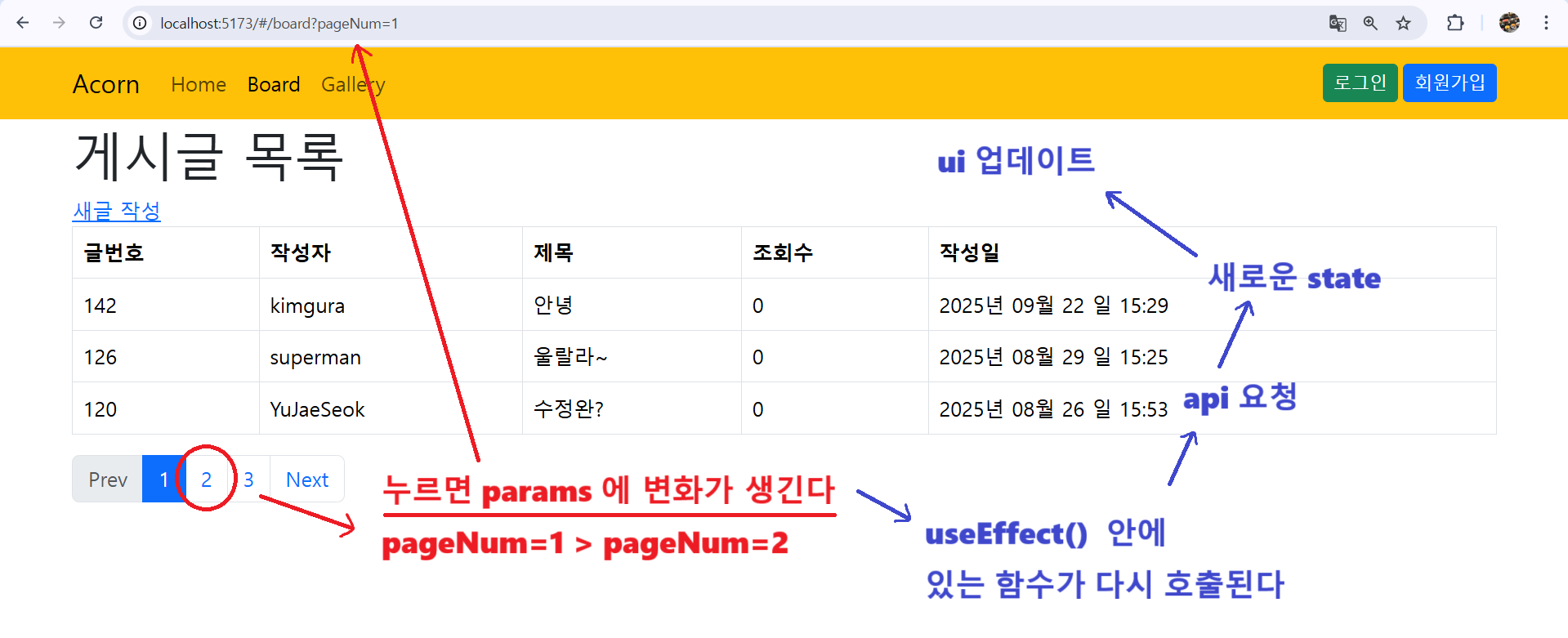
- 검색 옵션 & 검색어 입력 텍스트 박스 & 버튼 추가
<div className="row my-3">
    <div className="col-md-6 ms-auto">
        <div className="input-group">

            <select value="" name="search" className="form-select">
                <option value="title_content">제목+내용</option>
                <option value="title">제목</option>
                <option value="writer">작성자</option>
            </select>

            <input value="" type="text" name="keyword" className="form-control" placeholder="검색어 입력..." />

            <button type="submit" className="btn btn-outline-secondary">
                <i className="bi bi-search"></i>
                <span className="visually-hidden">검색</span>
            </button>
            <button className="btn btn-outline-danger">
                <i className="bi bi-arrow-clockwise"></i>
                <span className="visually-hidden">새로고침</span>
            </button>
        </div>
    </div>
</div>
<p>
    <strong></strong> 에 대한 검색 결과
    <strong></strong> 개
</p>- 검색 관련
useState함수 추가- 검색 조건과 검색 키워드를 상태값으로 관리
// 검색 조건과 검색 키워드를 상태값으로 관리
const [search, setSearch] = useState({
	search:"title_content", // 제목 + 내용 검색이 초기값
	keyword:""
});handleSearchChange함수 추가- 검색 조건에 변화가 생겼을 때 호출할 함수
const handleSearchChange = (e) =>{
	setSearch({
		...search,
		[e.target.name]:e.target.value
	});
};handleSearchClick함수 추가- 검색 버튼을 눌렀을 때 호출할 함수
const handleSearchClick = () => {
	// search 상태값 object 에 저장된 내용을 query 문자열로 변경한다
	// {search:"name_addr" , keyword:"kim"} => search=title_content&keyword=kim
	const query = new URLSearchParams(search).toString();
    // "/board?search=title_content&keyword=kim" 이런 형식으로 주소창이 변경된다
    navigate(`/board?${query}`);
};- select 에
onChange이벤트 &value속성 추가
<select onChange={handleSearchChange} value={search.keyword} name="search" className="form-select">- input 에
onChange이벤트 &value속성 추가
<input onChange={handleSearchChange} value={search.keyword} type="text" name="keyword" className="form-control" placeholder="검색어 입력..."/>- 검색 버튼에
onClick이벤트 추가
<button onClick={handleSearchClick} className="btn btn-outline-secondary">handleRefreshClick함수 추가- 새로고침을 눌렀을 때
const handleRefreshClick = () => {
	// 검색 상태값을 초기 상태로 변경하고
    setSearch({
		search:"title_content",
		keyword:""
	});
	// 1 page 로 이동
	navigate("/board");
};- 새로고침 버튼에
onClick이벤트 추가
<button onClick={handleRefreshClick} className="btn btn-outline-danger">- 검색 결과에 대한 표시 코드 추가
{pageInfo.keyword && <p className="alert alert-success">
	<strong>{pageInfo.keyword} </strong> 에 대한 검색 결과
	<strong>{pageInfo.totalRow}</strong> 개
</p>}
학원 공부 내용 정리