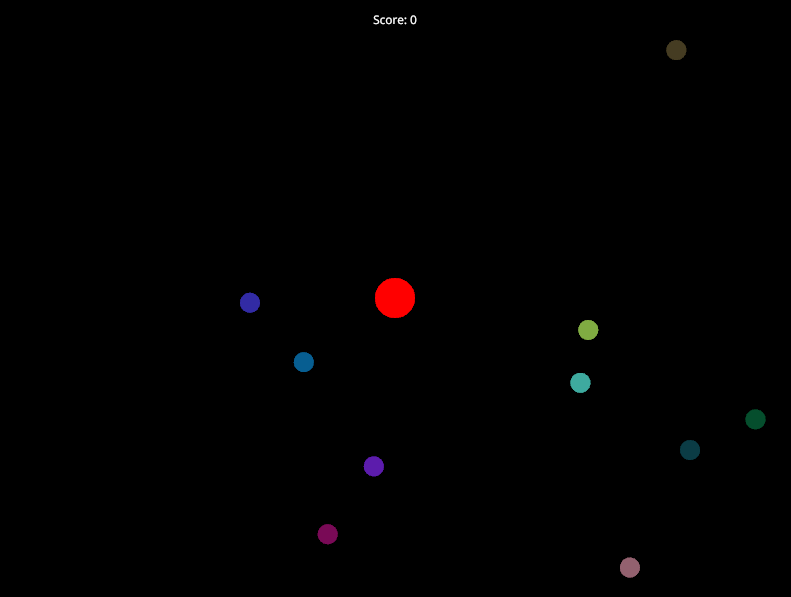
Struct의 중첩 트리 구조
Model
├── player: Player
│   ├── position: Vec2
│   ├── size: f32
│   └── color: Rgb
│
├── particles: Vec<Particle>
│   └── [각 요소가 Particle]
│       ├── position: Vec2
│       ├── velocity: Vec2
│       └── color: Rgba
│
└── game_state: GameState
    ├── score: u32
└── is_paused: boolModel은 최상위 루트 구조체입니다.Player,Vec<Particle>,GameState는Model의 필드로 포함됩니다.Vec<Particle>는 동적 배열이므로, 그 안에 여러 개의Particle인스턴스가 들어갑니다.- 각 하위 구조체(
Player,Particle,GameState)는 다시 기본 타입(Vec2,f32,u32,bool,Rgba등)으로 구성됩니다.
📝 Rust Code
use nannou::prelude::*;

struct Model {
    player: Player,
    particles: Vec<Particle>,
    game_state: GameState,
}

struct Player {
    position: Vec2,
    size: f32,
    color: Rgb,
}

struct Particle {
    position: Vec2,
    velocity: Vec2,
    color: Rgba,
}

struct GameState {
    score: u32,
    is_paused: bool,
}

fn main() {
    nannou::app(model).update(update).event(event).run();
}

fn model(app: &App) -> Model {
    let _window = app
        .new_window()
        .size(800, 600)
        .view(view)
        .key_pressed(key_pressed)
        .build()
        .unwrap();

    let mut particles = Vec::new();
    for _ in 0..10 {
        particles.push(Particle {
            position: vec2(
                random_range(-300.0, 300.0),
                random_range(-200.0, 200.0),
            ),
            velocity: vec2(
                random_range(-50.0, 50.0),
                random_range(-50.0, 50.0),
            ),
            color: rgba(random_f32(), random_f32(), random_f32(), 0.5),
        });
    }

    Model {
        player: Player {
            position: vec2(0.0, 0.0),
            size: 20.0,
            color: rgb(1.0, 0.0, 0.0),
        },
        particles,
        game_state: GameState {
            score: 0,
            is_paused: false,
        },
    }
}

fn update(app: &App, model: &mut Model, update: Update) {
    if model.game_state.is_paused {
        return;
    }

    let dt = update.since_last.as_secs_f32();
    for particle in &mut model.particles {
        particle.position += particle.velocity * dt;
        let win = app.window_rect();
        if particle.position.x < win.left() || particle.position.x > win.right() {
            particle.velocity.x *= -1.0;
        }
        if particle.position.y < win.bottom() || particle.position.y > win.top() {
            particle.velocity.y *= -1.0;
        }
        if particle.position.distance(model.player.position) < model.player.size + 10.0 {
            model.game_state.score += 1;
        }
    }
}

fn event(_app: &App, model: &mut Model, event: Event) {
    match event {
        Event::WindowEvent {
            simple: Some(window_event),
            ..
        } => match window_event {
            WindowEvent::KeyPressed(key) => key_pressed(_app, model, key),
            _ => {}
        },
        _ => {}
    }
}

fn key_pressed(_app: &App, model: &mut Model, key: Key) {
    match key {
        Key::Up => model.player.position.y += 10.0,
        Key::Down => model.player.position.y -= 10.0,
        Key::Left => model.player.position.x -= 10.0,
        Key::Right => model.player.position.x += 10.0,
        Key::Space => model.game_state.is_paused = !model.game_state.is_paused,
        _ => {}
    }
}

fn view(app: &App, model: &Model, frame: Frame) {
    let draw = app.draw();
    draw.background().color(BLACK);

    draw.ellipse()
        .xy(model.player.position)
        .radius(model.player.size)
        .color(model.player.color);

    for particle in &model.particles {
        draw.ellipse()
            .xy(particle.position)
            .radius(10.0)
            .color(particle.color);
    }

    draw.text(&format!("Score: {}", model.game_state.score))
        .xy(vec2(0.0, app.window_rect().top() - 20.0))
        .color(WHITE);

    if model.game_state.is_paused {
        draw.text("Paused")
            .xy(vec2(0.0, 0.0))
            .color(YELLOW)
            .font_size(40);
    }

    draw.to_frame(app, &frame).unwrap();
}
📝 Rust Code + Comment
use nannou::prelude::*;

// === 중첩 구조체(Nested Structs) 설명 ===
// 이 코드는 여러 구조체를 계층적으로 구성하여 복잡한 상태를 체계적으로 관리합니다.
// - `Model`은 애플리케이션의 최상위 상태이며,
//   → `Player`, `Vec<Particle>`, `GameState`라는 하위 구조체를 포함합니다.
// - 이 방식은 코드를 **모듈화**, **가독성 향상**, **확장성** 측면에서 매우 유리합니다.
// - 각 구조체는 자신의 책임만 집중적으로 처리하며, 변경이 서로에게 영향을 덜 줍니다.

// 최상위 상태 구조체: 애플리케이션 전체 상태를 관리
struct Model {
    player: Player,           // 플레이어 객체
    particles: Vec<Particle>, // 파티클(작은 원)들의 목록
    game_state: GameState,    // 게임 관련 상태 (점수, 일시정지 등)
}

// 플레이어를 표현하는 구조체
struct Player {
    position: Vec2, // 플레이어의 중심 좌표 (x, y)
    size: f32,      // 원의 반지름
    color: Rgb,     // 색상 (투명도 없음 → 완전 불투명)
}

// 움직이는 파티클(작은 원)을 표현하는 구조체
struct Particle {
    position: Vec2, // 현재 위치
    velocity: Vec2, // 속도 벡터 (픽셀/초 단위)
    color: Rgba,    // 색상 (알파 채널 포함 → 반투명 가능)
}

// 게임의 논리적 상태를 저장하는 구조체
struct GameState {
    score: u32,       // 수집한 점수 (파티클과 충돌 시 증가)
    is_paused: bool,  // 게임 일시정지 여부
}

// 프로그램 진입점
fn main() {
    // Nannou 애플리케이션 설정:
    // - model: 초기 상태 생성
    // - update: 매 프레임 상태 갱신
    // - event: 키보드/마우스 등 이벤트 처리
    nannou::app(model).update(update).event(event).run();
}

// 애플리케이션 초기화 함수
fn model(app: &App) -> Model {
    // 창 생성 및 설정
    let _window = app
        .new_window()
        .size(800, 600)          // 창 크기: 800x600 픽셀
        .view(view)              // 렌더링 콜백 지정
        .key_pressed(key_pressed) // 키 입력 이벤트 핸들러 등록
        .build()
        .unwrap();

    // 10개의 랜덤 파티클 생성
    let mut particles = Vec::new();
    for _ in 0..10 {
        particles.push(Particle {
            // 위치: 화면 내 임의 좌표 (x: -300~300, y: -200~200)
            position: vec2(
                random_range(-300.0, 300.0),
                random_range(-200.0, 200.0),
            ),
            // 속도: x, y 방향 모두 -50 ~ +50 픽셀/초 범위
            velocity: vec2(
                random_range(-50.0, 50.0),
                random_range(-50.0, 50.0),
            ),
            // 색상: 랜덤 RGB + 알파 0.5 (반투명)
            color: rgba(random_f32(), random_f32(), random_f32(), 0.5),
        });
    }

    // 초기 Model 반환
    Model {
        player: Player {
            position: vec2(0.0, 0.0), // 화면 중앙
            size: 20.0,               // 반지름 20
            color: rgb(1.0, 0.0, 0.0), // 빨간색
        },
        particles,
        game_state: GameState {
            score: 0,        // 초기 점수 0
            is_paused: false, // 게임 시작 시 실행 상태
        },
    }
}

// 매 프레임 상태를 업데이트하는 함수
fn update(app: &App, model: &mut Model, update: Update) {
    // 게임이 일시정지 상태면 업데이트 중단
    if model.game_state.is_paused {
        return;
    }

    // 프레임 간 경과 시간(초) → 프레임 독립적 이동 보장
    let dt = update.since_last.as_secs_f32();

    // 모든 파티클 업데이트
    for particle in &mut model.particles {
        // 위치 갱신: pos += vel * dt
        particle.position += particle.velocity * dt;

        // 창 경계 충돌 감지 및 반사
        let win = app.window_rect(); // 현재 창의 경계 정보 (left, right, top, bottom)
        if particle.position.x < win.left() || particle.position.x > win.right() {
            particle.velocity.x *= -1.0; // x 방향 속도 반전
        }
        if particle.position.y < win.bottom() || particle.position.y > win.top() {
            particle.velocity.y *= -1.0; // y 방향 속도 반전
        }

        // 플레이어와 파티클 충돌 감지:
        // - 두 원의 중심 거리가 (플레이어 반지름 + 파티클 반지름)보다 작으면 충돌
        // - 파티클 반지름은 view()에서 10.0으로 고정됨
        if particle.position.distance(model.player.position) < model.player.size + 10.0 {
            model.game_state.score += 1; // 점수 1 증가
            // ※ 실제 게임에서는 파티클 제거 또는 재생성 로직 추가 가능
        }
    }
}

// 이벤트 핸들러: 키보드, 마우스, 창 이벤트 등을 처리
// 이 예제에서는 주로 키보드 입력을 `key_pressed`로 위임
fn event(_app: &App, model: &mut Model, event: Event) {
    match event {
        Event::WindowEvent {
            simple: Some(window_event), // 단순 이벤트만 처리
            ..
        } => match window_event {
            WindowEvent::KeyPressed(key) => {
                // 키 입력 이벤트를 별도의 함수로 위임 → 코드 분리 및 재사용성 향상
                key_pressed(_app, model, key);
            }
            _ => {} // 다른 창 이벤트(예: 마우스 클릭)는 무시
        },
        _ => {} // 비-창 이벤트(예: MIDI, OSC)는 무시
    }
}

// 키보드 입력 처리 함수
fn key_pressed(_app: &App, model: &mut Model, key: Key) {
    match key {
        Key::Up => model.player.position.y += 10.0,    // 위로 이동
        Key::Down => model.player.position.y -= 10.0,  // 아래로 이동
        Key::Left => model.player.position.x -= 10.0,  // 왼쪽 이동
        Key::Right => model.player.position.x += 10.0, // 오른쪽 이동
        Key::Space => {
            // 스페이스바로 일시정지 토글
            model.game_state.is_paused = !model.game_state.is_paused;
        }
        _ => {} // 다른 키는 무시
    }
}

// 매 프레임 화면을 그리는 함수
fn view(app: &App, model: &Model, frame: Frame) {
    let draw = app.draw();

    // 배경을 검은색으로 설정
    draw.background().color(BLACK);

    // 플레이어 그리기: 빨간색 원
    draw.ellipse()
        .xy(model.player.position) // 중심 위치
        .radius(model.player.size) // 반지름
        .color(model.player.color); // 색상

    // 모든 파티클 그리기: 반투명 원
    for particle in &model.particles {
        draw.ellipse()
            .xy(particle.position)
            .radius(10.0)        // 고정 반지름
            .color(particle.color);
    }

    // 점수 표시: 화면 상단 중앙 근처
    draw.text(&format!("Score: {}", model.game_state.score))
        .xy(vec2(0.0, app.window_rect().top() - 20.0)) // 상단에서 20px 아래
        .color(WHITE);

    // 일시정지 상태면 "Paused" 텍스트 표시
    if model.game_state.is_paused {
        draw.text("Paused")
            .xy(vec2(0.0, 0.0))    // 화면 정중앙
            .color(YELLOW)
            .font_size(40);         // 큰 글자
    }

    // 그리기 명령을 프레임에 적용
    draw.to_frame(app, &frame).unwrap();
}
Coding Art with Blender / oF / Processing / p5.js / nannou