📝 Rust Code
use nannou::prelude::*;
use std::fs;

fn main() {
    nannou::app(model).update(update).run();
}

struct Model {
    font_thin: text::Font,
    font_light: text::Font,
    font_regular: text::Font,
    font_medium: text::Font,
    font_black: text::Font,
}

fn model(app: &App) -> Model {
    app.new_window().size(800, 800).view(view).build().unwrap();

    let assets_path = app.assets_path().expect("assets path");

    let font_thin = load_font(&assets_path, "NotoSans-Thin.ttf");
    let font_light = load_font(&assets_path, "NotoSans-Light.ttf");
    let font_regular = load_font(&assets_path, "NotoSans-Regular.ttf");
    let font_medium = load_font(&assets_path, "NotoSans-Medium.ttf");
    let font_black = load_font(&assets_path, "NotoSans-Black.ttf");

    Model {
        font_thin,
        font_light,
        font_regular,
        font_medium,
        font_black,
    }
}

fn load_font(assets_path: &std::path::Path, filename: &str) -> text::Font {
    let font_path = assets_path.join("fonts").join(filename);
    let bytes = fs::read(&font_path).expect(&format!("Failed to read font file: {}", filename));
    text::Font::from_bytes(bytes).expect(&format!("Failed to load font: {}", filename))
}

fn update(_app: &App, _model: &mut Model, _update: Update) {}

fn view(app: &App, model: &Model, frame: Frame) {
    let draw = app.draw();

    draw.background().color(hsl(0.0, 0.0, 0.03));

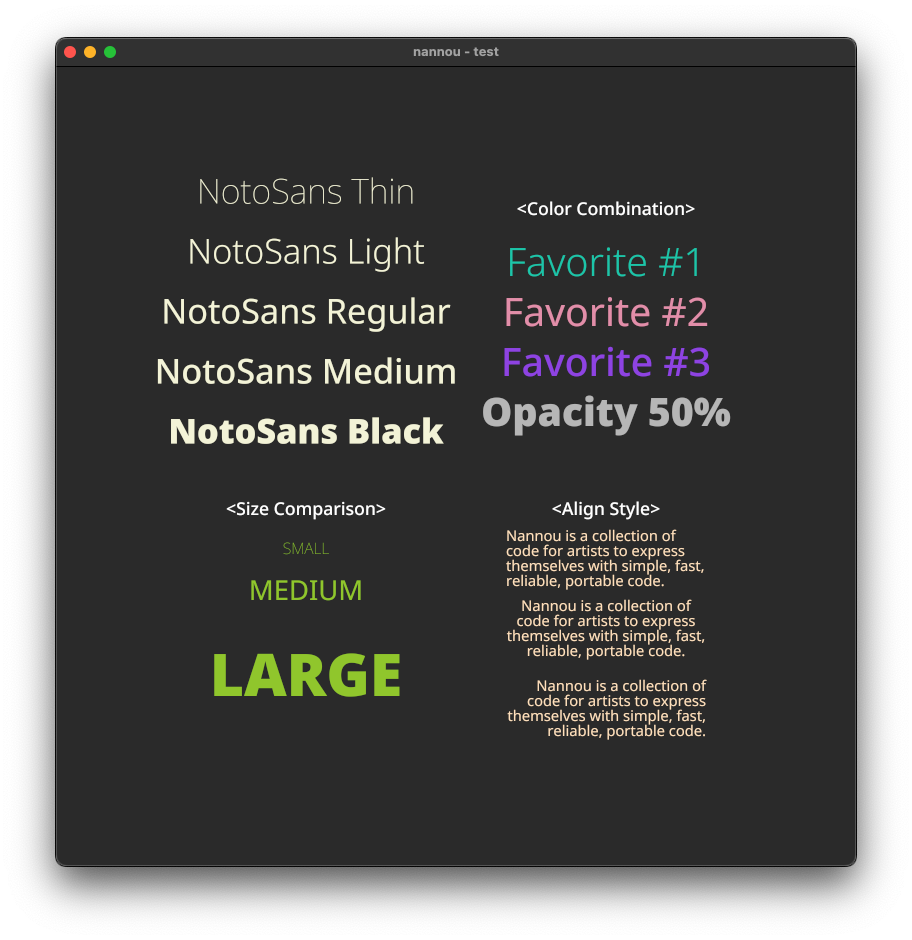
    // Thin 폰트
    draw.text("NotoSans Thin")
        .font(model.font_thin.clone())
        .font_size(35)
        .xy(pt2(-150.0, 280.0))
        .color(BEIGE)
        .no_line_wrap();

    // Light 폰트
    draw.text("NotoSans Light")
        .font(model.font_light.clone())
        .font_size(35)
        .xy(pt2(-150.0, 220.0))
        .color(BEIGE)
        .no_line_wrap();

    // Regular 폰트
    draw.text("NotoSans Regular")
        .font(model.font_regular.clone())
        .font_size(35)
        .xy(pt2(-150.0, 160.0))
        .color(BEIGE)
        .no_line_wrap();

    // Medium 폰트
    draw.text("NotoSans Medium")
        .font(model.font_medium.clone())
        .font_size(35)
        .xy(pt2(-150.0, 100.0))
        .color(BEIGE)
        .no_line_wrap();

    // Black 폰트
    draw.text("NotoSans Black")
        .font(model.font_black.clone())
        .font_size(35)
        .xy(pt2(-150.0, 40.0))
        .color(BEIGE)
        .no_line_wrap();

    // 다양한 크기의 폰트 무게 비교
    draw.text("<Size Comparison>")
        .font(model.font_medium.clone())
        .font_size(18)
        .xy(pt2(-150.0, -40.0))
        .color(WHITE)
        .no_line_wrap();

    draw.text("SMALL")
        .font(model.font_thin.clone())
        .font_size(16)
        .xy(pt2(-150.0, -80.0))
        .color(YELLOWGREEN)
        .no_line_wrap();

    draw.text("MEDIUM")
        .font(model.font_regular.clone())
        .font_size(28)
        .xy(pt2(-150.0, -120.0))
        .color(YELLOWGREEN)
        .no_line_wrap();

    draw.text("LARGE")
        .font(model.font_black.clone())
        .font_size(60)
        .xy(pt2(-150.0, -200.0))
        .color(YELLOWGREEN)
        .no_line_wrap();

    // 색상
    draw.text("<Color Combination>")
        .font(model.font_medium.clone())
        .font_size(18)
        .xy(pt2(150.0, 260.0))
        .color(WHITE)
        .no_line_wrap();

    draw.text("Favorite #1")
        .font(model.font_light.clone())
        .font_size(40)
        .xy(pt2(150.0, 210.0))
        .color(rgb(0.1, 0.8, 0.7))
        .no_line_wrap();

    draw.text("Favorite #2")
        .font(model.font_regular.clone())
        .font_size(40)
        .xy(pt2(150.0, 160.0))
        .color(rgb(0.9, 0.6, 0.7))
        .no_line_wrap();

    draw.text("Favorite #3")
        .font(model.font_medium.clone())
        .font_size(40)
        .xy(pt2(150.0, 110.0))
        .color(rgb(0.6, 0.3, 0.9))
        .no_line_wrap();

    draw.text("Opacity 50%")
        .font(model.font_black.clone())
        .font_size(40)
        .xy(pt2(150.0, 60.0))
        .color(rgba(1.0, 1.0, 1.0, 0.5))
        .no_line_wrap();

    // 정렬 방식
    draw.text("<Align Style>")
        .font(model.font_medium.clone())
        .font_size(18)
        .xy(pt2(150.0, -40.0))
        .color(WHITE)
        .no_line_wrap();

    draw.text("Nannou is a collection of code for artists to express themselves with simple, fast, reliable, portable code.")
        .font(model.font_regular.clone())
        .font_size(15)
        .justify(text::Justify::Left)
        .xy(pt2(150.0, -90.0))
        .color(BISQUE);

    draw.text("Nannou is a collection of code for artists to express themselves with simple, fast, reliable, portable code.")
        .font(model.font_regular.clone())
        .font_size(15)
        .justify(text::Justify::Center)
        .xy(pt2(150.0, -160.0))
        .color(BISQUE);

    draw.text("Nannou is a collection of code for artists to express themselves with simple, fast, reliable, portable code.")
        .font(model.font_regular.clone())
        .font_size(15)
        .justify(text::Justify::Right)
        .xy(pt2(150.0, -240.0))
        .color(BISQUE);

    draw.to_frame(app, &frame).unwrap();
}
Coding Art with Blender / oF / Processing / p5.js / nannou