📝 Rust Code
use nannou::prelude::*;
use nannou::rand::random_f32;

fn main() {
    nannou::app(model).update(update).run();
}

struct PointData {
    position: Point2,
    color: Rgba,
}

struct Model {
    points: Vec<PointData>,
}

fn model(app: &App) -> Model {
    app.new_window()
        .size(800, 600)
        .view(view)
        .mouse_pressed(mouse_pressed)
        .build()
        .unwrap();

    Model {
        points: Vec::new(),
    }
}

fn update(_app: &App, model: &mut Model, _update: Update) {
    // 랜덤하게 점 추가 (5% 확률)
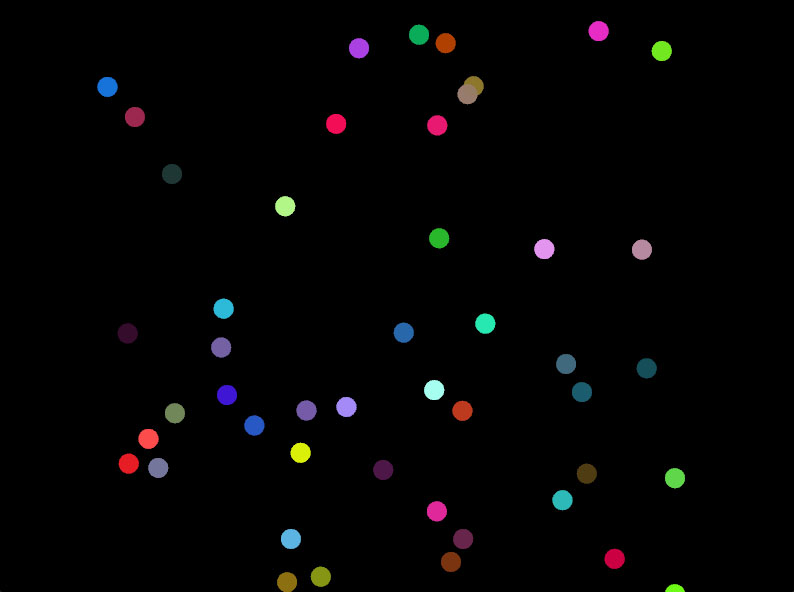
    if random_f32() < 0.05 {
        let x = random_range(-300.0, 300.0);
        let y = random_range(-300.0, 300.0);
        let color = rgba(
            random_f32(), // R
            random_f32(), // G
            random_f32(), // B
            0.8,          // Alpha
        );

        model.points.push(PointData {
            position: pt2(x, y),
            color,
        });
    }

    // 너무 많은 점 제한 (150개 유지)
    if model.points.len() > 150 {
        model.points.remove(0);
    }
}

fn mouse_pressed(app: &App, model: &mut Model, button: MouseButton) {
    if button == MouseButton::Left {
        let mouse_pos = app.mouse.position();
        let color = rgba(
            random_f32(), // R
            random_f32(), // G
            random_f32(), // B
            0.8,          // Alpha
        );

        model.points.push(PointData {
            position: mouse_pos,
            color,
        });
    }
}

fn view(app: &App, model: &Model, frame: Frame) {
    let draw = app.draw();

    // 반투명 배경으로 트레일 효과 생성
    draw.rect()
        .wh(app.window_rect().wh())
        .color(rgba(0.0, 0.0, 0.0, 0.03));

    // 모든 점 그리기
    for point_data in &model.points {
        draw.ellipse()
            .xy(point_data.position)
            .radius(10.0)
            .color(point_data.color);
    }

    draw.to_frame(app, &frame).unwrap();
}
📝 Rust Code + Comment
// Nannou의 기본 기능과 랜덤 함수를 사용하기 위한 모듈 임포트
use nannou::prelude::*;
use nannou::rand::random_f32; // 0.0 ~ 1.0 사이의 랜덤 f32 값을 생성하는 함수

// 프로그램 진입점: Nannou 애플리케이션을 생성하고 실행
fn main() {
    // model 함수로 초기 상태 설정, update 함수로 매 프레임 상태 갱신, view로 렌더링
    nannou::app(model).update(update).run();
}

// 각 점의 위치와 색상을 저장하는 구조체
struct PointData {
    position: Point2, // 2D 좌표 (x, y)
    color: Rgba,      // 색상 (빨강, 초록, 파랑, 투명도)
}

// 애플리케이션의 전체 상태를 저장하는 구조체
struct Model {
    points: Vec<PointData>, // 화면에 그려질 점들의 목록
}

// 애플리케이션 시작 시 한 번만 호출되는 초기화 함수
fn model(app: &App) -> Model {
    // 새 창을 생성하고 설정:
    app.new_window()
        .size(800, 600)               // 창 크기를 800x600 픽셀로 지정
        .view(view)                   // 렌더링 콜백으로 view 함수 지정
        .mouse_pressed(mouse_pressed) // 마우스 클릭 이벤트 핸들러 지정
        .build()                      // 창 생성 완료
        .unwrap();                    // 오류 발생 시 프로그램 중단

    // 초기 Model 반환: 빈 점 목록으로 시작
    Model {
        points: Vec::new(),
    }
}

// 매 프레임마다 호출되어 상태를 업데이트하는 함수
fn update(_app: &App, model: &mut Model, _update: Update) {
    // 5% 확률로 랜덤 위치에 새 점 추가
    if random_f32() < 0.05 {
        // x, y 좌표를 -300.0 ~ 300.0 범위에서 랜덤 생성 (화면 중앙 기준)
        let x = random_range(-300.0, 300.0);
        let y = random_range(-300.0, 300.0);
        // 랜덤 RGB 색상 생성 (알파는 0.8로 고정 → 반투명)
        let color = rgba(
            random_f32(), // 빨강 성분
            random_f32(), // 초록 성분
            random_f32(), // 파랑 성분
            0.8,          // 투명도 (0.0 = 완전 투명, 1.0 = 완전 불투명)
        );

        // 새 점 데이터를 벡터 끝에 추가
        model.points.push(PointData {
            position: pt2(x, y), // pt2는 (x, y) 좌표를 Point2 타입으로 변환
            color,
        });
    }

    // 점의 개수가 150개를 초과하면 가장 오래된 점(인덱스 0)을 제거하여 메모리 과부하 방지
    if model.points.len() > 150 {
        model.points.remove(0);
    }
}

// 마우스 버튼이 눌렸을 때 호출되는 이벤트 핸들러
fn mouse_pressed(app: &App, model: &mut Model, button: MouseButton) {
    // 왼쪽 마우스 버튼만 반응
    if button == MouseButton::Left {
        // 현재 마우스 커서 위치를 가져옴 (화면 중앙이 (0, 0))
        let mouse_pos = app.mouse.position();
        // 랜덤 색상 생성 (알파는 0.8로 고정)
        let color = rgba(
            random_f32(), // 빨강
            random_f32(), // 초록
            random_f32(), // 파랑
            0.8,          // 투명도
        );

        // 마우스 위치에 새 점 추가
        model.points.push(PointData {
            position: mouse_pos,
            color,
        });
    }
}

// 매 프레임 화면을 그리는 함수
fn view(app: &App, model: &Model, frame: Frame) {
    let draw = app.draw(); // 그리기 명령을 담을 Draw 객체 생성

    // 트레일(잔상) 효과를 위한 반투명 검은색 사각형 배경:
    // 알파값이 낮아(0.03) 이전 프레임의 내용이 서서히 흐려지며 사라짐
    draw.rect()
        .wh(app.window_rect().wh()) // 창 전체 크기
        .color(rgba(0.0, 0.0, 0.0, 0.03)); // 매우 투명한 검정색

    // 저장된 모든 점을 타원(원)으로 그림
    for point_data in &model.points {
        draw.ellipse()
            .xy(point_data.position)  // 점의 위치
            .radius(10.0)             // 원의 반지름
            .color(point_data.color); // 점의 색상
    }

    // 그리기 명령을 실제 프레임 버퍼에 적용
    draw.to_frame(app, &frame).unwrap();
}
Coding Art with Blender / oF / Processing / p5.js / nannou