
Redux 미들웨어
개념
- action이 reducer로 가기 전 중간에서 작업 처리
- Redux가 비동기 작업을 할 수 있도록 해주는 것 (로깅, 충돌 보고, 비동기 API 통신, 라우팅 등)
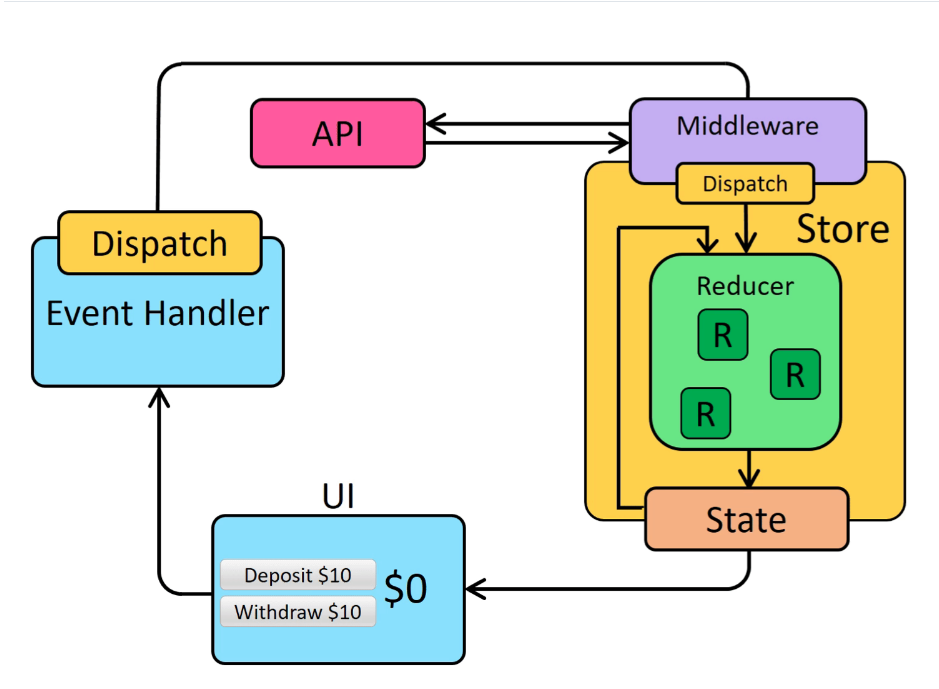
그림 출처
사용하기
설치
//redux-saga도 있지만 큰규모가 아니라면 thunk쓰면 됨
npm install redux-thunk
실행 과정
- 저장소 파일
store.js
import { createStore, applyMiddleware } from 'redux';
import { thunk } from 'redux-thunk';

// store에 미들웨어 파라미터 추가해서 보내줌
let store = createStore(productReducer, applyMiddleware(thunk));- 미들웨어 파일
redux > actions > productAction.js
function getProducts() {
  // 함수리턴, 매개변수 2개, getState는 현재 state 받아볼 수 있음
  return async (dispatch,getState) => {
    // 처리할 비동기 작업 작성
    let url = ""
    let response = await fetch(url)
    let data = await response.json
    // 미들웨어 -> reducer
    dispatch({type: "GET_PRODUCT_SUCCESS"},payload(data))

  };
}

// 객체에 함수를 담아서 반환 => action이 여러개가 될 것이기 때문에
export const productAction = {getProducts};- 비동기 처리 사용하는 컴포넌트에서 미들웨어 불러주기
ProductAll.js
import productAction from '../redux/actions/productAction'
import { useDispatch, useSelector } from 'react-redux'

const ProductAll = () => {
  // 미들웨어 거쳐 리듀서 처리후 저장된 store에서 state값 들고오기
  const productList = useSelector((state) => state.productList);
  const dispatch = useDispatch();
  const getProducts = () =>{
    // 컴포넌트 -> 미들웨어
    dispatch(productAction.getProducts());
  }
} - reducer 파일
redux > reducers > productReducer.js
let initialState = {
  productList: [],
};

function productReduucer = (state=initialState, action) => {
  let {type,payload} = action;
  switch(type) {
    case 'GET_PRODUCT_SUCCESS':
      return {...state, productList: payload.data};
    deffault:
      return {...state};
  }
}
export default productReducer;
- reducer 파일이 여러개인 경우 하나로 통합해서 store에 넣어줘야 함
redux > store.js
import { createStore, applyMiddleware } from 'redux';
import { thunk } from 'redux-thunk';
// rootReducer는 임의로 붙여준 이름, index파일은 기본 파일이라 자동으로 찾아감
import rootReducer from "./reducer"

let store = createStore(rootReducer, applyMiddleware(thunk));

export default store;
redux > reducers > index.js
import { combineReducers } from 'redux';
import authenticateReducer from './authenticateReducer';
import productReducer from './productReducer';

export default combineReducers({
  auth: authenticateReducer,
  product: productReducer,
});
정리
- 컴포넌트 생성하기, store에서 관리할 state 정하기
- store 파일 생성 (reducer- 별도파일 필요, middleware - 라이브러리로 바로 생성가능)
- reducer 파일 생성
- 미들웨어를 위한 Action 파일 생성하고 비동기 처리가 필요한 작업하고 reducer로 보내는 dispatch 정의하기
- reducer 파일에서 미들웨어로 부터 받은 type과 payload를 가공해 원하는 state객체 반환 정의하기
- 컴포넌트 파일에서 미들웨어로 dispatch하기
- 컴포넌트 파일에서 useSelector로 state 값 불러와서 원하는 곳에서 사용하기

개발블로그입니다.