이번에는 ‘경호원에게 필요한 법률’ 또는 ‘자격증 준비 시 참고해야 할 법률’ 정보를 웹사이트에서 제공하는 기능을 구현해보았다.
왜 법률 정보가 필요할까?
경호원을 준비하는 사람들에게는 단순한 체력이나 실무 능력뿐 아니라, 관련 법률에 대한 이해도 매우 중요하다.
예를 들어, 「경비업법」, 「청원경찰법」, 「형법」 등은 경호 업무와 직접적으로 연결되며, 자격증 시험에서도 자주 등장하는 핵심 법령들이다.
그래서 사용자들이 별도로 법령을 찾아보지 않아도, 사이트 내에서 필요한 법률을 바로 확인할 수 있도록 하고자 했다. 이를 위해 공공데이터포털에서 제공하는 법령정보 API를 신청하고 연동하여, 실시간으로 법률 데이터를 불러오는 기능을 구현하였다.
Controller
 // 법률 게시판 처리
        if (boardId == 9) {
            List<String> queries = List.of(
                    "경비업법",
                    "청원경찰법", "국가공무원법", "군인사법",
                    "헌법", "민법", "형법", "형사소송법", "행정법",
                    "소방기본법", "소방시설공사업법", "위험물안전관리법"
            );

            List<Map<String, String>> allLaws = new ArrayList<>();

            for (String query : queries) {
                List<Map<String, String>> result = lawService.getLawInfoList(query);
                for (Map<String, String> item : result) {
                    if (item.get("법령명") == null) continue;

                    String lawName = item.get("법령명");
                     if (keyword == null || keyword.isBlank()){	// 키워드 입력 x -> 전체 법령 정보
                       allLaws.add(item);
                   }
                   else if (lawName.contains(keyword)){	// 키워드 입력 -> 키워드 포함한 법령 정보
                       allLaws.add(item);
                   }
                }
            }

            // 페이징 처리
            int numOfRows = 10;
            int totalCount = allLaws.size();
            int pagesCount = (int) Math.ceil((double) totalCount / numOfRows);
            int fromIndex = Math.min((page - 1) * numOfRows, totalCount);
            int toIndex = Math.min(fromIndex + numOfRows, totalCount);
            List<Map<String, String>> pagedLaws = allLaws.subList(fromIndex, toIndex);

            // 모델에 전달
            model.addAttribute("lawList", pagedLaws);
            model.addAttribute("pageNo", page);
            model.addAttribute("pagesCount", pagesCount);
            model.addAttribute("numOfRows", numOfRows);
            model.addAttribute("keyword", searchKeyword);
            model.addAttribute("board", board);

            return "/usr/post/lawlist"; // JSP 파일명
}UsrPostController의showList부분에boarId=7일 경우, 법률 정보를 가져올 수 있도록 처리하였다.
또한, 법률 데이터는 일반 게시글과 구조를 다르기 할 것이기 때문에, 법률 목록만을 위한 페이징 처리 로직을 추가하여 각 페이지에서 일정 개수의 법령만 보여지도록 구현하였다.
Service
@Service
public class LawService {

    // 제외 법률
    private static final List<String> EXCLUDED_KEYWORDS = List.of(
            "난민법",
            "데이터기반행정",
            "헌법재판소 규칙"
    );

    private boolean shouldExclude(String lawName) {
        for (String keyword : EXCLUDED_KEYWORDS) {
            if (lawName.contains(keyword)) {
                return true;
            }
        }
        return false;
    }


    // 단일 법령명 처리
    public List<Map<String, String>> getLawInfoList(String query) {
        List<Map<String, String>> resultList = new ArrayList<>();
        int totalCount = 0;

        try {
            StringBuilder urlBuilder = new StringBuilder("http://apis.data.go.kr/1170000/law/lawSearchList.do");
            urlBuilder.append("?" + URLEncoder.encode("serviceKey", "UTF-8") + "=인증코드 넣기");
            urlBuilder.append("&" + URLEncoder.encode("target", "UTF-8") + "=" + URLEncoder.encode("law", "UTF-8"));
            urlBuilder.append("&" + URLEncoder.encode("query", "UTF-8") + "=" + URLEncoder.encode(query, "UTF-8"));
            urlBuilder.append("&" + URLEncoder.encode("numOfRows", "UTF-8") + "=10");
            urlBuilder.append("&" + URLEncoder.encode("pageNo", "UTF-8") + "=1");

            URL url = new URL(urlBuilder.toString());
            HttpURLConnection conn = (HttpURLConnection) url.openConnection();
            conn.setRequestMethod("GET");
            conn.setRequestProperty("Accept", "application/xml");

            InputStream is = conn.getInputStream();
            DocumentBuilderFactory dbFactory = DocumentBuilderFactory.newInstance();
            DocumentBuilder dBuilder = dbFactory.newDocumentBuilder();
            Document doc = dBuilder.parse(is);
            doc.getDocumentElement().normalize();

            // 전체 건수 파싱
            NodeList totalNode = doc.getElementsByTagName("totalCnt");
            if (totalNode.getLength() > 0) {
                totalCount = Integer.parseInt(totalNode.item(0).getTextContent());
            }

            NodeList nList = doc.getElementsByTagName("law");

            for (int temp = 0; temp < nList.getLength(); temp++) {
                Node nNode = nList.item(temp);
                if (nNode.getNodeType() == Node.ELEMENT_NODE) {
                    Element eElement = (Element) nNode;

                    String lawName = getTagValue("법령명한글", eElement);

                    if (lawName == null || shouldExclude(lawName)) continue;

                    Map<String, String> map = new HashMap<>();
                    map.put("법령명", lawName);
                    map.put("공포일자", getTagValue("공포일자", eElement));
                    map.put("공포번호", getTagValue("공포번호", eElement));
                    map.put("시행일자", getTagValue("시행일자", eElement));
                    map.put("법령구분명", getTagValue("법령구분명", eElement));
                    map.put("소관부처명", getTagValue("소관부처명", eElement));
                    map.put("법령상세링크", "https://www.law.go.kr" + getTagValue("법령상세링크", eElement));
                    resultList.add(map);
                }
            }

            conn.disconnect();
        } catch (Exception e) {
            e.printStackTrace();
        }

        return resultList;
    }

    // 여러 법령명 처리
    public List<Map<String, String>> getMultipleLawInfoList(List<String> queries) {
        List<Map<String, String>> allResults = new ArrayList<>();
        for (String query : queries) {
            allResults.addAll(getLawInfoList(query));
        }
        return allResults;
    }

    // 태그값 추출 헬퍼
    private String getTagValue(String tag, Element element) {
        NodeList nodeList = element.getElementsByTagName(tag);
        if (nodeList.getLength() == 0) return "";
        Node node = nodeList.item(0);
        return node.getTextContent();
    }
}-
법률 API를 활용하면서, 내가 필요한 법령만 선별해서 가져올 수 있도록 구현하였다.
특히, 경호직 준비에 실질적으로 필요한 법령들만 사용자에게 보여주기 위해 원하는 법령만 필터링하고 불필요한 법령(예: 난민법, 헌법재판소 규칙 등)은 별도로 제외하는 로직을 추가하였다. -
참고한 데이터 출처는
국가법령정보 공동활용사이트이다. API는공공데이터포털을 통해 신청했지만 예시코드는국가법령정보 공동활용사이트가 잘 정리되어 있어, 실제 구현 시에는 해당 사의트의 자료를 참고하였다.
-
JSP는 아직 폼을 완전히 구현하지 않았다.
결과를 빠르게 확인해보기 위해서 기본적인 검색창과 페이징 기능, 그리고 필요한 출력 항목들만 우선적으로 구성해두었다. -
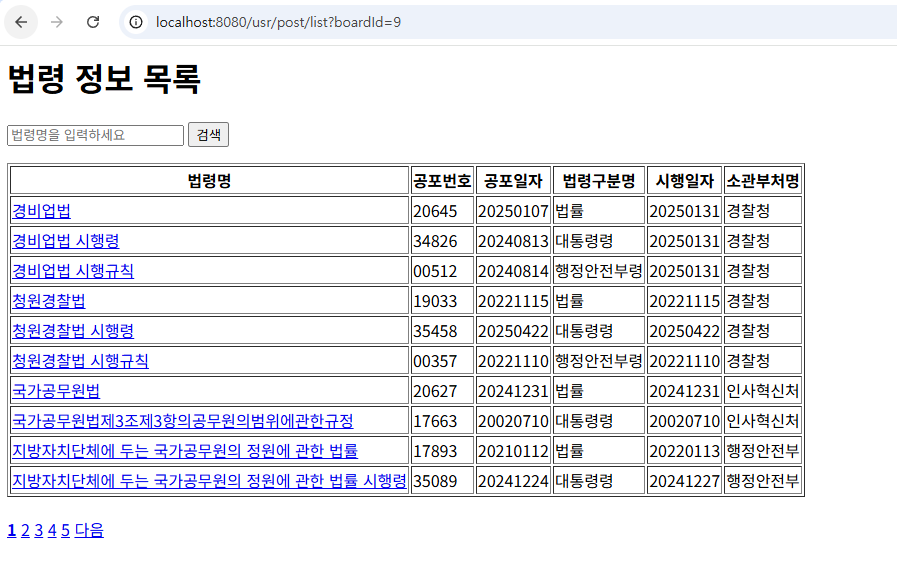
일단 결과로만 보면,
/usr/post/list?boardId=9을 직접 입력하면, 법률 목록의 1페이지부터 정상적으로 확인할 수 있도록 구성하였다.
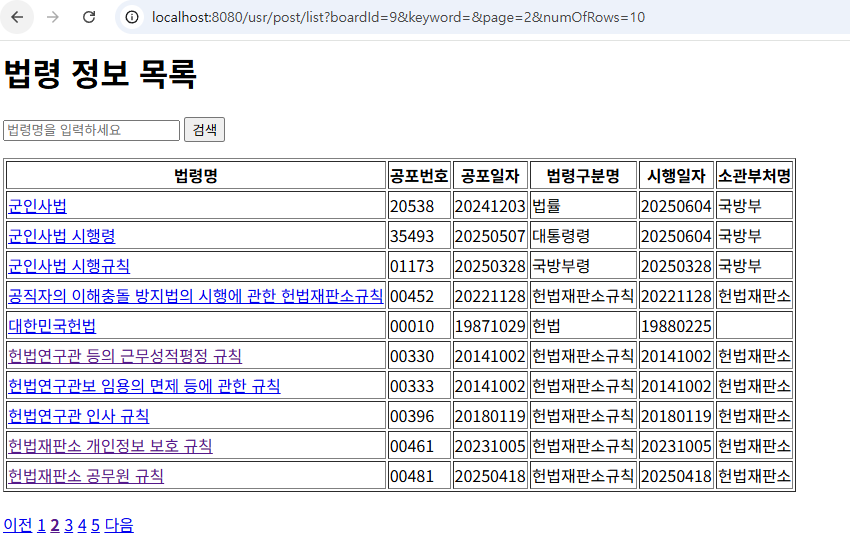
- 이후 2페이지를 클릭했을 때, URL이
/usr/post/list?boardId=9&page=2로 바뀌면서 실제 페이지 이동도 잘 동작하는 것을 확인할 수 있다.
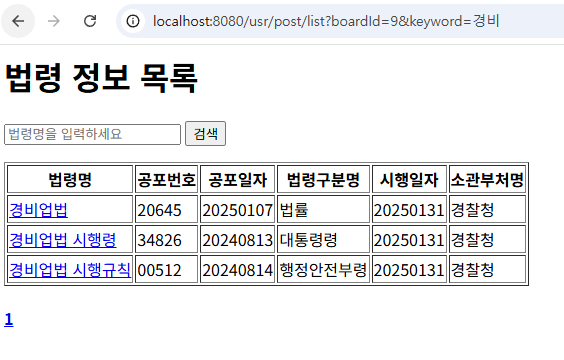
- 아래 이미지에서 볼 수 있듯이, 검색창에 '경비'를 입력하면 '경비'라는 키워드를 포함한 법령들만 필터링되어 화면에 출력되도록 구현하였다. 또한, 검색 시 URL도
/usr/post/list?boardId=9&keyword=경비와 같이 검색어가 포함된 형태로 동적으로 변경되는 것을 확인할 수 있다.