웹 기초
1. display 속성

display 속성
2.HTML,CSS,JS
HTML,CSS,JS
3.CSS- 태그 사용해서 막대 만들기
태그를 사용해서 3가지 색의 막대 만들기
4.웹 기초 - 관계, 글자, 링크 개념 (+ br, hr)
부모 자식 관계, 글자, 링크, br, hr
5.웹 기초 - 문제 : 링크 걸기 +emmet 문법
문제: 각각의 사이트 명에 링크를 걸어주세요(새 창으로 떠야 함), 문제: 젠코딩을 사용하여 링크 만들기, emmet(젠코딩) 문법
6.웹 기초 - table 태그
table 태그
7.웹 기초 - 후손 선택자, 자식 선택
후손/자식 선택자, 문제1, 문제2
8.웹 기초- text-align
text-align
9.웹 기초 - hover
hover
10.웹 기초 - 인접동생 선택자,  , text-decoration, display
인접동생, , text-decoration
11.웹 기초 - img
<img>태그, object-fit
12.웹 기초 - padding, margin
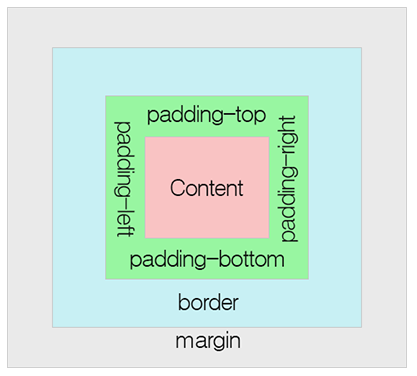
padding, margin
13.웹 기초 - 선택자
nth-child, nth-of-type, id, class 선택자
14.웹 기초 - border-radius, cursor, inherit, 노멀 라이즈
border-radius, cursor, inherit, 노멀라이즈
15.웹 기초 - 단순한 메뉴 구현
단순한 메뉴 구현
16.웹 기초 - ul, ol, li, h 노멀라이즈
ul, ol, li, h 노멀라이즈
17.JS(Java Script) - var, let, const, JS타입
var
18.웹 기초- vertical-align / inline-grid / box-sizing
vertical-align, grid, box-sizing
19.CSS - 메인페이지 구현
1단계: 노멀라이즈 2단계: 컨테이너 구현 !codepen[fvefwskz-the-decoder/embed/bNNrKqR?default-tab=js] 3단계: 로고바 구현 !codepen[fvefwskz-the-decoder/embed/azzyKWx?default-tab=js] 4,5단계: 메뉴바 구현, 마크업, css작업 !codepen[fve...
20.CSS - position, transform
position, transform
21.CSS - 멀티메뉴 제작을 위한 선택자 연습
멀티 메뉴 튜토리얼, 선택자 개수
22.CSS - white-space , overflow , text-overflow
white-space, overflow , text-overflow
23.CSS - 풀 다운 메뉴
목표: 1차, 2차 메뉴 완성 1단계 : 1차 메뉴 완성 !codepen[fvefwskz-the-decoder/embed/RNNQvzm?default-tab=js] 2단계 : 2차 메뉴 마크업, 평상시에 숨겨두고 1차 메뉴에 마우스를 올렸을때 등장 !codepe
24.CSS - transition, opacity, visibility
transition, opacity, visibility
25.CSS - side-bar 만들기
::before / ::after 가상 요소 선택자, :not() 가상 선택자
26.CSS- float
float
27.CSS - flex
flex
28.웹 폰트, 라이브러리
웹 폰트, 라이브러리
29.JQuery
JQuey(제이쿼리
30.JS - onclick
onclick
31.JS - 팝업 열기/ 닫기
팝업 열기 click으로 팝업 열기 !codepen[fvefwskz-the-decoder/embed/oggqKVY?default-tab=js] 제이쿼리 가져오기 popup 클래스 만들기 컨테이너 클래스를 만들고 그 안에 버튼 만들기 팝업 버튼을 클릭했을 때 팝업 창 구현 JS 함수 만들기 mouseenter로 팝업 열기 !codepen[fvefws...
32.JS - addClass, removeClass, hasClass
addClass, removeClass, hasClass
33.JS - addClass / removeClass 사용해서 팝업 창 만들기
팝업 구현 1 !codepen[fvefwskz-the-decoder/embed/wBBjwXZ?default-tab=js] CSS - popup클래스에 active클래스를 부여해 display:block;으로만 설정해둔다. JS - Popupshow, Popuphide 함수를 만들고, 팝업 버튼을 눌렀을때 active 추가하고 팝업 닫기 버튼을 눌렀을때 ...
34.tailwind
tailwind
35.JS - preventDefault, stopPropagation, alert, confirm,
preventDefault, stopPropagation, return false, alert, confirm
36.JS- 객체
객체
37.JS - this
this
38.JS - next, prev, mouseenter, parent, children, find, siblings, dblclick
.prev(), .next(), parent() , children(), .find(), .siblings(), .dblclick
39.JS - 반응형 모바일 메뉴 구현1, 미디어쿼리
미디어쿼리 CSS에서 어떤 스타일을 선택적으로 적용하고 싶을 때 사용 (if문과 비슷한 개념) 스타일부분에는 일반적인 CSS코드가 들어가는데, 조건이 만족될 때는 스타일이 적용되고, 만족하지 않으면 스타일이 무시된다. 1단계 : 탑바와 모바일 탑바가 스위치, 미디어쿼리 방법1 !codepen[fvefwskz-the-decoder/embed/wBBjL...
40.JS - 반응형 모바일 메뉴 구현2 (3차 메뉴)
1단계 : 메뉴 마크업 !codepen[fvefwskz-the-decoder/embed/QwwrerQ?default-tab=js] 메뉴 아이템에 자식이 있으면 [+] / [-]로 표시 -> after 사용 자식이 없는 메뉴는 >로 표시 2단계 : 반투명 배경중첩 !codepen[fvefwskz-the-decoder/embed/PwweMdm?defau...
41.JS - slideDown, slideUp, fadeIn, fadeOut
slideDown(), slideUp(), fadeIn(), fadeOut()
42.JS - 카카오페이증권 탑바 만들어보기
1단계 : 전체적인 레이아웃 구성 !codepen[fvefwskz-the-decoder/embed/dPPKyYe?default-tab=js] 2단계 : 1차 메뉴 세부 디자인 !codepen[fvefwskz-the-decoder/embed/vEErYNz?default-tab=js] 3단계 : 2차 메뉴 레이아웃 !codepen[fvefwskz-th...
43.JS - 탭 메뉴 만들기
1단계 : 디자인 !codepen[fvefwskz-the-decoder/embed/RNNJwOX?default-tab=js] 2단계 : 헤더 작업 !codepen[fvefwskz-the-decoder/embed/gbbKOJb?default-tab=js] 위처럼 아이템 메뉴 클릭시 폴더 형식으로 구현하려면 아래처럼 구현하면 된다. 3단계 : 바디 작...
44.JS - masonry, scrollTrigger, imagesLoaded , niceScroll, svg
masonry, imagesLoaded, scrollTrigger, niceScroll, svg
45.JS - form
form
46.JS - lightbox2
lightbox2