일단 처음 자바를 배우고, 처음에 적어야하는 자바 코드가 있다.
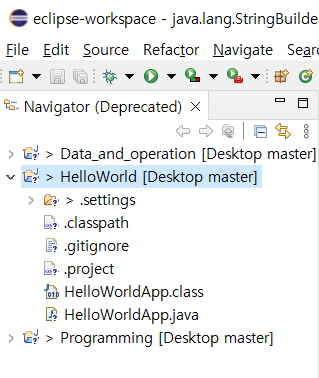
여기서 HelloWordlApp 위치에는
프로젝트를 만들고 new file를 생성한 이름과 동일해야한다.!!!
public class HelloWorldApp{
	public static void main(String[] args) {
    	 System.out.println("Hello world");//여기서 코드 구현
    }
}
Hello world 출력 코드를 배웠고
이젠 데이터 타입, 연산, 자주 쓰이는 문법을 간단하게 정리할것이다.
기억 해야할 이론적인 내용
System.out.println(6); // Number  그냥 숫자
				  ("6"); // String  큰따옴표
                  ('6'); // Charcter  작은따옴표
                  (6*2); , (6/2); 연산 가능
                  ("6"*"2"); 문자열은 연산 불가능
                  ("1111".length()); 4(문자열길이)
                  (1111.length()); X (숫자 길이함수 불가)

 문자열 다루기
 public class StringApp {

	public static void main(String[] args) {
		System.out.println("Hello "
				+ "world");  // Hello world
		System.out.println("Hello \nworld");  // Hello
        										 world
 		System.out.println("Hello \"World\""); // Hello "World"

	}

}

문자열 대체하기  [[[name]]] -> ryun
public class StringApp {

	public static void main(String[] args) {

		System.out.println("Hello, [[[name]]] ...bye".replace("[[[name]]]","ryun"));
	}
  //결과 Hello, ryun ...bye
}
다른 java파일 불러오기, 호출
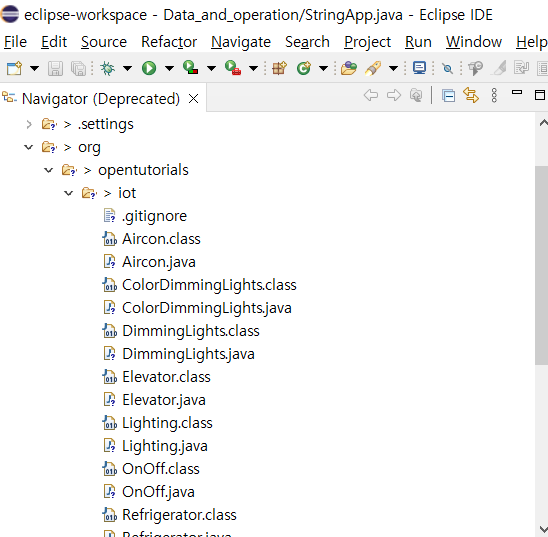
여기서 Elevator.java, Lighting.java, Security.java를 불러온다.
import org.opentutorials.iot.Elevator;  //import를 통한 연결
import org.opentutorials.iot.Lighting;
import org.opentutorials.iot.Security;

public class OkJavaGoInHome {

    public static void main(String[] args) {

        String id = "JAVA APT 507";

        // Elevator call
        Elevator myElevator = new Elevator(id);  //호출
        myElevator.callForUp(1);

        // Security off
        Security mySecurity = new Security(id);
        mySecurity.off();

        // Light on
        Lighting hallLamp = new Lighting(id+" / Hall Lamp");
        hallLamp.on();

        Lighting floorLamp = new Lighting(id+" / floorLamp");
        floorLamp.on();

    }

}
실행 후 변수를 받아와서 변수에 담고 그 변수 활용하기
import javax.swing.JOptionPane;  //JOptionPane를 활용하기 위함

import org.opentutorials.iot.DimmingLights;
import org.opentutorials.iot.Elevator;
import org.opentutorials.iot.Lighting;
import org.opentutorials.iot.Security;

public class OkJavaGoInHomeInput {

    public static void main(String[] args) {

        String id = JOptionPane.showInputDialog("Enter a ID");
        String bright = JOptionPane.showInputDialog("Enter a Bright level");

        // Elevator call
        Elevator myElevator = new Elevator(id);
        myElevator.callForUp(1);

        // Security off
        Security mySecurity = new Security(id);
        mySecurity.off();

        // Light on
        Lighting hallLamp = new Lighting(id+" / Hall Lamp");
        hallLamp.on();

        Lighting floorLamp = new Lighting(id+" / floorLamp");
        floorLamp.on();

        DimmingLights moodLamp = new DimmingLights(id+" moodLamp");
        moodLamp.setBright(Double.parseDouble(bright));
        moodLamp.on();

    }

}
실행시키면 해당 변수를 입력하여 그 값을 활용할수 있다.
String id = JOptionPane.showInputDialog("Enter a ID")
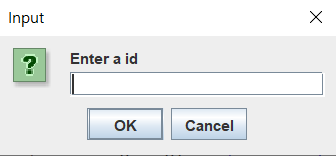
변수 자료형이 문자열 자료형이므로 만약 double이나 int로 받아야한다면
String으로 먼저 받고 자료형 변환 코드를 활용하자.
배운 내용중 중요한 코드와 해당 설명들을 적어보았다. 이것을 다시 되돌아보면서 까먹지 않도록 해야겠다.

꾸준히 해보자 뭐든지.(웹개발)